moxon-frame-generator
simple generator for 3D-printed frames for a moxon rectangle antenna
OpenSCAD★ 50
Fusion 360 Thread Profiles for 3D-Printed Threads
 BalzGuenat
git clone https://github.com/BalzGuenat/CustomThreads.gitBalzGuenat/CustomThreadsFusion 360 comes with various thread standards, most of which are not a great fit for 3D printing because they are too fine to work well when printed. This project defines thread profiles that are aimed at 3D printing so that they work, even when printed with lower detail settings (e.g. 0.30mm layer height).
The provided 3DPrintedMetricV3.xml file contains the thread profiles listed below.
Additional profiles can be easily generated from the included Python script.
Shape: 60° trapezoidal
Size (OD): 8-50mm
Pitch: 3.5mm, 5mm
Classes: O.0, O.1, O.2, O.4, O.8
The classes specify tolerances. O.0 has the tightest tolerances which are loosely based on ISO M30x3.5 6g/6H. The number after the 'O.' specifies, in tenths of a millimeter, how much the major, minor and pitch diameters are offset compared to O.0. For example, O.2 would have a 0.2mm looser tolerance than O.0.
3DPrintedMetric.xml contains old thread definitions and is provided for compatibility with older prints or models.
If you just want to use the profiles with no customization, download the file 3DPrintedMetricV3.xml, save it in the following directory and then restart Fusion 360.
On Windows:
%localappdata%\Autodesk\webdeploy\Production\<version ID>\Fusion\Server\Fusion\Configuration\ThreadData
On Mac OS:
Macintosh HD> Users> [Username] > Library > Application Support > Autodesk > Webdeploy > production > [Version specific ID] > Then right click on "Autodesk Fusion 360" and choose Show Package Contents > Contents > Libraries > Applications > Fusion > Fusion > Server > Fusion > Configuration >ThreadData
(see also here)
When you now create or edit a Thread feature, you should be able to select the Thread Type "3D-printed Metric Threads".
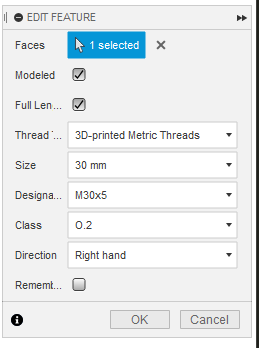
Note: Profiles will need to be reinstalled after every Fusion 360 update. To do this automatically, check out the ThreadKeeper plugin.
You can generate your own thread profile file using the main.py script.
To execute the script, Python 3.9 or newer is required.
The script has no parameters and can be executed like so:
python main.py
This will create a file named output.xml in the working directory which you can then rename and install in Fusion as described above.
To customize the generated profiles, simply edit the values defined at the top of main.py.
NAME = "3D-printed Metric Threads V3"
UNIT = "mm"
ANGLE = 60.0
SIZES = list(range(8, 51))
PITCHES = [3.5, 5.0]
OFFSETS = [.0, .1, .2, .4, .8]
more like this
simple generator for 3D-printed frames for a moxon rectangle antenna
GPX 轨迹转 3D 可打印地形模型 | Hiking trail to 3D printable terrain | Electron + Vue。 一款面向户外爱好者与 3D 打印玩家的 Web 工具。将 GPX 徒步/骑行轨迹一键转…
Install and monitor KlipperScreen on Android via DroidKlipp APK, USB ADB forwarding, and WiFi fallback
search projects, people, and tags