Dotfiles
KDE Plasma for twm users.
 Blacksuan19
git clone https://github.com/Blacksuan19/Dotfiles.gitBlacksuan19/DotfilesDotfiles
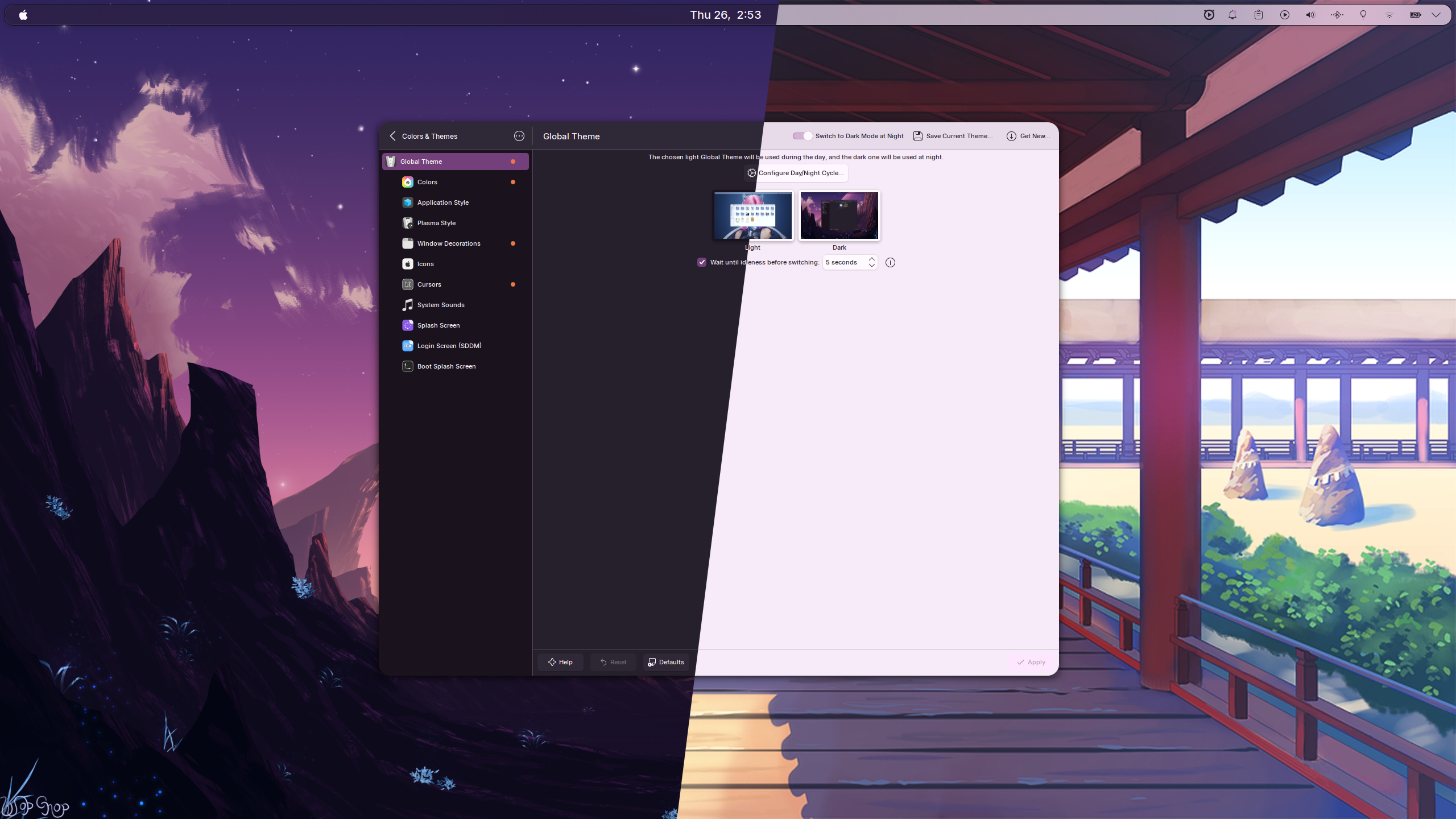
Personal KDE Plasma 6 dotfiles for a tiling-focused desktop on CachyOS. Config files are managed with GNU Stow and the full Plasma environment (themes, KWin rules, shortcuts, plasmoids) is snapshotted and restored via konsave.
Quick Start
1. Install Required Tools
stow— symlinks config packages into$HOMEkonsave— restores the Plasma environment (pip install konsave)
2. Install Required Plasma Packages
These need to be present before applying the konsave profile. On CachyOS/Arch (see Bootstrap for chaotic-AUR setup):
yay -S darkly-bin kwin-effect-rounded-corners-git kwin-scripts-krohnkite-git colloid-icon-theme-git plasma6-applets-wallhaven-reborn-git
For other distros, install from source:
| Component | Source |
|---|---|
| Darkly — Qt application style | GitHub |
| KDE Rounded Corners — KWin effect | GitHub |
| Krohnkite — tiling KWin script | Codeberg |
| Colloid Icon Theme — icons | GitHub |
| Wallhaven wallpaper plugin | GitHub |
3. Clone and Run
git clone --recurse-submodules https://github.com/Blacksuan19/Dotfiles ~/.dotfiles
cd ~/.dotfiles
bash install.sh
install.sh stows all config packages and then prompts whether to apply the
Plasma-Round konsave profile. Answer y for a fully configured system in one
shot.
Fresh machine? Run
~/.local/bin/bootstrap.shfirst — it sets up git identity, chaotic-AUR, and installs all packages viayay. See Bootstrap below.
What the Plasma-Round Profile Installs
The Plasma-Round konsave profile is a full snapshot of the Plasma environment.
Applying it restores everything below. The required packages listed in Quick
Start are the only things that need to be installed separately.
Themes & Visuals
| Component | Theme / Package |
|---|---|
| Global theme | Dark Mode / Light Mode (custom, toggle between them) |
| Plasma desktop theme | Utterly-Round |
| Look-and-feel packages | Dark Mode, Light Mode |
| Window decorations | KWin is configured for Darkly; no Aurorae themes are bundled in the profile |
| Color schemes | BreezeDarkTint, BreezeLightTint |
| Kvantum themes | None |
| GTK 3 & GTK 4 themes | Breeze |
| Icons | GTK is configured to use Colloid-Dark (icon pack not bundled in this profile) |
| Cursor theme | Layan-white-cursors (configured in GTK / look-and-feel defaults) |
| Application style | Darkly |
| Fonts | Inter UI and JetBrainsMonoNL Nerd Font monospace |
KWin Scripts & Effects
| Name | Purpose |
|---|---|
| Krohnkite | Tiling window manager script |
| Rounded Corners | Rounded window corners |
switch-to-previous-desktop |
Jump back to last desktop using Super + Tab |
kwin4_effect_geometry_change |
Smooth window geometry animations |
Plasmoids
| Name | Purpose |
|---|---|
| com.dv.fokus | Focus/productivity widget |
| org.kde.latte.spacer | Panel spacer |
| Wallhaven | Wallhaven wallpaper plugin |
KDE Config Files Restored
The profile captures and restores these config files from ~/.config/:
| File | What it controls |
|---|---|
kdeglobals |
Global KDE settings (fonts, color scheme, widget style) |
kglobalshortcutsrc |
All global keyboard shortcuts |
kwinrc |
KWin compositor and window manager settings |
kwinrulesrc |
Per-window KWin rules (e.g. hide titlebar) |
plasmarc |
Plasma shell settings |
plasmashellrc |
Panel and desktop layout |
plasma-org.kde.plasma.desktop-appletsrc |
Plasmoid configuration |
breezerc |
Breeze window decoration settings |
kcminputrc |
Mouse, touchpad, and cursor settings |
kscreenlockerrc |
Lock screen settings |
ksplashrc |
Splash screen theme |
ksmserverrc |
Session manager settings |
krunnerrc |
KRunner settings |
klipperrc |
Clipboard manager settings |
konsolerc |
Konsole terminal settings |
plasmanotifyrc |
Notification settings |
spectaclerc |
Screenshot tool settings |
systemsettingsrc |
System Settings state |
xdg-desktop-portal-kderc |
XDG desktop portal settings |
plasma-localerc |
Locale and language settings |
kconf_updaterc |
KDE config migration tracking |
kded5rc |
KDE daemon settings |
gtk-3.0/ |
GTK 3 theme config (Breeze) |
gtk-4.0/ |
GTK 4 theme config (Breeze) |
Color System
The setup uses the active wallpaper's colors to tint the entire desktop — Qt and GTK apps alike pick up the palette automatically through KDE's color scheme integration. Switching wallpapers updates the accent color system-wide with no manual intervention.
For code editors and the terminal, Ayu is used as the color scheme:
| Mode | Theme | Used by |
|---|---|---|
| Light | Ayu Light | VS Code, Ghostty, Neovim |
| Dark | Ayu Dark | VS Code, Ghostty, Neovim |
Both themes switch automatically with the system light/dark mode.
Light/Dark Switching
The profile ships two custom global themes — Dark Mode and Light Mode — that
can be toggled manually via System Settings → Global Theme, or wired to Plasma's
automatic light/dark switching schedule.
Stow Packages
Each top-level directory (except screens/) is a stow package that mirrors
$HOME. install.sh discovers and stows them automatically.
| Package | Stowed to | Contents |
|---|---|---|
zsh/ |
~/ |
.zshrc, .zsh/ (aliases, exports, config, znap plugins) |
tmux/ |
~/ |
.tmux.conf, auto light/dark theme watch scripts |
nvim/ |
~/.config/nvim/ |
Neovim config (git submodule) |
ghostty/ |
~/.config/ghostty/ |
Ghostty terminal config |
starship/ |
~/.config/ |
starship.toml — shell prompt config |
mpv/ |
~/.config/mpv/ |
MPV config |
fusuma/ |
~/.config/fusuma/ |
Touchpad gesture config |
systemd/ |
~/.config/systemd/ |
User services (alist webdav mount) |
scripts/ |
~/.local/bin/ |
User commands (bootstrap, alist-handler, plasma2telegram-watch, etc.) |
desktop/ |
~/.local/share/applications/ |
XDG desktop entries |
konsave/ |
~/.config/konsave/ |
Plasma-Round konsave profile |
Bootstrap
Only needed on a fresh machine, run once before install.sh:
~/.local/bin/bootstrap.sh
It handles:
- Interactive git identity setup + sane git defaults (delta, GPG signing)
- Chaotic-AUR setup
- Package installation via
yayfrom the repo-owned package list
The package list lives at tools/bootstrap/packages-arch.txt — edit it to
add/remove packages before running bootstrap.
Media Protocol Handler
Handles mpv://, vlc://, and potplayer:// protocol links by stripping the
scheme prefix and launching the appropriate local player with the real URL.
Originally set up for use with AList but works with any
site that fires these protocol schemes.
mpv://andpotplayer://links both open in MPVvlc://links open in VLC
Files:
- Handler script:
scripts/.local/bin/alist-handler(stowed to~/.local/bin/alist-handler) - Desktop entry:
desktop/.local/share/applications/alist-player.desktop(stowed to~/.local/share/applications/)
Keybindings
Tiling is handled by Krohnkite. All shortcuts are stored in the konsave profile
(kglobalshortcutsrc) and restored automatically.
| Key | Action |
|---|---|
| Super | Launch KRunner |
| Super + Enter | Terminal |
| Super + W | Browser |
| Super + F | File manager |
| Super + Q | Close window |
| Super + Space | Toggle tiling layout |
| Super + Shift + F | Float window |
| Super + H/J/K/L | Focus left/down/up/right |
| Super + 1–9 | Switch to desktop N |
| Super + Shift + 1–9 | Move window to desktop N |
| Super + Tab | Cycle recent desktops |
| Super + Ctrl + H/J/K/L | Shrink window |
| Full screenshot | |
| Shift + Print | Area screenshot (Spectacle) |
| Super + V | Clipboard history |
| Super + S | Spotify |
| Super + T | Telegram |
| Alt + Tab | Cycle windows in all desktops |
more like this
vim-dap
Vim/Neovim debugger plugin providing a terminal interface to the Debug Adapter Protocol
tobira.nvim
Open the next door in your Vim journey — personalized command discovery based on your actual usage