tobira.nvim
Open the next door in your Vim journey — personalized command discovery based on your actual usage
 kamegoro
git clone https://github.com/kamegoro/tobira.nvim.gitkamegoro/tobira.nvim🚪 tobira.nvim
Learn the next Vim command from your own editing habits — not a cheat sheet.
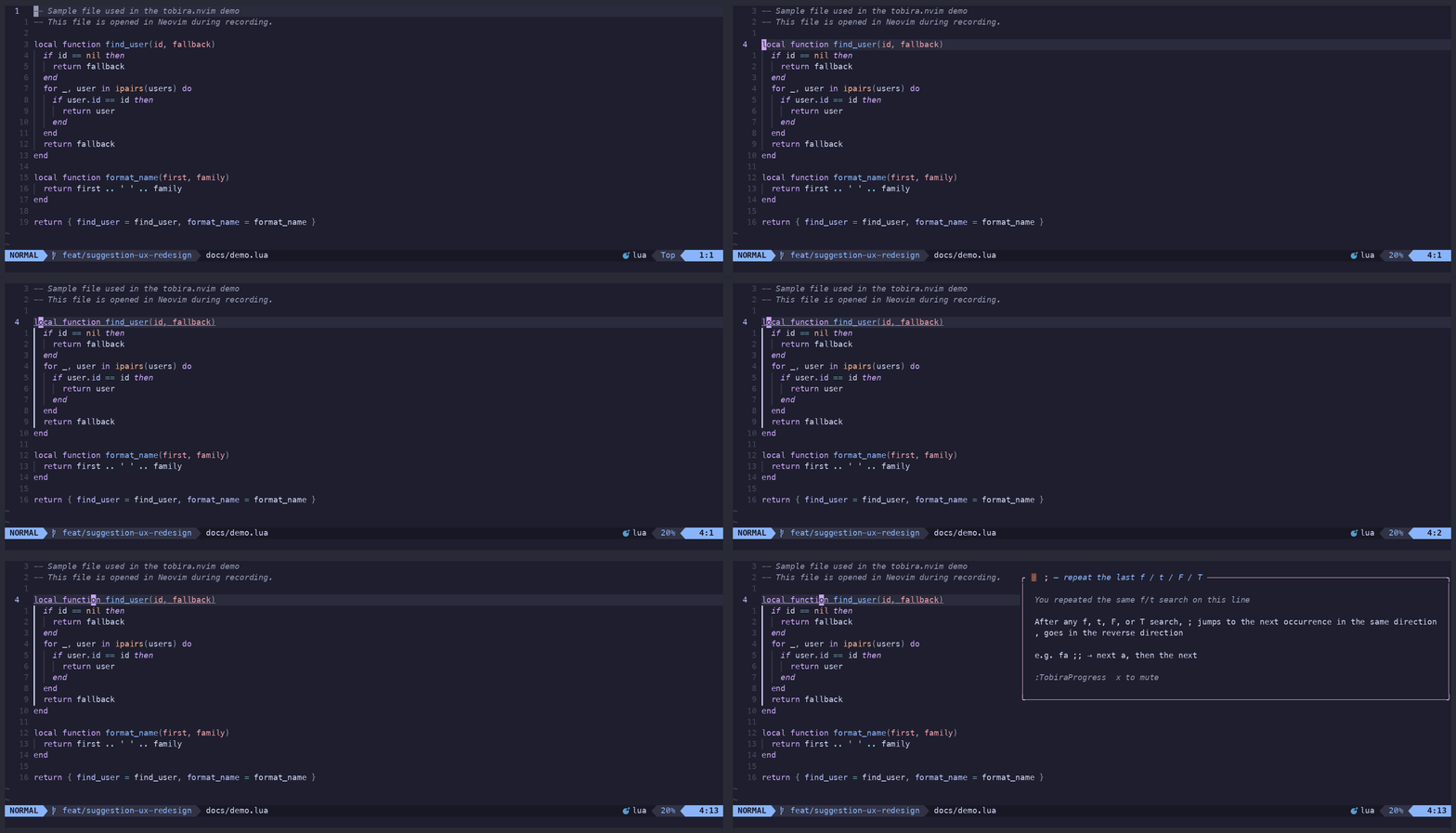
tobira watches how you actually edit, and when it spots a pattern you could do better, it quietly shows you the one command that would have helped. No quizzes. No interruptions.
Features • Installation • Usage • Configuration • vs hardtime.nvim
✨ Features
- 👀 Fully passive — reads keystrokes via
vim.on_key(); no config required, zero impact on your existing mappings - 🎯 54 detected patterns — repeated
f, hammeringj,dw→iinstead ofcw, insert-mode habits like<BS>spam, bouncing in and out with<Esc>i, a one-shot<Esc>→motion→iround trip, retyping the same identifier instead of using<C-n>, getting stuck in terminal mode, manually scrolling back to a place you jumped or edited before, manually repeating the same edit sequence 3 times instead of recording a macro, retyping the same:s///substitution across lines instead of using&/g&, bouncing between the same two files with:e/:binstead of<C-^>, using:tabnewas a one-tab-per-file browser, and more across motion, edit, search, window, fold, mark, macro, diff, ex, and terminal - ⌨️ Ex commands, too —
:g,:norm,:s, and friends are tracked from the command line itself, not just normal-mode keys, so:g/:normcan be suggested to users who have never tried them (tobira's own:Tobira*commands are excluded, so checking your stats never counts as usage) - 💬 One suggestion at a time — shown after a natural pause, capped per session, with a cooldown between auto-suggestions — never a popup quiz
- 📈 Mastery-aware — once you've used a command ~100 times, tobira stops suggesting it and moves on
- 🪜 Level-aware — beginner commands surface first, advanced ones once you're ready
- 🗺️ 165 commands in the learning graph, covering the full Neovim command surface
⚡️ Requirements
- Neovim 0.9+
- nvim-notify (optional — if installed, tobira's suggestion window matches its color scheme)
📦 Installation
lazy.nvim
{
  "kamegoro/tobira.nvim",
  event = "VeryLazy",
  opts = {},
}
packer.nvim
use {
  "kamegoro/tobira.nvim",
  config = function()
    require("tobira").setup()
  end,
}
🚀 Usage
| Command | Description |
|---|---|
:Tobira |
Show the next suggestion now (ignores cooldown). Press q / Esc to dismiss. |
:TobiraGuide |
Toggle the cheatsheet panel |
:TobiraProgress |
Show skill tree with mastery glyphs and a cursor-driven detail preview. x = suppress, p = pin, g/s = jump to guide/stats, q/Esc = close. |
:TobiraStats |
Show usage stats: command distribution (never/tried/familiar/mastered) and efficiency gap suggestions |
:TobiraReset |
Clear all usage data |
:checkhealth tobira |
Diagnose your install — Neovim version, data directory, usage.json validity, lang config |
Full documentation is available in Neovim via :help tobira.
📸 Screenshots — Guide, Stats & Progress panels
Guide panel
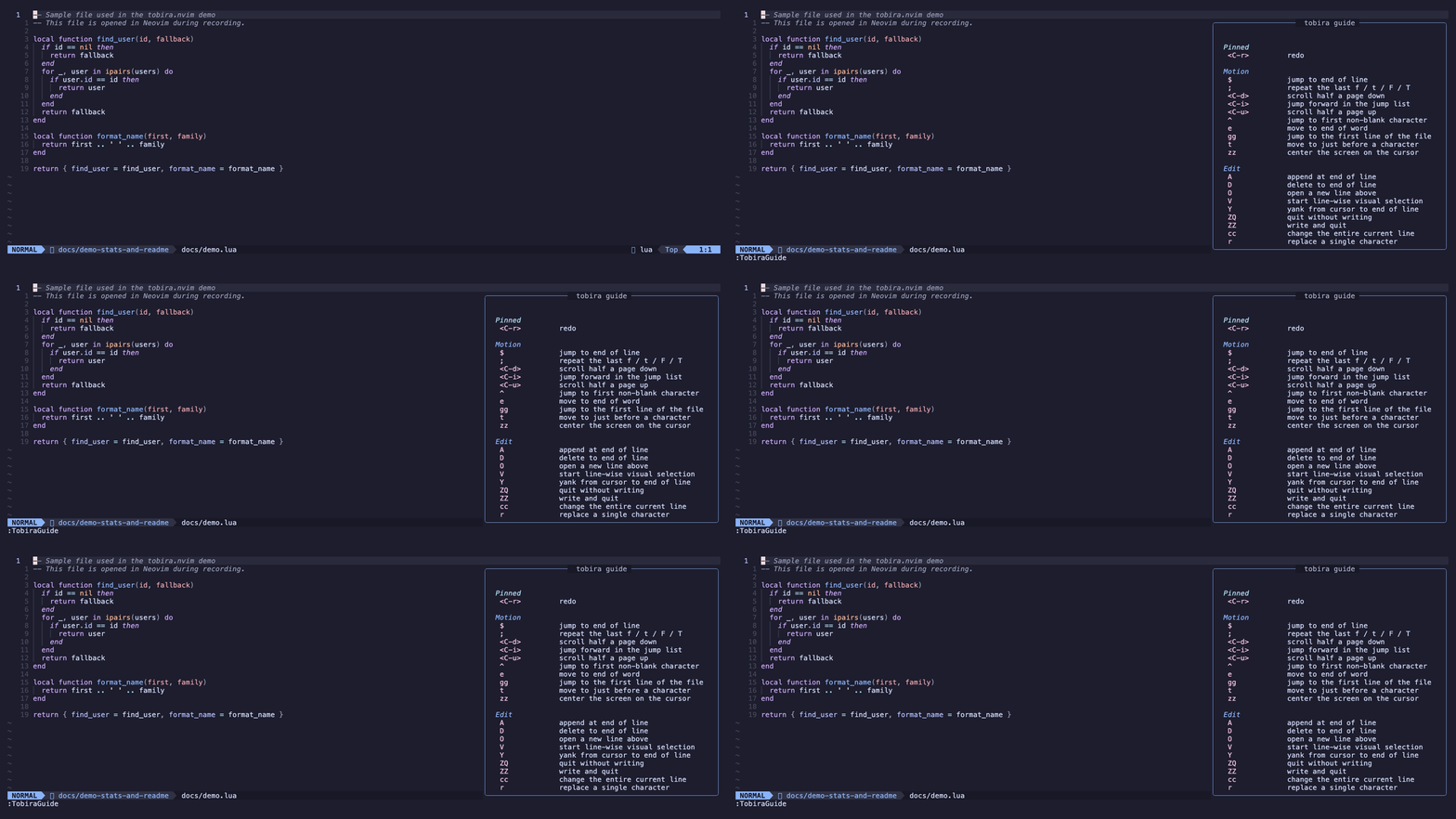
:TobiraGuide opens a cheatsheet on the right side of the screen. Commands you've already mastered are automatically hidden, so only your next targets are shown — and if one of them fades from use after you'd gotten comfortable with it, it reappears with a ⟳ (forgotten) marker instead of staying hidden forever. Pinned commands always appear at the top, marked ●. Covers all 10 categories: motion, edit, search, window, fold, mark, macro, diff, ex, and terminal — each capped to 3 unmastered commands (preferring ones you've never tried) so the panel stays a compact reference to glance at while you keep coding, with a +N more line if a category has more to show. Opens automatically on first launch.
Usage stats
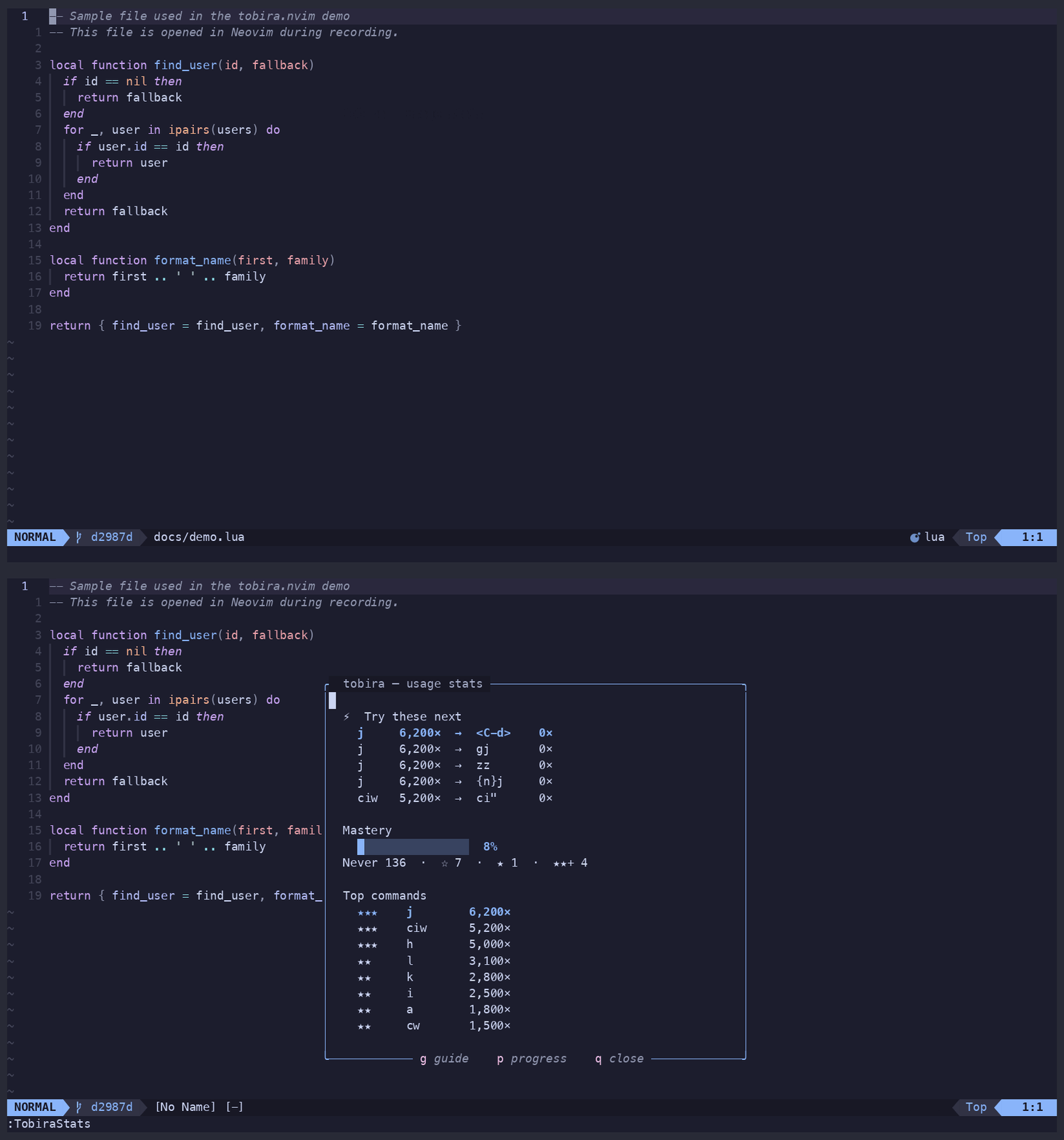
:TobiraStats leads with the one section that actually changes what you do next — Try these next, commands you're using heavily whose neighbors you've never tried — followed by a mastery bar and your top commands. Total keystrokes and how many commands you've discovered sit in a quiet line at the bottom: fun to see, but not the point. g / p jump straight to Guide / Progress.
Skill progress
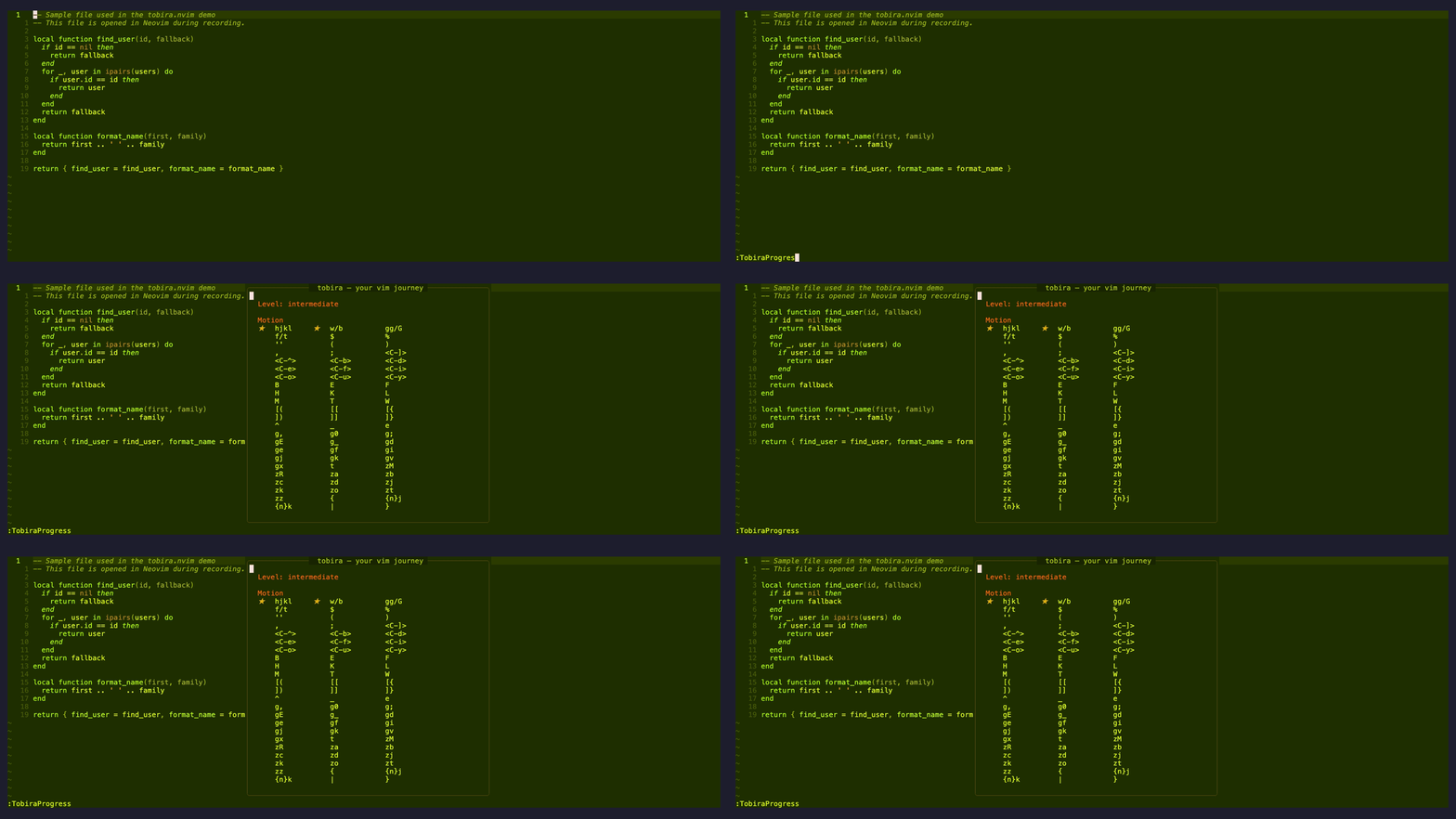
:TobiraProgress shows your current level and the full command learning graph as a calm grid — mastery glyphs only, no clutter. Move the cursor onto any command and a preview strip below the grid fills in with its usage sparkline, count, status, and how far it is from the next star. The header shows your overall {n} / {total} mastered ratio, and each category shows its own {done} / {total}.
| Glyph | Meaning |
|---|---|
| (blank) | Not yet tried |
☆ |
Tried (1+ uses) |
★ |
Familiar (100+ uses) |
★★ |
Practiced (1000+ uses) |
★★★ |
Mastered (5000+ uses) |
⟳ |
Forgotten — recent use has fallen off well below its earlier pace |
✗ |
Suppressed — you don't want this suggested |
● |
Pinned — always shown, in both :TobiraGuide and :TobiraProgress |
Keys inside :TobiraProgress: x toggles suppress on the command under the cursor, p toggles pin, g / s jump to Guide / Stats, q / Esc closes.
⚙️ Configuration
All options are optional — the defaults work out of the box.
require("tobira").setup({
  lang                = 'en',    -- 'en' | 'ja' | 'zh' | 'es' | 'fr' | 'de'
  idle_delay          = 1500,    -- ms of inactivity before showing an ambient suggestion
  idle_suggestions    = true,    -- enable ambient idle suggestions
  suggestion_cooldown = 300,     -- s between automatic suggestions (default: 5 min)
  max_shown           = 2,       -- max times to suggest the same command per session
  integrations        = true,    -- boost suggestions when a known helper plugin is installed
})
tobira always respects your own :nmap/:nnoremap overrides — it never suggests a
command you've remapped away, and integrations above only gates the optional
plugin-detection boost, not that baseline behavior (see :help tobira-integrations).
🎯 Detected patterns (examples)
| You do this | tobira suggests |
|---|---|
fa → fa on the same line |
; — repeat the last f/t |
dw → i |
cw — change word in one command |
v i w c |
ciw — text object, no visual needed |
j × 10 in a row |
} — jump by paragraph |
j × 10 in a row while &diff is set |
]c — jump to the next diff hunk |
dd × 3 in a row |
{n}dd — delete N lines at once |
r{x} × 3 in a row |
R — enter replace mode |
<C-w>q / <C-w>c × 2 in a row |
<C-w>o — close all other windows |
<BS> × 5 in insert mode |
<C-w> — delete the whole word at once |
<Esc> → 1 motion → i |
insert-mode <C-o> — run one command without leaving insert |
<Esc> × 2 in terminal mode, no effect |
<C-\><C-n> — exit terminal mode |
G, then scroll back manually |
<C-o> — jump back to where you were |
| Edit here, edit there, scroll back manually | g; — jump to your last edit |
G then gg (or gg then G) |
'' — jump straight back to your previous position |
cwFooBar<Esc> repeated 3× (navigation allowed between) |
qq...q / @q — record and replay a macro |
Same :s/pat/repl/ retyped on a 2nd line |
& — repeat the last substitute here |
Same :s/pat/repl/ retyped on a 3rd line |
g& — repeat it across the whole file |
:e A → :e B → :e A (or the equivalent with :b) |
<C-^> — jump straight to the alternate file |
:tabnew {distinct file} × 3, one tab each |
<C-^> — switch buffers instead of opening a tab per file |
57 patterns total — see :help tobira-patterns for the full list.
🆚 Similar plugins
| Plugin | What it does | vs tobira |
|---|---|---|
| hardtime.nvim | Blocks repeated keys, hints better motions | Punishes bad habits — tobira teaches without ever blocking input |
| precognition.nvim | Shows available motions as virtual text | Always-on overlay — tobira appears only when you would have benefited |
| spamguard.nvim | Detects key spamming | Spam detection only — tobira covers the full command graph and tracks mastery |
| pathfinder.vim | Suggests more efficient cursor movement | Cursor movement only — tobira covers motion, edit, and search |
| vim-be-good | Game-based practice | Generic drills — tobira personalizes to your actual usage |
tobira is the only plugin that learns from your actual usage and shows you the specific commands you are missing.
❓ FAQ
Will tobira slow down my Neovim?
It is designed to stay passive and lightweight. tobira reads keystrokes with
vim.on_key() and keeps the hot path minimal; it does not run file I/O for every
keystroke. Usage data is flushed when Neovim exits.
Does it send my keystrokes anywhere?
No. tobira stores usage data locally in Neovim's data directory under
tobira/usage.json. It does not upload your keystrokes or send them to a remote
service.
Can I use it alongside hardtime.nvim?
Yes. hardtime.nvim blocks repeated habits, while tobira watches your normal editing and suggests what to learn next. They solve different parts of the same problem and can complement each other.
A suggestion keeps appearing even though I know the command. What should I do?
Open :TobiraProgress, move to the command, and press x to suppress it. You
can also keep using the command normally; once it reaches the familiar threshold,
tobira stops treating it as a beginner suggestion.
How do I reset my data?
Run :TobiraReset. This clears tobira's local usage data so suggestions start
from a fresh profile.
🦾 Contributing
See CONTRIBUTING.md. This project follows strict TDD — tests before implementation, always.
License
MIT
⭐ Star History
more like this