DailyWallpaperHub
多源壁纸聚合平台 · 自动归档 Bing + Unsplash 精选壁纸 · AI 视觉故事生成 · 企业微信推送 · GitHub Pages 在线画廊
Python★ 50
A Gtk utility to set two different backgrounds for each monitor on GNOME (which lacks this feature)
 GabMus
git clone https://github.com/GabMus/HydraPaper.gitGabMus/HydraPaperA Gtk utility to set two different backgrounds for each monitor on GNOME (which lacks this feature)
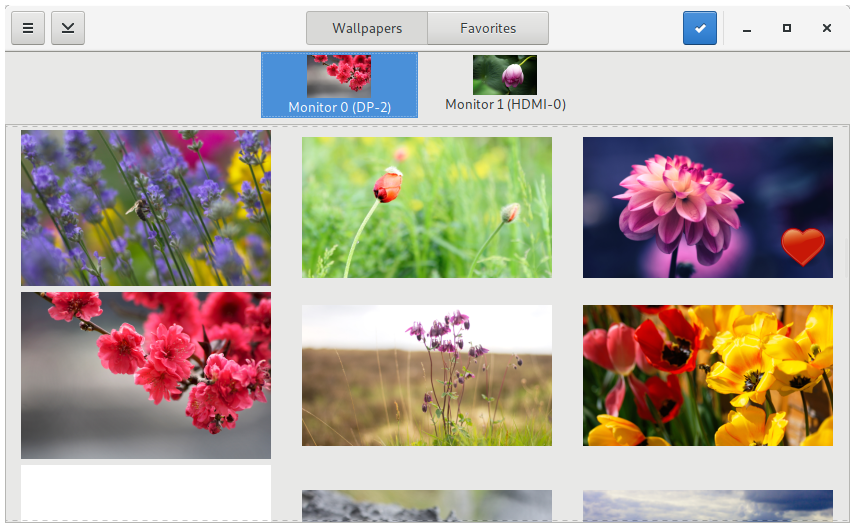
HydraPaper officially supports the following desktop environments:
It requires the following dependencies:
python3 (>=3.5)python-pillowlibwnck3gtkflatpak --version)flatpak remote-add --if-not-exists flathub https://dl.flathub.org/repo/flathub.flatpakrepo. This is needed for flatpak to download the GNOME 3.26 RuntimeClick the following button install HydraPaper from the Flathub store.

flatpak install hydrapaper*.flatpakflatpak --user install hydrapaper*.flatpakFor every notable change made to HydraPaper I will build a flatpak. If you want to try out the latest features and don't mind some bugs or crashes here and there, or if you want to help out with development, you can grab the latest development snapshot build using the following link: Get the latest development snapshot
You can uninstall HydraPaper from GNOME Software or Discover.
Alternatively you can run one of these commands:
flatpak uninstall org.gabmus.hydrapaper--user option: flatpak --user uninstall org.gabmus.hydrapaperYou can find HydraPaper on AUR, as hydrapaper-git (AUR page).
Your best bet is installing via Flatpak. Check the instructions in this section.
Alternatively ou can either run HydraPaper without installing it (refer to the Building for testing section), or install it in your system (refer to the Installing systemwide directly section).
This is the best practice to test HydraPaper without installing using meson and ninja.
git clone https://github.com/gabmus/hydrapaper
cd hydrapaper
mkdir builddir
cd builddir
meson ..
meson configure -Dprefix=$(pwd)/testdir
ninja install # This will actually install in hydrapaper/builddir/testdir
ninja run
cd hydrapaper/builddir
ninja install # This will actually install in hydrapaper/builddir/testdir
ninja run
First install flatpak and flatpak-builder from your distro repository. Although it's not necessary, you may also want to install gnome-software.
Create a directory somewhere in your home, I suggest something like ~/hydrapaperflatpak.
Either clone the whole HydraPaper repo (git clone https://github.com/gabmus/hydrapaper) or just download the flatpak manifest file from this repo in dist/flatpak/org.gabmus.hydrapaper.json. In either case, put the files inside the directory you created before.
Run the following: flatpak-builder --repo=repo hydrapaper $PATH_TO_MANIFEST where $PATH_TO_MANIFEST is the path to the org.gabmus.hydrapaper.json flatpak manifest. If everything works correctly, this command should create two directories repo and hydrapaper with flatpak stuff inside of your present working directory (again, I suggest to run everything inside a specifically designated directory).
Now you'll be creating a flatpak bundle, so that you can install it and distribute it without messing with flatpak repos. To do this you run flatpak build-bundle repo hydrapaper.flatpak org.gabmus.hydrapaper. This will give you a hydrapaper.flatpak file inside your present working directory. To install it, either open it with gnome-software or run flatpak install hydrapaper.flatpak.
Note: I am a just a beginner with flatpak, and probably some of the instructions I gave in this section of the readme are wrong or could be done better. If you know a better way of doing this, please don't hesitate to make a pull request or open an issue.
WARNING: This approach is discouraged, since it will manually copy all the files in your system. Uninstalling could be difficult and/or dangerous.
But if you know what you're doing, here you go:
git clone https://github.com/gabmus/hydrapaper
cd hydrapaper
mkdir builddir
cd builddir
meson ..
ninja install
more like this
多源壁纸聚合平台 · 自动归档 Bing + Unsplash 精选壁纸 · AI 视觉故事生成 · 企业微信推送 · GitHub Pages 在线画廊
search projects, people, and tags