deja
Predictive inline shell autosuggestions for zsh - Go daemon, no TUI, no sync
 Giammarco-Ferranti
git clone https://github.com/Giammarco-Ferranti/deja.gitGiammarco-Ferranti/deja
deja
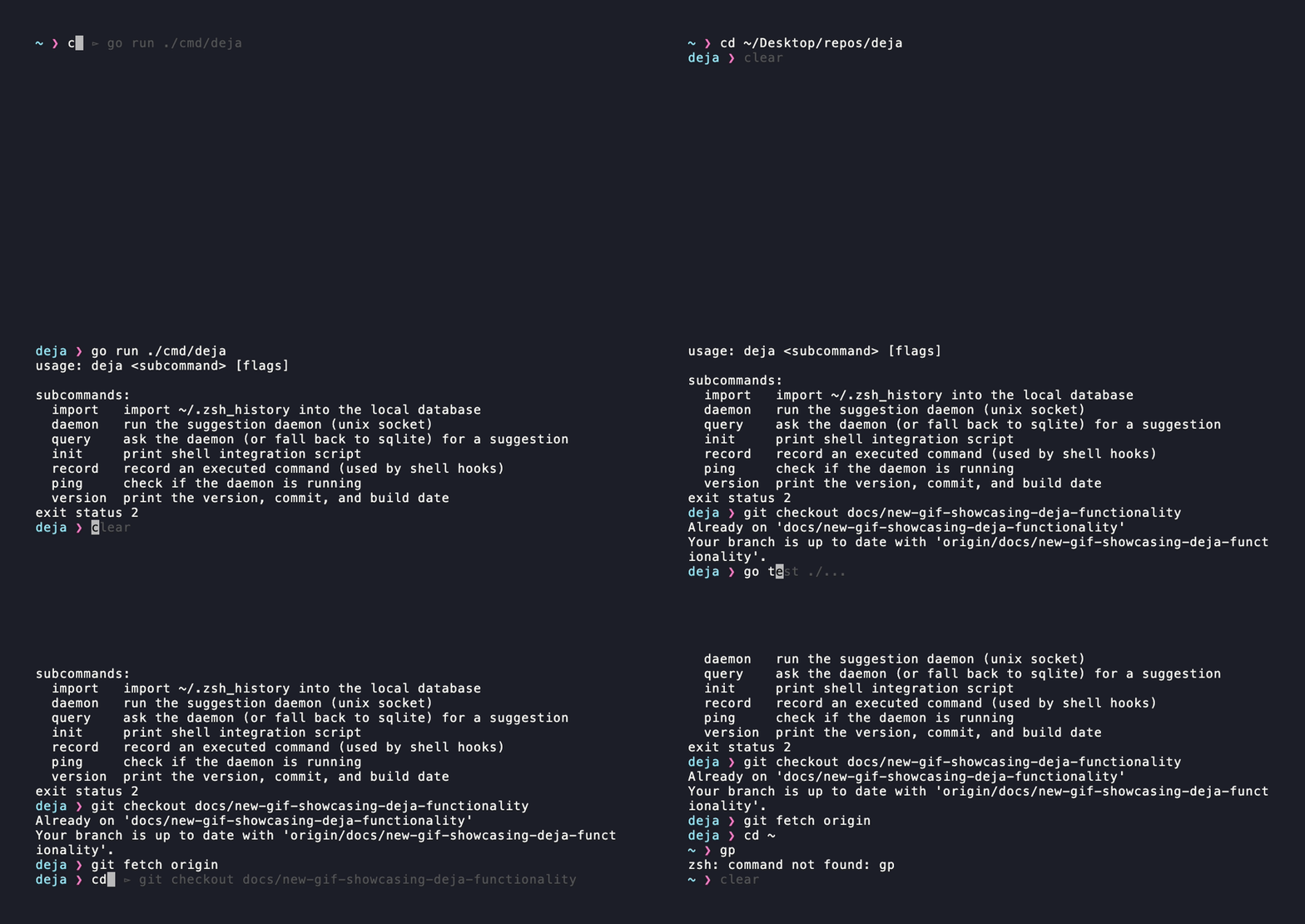
Predictive ghost-text autosuggestions for zsh — smarter than history, lighter than a plugin.
Deja is a smarter replacement for zsh-autosuggestions. Instead of only surfacing commands that start with what you've typed, Deja uses fuzzy matching, directory awareness, and command sequence prediction to suggest what you actually want to run — as inline ghost text, after every keystroke, with zero latency.
No account. No sync server. No TUI. Just ghost text that knows where you are.
Features
- Fuzzy matching — suggests commands even when you skip letters or mix up order
- Directory awareness — commands you run in
~/projects/foorank higher when you're in~/projects/foo - Sequence prediction — knows that you usually run
make testaftermake build - Frecency scoring — blends frequency + recency with a 1-week exponential decay
- Ghost text inline — uses zsh's
POSTDISPLAYwidget, not a separate pane - Daemon architecture — one lightweight background process serves all terminal windows;
<1msresponse per keystroke - Local-only — all data stays in a local SQLite database; nothing leaves your machine
- Alternatives picker — press
Tabto cycle through ranked alternatives without leaving the line
Installation
Homebrew (macOS & Linux)
brew install Giammarco-Ferranti/deja/deja && deja import && (grep -qF 'deja init zsh' ~/.zshrc 2>/dev/null || echo 'eval "$(deja init zsh)"' >> ~/.zshrc) && exec zsh
curl (any Linux/macOS, no Homebrew required)
curl -fsSL https://raw.githubusercontent.com/Giammarco-Ferranti/deja/main/install.sh | sh
Both commands install deja, import your existing zsh history, add the integration to ~/.zshrc (idempotent), and reload your shell. To audit the curl installer before running it, view it on GitHub.
Oh My Zsh
If you manage zsh with Oh My Zsh, enable deja the idiomatic way, the same flow as zsh-autosuggestions. The binary still comes from Homebrew or the curl script; the plugin just sources deja's integration for you.
# 1. Install the deja binary. Skip (or remove) the `eval "$(deja init zsh)"` line it
#    offers to add to ~/.zshrc, since the plugin runs that for you:
brew install Giammarco-Ferranti/deja/deja          # or the curl installer above

# 2. Clone the plugin into Oh My Zsh's custom plugins dir:
git clone https://github.com/Giammarco-Ferranti/deja \
  ${ZSH_CUSTOM:-~/.oh-my-zsh/custom}/plugins/deja

# 3. Add `deja` to plugins=(...) in ~/.zshrc:
#      plugins=( ... deja )

# 4. Import your history once and reload:
deja import && exec zsh
zinit
If you use zinit, add this to your .zshrc:
zinit ice wait"0" lucid depth=1
zinit light Giammarco-Ferranti/deja
zinit handles the Oh My Zsh plugin integration, so the eval "$(deja init zsh)" line is not needed. Make sure the deja binary is installed separately via Homebrew or the curl installer.
Manual (any framework)
Prefer not to clone the whole repo? Fetch just the plugin file instead:
mkdir -p ${ZSH_CUSTOM:-~/.oh-my-zsh/custom}/plugins/deja
curl -fsSL https://raw.githubusercontent.com/Giammarco-Ferranti/deja/main/deja.plugin.zsh \
  -o ${ZSH_CUSTOM:-~/.oh-my-zsh/custom}/plugins/deja/deja.plugin.zsh
Pick one activation, not both. The plugin runs
eval "$(deja init zsh)"for you, so if the installer already appended that line to~/.zshrc, remove it. Keeping both double-sources the integration.Deja replaces
zsh-autosuggestions, so don't list both inplugins=(). If deja detectszsh-autosuggestionsis loaded it stands down (see Troubleshooting).
Setup
The install commands above already do this for you. If you skipped them and have the binary on $PATH some other way, run these once to import your zsh history and activate the integration:
deja import
eval "$(deja init zsh)"
By default deja import reads your zsh history from $HISTFILE (when it's
exported), falling back to ~/.zsh_history. If your history lives elsewhere
or $HISTFILE is set in ~/.zshrc without export, so child processes can't
see it point deja at the file explicitly:
deja import --file /path/to/history
To make it permanent, add the eval line to your ~/.zshrc:
# ~/.zshrc
eval "$(deja init zsh)"
Deja auto-spawns its daemon on first use and keeps it running across sessions.
Key Bindings
| Key | Action | Rebind with |
|---|---|---|
→ (right arrow) |
Accept full suggestion | DEJA_ACCEPT_KEY (extra key) |
Ctrl+→ |
Accept next word only | DEJA_WORD_ACCEPT_KEY (extra key) |
Shift+→ |
Cycle fuzzy preset forward (tight → smart → loose) | DEJA_CYCLE_FUZZY_KEY |
Shift+← |
Cycle fuzzy preset backward (loose → smart → tight) | DEJA_CYCLE_FUZZY_BACK_KEY |
Shift+↑ |
Toggle ghost text on an empty prompt (persisted, global) | DEJA_TOGGLE_EMPTY_KEY |
Tab |
Open inline alternatives picker | DEJA_CYCLE_KEY |
Ctrl+X |
Suppress current suggestion (session-wide) | DEJA_TOGGLE_KEY |
| (unbound) | Dismiss the current ghost (this line only) | DEJA_DISMISS_KEY |
Accept the ghost suggestion with
→, notEnter.Enterexecutes whatever's literally in your buffer;→is what commits the ghost into the buffer first.
Custom key bindings
Every binding above can be remapped by exporting the matching env var before eval "$(deja init zsh)" in your ~/.zshrc. Values are zle key sequences (e.g. ^I is Tab, ^X is Ctrl+X, ^[[1;2C is Shift+→); run bindkey -L or pipe a keypress through cat -v to discover a key's sequence. Set any var to empty to leave that key unbound.
# defaults
export DEJA_CYCLE_KEY='^I'                 # Tab     → cycle alternatives
export DEJA_TOGGLE_KEY='^X'                # Ctrl+X  → suppress for the session
export DEJA_CYCLE_FUZZY_KEY='^[[1;2C'      # Shift+→ → next fuzzy preset
export DEJA_CYCLE_FUZZY_BACK_KEY='^[[1;2D' # Shift+← → previous fuzzy preset
export DEJA_TOGGLE_EMPTY_KEY='^[[1;2A'     # Shift+↑ → flip empty-prompt suggestions
# these are unbound by default (→ and Ctrl+→ already accept via wrapped widgets):
export DEJA_ACCEPT_KEY=       # accept full suggestion on a dedicated key
export DEJA_WORD_ACCEPT_KEY=  # accept the next word on a dedicated key
export DEJA_DISMISS_KEY=      # clear the ghost for this line (unlike Ctrl+X, the session keeps suggesting)
DEJA_DISMISS_KEY (deja-clear) differs from DEJA_TOGGLE_KEY (deja-toggle): dismiss only wipes the ghost on the current line, while toggle suppresses suggestions for the whole session until you toggle back or start a new shell.
Examples:
# Use Tab to accept the suggestion (and free Tab from cycling):
export DEJA_ACCEPT_KEY='^I' DEJA_CYCLE_KEY=

# Move alternatives-cycling off Tab so fzf/native completion keeps it:
export DEJA_CYCLE_KEY='^N'
Esc as dismiss: binding
DEJA_DISMISS_KEY='^['(Esc) directly is discouraged — Esc is the prefix byte for arrow keys, function keys, and vi-mode, so a bare^[binding can break those. Prefer a non-prefix key (e.g.^G), or set it knowing the tradeoff.
Tuning fuzziness
Deja's matcher accepts any in-order subsequence of the characters you've typed. By default it stops the typed letters from sprawling too far apart in a candidate — gco will match git checkout, but won't match git remote add origin. Pick a preset to tune that strictness:
| Preset | Behavior | Example: typing gco |
|---|---|---|
loose |
typed letters can be far apart (up to 8 chars between) | gco → git checkout -- README |
smart |
typed letters stay close together (up to 4 chars between) — default | gco → git checkout main |
tight |
typed letters must be near-adjacent (up to 1 char between) | gco → gco, g.co, gc.o |
Change the preset on the fly (takes effect immediately, persists across restarts):
deja fuzzy           # show current preset + examples
deja fuzzy tight     # set the preset
deja fuzzy cycle     # advance to the next preset  (tight → smart → loose → tight)
deja fuzzy back      # step to the previous preset (loose → smart → tight → loose)
Or cycle without leaving the line — press Shift+→ (forward) or Shift+← (backward) at any prompt and the next preset is applied immediately. The ghost suggestion repaints under the new mode in the same frame, and a picker-style confirmation appears below the prompt showing where you are in the ladder:
deja: fuzzy tight *smart* loose
Rebind via DEJA_CYCLE_FUZZY_KEY / DEJA_CYCLE_FUZZY_BACK_KEY (set either to empty to disable that direction; tmux users may need set -g xterm-keys on for the default Shift+arrow sequences to pass through).
Or override per shell session via environment variable:
export DEJA_FUZZY=smart # before the daemon starts; takes precedence over the saved preset
Suppressing ghost text on an empty prompt
By default, on a fresh prompt — before you've typed anything — Deja predicts the command you're most likely to run next, based on command-sequence, frecency, and directory signals, and shows it as ghost text. If you'd rather see nothing until you start typing, turn empty-prompt suggestions off:
deja empty            # show whether empty-prompt suggestions are on
deja empty off        # never suggest on an empty prompt (aliases: deja empty hide)
deja empty on         # restore the default (aliases: deja empty show)
deja empty toggle     # flip the setting, printing just the new state (on|off)
Or flip it without leaving the line — press Shift+↑ at any prompt. The ghost appears or disappears in the same frame, and a picker-style confirmation shows the new state below the prompt:
deja: empty *on* off
Rebind via DEJA_TOGGLE_EMPTY_KEY (set it to empty to leave Shift+↑ unbound; tmux users may need set -g xterm-keys on for the default Shift+arrow sequences to pass through). Note that — like fuzzy cycling — the keypress changes the persisted, global setting, not just the current session.
Changes take effect immediately if the daemon is running and persist across restarts (saved to ~/.local/share/deja/config). Override per shell session with an environment variable:
export DEJA_EMPTY=off # before the daemon starts; takes precedence over the saved setting
This is a global, persisted setting. It's different from Ctrl+X, which suppresses all suggestions for the current shell session only (see Key Bindings).
Troubleshooting
Every subcommand supports --help (e.g. deja query --help) for flag-level details. The most common issues:
Suggestions aren't appearing.
- Check the daemon is reachable:
deja pingshould printpong. - Confirm the integration is loaded in your shell:
eval "$(deja init zsh)"must be in~/.zshrcand the shell re-sourced (exec zsh). Ctrl+Xtoggles per-session suppression — start a new shell to clear it.
Using another inline-suggestion plugin.
Deja renders its own ghost text and replaces zsh-autosuggestions — don't run both. If Deja detects zsh-autosuggestions is loaded it prints a one-line notice and stands down (rather than wrapping the same ZLE widgets, which can wedge the line editor). To use Deja, remove zsh-autosuggestions from plugins=() in ~/.zshrc and restart your shell.
The daemon seems stuck.
pkill -f 'deja daemon'
A fresh terminal will auto-respawn it via the init script.
Stale socket after a crash.
rm ~/.local/share/deja/sock
Then open a new shell.
Reset the database (start over from current ~/.zsh_history).
pkill -f 'deja daemon'
rm ~/.local/share/deja/deja.db
deja import
Where data lives.
| Path | Purpose |
|---|---|
~/.local/share/deja/deja.db |
SQLite database (history, stats, sequences) |
~/.local/share/deja/sock |
Unix socket the daemon listens on |
~/.local/share/deja/init.zsh |
Generated zsh integration script |
How It Works
Deja is built around four signals that are combined into a single composite score:
score = 1.0 × fuzzy
      + 0.4 × frecency
      + 0.3 × directory_affinity
      + 0.5 × sequence_score
| Signal | What it measures |
|---|---|
| Fuzzy | Subsequence match quality with bonuses for consecutive characters, word boundaries, and prefix hits |
| Frecency | Log-scaled frequency combined with exponential recency decay (1-week half-life) |
| Directory affinity | How often you've run this command from the current directory |
| Sequence score | Probability that this command follows the one you just ran |
Architecture
┌─────────────────┐     JSON/Unix socket      ┌──────────────────────┐
│   zsh widget    │ ──────────────────────▶   │   deja daemon        │
│  (per keystroke)│ ◀──────────────────────   │  (single process,    │
└─────────────────┘    suggestion (<1ms)       │   all terminals)     │
                                               └──────────┬───────────┘
                                                          │
                                                    SQLite (WAL)
                                               commands · stats · seqs
The daemon loads all state into memory at startup (map[string]*CommandStat, top-100 directory affinities, sequence pairs) and uses a sync.RWMutex so reads never block each other. Writes (command recording) take microseconds.
If the daemon is unavailable, deja query falls back to a direct SQLite read automatically.
Building from Source
git clone https://github.com/Giammarco-Ferranti/deja.git
cd deja
make build        # produces ./bin/deja

go test ./...     # run all tests
go vet ./...      # lint
Releases
Releases are automated via release-please and driven by conventional commits on main:
feat: ...→ minor bumpfix: ...→ patch bumpfeat!: ...or aBREAKING CHANGE:footer → major bumpchore:,docs:,test:,refactor:→ no version bump
After qualifying commits land on main, the release-please workflow opens (and keeps updating) a Release PR that bumps .release-please-manifest.json and updates CHANGELOG.md. Merging that PR is the release action — it creates the vX.Y.Z git tag, which triggers release.yml to run the test suite and (only on green) publish binaries via GoReleaser and update the Homebrew tap.
Maintainers should not run git tag manually.
Contributing
Contributions are welcome — see CONTRIBUTING.md for setup, workflow, and commit conventions. For anything larger than a small fix, please open an issue first so we can align on direction.
The scorer (internal/scorer/) is the most iteration-heavy part of the codebase — the four signal weights are the best place to experiment if you want to improve suggestion quality.
Security
Please report vulnerabilities privately via GitHub's "Report a vulnerability" button on the repo's Security tab, not as public issues.
Uninstall
- Remove the integration line from
~/.zshrc:eval "$(deja init zsh)"
- Stop the running daemon:
pkill -f 'deja daemon'
- Delete local data (history DB, socket, generated init script):
rm -rf ~/.local/share/deja/
- Remove the binary, depending on how you installed it:
- Homebrew:
brew uninstall deja(and optionallybrew untap Giammarco-Ferranti/deja) - curl installer:
rm "$(which deja)"(default location is~/.local/bin/deja)
- Homebrew:
License
MIT — see LICENSE.
Made with ☕ and a friendly ghost.
more like this
meine
meine 🌒 - A CLI file manager and system utility built with Textual. It combines intuitive command parsing with rich t…
tobira.nvim
Open the next door in your Vim journey — personalized command discovery based on your actual usage
xylocopa
A to-do list that runs your Claude Code agents — capture anywhere, dispatch in parallel, review from your phone.