Neptune
Neptune is a mechanical keysound app like Mechvibes except its faster and written in Go
 M1ndo
M1ndogit clone https://github.com/M1ndo/Neptune.gitM1ndo/NeptuneNeptune
Neptune is versatile application that produces a sound when keys are pressed. It offers the advantage of providing a realistic typing experience without disturbing those around you. With its superior speed, minimal almost no CPU usage, and low memory footprint (6-17MB), Neptune is an efficient solution for whether you want to simulate a mechanical keyboard, turn it into a piano, or experiment with other sounds. Developed using Go, Neptune ensures optimal performance and responsiveness.
Supported
- [X] Linux (Works in both X11/Wayland)
- [X] Windows (Works)
- [-] MacOs (Works)
- [-] BSD (Untested)
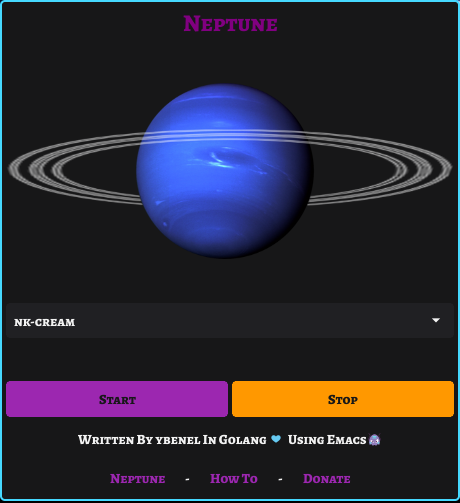
Screenshot // Demo (Sound on)
demo.mp4
Installation.
By default i provide pre-built binaries for both Linux and Windows, I’d include MacOS as well if i had a MacOs machine to build the app, although it is possible to cross-compile from Linux to MacOs its very troublesome and requires building a toolchain and whatnot.
Runtime dependencies (Linux Only).
There’s few runtime dependencies required in order to run/build Neptune (cli or gui). If you’re running Ubuntu/Debian based, there’s a high change you won’t need to install any of the following dependencies.
apt install libx11-6 libxtst6 libx11-xcb1 libxcb-xkb1 libxkbcommon0 libxkbcommon-x11-0 libasound2 libayatana-appindicator3-1 libxxf86vm1 libgl1
ARCH use the AUR to install the dependencies and the package.
Binaries (CLI / GUI).
Both Windows And Linux built binaries are for x86_64 (amd64) architecture only more to come soon. Headover to the Releases and download the appropriate build for your machine.
Linux
Arch Linux (AUR)
yay -S realneptune # (BINARY)
yay -S realneptune-cli # (BINARY)
# OR BUILD (GIT VERSION)
yay -S realneptune-git
yay -S realneptune-cli-git
Ubuntu/Debian
sudo dpkg -i Neptune-1.0.2-1.deb
# CLI
sudo dpkg -i Neptune-Cli-1.0.2-1.deb
Other distros.
GUI
To install Neptune your Linux distribution (make sure you have download the latest release)
mkdir Neptune && tar -xf Neptune.tar.xz -C Neptune/ && cd Neptune; sudo make install
CLI
sudo wget https://github.com/M1ndo/Neptune/releases/download/v1.0.2/Neptune-Cli -O /usr/bin/Neptune && chmod +x /usr/bin/Neptune
Windows
Important Notice Windows Defender will mistakenly flag the executable as malicious. But its not malicious because i don’t own a signing certificate (This issue should disappear later) If you get a defender smart screen just click on Show and Run this file .
MacOs
Unavailable at the moment (Soon)
Building.
To build Neptune you’ll have to satisfy few requirements.
- Golang version >1.19
- GCC or Clang compiler
- Mingw64 (Windows)
- make
- Fyne (Optional)
Use TAGS=”nosystray” if you don’t wanna build with a systray (Mandatory for MacOs “systray broken”). Use PKG=fyne to package/build with fyne.
To change architecture and compiler, use eg.
GOARCH=arm CC=arm-linux-gnueabihf-gcc CXX=arm-linux-gnueabihf-g++ make linux # windows , darwin
Linux
Make sure you have all runtime dependencies installed.
make linux
# OR
make linux-cli
Windows
make windows
MacOs
TAGS="nosystray" make darwin
# OR CLI
TAGS="nosystray" make darwin-cli
Command Line
NOTE: GUI Neptune is also built with CLI Mode To run Neptune in CLI mode
Neptune -cli -download # (Downloads Missing sounds "First time run")
Neptune -cli -soundkey "Alpacas" # Use Alpacas Soundkey
Neptune -lst # List Available installed sound keys.
CLI Options
Usage of Neptune:
  -cli
        Run in CLI instead of GUI
  -download
        Download all other soundkeys
  -lst
        List all available sounds
  -sounddir string
        Sounds directory
  -soundkey string
        Soundkey to use default (nk-cream)
  -verbose
        Verbose output (Debugging)
  -volume float
        Set volume (0 to 1) (default 1)
Keysounds.
By default nk-cream keysounds are embedded in the app so it doesn’t require any assets.
By default when your first run the app on GUI mode, it will download the missing sounds and the app will restart itself.
Custom Sounds keys
View this Tutorial Showing how to create your own soundkey.
Setting/Creating a custom keys is very simple and doesn’t require to write any configurations. Be in the following folder
- For Linux:
~/.local/share/Neptune - For Windows:
%AppData%\Neptune (C:\Users\Ybenel\Local\Appdata\Roaming\Neptune) - For MacOs:
Library\Application Support\Neptune
create a folder with any name you want then create a file called config.json (don’t worry there’s no configuration)
Then let’s say you want to create a custom key for “key a” all you have to do is to move your custom sound file.
It should be .wav or .ogg and call it a.wav and that’s it .
- So it would be like
alt->alt.wavoralt.ogg
If you’re not sure about the key name read this file variable LEcode2Char
Fallback sounds.
Let say you want to create a custom sound but you don’t wanna customize each key. This is where fallback sound keys come in. all you have to do is have a sound file that will be played for every other key that doesn’t have its sound file. The fallback file can be anywhere from (it only needs to have a keyword fallback) And there could be multiple fallback files (all fallback files will be used randomly on each click)
fallback.wav
fallback2.wav
fallback3.ogg
fallbackgg.wav
Key Events (up and down)
Neptune supports keyevents. so that when you click on a key it will play a sound and when u release that key it will play another sound.
To define a multi event keysound. just append the keyword -up to the soundfile.
Let’s say you have a soundfile for key “shift”, like shift.wav this will be played when the key is pressed.
For when its released that soundfile should be shift-up.wav.
- Key like
alt.wavits release event sound file will bealt-up.wav
This also works for fallback keys, so there could fallback.wav fallback-up fallback2.ogg fallback2-up.ogg and so on.
However there one thing you add to let Neptune know that this soundkey supports multi events.
Edit config.json in soundkey directory you created and add this (name is optional).
{
  "name": "blabla",
  "support-events": true
}
Donate.
If you wanna consider supporting this project by donating, please spare some cash Here
Author
Written by ybenel
License
AGPLv3
more like this