moxon-frame-generator
simple generator for 3D-printed frames for a moxon rectangle antenna
OpenSCAD★ 50
Command line interface (CLI) for 3d printing
 Spiritdude
git clone https://github.com/Spiritdude/Print3r.gitSpiritdude/Print3rPrint3r is a command-line tool (without GUI) to print 3d parts (.gcode, .stl, .amf, .3mf, .obj, .off, .scad, .sscad, etc) to 3d printers, utilizing a slicer of your choice (Slic3r, Slic3r PE, PrusaSlicer, SuperSlicer, CuraEngine 3.x, CuraEngine 4.x, CuraEngine 5.x, Cura 15.04 and a few more).
print3r -p prusa-i3 print cube.scad
print3r -p ender3 -d /dev/ttyUSB1 print cube.stl
print3r preview cube.gcode
.scad, .stl* or .gcode to 3d printers.scad or .stl* saving .gcode without printing--scale=<x>,<y>,<z>, --rotate=<x>,<y>,<z>, --translate=<x>,<y>,<z>, --random-placement, --auto-center, --multiply-part=<n>--temperature=<c>, --layer-height=<h>, --fill-density=<f>, --perimeters=<n>, etc..png image with render commandyagv Gcode viewer with preview command*) .stl (ascii & binary), and preliminary .amf and .obj supported as well.
2022:
@revo-{yellow,red,blue,green,pink} macros, -o <output> added--device/-d --printer/-p --slicer/-s short-cuts added--scad with --scad.= to pass variables to OpenSCAD models, experimental support for metatron- and enoch-slicer (--slicer=metatron or enoch)--slicer=voxgl)2021:
lab-slicer and vox3l-slicer (--slicer=lab or vox3l)webcam=<url>[ <url2>...] and webcam_snap=<settings>[ <setting2>...]M501 outputzplus-slicer (--slicer=zplus)--uid=... uid (to track printed parts)--post=<post1>[,<post2>...] and --post_<post1>=proc %i -o %o--slicer=mandoline added--slicer=slicer4rtn added2019:
--slicer=cura4, see wiki for install instructions--toolmap & --toolremap--slicer=prusa support, additional inline functions support for gcode transformation: &toolcolor(n,a,b,c,d,e), &hsl2cmy(h,s,l), &phases(n=2|3,p=3|4)--prepend_gcode=... for start-gcode addition, and --layer-gcode=...skirts, brims and rafts, support and seam slicer-independent2018:
client command added, and --device=tcp:<remote-ip>[:<n>] added for remote printing capabilitiesprint/travel/infill/perimeter/small_perimeter/bridge/retract_speed)/usr/share/print3r & ~/.config/print3r/)--scad=<code> to additionally execute openscad code.../<slicer>/map.ini--slicer=cura and cura-legacy--slicer=<slicer> with --printer=<profile> leads to ../<slicer>/<profile>, @<setting> leads to settings/macro/<setting>.amf and .obj native support for preprocessing (scale,rotate,translate,mirror)--scale=0,0,30mm or --scale=50mm, and --scale=50% same as --scale=0.5, --auto-center to center printPRINT3R enviromental variable considered, 'baudrate=auto' probes baudrate.slic3r, slic3r-pe, cura-legacy and curaclient command and --device=tcp:<remote-ip>[:<n>] (n=0 (default),1,2 etc)yagv viewerPrimary focus in on Linux (Debian, Ubuntu) and alike platforms like FreeBSD and such.
openscad, see OpenSCAD.orgslic3r, Debian/Ubuntu: apt install slic3rThe software is licensed under GPLv3
git clone https://github.com/Spiritdude/Print3r
cd Print3r
make requirements
make install
See Profiles how to setup a dedicated printer profile.
Print3r (print3r) 0.3.20 USAGE: [<options>] <cmd> <file1> [<...>]

   options:
      --verbose or -v or -vv  increase verbosity
      --quiet or -q           no output except fatal errors
      --baudrate=<n>          set baudrate, default: 115200
         -b <n>
      --device=<d>            set device, default: /dev/ttyUSB0
         -d <device>
      --slicer=<slicer>       set slicer, default: slic3r
         -s <slicer>
                                 5dmaker, cura, cura-legacy, cura-slicer, cura4, cura5, curax, enoch, goslice, kirimoto, lab, mandol
ine, metatron, prusa, slic3r, slic3r-pe, slicer4rtn, super, vox3l, voxgl, zplus
      --printer=<name>        config of printer, default: default
         -p <name>
      --version               display version and exit
      --output=<file>         define output file for 'slice' and 'render' command
         -o <file>
      --scad                  consider all arguments as actual OpenSCAD code (not files)
      --scadlib=<files>       define OpenSCAD files separated by "," or ":"
                              by default 'use <file>', change with --scadimport=include
      --prepend-gcode=...     add manually start-gcode
      --layer-gcode=...       insert gcode at layer change
      --display_update=off    turn built-in display updates off
      --post_<stage>=...      define a post-processing stage (use '%i' input file, '%o' output file)
      --post=<stage>[,<stage>]  apply post-processing stage(s)
      part preprocessing:
         --random-placement   place print randomly on the bed
         --auto-center        place print in the center
         --multiply-part=<n>  multiply part(s)
            --rows=<n>           define rows for multiplied parts
            --cols=<n>           define cols for multiplied parts
         --scale=<x>,<y>,<z>     scale part x,y,z (absolute if 'mm' is appended)
         --scale=<f>             scale part f,f,f
         --rotate=<x>,<y>,<z>    rotate x,y,z
         --translate=<x>,<y>,<z> translate x,y,z
         --mirror=<x>,<y>,<z>    mirror x,y,z (0=keep, 1=mirror)
      --uid=<id>              define part unique id (default: auto generated uid)
      --<key>=<value>         include any valid slicer option (e.g. slic3r --help)

   commands:
      print <file> [...]      print (convert & slice & print) part(s) (3mf, 3mj, 5mf, amf, brep, fcstd, iges, obj, off, step, stl)
      slice <file> [...]      slice file(s) to gcode (same formats as 'print')
      preview <file> [...]    slice & preview (same formats as 'print')
      render <file> [...]     render an image (use '--output=sample.png' or so)
      gcode <code1> [...]     send gcode lines
      gconsole                start gcode console
      client                  map USB connected printer to network (per device)
      log [<term>|<#num>]     list log of finished prints, use -v for details or --format=json to dump JSON
                                 use --output=<k>[,<k1>] to list particular keys
                                 if num is negative, the last entries are shown, e.g. '#-5'
      help

   examples:
     export PRINT3R "printer=my_printer" --OR-- setenv PRINT3R "printer=my_printer"
      print3r slice cube.stl
      print3r --layer-height=0.2 -o test.gcode slice cube.stl
      print3r -p ender3 -d /dev/ttyUSB1 print test.gcode
      print3r -p corexy -d /dev/ttyUSB2 --layer-height=0.3 --fill-density=0 print cube.stl
      print3r -p ender3 -d tcp:192.168.0.2 --layer-height=0.25 print cube.stl
      print3r print cube.scad
      print3r print parametric.scad --scad.A=20 --scad.B=30
      print3r --scad print "cube(20)"
      print3r --scad print "cube(a)" --scad.a=20
      print3r log
      print3r --output=uid,layer_height log cube
      print3r log -v '#12'
      print3r gcode 'G28 X Y' 'G1 X60' 'G28 Z'
      print3r gconsole
      == Print3r: Gcode Console (gconsole) - use CTRL-C or 'exit' or 'quit' to exit
         for valid Gcode see https://reprap.org/wiki/G-code
         conf: device /dev/ttyUSB0, connected
      > M115
      ...
print3r --fill-density=0 --layer-height=0.2 print cube.scad
print3r --print-center=100,100 print cube.scad
print3r --printer=ender3.ini --device=/dev/ttyUSB1 --random-placement --rotate=45,0,0 print cube.scad
print3r -p ender3.ini -d /dev/ttyUSB1 --random-placement --rotate=45,0,0 print cube.scad
print3r --multiply-part=3 --scale=50% print cube.scad
print3r --scale=2 print cube.scad
print3r --scale=1,4,0.5 print cube.scad
print3r --scale=30% print cube.scad
print3r --scale=50mm print cube.scad
print3r --scale=0,0,30mm print 3DBenchy.stl
PRINT3RYou can set any option into PRINT3R environment variable, "<key>=<value>", combined with ":", like:
export PRINT3R "printer=prusa-i3:temperature=190:..."
print3r print cube.scad
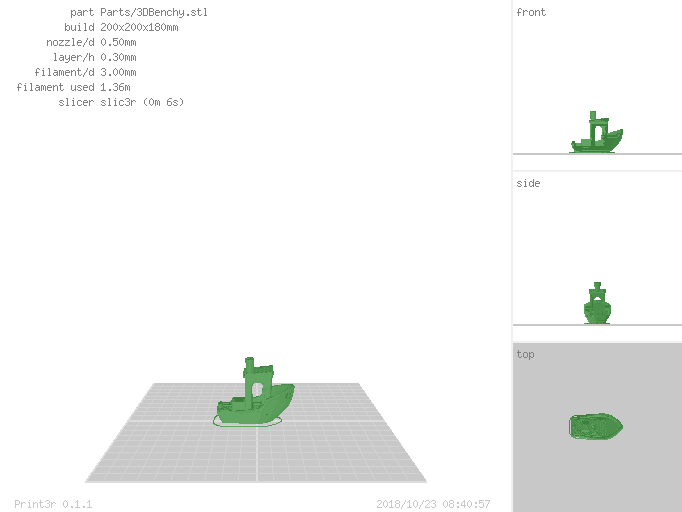
Instead to actually print parts, you can also let them render into .png image as well (e.g. for documentation purposes or preview):
print3r --output=benchy.png render 3DBenchy.stl
more like this
simple generator for 3D-printed frames for a moxon rectangle antenna
GPX 轨迹转 3D 可打印地形模型 | Hiking trail to 3D printable terrain | Electron + Vue。 一款面向户外爱好者与 3D 打印玩家的 Web 工具。将 GPX 徒步/骑行轨迹一键转…
Install and monitor KlipperScreen on Android via DroidKlipp APK, USB ADB forwarding, and WiFi fallback
search projects, people, and tags