hamr
Hamr is an extensible launcher for Wayland built with rust and gtk layer shell. Extend it with plugins that can be writ…
 Stewart86
Important
Maintenance status: Hamr is currently in maintenance mode. I recently started a full-time job and no longer use Linux as my daily operating system, so I am not able to work on the project day to day.
Pull requests for feature requests and bug fixes are still welcome and will be reviewed when I have time. If you would like to challenge yourself by resolving open issues, feel free to open a PR.
If anyone is interested in taking over maintenance, please let me know. I can add a new maintainer as a code owner.

Hamr
A fast, extensible desktop launcher for Linux.
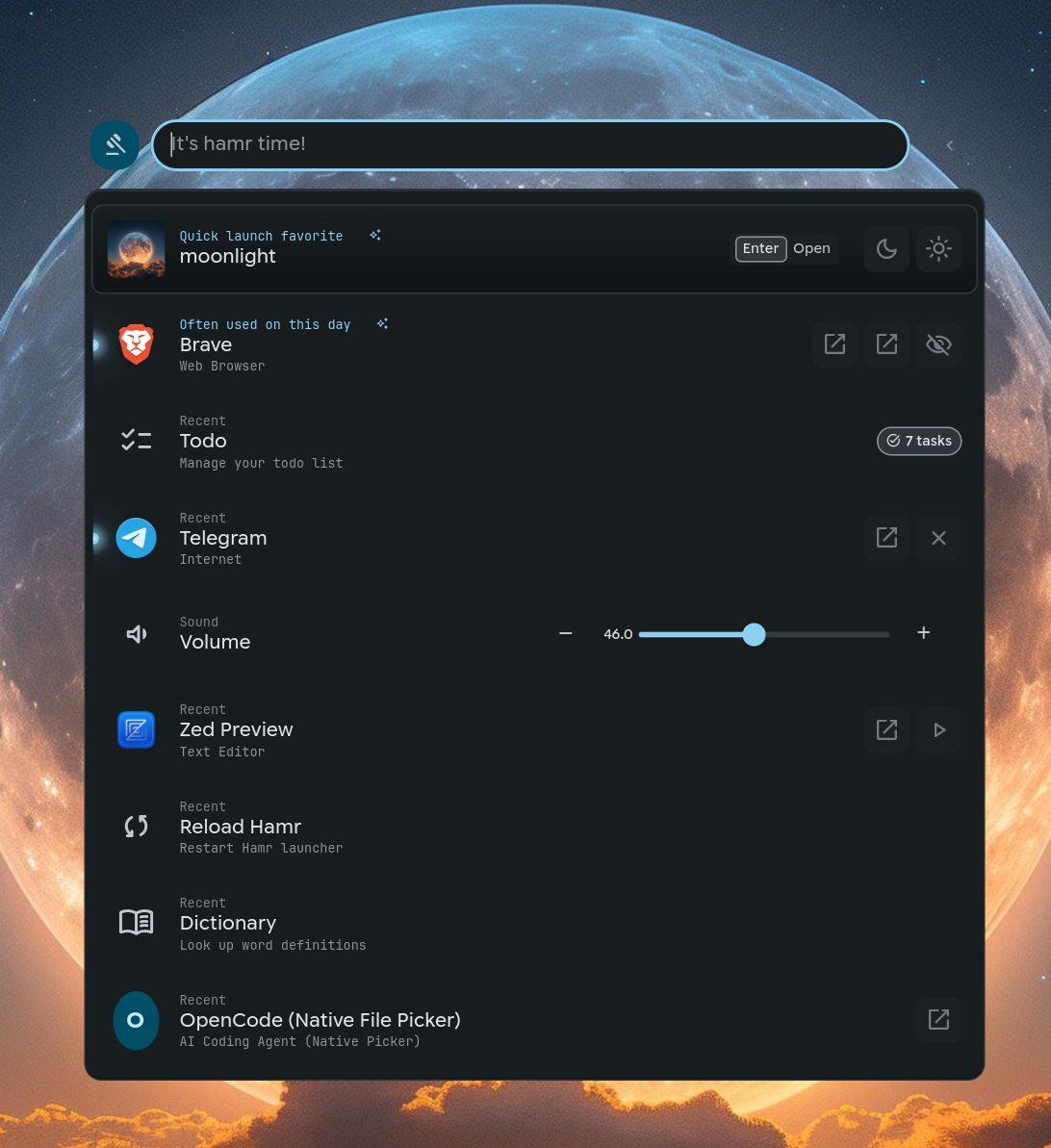
Hamr learns from your usage patterns to surface what you need, when you need it. Type a few characters to launch apps, calculate math, search files, access clipboard history, and more.
Features
- Frecency ranking - Results sorted by frequency + recency
- Learned shortcuts - Type "q" to find QuickLinks if that's how you found it before
- Fuzzy matching - Fast, typo-tolerant search powered by nucleo
- Smart suggestions - Context-aware suggestions based on time and usage
- Extensible plugins - JSON protocol, any language (Python, Bash, Go, Rust)
- Live updates - Plugins emit real-time updates without refreshing the list
- Rich UI - Forms, cards, sliders, gauges, preview panels, grid browsers
Installation
Quick Install (Linux)
curl -fsSL https://hamr.run/install.sh | bash

# Or opt-in to systemd setup during install
curl -fsSL https://hamr.run/install.sh | bash -s -- --systemd
This downloads the latest release binaries (x86_64/aarch64), installs to ~/.local/bin, and copies bundled plugins next to the binaries.
Systemd setup is optional (opt-in) via --systemd or by running hamr install after installation.
Dependencies: GTK4 4.20+, gtk4-layer-shell, Python 3.9+
Plugin Runtime Dependencies
Some bundled plugins depend on extra system tools. Hamr will still install without them, but those plugins may show errors or reduced functionality until the tools are installed.
| Plugin | Required tool(s) | Notes |
|---|---|---|
calculate |
qalc |
Calculator expressions, units, currency, and temperature conversion |
clipboard |
cliphist |
Clipboard history browsing and management |
player |
playerctl |
Media player controls |
files |
fd, fzf |
File search and fuzzy matching |
bitwarden |
bw |
Bitwarden vault access |
zoxide |
zoxide |
Directory jumping from zoxide history |
screenrecord |
wf-recorder, slurp |
Screen and region recording |
snip |
grim, slurp, satty, wl-copy |
Screenshot capture, annotation, and clipboard copy |
screenshot |
tesseract |
OCR search over screenshots |
snippet, emoji |
ydotool or wtype |
Optional direct text typing; clipboard copy still works with wl-copy |
On Arch Linux, common packages are libqalculate, cliphist, playerctl, fd, fzf, bitwarden-cli, zoxide, wf-recorder, slurp, grim, satty, wl-clipboard, tesseract, and ydotool.
Manual Download
# Pick the right archive for your CPU:
# - x86_64:  hamr-linux-x86_64.tar.gz
# - aarch64: hamr-linux-aarch64.tar.gz
wget https://github.com/Stewart86/hamr/releases/latest/download/hamr-linux-x86_64.tar.gz
tar -xzf hamr-linux-x86_64.tar.gz
cd hamr-linux-x86_64
mkdir -p ~/.local/bin/
cp hamr hamr-daemon hamr-gtk hamr-tui ~/.local/bin/
cp -r plugins ~/.local/bin/

# Option 1: Run directly (no systemd)
~/.local/bin/hamr

# Option 2 (recommended, opt-in): systemd user services
~/.local/bin/hamr install
systemctl --user start hamr-gtk
Compositor Support
| Compositor | Status | Notes |
|---|---|---|
| Hyprland | ✅ Supported | Full functionality with layer-shell |
| Niri | ✅ Supported | Full functionality with layer-shell |
| Sway | ✅ Supported | Works with layer-shell protocol |
| KDE Wayland | ✅ Supported | Requires layer-shell support |
| GNOME Wayland | ❌ Not Supported | No layer-shell protocol support |
| X11 | ❌ Not Supported | Wayland-only application |
Installer Flags:
| Flag | Description |
|---|---|
--check |
Dry-run mode: show what would be installed without making changes |
--yes |
Assume yes for all prompts (non-interactive mode) |
--reset-user-data |
Reset user configuration and plugins (backup created) |
--systemd |
Run hamr install after installing binaries (opt-in) |
Build from Source
Requires Rust 1.88+, GTK4 4.20+, gtk4-layer-shell.
# Install dependencies (Arch)
sudo pacman -S gtk4 gtk4-layer-shell rust python

# Install dependencies (Fedora)
sudo dnf install gtk4-devel gtk4-layer-shell-devel rust python3

# Install dependencies (Ubuntu/Debian)
sudo apt install libgtk-4-dev gtk4-layer-shell-dev rustc cargo python3

# Clone and build
git clone https://github.com/stewart86/hamr
cd hamr
./install.sh

# Or build manually
cargo build --release
mkdir -p ~/.local/bin
cp target/release/{hamr,hamr-daemon,hamr-gtk,hamr-tui} ~/.local/bin/

# Option 1: Run directly (no systemd)
hamr

# Option 2 (recommended, opt-in): systemd user services
hamr install
systemctl --user start hamr-gtk
NixOS / Nix
# Try without installing
nix run github:stewart86/hamr

# Install to profile
nix profile install github:stewart86/hamr
Or add to your flake:
{
  inputs.hamr.url = "github:stewart86/hamr";
  # ...
  nixpkgs.overlays = [ hamr.overlays.default ];
  environment.systemPackages = [ pkgs.hamr ];
}
Arch Linux (AUR)
# Pre-built binary (recommended - faster install)
paru -S hamr-bin

# Or build from source
paru -S hamr
Run (two ways):
# Option 1: Run directly (no systemd)
hamr

# Option 2 (recommended, opt-in): systemd user services
hamr install
systemctl --user start hamr-gtk
Note: AUR packages do not auto-enable systemd services; hamr install is the opt-in step.
Updating
Do not uninstall Hamr before upgrading. Re-run your original install method to update in place.
Existing config in ~/.config/hamr/ and user-created plugins are preserved by default.
# AUR
paru -Syu hamr-bin   # or hamr

# Installer / manual download users
curl -fsSL https://hamr.run/install.sh | bash

# Restart the running instance after upgrading
hamr restart
Full upgrade instructions: docs/getting-started/installation.md#updating
Quick Start
hamr                    # Start launcher (auto-starts daemon)
hamr toggle             # Toggle visibility
hamr plugin clipboard   # Open specific plugin
hamr status             # Check daemon status
Compositor Setup
Hyprland (~/.config/hypr/hyprland.conf):
exec-once = hamr
bind = $mainMod, SPACE, exec, hamr toggle
bind = $mainMod, V, exec, hamr plugin clipboard
Niri (~/.config/niri/config.kdl):
spawn-at-startup "hamr"

binds {
    Mod+Space { spawn "hamr" "toggle"; }
    Mod+V { spawn "hamr" "plugin" "clipboard"; }
}

// Optional: enable Niri 26.04+ background blur behind Hamr.
// Hamr uses the layer-shell namespace "hamr".
layer-rule {
    match namespace="^hamr$"

    background-effect {
        blur true
        xray false
    }
}

blur {
    passes 3
    offset 3.0
    saturation 1.5
}
Systemd (optional):
# Systemd user services are recommended for auto-start on login (opt-in)
hamr install
systemctl --user start hamr-gtk

# Without systemd, just run:
hamr
Built-in Plugins
| Plugin | Description |
|---|---|
apps |
Application launcher with categories |
shell |
Execute shell commands |
calculate |
Calculator with currency, units, temperature |
clipboard |
Clipboard history with search |
power |
Shutdown, reboot, suspend, logout |
Additional plugins available: bitwarden, dictionary, emoji, files, quicklinks, snippets, totp, weather, wifi, youtube.
Prefix Shortcuts
| Prefix | Function | Prefix | Function |
|---|---|---|---|
~ |
File search | ; |
Clipboard history |
/ |
Actions & plugins | ! |
Shell history |
= |
Calculator | : |
Emoji picker |
Prefixes are configurable in ~/.config/hamr/config.json.
Documentation
- Installation - Full installation guide
- Configuration - All config options
- Logging - Log paths, env vars, debugging
- Theming - Material Design 3 colors, matugen/pywal
- Troubleshooting - Common issues and solutions
- Plugin Development - Create your own plugins
- API Reference - Plugin protocol specification
- Architecture - System design and crate structure
Development
# Build
cargo build

# Run tests
cargo test

# Run with debug logging
RUST_LOG=debug cargo run -p hamr-daemon

# Test a plugin
cargo run -p hamr -- test shell "ls -la"
Architecture
hamr-cli     hamr-gtk     hamr-tui
    \           |           /
     \          |          /
      +----JSON-RPC 2.0---+
               |
          hamr-daemon
               |
          hamr-core
               |
    +---------+---------+
    |         |         |
  search   plugins   frecency
- hamr-core: Platform-agnostic core (search, plugins, frecency, indexing)
- hamr-daemon: Socket server wrapping core
- hamr-gtk: GTK4 native UI with layer shell
- hamr-tui: Terminal UI for headless use
- hamr-cli: Command-line interface
Contributing
Contributions welcome! Please read the Architecture Guide and Agent Guidelines before submitting PRs.
License
MIT License - see LICENSE for details.
more like this
xmb-bigscreen
XMB for Plasma BigScreen, console-like fullscreen launcher for living room gamepad users
TachiSnap
TachiSnap — Pixel Snapper for animation pixel artists. Rust + WebAssembly client-side tool for cleaning up AI-generated…
r2
Free open-source Cloudflare R2 desktop client and S3 GUI for macOS, Windows, and Linux. Manage Cloudflare R2, AWS S3, M…