TachiSnap
TachiSnap — Pixel Snapper for animation pixel artists. Rust + WebAssembly client-side tool for cleaning up AI-generated…
HTML★ 50
palette-based image recoloring tool
 ashish0kumar
git clone https://github.com/ashish0kumar/tint.gitashish0kumar/tintCommand-line tool to recolor images using your favorite theme palettes
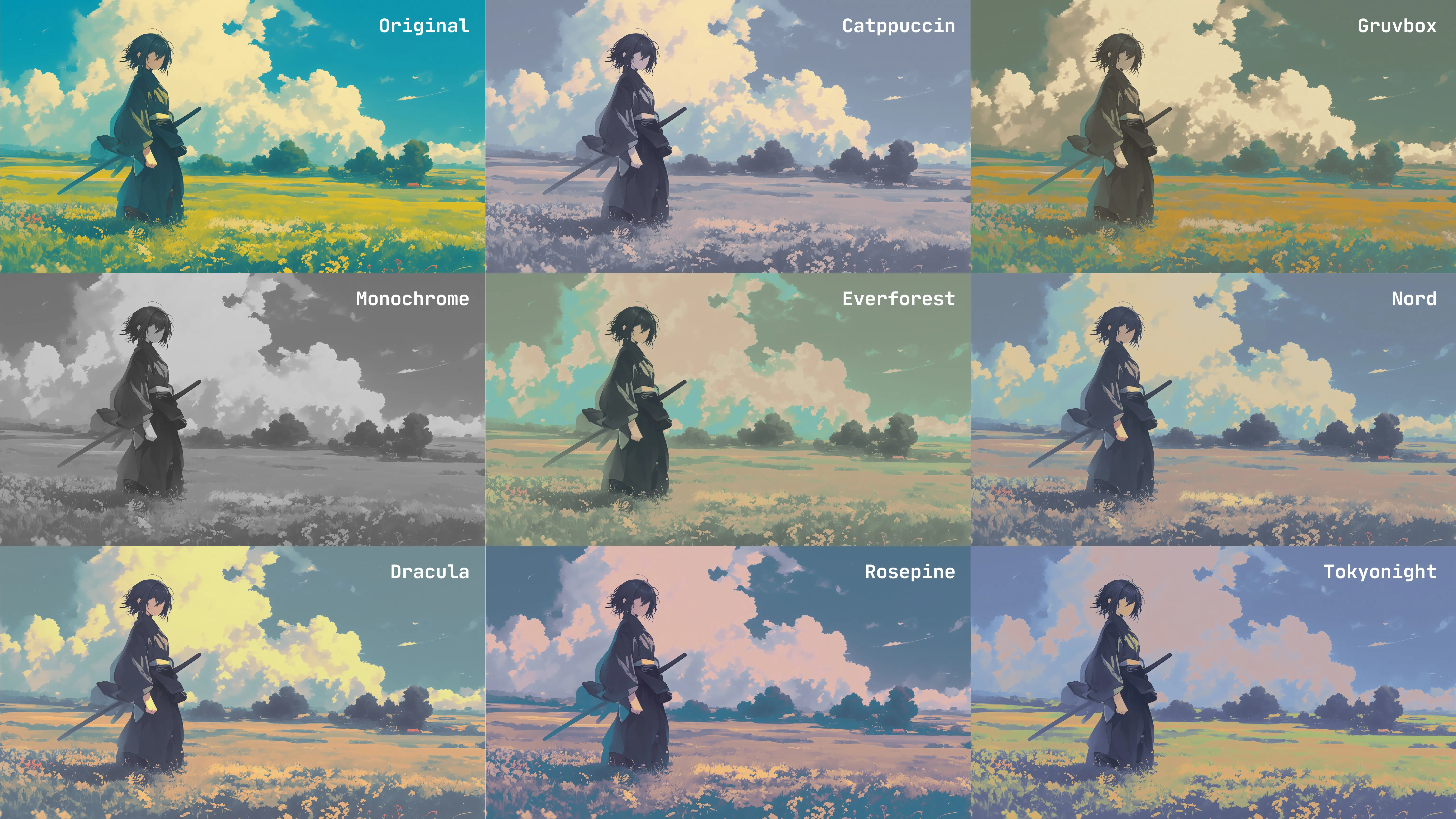
nearest colors and weighting function power.| Theme | Flavors |
|---|---|
| Ayu | light, mirage, dark |
| Catppuccin | frappe, latte, macchiato, mocha |
| Dracula | default |
| Everforest | dark, light |
| Gruvbox | dark, light |
| Kanagawa | dragon, lotus |
| MonokaiPro | classic, spectrum, octagon, machine, ristretto |
| Monochrome | default |
| NightOwl | default |
| Nord | default |
| RosePine | dawn, main, moon |
| Solarized | dark, light |
| Tokyonight | light, night, storm |
yay -S tint
nix profile install nixpkgs#tint
sudo xbps-install -S tint
go installEnsure your Go environment is set up (GOBIN is in your PATH), then run:
go install github.com/ashish0kumar/tint@latest
Clone the repo, build the project and move it inside your $PATH:
git clone --depth=1 https://github.com/ashish0kumar/tint
cd tint
go build
sudo mv tint /usr/local/bin/
tint -h
Usage: tint --image <IMAGE> --theme <THEME-FLAVOR> [OPTIONS]

  --theme, -t <STRING>
        Theme palette and optional flavor (required).
        Use --list-themes to see all available themes and flavors.

  --image, -i <PATH>
        Path to the input image (required). Supports JPEG, PNG formats.

Options:

  --output, -o <PATH>
        Path for the output image.
        (Default: <input_filename>_themed_<theme-flavor>.<input_format>)

  --luminosity <FLOAT>
        Luminosity adjustment factor (e.g., 0.8 for darker, 1.2 for brighter).
        (Default: 1.0)

  --nearest <COUNT>
        Number of nearest palette colors to consider for interpolation.
        (Default: 30)

  --power <FLOAT>
        Power for Shepards Method (influences how quickly weights fall off).
        (Default: 2.5)

  --list-themes, -l
        List all available themes and their flavors.

  --not-open
        not open the recolored image in the default viewer

  --vesion, -v
        Check the version.

  --help, -h
        Print this help message.
Warning
Memory Note
Processing large images (e.g., 50MP, ~7071x7071) can use significant RAM.
A 50MP image in RGBA format (4 bytes/pixel) may consume over 500 MiB of memory.
Ensure your system has enough free memory before running.
# Recolor an image using the Catppuccin theme (default flavor)
tint --image input.jpg --theme catppuccin

# Use the Catppuccin theme's "latte" flavor and specify an output filename
tint -i image.png -t catppuccin-latte -o output_light.png

# Apply the Gruvbox theme and make the image slightly brighter
tint -i pic.jpeg -t gruvbox -o bright_pic.jpg --luminosity 1.2

# Recolor using Everforest theme with a smoother gradient (more nearest colors)
tint -i bg.png -t everforest --nearest 50

# Use Tokyonight theme and tweak the interpolation strength (Shepard's Method)
tint -i wallpaper.png -t tokyonight --power 3.5

# List all available themes and flavors
tint --list-themes
I'd love to expand tint's theme collection! If you have a favorite theme not yet included, or want to contribute a new one, here's how:
Understand the structure:
Theme definitions live in the themes/ directory. Each theme typically gets its own .go file (eg themes/catppuccin.go).
Colors are defined as color.RGBA values, usually converted from hexadecimal strings using the hexToRGBA helper function found in themes/registry.go
Create your theme file:
Create a new Go file in the themes/ directory (eg themes/mytheme.go).
Inside this file, define a map[string]map[string]color.RGBA that holds your theme data.
The top-level key should be your theme's main name (eg "mytheme").
The nested map contains flavors. If your theme has multiple flavors (eg dark/light variants), define them as sub-maps (eg "dark": {...}, "light": {...}).
Crucially, every theme must include a "default" flavor. This is the palette tint will use if no specific flavor is mentioned by the user when running the command (eg just -t catppuccin will pick catppuccin-default).
Map descriptive color names (eg "base", "surface0") to their color.RGBA values using hexToRGBA
Example themes/mytheme.go structure:
package themes

import "image/color"

var MyTheme = map[string]map[string]color.RGBA{
    "default": { // Important
        "background": hexToRGBA("#282A36"),
        "foreground": hexToRGBA("#F8F8F2"),
        "comment":    hexToRGBA("#6272A4"),
        // ... more colors
    },
    "dark": {
        "base":     hexToRGBA("#1A1A1A"),
        "text":     hexToRGBA("#F0F0F0"),
        "accent":   hexToRGBA("#FF5733"),
        // ... more colors
    },
    "light": {
        "base":     hexToRGBA("#F0F0F0"),
        "text":     hexToRGBA("#1A1A1A"),
        "accent":   hexToRGBA("#337AFF"),
        // ... more colors
    },
}
Register your theme:
themes/registry.goAllThemeData map.var AllThemeData = map[string]map[string]map[string]color.RGBA{
// ... existing themes
"mytheme": MyTheme, // Add this line
}
Validate and Test:
go build from the project root to ensure there are no compilation errors.tint -t mytheme-dark (or mytheme) with an image to confirm it works as expected.Submit a Pull Request:
themes/registry.goThis project has been inspired by the work of others in the open-source community:
Contributions are always welcome! If you have ideas, bug reports, or want to submit code, please feel free to open an issue or a pull request.

© 2025-present Ashish Kumar
more like this
TachiSnap — Pixel Snapper for animation pixel artists. Rust + WebAssembly client-side tool for cleaning up AI-generated…
多源壁纸聚合平台 · 自动归档 Bing + Unsplash 精选壁纸 · AI 视觉故事生成 · 企业微信推送 · GitHub Pages 在线画廊
meine 🌒 - A CLI file manager and system utility built with Textual. It combines intuitive command parsing with rich t…
search projects, people, and tags