blogr
Write, edit, and publish your blog without ever leaving your terminal!
 bahdotsh
Blogr
A fast, lightweight static site generator built in Rust for creating and managing blogs. Write in Markdown, preview with a built-in terminal editor, and deploy to GitHub Pages with a single command.
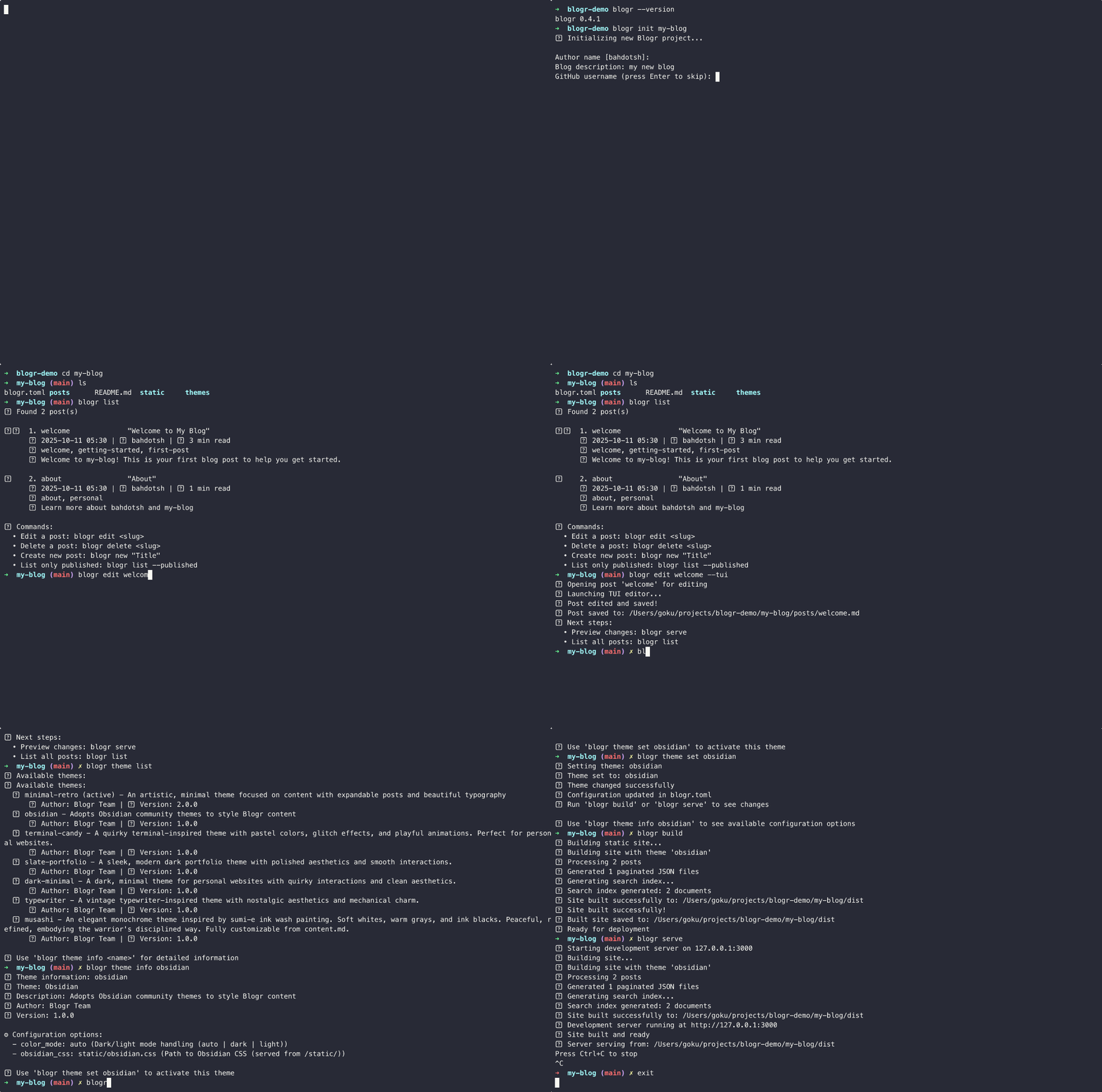
Quick Start
Get up and running in 5 minutes:
# 1. Install Blogr
cargo install blogr-cli

# 2. Create your blog
blogr init my-blog
cd my-blog

# 3. Create your first post
blogr new "Hello World"

# 4. Preview your blog
blogr serve
# Opens http://localhost:3000

# 5. Deploy to GitHub Pages
export GITHUB_TOKEN=your_github_token
blogr deploy
For a personal website instead of a blog:
blogr init --personal my-portfolio
Installation
Requirements:
- Rust 1.70+ (Install Rust)
- Git (for deployment)
- GitHub account (for GitHub Pages deployment)
Install from crates.io (recommended):
cargo install blogr-cli
Install from source:
git clone https://github.com/bahdotsh/blogr.git
cd blogr
cargo install --path blogr-cli
Features
Two Site Types
- Blog Mode: Traditional blog with posts, archives, tags, and RSS feeds
- Personal Mode: Portfolio/personal website without blog functionality
- Single command initialization for either type
- Theme-specific optimizations for each mode
Content Creation
- Write posts in Markdown with YAML frontmatter
- Built-in terminal editor with live preview
- Draft and published post management
- Tag-based organization
- Automatic slug generation
- External post support (link to posts hosted elsewhere)
Site Generation
- Fast static site builds
- Multiple themes: 8 built-in themes for blogs and personal sites
- Full-text search with MiniSearch integration
- Syntax highlighting for code blocks
- MathJax support for LaTeX math expressions (opt-in)
- RSS/Atom feeds (blog mode)
- SEO-friendly output
Development
- Live reload development server
- Interactive configuration editor
- Project validation and cleanup tools
- Comprehensive CLI commands
Deployment
- One-command GitHub Pages deployment
- Custom domain support with CNAME generation
- Automatic git branch management
- Deployment status checking
Newsletter System (optional)
- Email subscription collection via IMAP
- Interactive subscriber approval interface
- Newsletter creation from blog posts or custom content
- SMTP integration for reliable email delivery
- Import/export from popular services (Mailchimp, ConvertKit, etc.)
- REST API for external integrations
- Extensible plugin system
Documentation
For detailed information about specific features, see the following documentation:
- Commands Reference - Complete CLI command reference
- Configuration Guide - All configuration options
- Themes Guide - Available themes and customization
- Newsletter System - Email newsletter setup and usage
- Search Feature - Full-text search configuration
- Terminal Editor - Built-in editor usage
Basic Commands
Project Management
blogr init my-blog                    # Create new blog
blogr init --personal my-portfolio   # Create personal website
blogr project info                    # Show project details
Content Management
blogr new "My Post Title"             # Create new post
blogr list                            # List all posts
blogr edit my-post-slug               # Edit existing post
Development & Deployment
blogr serve                           # Start dev server
blogr build                           # Build static site
blogr deploy                          # Deploy to GitHub Pages
Configuration
blogr config edit                     # Interactive config editor
blogr theme set minimal-retro         # Switch theme
Project Structure
When you create a new blog, Blogr generates this structure:
my-blog/
├── blogr.toml              # Configuration file
├── posts/                  # Markdown posts
│   ├── welcome.md          # Sample post
│   └── about.md            # About page
├── static/                 # Static files (images, CSS, JS)
│   ├── images/
│   ├── css/
│   └── js/
└── .github/workflows/      # GitHub Actions (auto-generated)
    └── deploy.yml
Key files:
blogr.toml- Your site configurationposts/- All your blog posts in Markdownstatic/- Images, custom CSS, and JavaScript files.github/workflows/- Automatic deployment setup
Configuration
Edit blogr.toml to configure your site. Use blogr config edit for an interactive editor.
Basic Configuration:
[blog]
title = "My Blog"
author = "Your Name"
description = "My thoughts and ideas"
base_url = "https://yourusername.github.io/blog"

[theme]
name = "minimal-retro"  # or "dark-minimal" for personal sites

[github]
username = "yourusername"
repository = "blog"

[site]
site_type = "blog"  # or "personal" for portfolio sites

[math]
enabled = true  # Enable MathJax for LaTeX math rendering
For detailed configuration options, see the Configuration Guide.
Post Format
Posts use Markdown with YAML frontmatter:
---
title: "My Blog Post"
date: "2024-01-15"
author: "Your Name"
description: "Brief description"
tags: ["rust", "programming"]
status: "published"
slug: "my-blog-post"
---

# My Blog Post

Your content goes here in **Markdown**.
Frontmatter Fields:
title- Post title (required)date- Publication date (auto-generated if not provided)author- Author name (uses blog author if not provided)description- Post description for SEOtags- Array of tags for categorizationstatus-"published"or"draft"slug- URL slug (auto-generated from title if not provided)featured- Boolean, mark post as featured (default: false)external_url- URL for external posts (appears in listings but links externally)
Personal Website Content
For personal mode (--personal), use content.md with frontmatter to define your site. See the Themes Guide for detailed examples.
Search
Blogr includes a powerful client-side full-text search feature powered by MiniSearch. Search is enabled by default and works entirely in the browser without requiring a server.
Features:
- Full-text search across post titles, tags, and content
- Real-time results as you type
- Keyboard navigation (use
/to focus search) - Smart excerpts with highlighted search terms
- Lazy loading for better performance
For detailed search configuration and troubleshooting, see the Search Feature Guide.
Math Support
Blogr supports LaTeX math expressions via MathJax 3. Math rendering is opt-in — add the following to your blogr.toml:
[math]
enabled = true
Use standard LaTeX delimiters in your Markdown:
- Inline math:
$E = mc^{2}$renders as inline math - Display math:
$$\sum_{i=1}^{n} i$$renders as a centered block equation
Blogr's markdown parser converts $...$ to \(...\) and $$...$$ to \[...\], which MathJax then renders client-side.
Themes
Blogr comes with 8 built-in themes designed for different purposes:
Blog Themes:
- Minimal Retro (default) - Clean, artistic design with retro aesthetics
- Obsidian - Compatible with Obsidian community themes
- Terminal Candy - Quirky terminal-inspired theme with pastel colors
- Brutja - Minimal, brutalist theme with pops of color
Personal Website Themes:
- Dark Minimal (default) - Dark minimalist-maximalist with cyberpunk aesthetics
- Musashi - Dynamic modern theme with smooth animations
- Slate Portfolio - Glassmorphic professional portfolio theme
- Typewriter - Vintage typewriter aesthetics with nostalgic charm
For detailed theme information, customization options, and setup instructions, see the Themes Guide.
Newsletter System
Blogr includes a comprehensive email newsletter system that allows you to collect subscribers, manage them through an approval interface, and send newsletters based on your blog posts or custom content.
Features:
- Email subscription collection via IMAP
- Interactive approval interface for subscriber requests
- Automatic newsletters from latest blog posts
- Custom newsletter creation with Markdown content
- SMTP integration for reliable email delivery
- Import/export from popular services (Mailchimp, ConvertKit, etc.)
- REST API for external integrations
- Extensible plugin system
For detailed newsletter setup, configuration, and usage, see the Newsletter System Guide.
Deployment
GitHub Pages (recommended)
-
Set up GitHub token:
export GITHUB_TOKEN=your_token
Get a token at https://github.com/settings/tokens (needs
repoandworkflowscopes) -
Deploy:
blogr deploy
Your blog will be available at https://yourusername.github.io/repository
Custom Domains
- Configure domain:
blogr config domain set yourdomain.com - Set up DNS records (A records for apex domains, CNAME for subdomains)
- Deploy and configure in GitHub repository Settings → Pages → Custom domain
Manual Deployment
blogr build
# Copy contents of `dist/` folder to your web server
Development
Build from source:
git clone https://github.com/bahdotsh/blogr.git
cd blogr
cargo build --release
Run tests:
cargo test
Code structure:
blogr-cli/- Main CLI applicationblogr-themes/- Theme system
Contributing
Contributions are welcome! See CONTRIBUTING.md for guidelines.
Areas to help:
- New themes
- Features and bug fixes
- Documentation
- Testing
Changelog
v0.4.1 (Latest)
New Features:
- External Post Support: Create posts that link to external URLs, appearing in listings but redirecting to the original source
- Search Improvements: Insert spaces at block boundaries in plain text extraction for better search indexing
- Newsletter API: API endpoints for creating and sending newsletters
- Newsletter Hardening: Cleanup, rate limiting, and validation improvements for the newsletter subsystem
v0.4.0
New Features:
- Typewriter Theme: Vintage typewriter-inspired theme for personal websites with nostalgic aesthetics
- Brutja Theme: Minimal brutalist blog theme with pops of color
- Blog Link Support: All personal website themes now support a
bloglink in social links - Content.md Override: Personal mode now uses
titleanddescriptionfromcontent.mdinstead ofblogr.toml - Conditional Separators: Typewriter theme displays separator lines only when sections are present
Improvements:
- Better theme organization with clear separation between blog and personal themes
- Enhanced personal website customization options
- Improved documentation for all themes
Themes:
- Blog themes: Minimal Retro, Obsidian, Terminal Candy, Brutja
- Personal themes: Dark Minimal, Musashi, Slate Portfolio, Typewriter
Previous Versions
See blogr-themes/README.md for detailed theme changelog.
License
MIT License - see LICENSE for details.
Links
Built with Rust 🦀
more like this
TachiSnap
TachiSnap — Pixel Snapper for animation pixel artists. Rust + WebAssembly client-side tool for cleaning up AI-generated…
meine
meine 🌒 - A CLI file manager and system utility built with Textual. It combines intuitive command parsing with rich t…
bit_gossip
Pathfinding library for calculating all node pairs' shortest paths in an unweighted undirected graph.