soundscope
A TUI app for analyzing audio data such as frequencies and loudness (LUFS)
 bananaofhappiness
git clone https://github.com/bananaofhappiness/soundscope.gitbananaofhappiness/soundscopeSoundscope — a CLI audio file analyzer tool.
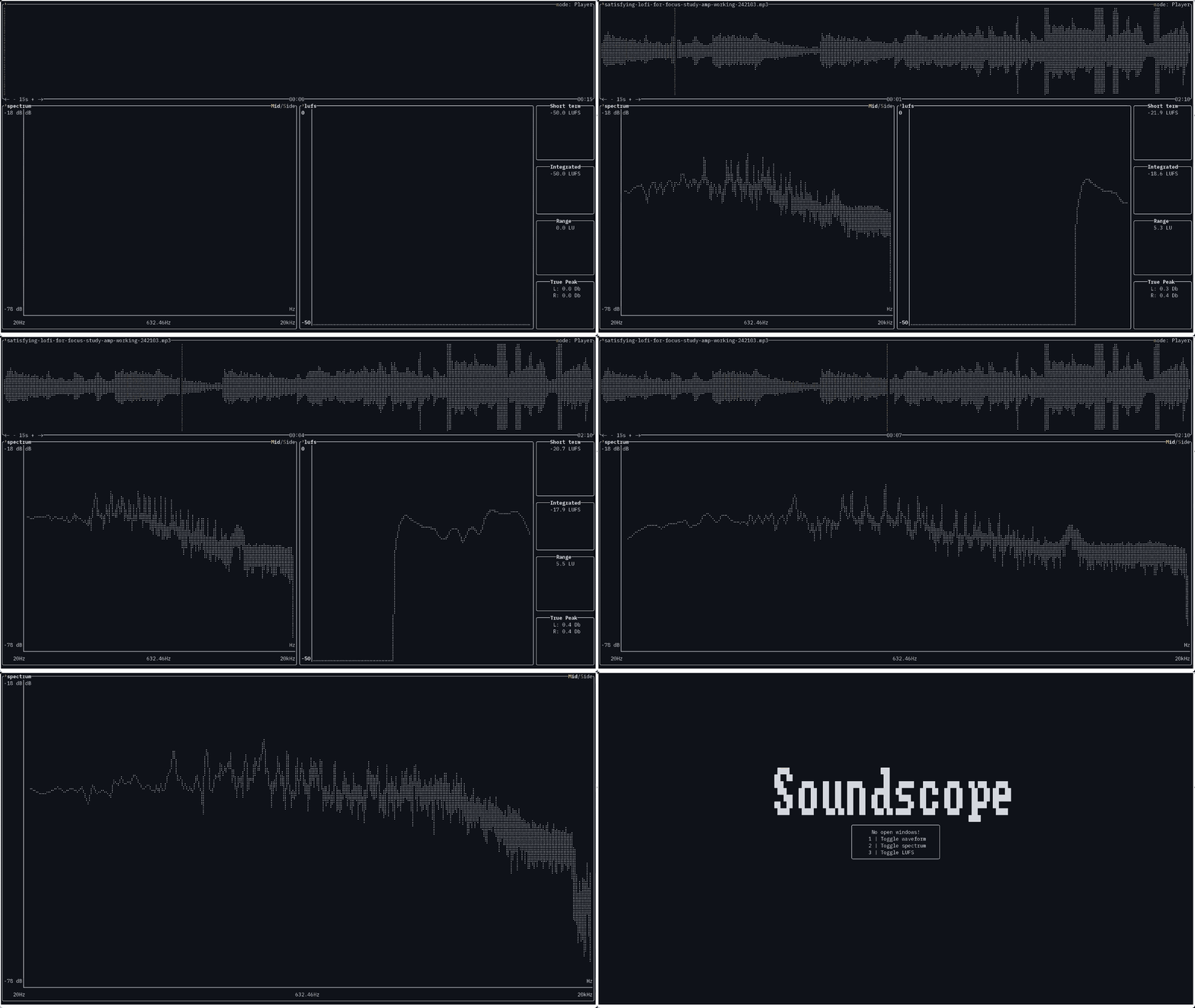
Soundscope is a crossplatform CLI tool for analyzing audio files.
✨ Features
- 🎤 Analysis of both audio files and microphone input in real-time.
- 📊 Frequency Spectrum — view the frequency distribution.
- 📉 Waveform Display — see the amplitude over time with Min-Max Decimation algorithm.
- 🔊 LUFS Metering and True Peak — measure loudness precisely.
- 🎨 Customizable Theme — change the color scheme to your liking.
🚀 Installation
Using pacman (on Arch Linux)
sudo pacman -S soundscope
Using Cargo
cargo install soundscope
or
cargo install --git https://github.com/bananaofhappiness/soundscope
Precompiled Binaries
Grab the latest release for your platform from the Releases page.
🔧 Usage
- Run the tool using
soundscopecommand. You can optionally provide an audio file path to open it directly on startup:soundscope path/to/audio.mp3 - Press
h,?, orF1to view the help popup with all available keyboard shortcuts.
🎨 Themes
Built-in Themes
Soundscope comes with several pre-built themes that you can use directly without creating a custom theme file:
- Catppuccin — Mocha, Macchiato, Frappé, Latte
- Dracula — Classic dark theme with vibrant accents
- Gruvbox Dark — Warm, retro color scheme
- Material Dark — Based on Google's Material Design
- Monokai — Classic dark theme with high contrast
- Nord — Arctic, north-bluish color palette
- One Dark / One Light — Popular themes from Atom/VSCode
- Solarized — Dark and Light variants with precision colors
- Tokyo Night — Inspired by Tokyo's neon nightlife
- Ayu Dark — Bright colors comfortable for all-day use
- Black & White / White & Black — Minimal monochrome themes
Press t in the application to open the theme selection list and choose any of these built-in themes.
Creating a custom theme
The theme is set in .toml file which must be placed in {YOUR_CONFIG_DIRECTORY}/soundscope directory. Here is an example theme (which is default for the app) containing all possible variables:
[global]
background = "Black"
# It is default value for everything that is not a background
foreground = "221" # It is an ANSI-256 value for LightGoldenrod2 color. See https://www.ditig.com/256-colors-cheat-sheet.

# Color used to highlight corresponding characters
# Like highlighting L in LUFS to let the user know
# that pressing L will open the LUFS meter
highlight = "160" # Red3 color. Note that it can also be written as "#d70000"

# For simplicity yellow color in this example is written as "Yellow" instead of "221", and light red is written as "LightRed" instead of "160". But default color scheme uses LightGoldenrod2 (221) for foreground and Red3 (160) for highlight.
[waveform]
borders = "Yellow"
waveform = "Yellow"
playhead = "LightRed"# if not set, default is highlighted color
# Current playing time and total duration
current_time = "Yellow"
total_duration = "Yellow"
# Buttons like <-, +, -, ->
controls = "Yellow"
# Color of a button when it's pressed
controls_highlight = "LightRed"
labels = "Yellow"

[fft]
foreground = "Yellow"
background = "Black"
borders = "Yellow"
# Frequencies and LUFS tabs text
labels = "Yellow"
axes = "Yellow"
axes_labels = "Yellow"
mid_fft = "Yellow"
side_fft = "LightRed"

[lufs]
axis = "Yellow"
chart = "Yellow"
# Frequencies and LUFS tabs text
labels = "Yellow"
# Text color on the left
foreground = "Yellow"
# Color of the numbers on the left
numbers = "Yellow"
borders = "Yellow"
background = "Black"
highlight = "LightRed"

[devices]
background = "Black"
foreground = "Yellow"
borders = "Yellow"
highlight = "LightRed"

[explorer]
background = "Black"
borders = "Yellow"
item_foreground = "Yellow"
highlight_item_foreground = "LightRed"
dir_foreground = "Yellow"
highlight_dir_foreground = "LightRed"

[error]
background = "Black"
foreground = "LightRed"
borders = "LightRed"

[help]
background = "Black"
foreground = "Yellow"
borders = "Yellow"
highlight = "LightRed"
Only global foreground and global background colors are mandatory. You can pass the ANSI-256 color number (see this cheat sheet) or HEX color code (prefixed with #) or use one of the predefined colors below:
- Black
- Red
- Green
- Yellow
- Blue
- Magenta
- Cyan
- Gray
- DarkGray
- LightRed
- LightGreen
- LightYellow
- LightBlue
- LightMagenta
- LightCyan
- White
- Reset
Reset restores the terminal's default color. This can be useful if you're using a transparent background.
Color separators -, _, and are supported and names are case insensitive. For example, Light-blue or light_blue or light Blue are all valid.
After saving your theme into .toml file and placing it into {YOUR_CONFIG_DIRECTORY}/soundscope, press t to open up the theme selection list and choose yours.
🐛 Known Issues
- Note: The frequency spectrum visualization may appear noisy in this release. This will be improved in a future version once ratatui#2426 is merged, which adds a filled-area chart rendering mode that will fill the area under the curve.
Other known issues:
- Rapidly seeking through an audio file may cause lag, resulting in the playhead being in an incorrect position. Pausing playback and waiting for the playhead to return to the correct spot before resuming usually resolves the issue.
- In some audio files the playhead may gradually drift slightly to the right of the waveform center over time.
- Some files with high sample rate play back normally, but real-time visualization (waveform, spectrum, LUFS) lags significantly behind. For example, this occurs with
.wavfiles with a sample rate > 48000, while.mp3files at 92000 play without noticeable lag.
🤝 Contributing
Pull Requests, Issues and Suggestions are welcome!
📜 License
This project is licensed under the MIT License — see LICENSE for details.
☕ Support
If you like Soundscope and want to support its development:
- Ethereum (ERC-20): 0xe8f2dd8a2d3a6ba9c571aadc720b6f1bea47fe4a
- Bitcoin: bc1qype09urnpfztgrw6af83a2g86jrfhf5tr8dwp8
- Solana: 9YmZXS7uYJSY9AwLmVmbDTgAAp987W3mQ1P3U5MUQ9Sv
- Tron: TSwN6uW67KrmwvGUmXjJVAykmaWQ5wRZnM
- Boosty
Your support helps keep this project alive ❤️
more like this
TachiSnap
TachiSnap — Pixel Snapper for animation pixel artists. Rust + WebAssembly client-side tool for cleaning up AI-generated…
meine
meine 🌒 - A CLI file manager and system utility built with Textual. It combines intuitive command parsing with rich t…
bit_gossip
Pathfinding library for calculating all node pairs' shortest paths in an unweighted undirected graph.