lovelace-xiaomi-vacuum-card
Simple card for various robot vacuums in Home Assistant's Lovelace UI
 benct
benctgit clone https://github.com/benct/lovelace-xiaomi-vacuum-card.gitbenct/lovelace-xiaomi-vacuum-cardxiaomi-vacuum-card
Simple card for various robot vacuums in Home Assistant's Lovelace UI
Integrated support for most vacuums from the following brands/models: Xiaomi, Roomba, Neato, Robovac, Valetudo, Ecovacs, Deebot
Installation
Manually add xiaomi-vacuum-card.js
to your <config>/www/ folder and add the following to the configuration.yaml file:
lovelace:
  resources:
    - url: /local/xiaomi-vacuum-card.js?v=4.5.0
      type: module
OR install using HACS and add this (if in YAML mode):
lovelace:
  resources:
    - url: /hacsfiles/lovelace-xiaomi-vacuum-card/xiaomi-vacuum-card.js
      type: module
The above configuration can be managed directly in the Configuration -> Lovelace Dashboards -> Resources panel when not using YAML mode, or added by clicking the "Add to lovelace" button on the HACS dashboard after installing the plugin.
If you want to use the vacuum background image, download and add
img/vacuum.png
to <config>/www/img/ or configure your own preferred path.
Configuration
| Name | Type | Default | Description |
|---|---|---|---|
| type | string | Required | custom:xiaomi-vacuum-card |
| entity | string | Required | vacuum.my_xiaomi_vacuum |
| name | string/bool | friendly_name |
Override friendly name (set to false to hide) |
| image | string/bool | false |
Set path/filename of background image (i.e. /local/img/vacuum.png) |
| state | Entity Data | (see below) | Set to false to hide all states |
| attributes | Entity Data | (see below) | Set to false to hide all attributes |
| buttons | Button Data | (see below) | Set to false to hide button row |
Entity Data
Default vacuum attributes under each list:
state(left list) includestatus,batteryandmode.attributes(right list) includemain_brush,side_brush,filterandsensor.
See examples on how to customize, hide or add custom attributes.
| Name | Type | Default | Description |
|---|---|---|---|
| key | string | Required | Attribute/state key on vacuum entity |
| icon | string | Optional icon | |
| label | string | Optional label text | |
| unit | string | Optional unit |
Button Data
Default buttons include start, pause, stop, spot (hidden), locate and return.
See examples on how to customize, hide or add custom buttons/actions.
| Name | Type | Default | Description |
|---|---|---|---|
| icon | string | Required | Show or hide stop button |
| service | string | Required | Service to call (i.e vacuum.start) |
| show | bool | true |
Show or hide button |
| label | string | Optional label on hover | |
| service_data | object | Data applied to the service call |
Other vendors
This card was originally written for Xiaomi (Roborock) vacuum cleaners, but version 2.0 and later has added support for some other vendors too.
If you want any other vendors to be added, feel free to open an issue or contribute directly with a PR.
| Name | Type | Default | Description |
|---|---|---|---|
| vendor | string | xiaomi |
Supported vendors: xiaomi, xiaomi_mi, valetudo, ecovacs, deebot, deebot_slim, robovac, roomba, neato |
Note: Default attributes and buttons may change for each vendor integration.
Screenshots
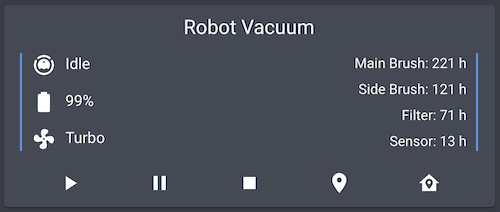
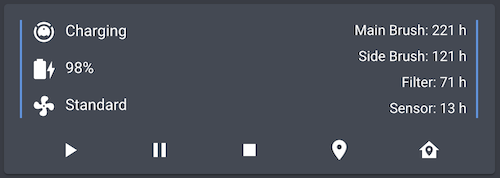
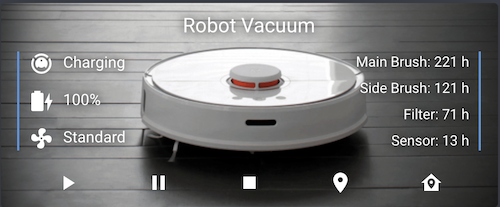
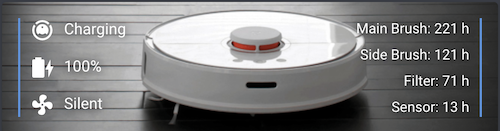
Examples
Basic configuration:
- type: custom:xiaomi-vacuum-card
  entity: vacuum.xiaomi_vacuum_cleaner
- type: custom:xiaomi-vacuum-card
  entity: vacuum.xiaomi_vacuum_cleaner
  image: /local/custom/folder/background.png
  name: My Vacuum
  vendor: xiaomi
Hide state, attributes and/or buttons:
- type: custom:xiaomi-vacuum-card
  entity: vacuum.xiaomi_vacuum_cleaner
  state: false
  attributes: false
  buttons: false
Hide specific state values, attributes and/or buttons:
- type: custom:xiaomi-vacuum-card
  entity: vacuum.xiaomi_vacuum_cleaner
  state:
    mode: false
  attributes:
    main_brush: false
    side_brush: false
  buttons:
    pause: false
    locate: false
Customize specific state values, attributes and/or buttons:
- type: custom:xiaomi-vacuum-card
  entity: vacuum.xiaomi_vacuum_cleaner
  state:
    status:
      key: state
    mode:
      icon: mdi:robot-vacuum
      label: 'Fan speed: '
      unit: 'percent'
  attributes:
    main_brush:
      key: component_main_brush
    side_brush:
      key: component_side_brush
  buttons:
    pause:
      icon: mdi:stop
      label: Hold
      service: vacuum.stop
Show default clean spot button:
- type: custom:xiaomi-vacuum-card
  entity: vacuum.xiaomi_vacuum_cleaner
  buttons:
    spot:
      show: true
Add custom attributes:
- type: custom:xiaomi-vacuum-card
  entity: vacuum.xiaomi_vacuum_cleaner
  attributes:
    clean_area:
      key: 'clean_area'
      label: 'Cleaned area: '
      unit: ' m2'
Add custom buttons and service calls:
- type: custom:xiaomi-vacuum-card
  entity: vacuum.xiaomi_vacuum_cleaner
  buttons:
    new_button:
      icon: mdi:light-switch
      label: Custom button!
      service: light.turn_off
      service_data:
        entity_id: light.living_room
Translations:
- type: custom:xiaomi-vacuum-card
  entity: vacuum.xiaomi_vacuum_cleaner
  attributes:
    main_brush:
      label: 'Hovedkost: '
      unit: ' timer'
    side_brush:
      label: 'Sidekost: '
      unit: ' timer'
    filter:
      label: 'Filtere: '
    sensor:
      label: 'Sensorer: '
  buttons:
    start:
      label: Start!
    pause:
      label: Stopp!
    stop:
      label: Hammertime
Disclaimer
This project is not affiliated, associated, authorized, endorsed by, or in any way officially connected with the Xiaomi Corporation, or any of its subsidiaries or its affiliates. The official Xiaomi website can be found at https://www.mi.com/global/.
My cards
xiaomi-vacuum-card |
multiple-entity-row |
github-entity-row |
battery-entity-row |
attribute-entity-row
more like this
todo-swipe-card
A specialized swipe card for todo lists in Home Assistant with custom styling
esphome_modbus_bridge
ESPHome Modbus TCP↔RTU Bridge – Transparent bridge for ESP8266/ESP32 that lets multiple Modbus TCP clients communicate…
ESPGeiger
☢️ ESP8266 / ESP32 Firmware for collecting and reporting statistics from Geiger counters