lovelace-thermostat-dark-card
🌡 Thermostat card with a round and black feel to it
 ciotlosm
git clone https://github.com/ciotlosm/lovelace-thermostat-dark-card.gitciotlosm/lovelace-thermostat-dark-cardThermostat Dark Card
English | 🌐 Supports: English, 中文 (Chinese Simplified), Slovenčina (Slovak)
A Nest-style thermostat card for Home Assistant with a round dial interface. Supports single and dual (heat/cool) setpoints, preset modes, and multiple themes.
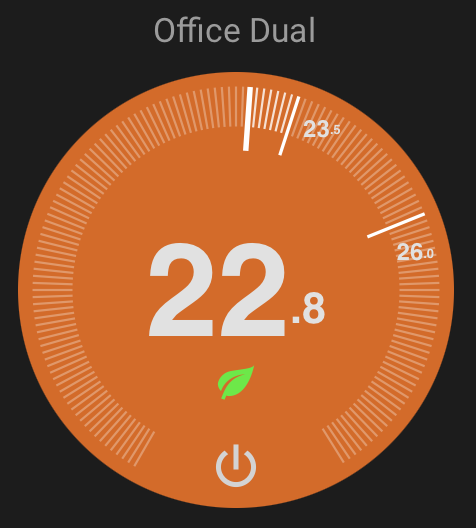
Key features:
- Pure SVG rendering — lightweight, no images, optimized for low bandwidth
- Single and dual (heat/cool) temperature modes
- Ring drag interaction for setting temperature
- Predictive state feedback while editing
- Dark, light, and transparent themes
- Preset mode indicators (eco, away, home, sleep, boost)
- Responsive — scales to any card size
Installation
HACS (Recommended)
Or manually:
- Open HACS in Home Assistant
- Search for "Thermostat Dark Card"
- Install and restart Home Assistant
Manual
- Download
thermostat-dark-card.jsfrom the latest release - Place it in
config/www/ - Add the resource in Settings → Dashboards → Resources:
- URL:
/local/thermostat-dark-card.js - Type: JavaScript Module
- URL:
Usage
type: custom:thermostat-dark-card
entity: climate.living_room
Configuration
UI Options
These are available in the visual card editor:
| Option | Type | Default | Description |
|---|---|---|---|
entity |
string | required | Climate entity ID |
name |
string / false | entity name | Card title. Set to false to hide |
hide_name |
boolean | false |
Hide the card title |
theme |
string | dark |
dark, light, transparent, or glassy |
step |
number | from entity | Temperature step override (celsius only) |
readonly |
boolean | false |
Disable all interaction (display only) |
ambient_temperature |
string | — | External temperature sensor entity ID |
status_entity |
string | — | Entity whose state is shown as text above temperature |
show_power_toggle |
boolean | true |
Show power on/off button |
show_preset_indicator |
boolean | true |
Show preset mode icon |
pending |
number | 3 |
Seconds before committing temperature change |
Advanced Options (YAML only)
For fine-tuning behavior — not exposed in UI:
| Option | Type | Default | Description |
|---|---|---|---|
idle_zone |
number | 0 |
Minimum gap between low/high targets in dual mode |
range_min |
number | from entity | Override minimum temperature |
range_max |
number | from entity | Override maximum temperature |
colors |
object | — | Custom color overrides (see below) |
preset_icons |
object | — | Map preset names to icons (see below) |
Expert Options (use at your own risk)
Internal rendering parameters — changing these may break the dial appearance:
| Option | Type | Default | Description |
|---|---|---|---|
diameter |
number | 400 |
SVG viewBox size (all proportions are relative to this) |
num_ticks |
number | 150 |
Number of tick marks on the ring |
tick_degrees |
number | 300 |
Arc span of tick marks (degrees) |
show_ticks |
boolean | true |
Show tick marks |
Themes
- dark — Black/dark grey background (default)
- light — Light grey background with dark text
- transparent — No disc background, use with card-mod for custom backgrounds
Transparent theme example with a room photo:
type: custom:thermostat-dark-card
entity: climate.bedroom
theme: transparent
card_mod:
  style: |
    ha-card {
      background: url("/local/bedroom.jpg") center/cover no-repeat;
    }
Color Overrides
Override disc colors via YAML (not available in visual editor):
type: custom:thermostat-dark-card
entity: climate.living_room
colors:
  heating: "#ff5500"
  cooling: "#0088ff"
  idle: "#1a1a1a"
  off: "#444444"
Preset Icons
Map custom preset mode names to built-in icons:
type: custom:thermostat-dark-card
entity: climate.ecobee
preset_icons:
  vacation: eco
  night: sleep
  party: boost
Available icon names: eco, away, home, sleep, boost, comfort, activity
Built-in mappings (no config needed):
eco,away→ leafhome→ housesleep→ moonboost→ flamecomfort→ sunactivity→ person
Unknown presets show no icon unless mapped via preset_icons.
External Temperature Sensor
Use a separate sensor for the ambient temperature display instead of the climate entity's built-in sensor:
type: custom:thermostat-dark-card
entity: climate.living_room
ambient_temperature: sensor.living_room_external_temp
Features
- Single and dual mode — Automatically adapts based on entity attributes
- Ring interaction — Drag on the tick ring to set temperature
- Chevron controls — Tap up/down arrows for precise adjustments
- Predictive feedback — Disc color fades to show predicted heating/cooling state while editing
- Preset indicators — Shows eco leaf, home, sleep, and other icons
- More-info dialog — Long-press (mobile) or right-click (desktop) opens the HA entity dialog
- Responsive — Scales to fit any card size
License
MIT
Support
If you find this card useful, consider buying me a coffee:
more like this
todo-swipe-card
A specialized swipe card for todo lists in Home Assistant with custom styling
esphome_modbus_bridge
ESPHome Modbus TCP↔RTU Bridge – Transparent bridge for ESP8266/ESP32 that lets multiple Modbus TCP clients communicate…
ESPGeiger
☢️ ESP8266 / ESP32 Firmware for collecting and reporting statistics from Geiger counters