palenight.vim
Soothing color scheme for your favorite [best] text editor
 drewtempelmeyer
git clone https://github.com/drewtempelmeyer/palenight.vim.gitdrewtempelmeyer/palenight.vim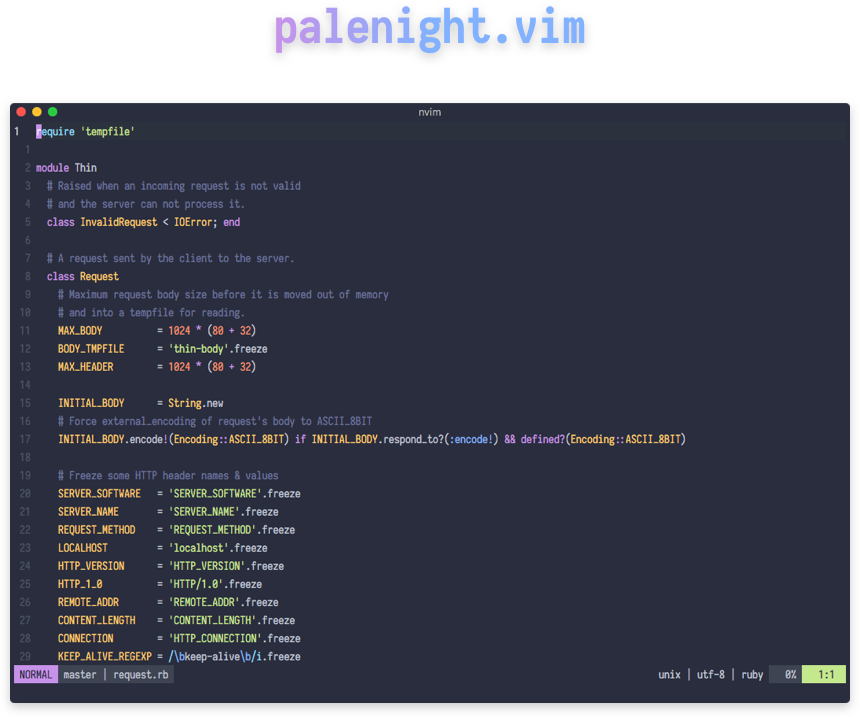
A dark color scheme for Vim/Neovim based off the Material Pale Night color scheme. Much of the work is based on the lovely onedark.vim color scheme.
Neovim with Lua
Installation
Using lazy.nvim:
{
  "drewtempelmeyer/palenight.vim",
  lazy = false,
  priority = 1000,
  config = function()
    vim.opt.termguicolors = true
    vim.opt.background = "dark"
    vim.cmd.colorscheme("palenight")
  end,
}
Usage
In your Lua configuration, such as ~/.config/nvim/init.lua, use:
vim.opt.termguicolors = true
vim.opt.background = "dark"
vim.cmd.colorscheme("palenight")
To configure lightline, add the following line:
vim.g.lightline = { colorscheme = "palenight" }
To configure airline, add the following line:
vim.g.airline_theme = "palenight"
True Colors
To provide the best user experience possible, I recommend enabling true colors. Current Vim and Neovim versions support this with termguicolors:
vim.opt.termguicolors = true
Italics
Italics are a fantastic way to improve the appearance of your code. Italics will do what they can, but, as they say, "you can't polish a 💩." (Although MythBusters busted this). Digressing here, so place this into your config:
vim.g.palenight_terminal_italics = 1
Overriding Colors
Overriding palenight's colors is supported by setting the
g:palenight_color_overrides variable. See palenight.vim
for a list of colors that may be overridden. You must provide gui, cterm,
and cterm16 values for each.
Example: Overriding the background color to pure black
vim.g.palenight_color_overrides = {
  black = { gui = "#000000", cterm = "0", cterm16 = "0" },
}
Vim with Vimscript
Installation
Using vim-plug, add this to your
~/.vimrc:
Plug 'drewtempelmeyer/palenight.vim'
Then install it from Vim:
:PlugInstall
Usage
In your Vim configuration, such as ~/.vimrc, use:
set termguicolors
set background=dark
colorscheme palenight
To configure lightline, add the following line:
let g:lightline = { 'colorscheme': 'palenight' }
To configure airline, add the following line:
let g:airline_theme = 'palenight'
True Colors
To provide the best user experience possible, I recommend enabling true colors. Current Vim and Neovim versions support this with termguicolors:
set termguicolors
Italics
Italics are a fantastic way to improve the appearance of your code. Italics will do what they can, but, as they say, "you can't polish a 💩." (Although MythBusters busted this). Digressing here, so place this into your config:
let g:palenight_terminal_italics = 1
Overriding Colors
Overriding palenight's colors is supported by setting the
g:palenight_color_overrides variable. See palenight.vim
for a list of colors that may be overridden. You must provide gui, cterm,
and cterm16 values for each.
Example: Overriding the background color to pure black
let g:palenight_color_overrides = {
      \ 'black': { 'gui': '#000000', 'cterm': '0', 'cterm16': '0' },
      \ }
Contributors
more like this