perplexity-cli
🧠 A simple command-line client for the Perplexity API. Ask questions and receive answers directly from the terminal! 🚀🚀🚀
Python★ 176
Meta Agents Research Environments is a comprehensive platform designed to evaluate AI agents in dynamic, realistic scen…
 facebookresearch
git clone https://github.com/facebookresearch/meta-agents-research-environments.gitfacebookresearch/meta-agents-research-environments
A research environment for simulating complex, real-life tasks that require multi-step reasoning and dynamic adaptation.
Meta Agents Research Environments (ARE) is a platform designed to evaluate AI agents in dynamic, realistic scenarios. Unlike static benchmarks, this research platform introduces evolving environments where agents must adapt their strategies as new information becomes available, mirroring real-world challenges. In particular, ARE runs the Gaia2 benchmark, a follow-up to Gaia, evaluating a broader range of agent capabilities.

Looking for the container-based Gaia2-CLI benchmark stack? Start with gaia2-cli.
ARE addresses critical gaps in AI agent evaluation by providing:
| Quick Start | Get up and running with your first scenario in just a few minutes with step-by-step instructions. |
| Gaia2 Evaluation | Build and evaluate your agents on the Gaia2 benchmark, a comprehensive suite of 800 dynamic scenarios across 10 universes. |
| Gaia2 Blog Post | Learn more about Gaia2 on the Hugging Face blog. |
| Paper | Read the research paper detailing the Gaia2 benchmark and evaluation methodology. |
| Demo | Try the ARE Demo on Hugging Face — Play around with the agent platform directly in your browser, no installation required! |
| Gaia2 Leaderboard | Check the self-published results from Gaia2 Benchmark runs. |
| Learn More | Dive deeper into the core concepts of agents, environments, apps, events, and scenarios. |
For complete installation instructions and setup options, see the Installation Guide.
First, install uv, a fast Python package installer and resolver.
The fastest way to get started is using uvx to run commands directly:
# Run Gaia2 benchmark scenarios
uvx --from meta-agents-research-environments are-benchmark gaia2-run --hf meta-agents-research-environments/gaia2 --hf_split validation -l 1

# Run custom scenarios
uvx --from meta-agents-research-environments are-run -s scenario_tutorial -a default
All the commands in this README and the documentation are available through uvx.
Alternatively, install the package directly with different dependency sets:
# Minimal install (core dependencies only)
# Good for basic benchmarking and running most scenarios
pip install meta-agents-research-environments

# With GUI (recommended for interactive exploration)
pip install "meta-agents-research-environments[gui]"
Which installation should I choose?
meta-agents-research-environments): For running benchmarks and scenarios via CLI[gui]): Adds web interface for interactive exploration (recommended for local development)After installation, these command-line tools are available:
Run Individual Scenarios
are-run -s scenario_find_image_file -a default
Benchmark Evaluation
are-benchmark run -d /path/to/scenarios --agent default --limit 10
Gaia2 Evaluation
are-benchmark gaia2-run --hf meta-agents-research-environments/gaia2 --hf_split validation -l 5
Interactive GUI
are-gui -s scenario_find_image_file
The GUI provides a web-based interface for interactive scenario exploration and real-time agent monitoring. When started, it typically runs at http://localhost:8080. The interface supports different view modes:
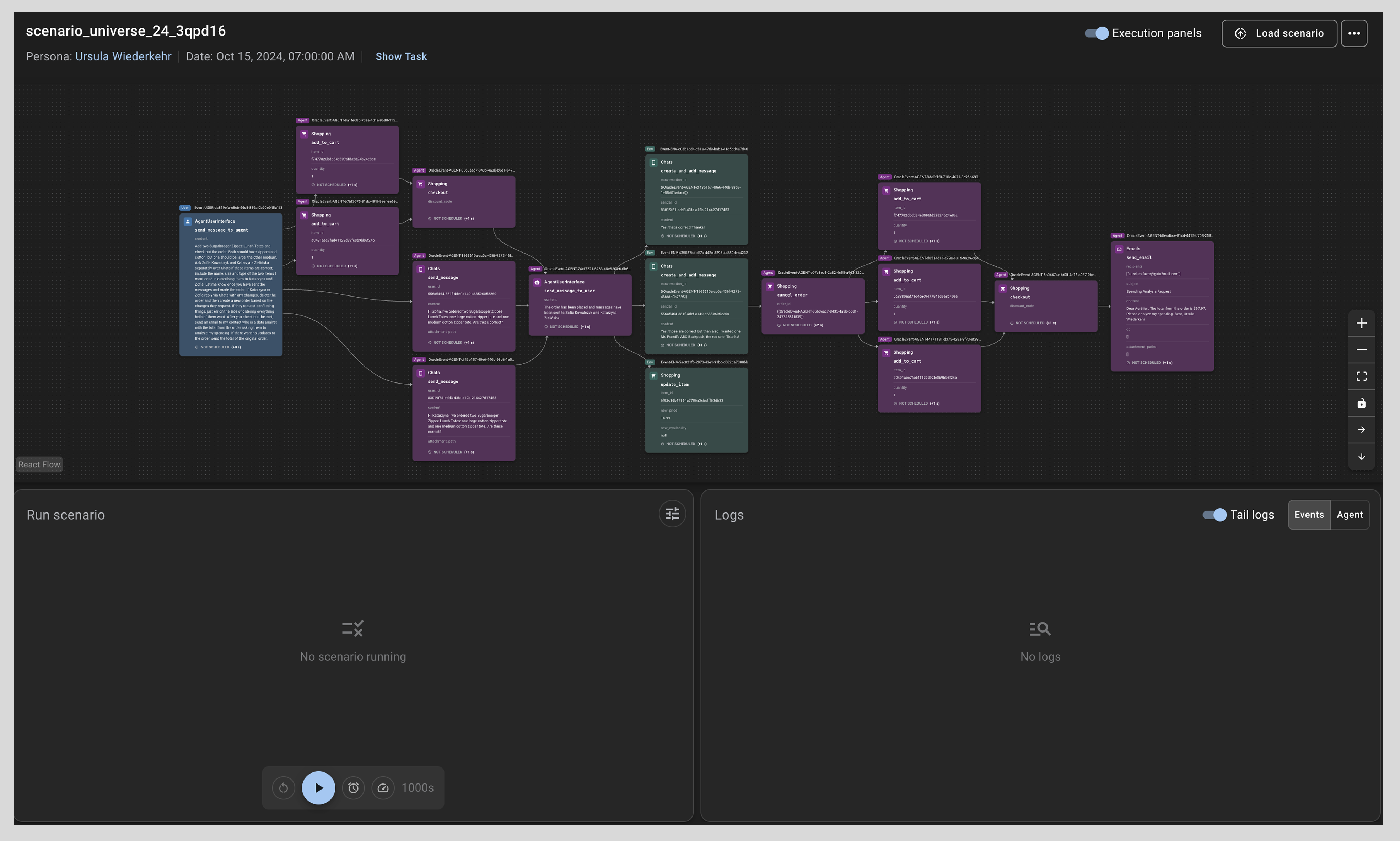
For detailed information about the GUI features, navigation, and workspace usage, see the Understanding UI Guide.
ARE supports multiple AI model providers through LiteLLM:
# Llama API
export LLAMA_API_KEY="your-api-key"
are-benchmark run --hf meta-agents-research-environments/gaia2 --hf_split validation \
  --model Llama-3.1-70B-Instruct --provider llama-api --agent default

# Local deployment
are-benchmark run --hf meta-agents-research-environments/gaia2 --hf_split validation \
  --model your-local-model --provider local \
  --endpoint "http://localhost:8000" --agent default
For detailed information on configuring different model providers, environment variables, and advanced options, see the LLM Configuration Guide.
Run any command with --help to see all available options.
# Set up your model configuration
export LLAMA_API_KEY="your-api-key"

# Run a validation set to test your setup
are-benchmark run --hf meta-agents-research-environments/gaia2 --hf_split validation \
  --model meta-llama/Llama-3.3-70B-Instruct --model_provider novita \
  --agent default --limit 10 --output_dir ./validation_results

# Run complete Gaia2 evaluation for leaderboard submission
are-benchmark gaia2-run --hf meta-agents-research-environments/gaia2 \
  --model Llama-3.1-70B-Instruct --provider llama-api \
  --agent default --output_dir ./gaia2_results \
  --hf_upload my-org/gaia2-results
Comprehensive documentation is available at:
Key documentation sections:
We welcome contributions! Please see our Contributing Guide for details on:
This project is licensed under the MIT License. See the LICENSE file for details.
If you use Meta Agents Research Environments in your work, please cite:
@misc{froger2025arescalingagentenvironments,
      title={ARE: Scaling Up Agent Environments and Evaluations},
      author={Romain Froger and Pierre Andrews and Matteo Bettini and Amar Budhiraja and Ricardo Silveira Cabral and Virginie Do and Emilien Garreau and Jean-Baptiste Gaya and Hugo Laurençon and Maxime Lecanu and Kunal Malkan and Dheeraj Mekala and Pierre Ménard and Gerard Moreno-Torres Bertran and Ulyana Piterbarg and Mikhail Plekhanov and Mathieu Rita and Andrey Rusakov and Vladislav Vorotilov and Mengjue Wang and Ian Yu and Amine Benhalloum and Grégoire Mialon and Thomas Scialom},
      year={2025},
      eprint={2509.17158},
      archivePrefix={arXiv},
      primaryClass={cs.AI},
      url={https://arxiv.org/abs/2509.17158},
}
more like this
🧠 A simple command-line client for the Perplexity API. Ask questions and receive answers directly from the terminal! 🚀🚀🚀
Unity project showcasing A* pathfinding, fully jobified & burst compiled. It also contains examples of RaycastCommand a…
:hugs: AeroPath: An airway segmentation benchmark dataset with challenging pathology
search projects, people, and tags