AlfreDo
Alfred for Todoist
 giovannicoppola
Go★ 92⑂ 3 forksMITupdated 1 month ago
git clone https://github.com/giovannicoppola/AlfreDo.gitgiovannicoppola/AlfreDoREADME.mdfork it — it’s yours
AlfreDo
An Alfred Workflow for Todoist.
NOTE: app not created by, affiliated with, or supported by Doist.
- Motivation
- Setting up
- Basic Usage
- Known Issues
- New features in version 0.5
- Acknowledgments
- Changelog
- Feedback
Motivation ✅
- Quickly list, search, and act on your Todoist tasks
- Add new tasks to Todoist through Alfred
Setting up ⚙️
Needed
- Alfred 5 with Powerpack license
- A Todoist account
- Download
AlfreDolatest release
Default settings
- In Alfred, open the 'Configure Workflow' menu in
AlfreDopreferences- set the Todoist API token (login into your account, then generate it here)
- Optional:
- set the keyword (or hotkey) to show:
- Tasks due today (default:
!1) - Overdue (default:
!2) - All tasks (default:
!3) - Tasks with a deadline (default:
!4) - New task (default:
!!!)
- Tasks due today (default:
- set the keyword (or hotkey) to force-refresh (default:
todoist::refresh) - set the keyword (or hotkey) to create a new task (default:
!!!) - set refresh rate (in days). Default:
1- Recommended
0(refresh every time) or1if you use Todoist often from browser, mobile etc. - Database is automatically refreshed when a task is created, completed, or rescheduled.
- Refresh can be forced using a keyword (default:
todoist::refresh) or hotkey.
- Recommended
- show Karma daily and weekly goals? Default:
yes - partial match search? Default:
yes. Search projects and labels anywhere in the string. Will search from start if unchecked - open task in Todoist app, or website
- set the keyword (or hotkey) to show:
Basic Usage 📖
Searching your tasks 🔍
- launch with keyword or custom hotkey. You can start from 1) tasks due today, 2) tasks overdue, 3) all tasks, or 4) tasks with a deadline.
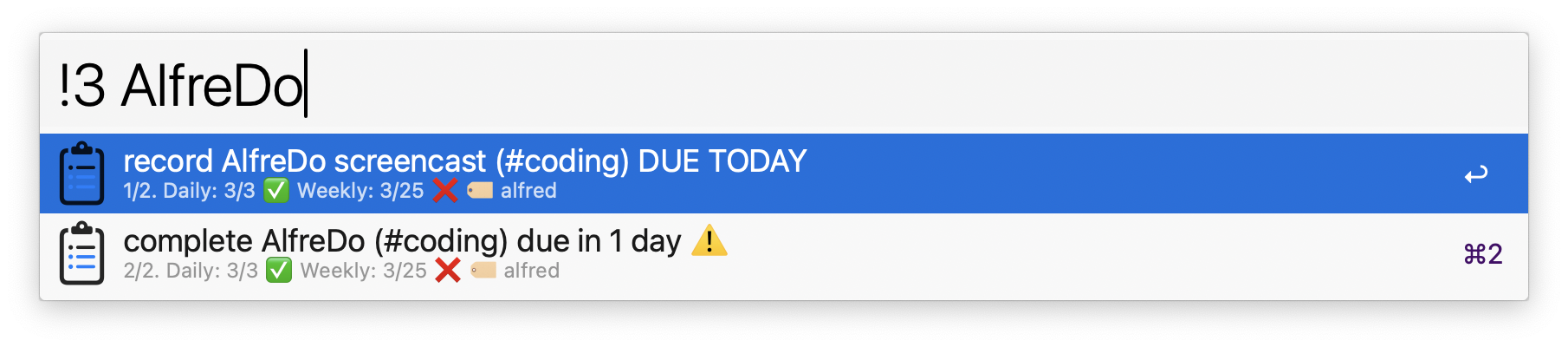
- Use multiple strings, or label/projects to refine search. Use
@to enter one or more labels,#to enter a project/section. - Once a task is selected, you can do one of five things:
enter↩️ will open the task on Todoist (default) or in the Todoist app, based on user preference set inConfigure Workflowshift-enter⇧↩️ will complete the taskctrl-enter^↩️ will open a menu to reschedule the task. Choose one of the preset options, or enter a date in international format, with (YYYY-MM-DDTHH:MM) or without (YYYY-MM-DD) time, or enter a number of days. You can also usewormafter the number to enter weeks and months, respectively (e.g.10wwill reschedule in 10 weeks). Time (in 24h format) can be added after these shortcuts as well (e.g.7w13:13). Natural language dates are also supported (e.g.tomorrow,next friday).alt-enter⌥↩️ will open the task for editing. The current task content, labels, project, priority, due date, and deadline are pre-populated in the input field. Modify any attribute using the same syntax as task creation, then pressshift-enter⇧↩️ to save.ctrl-alt-cmd-enter⌃⌥⌘↩️ will delete the task immediately (no confirmation)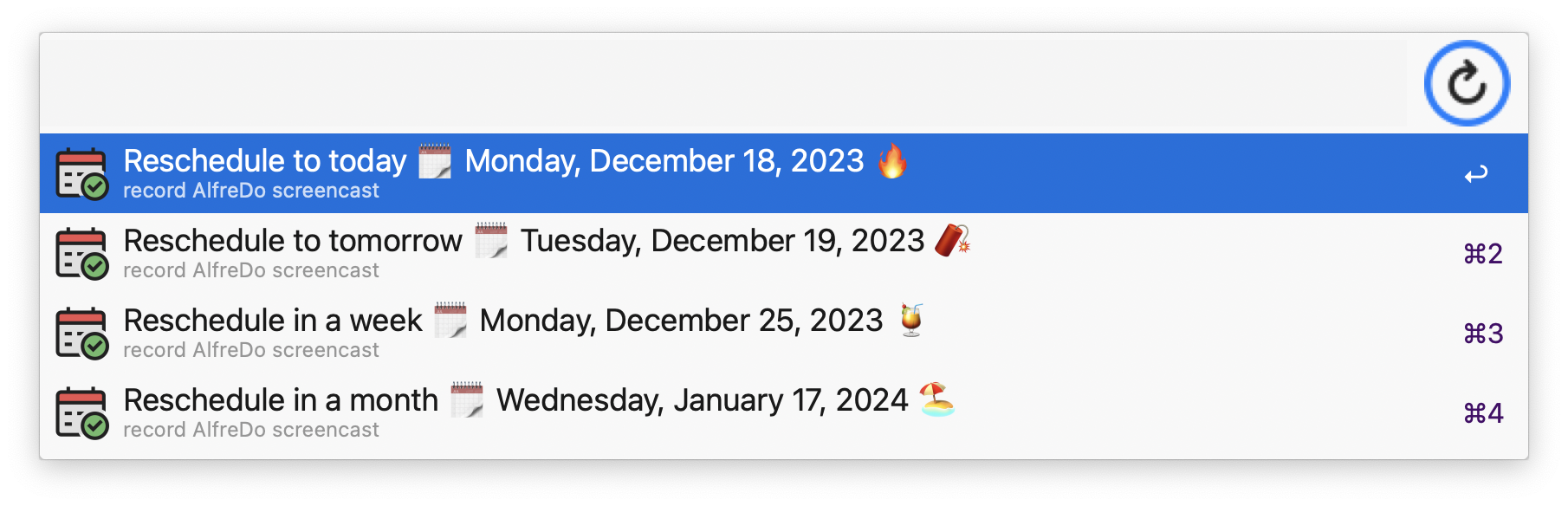
Creating new tasks ⭐
- launch with keyword (default:
!!!) or hotkey. - Use:
@to enter one or more labels (new ones can be created on the fly)#to enter a project/section (Inboxwill be used if none entered)p[1-4]to enter a prioritydue:to enter a due date. Choose one of the preset options, or enter a date in international format, with (YYYY-MM-DDTHH:MM) or without (YYYY-MM-DD) time, or enter a number of days. You can also usewormafter the number to enter weeks and months, respectively (e.g.10wwill set a due date in 10 weeks). Time (in 24h format) can be added after these shortcuts as well (e.g.7w13:13). Natural language dates are also supported (e.g.due:tomorrow,due:next friday){deadline}to set a deadline using curly braces:{YYYY-MM-DD}, or relative expressions like{7d},{3w},{2m}. Natural language deadlines are also supported:{next friday},{tomorrow}for ...to set a task duration in natural language (e.g.for 30 minutes,for 45 mins,for 2h,for 2h15m). The duration is only applied when the task also has a due date with a time (e.g.do something tomorrow at 5pm for 30 minutes). English only.
- Task Stamp: optionally add a description to every new task. Set the
TASK_STAMPvariable in the Workflow Configuration to a template string. Use{timestamp}as a placeholder for the current date and time (e.g.Created {timestamp}→Created Sunday, February 8, 2026, 12:40:23 pm). Leave empty to skip. - Universal Action: new tasks can be created by selecting text in any app, then launching Universal Actions and selecting
Create a new Todoist task.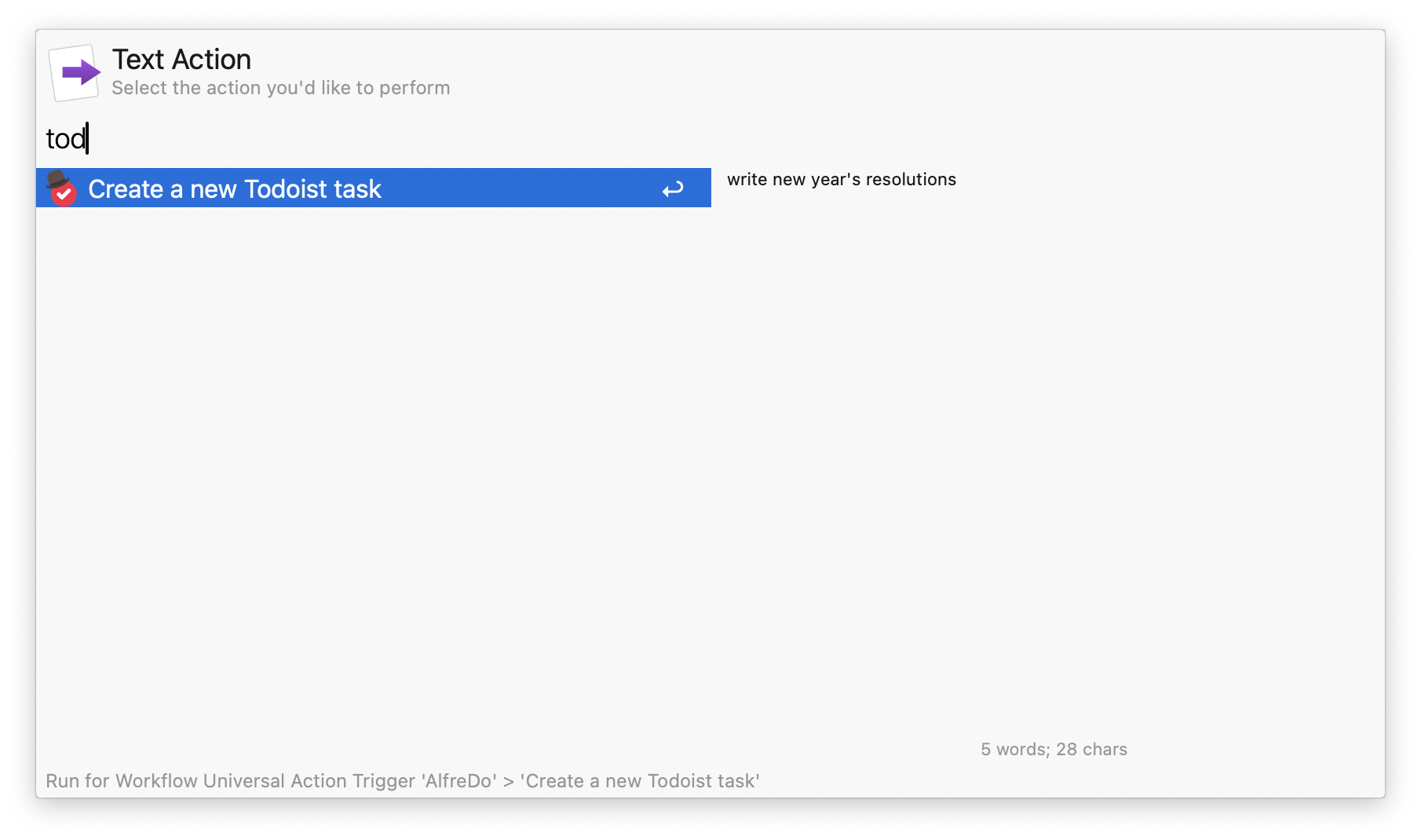
Editing tasks ✏️
- Select a task from any query view, then press
alt-enter⌥↩️ to edit it - The current task content, labels, project, priority, due date, and deadline are pre-populated in the input field
- Modify any attribute using the same syntax as task creation (
@label,#Project,p1–p4,due:,{deadline}), then pressshift-enter⇧↩️ to save
Database refresh 🔄
- will occur according to the rate in days set in
AlfreDopreferences, after a task is created, completed, rescheduled, or deleted, or...todoist::refreshto force database refresh
Limitations & known issues ⚠️
- None for now, but I have not done extensive testing, let me know if you see anything!
Acknowledgments 😀
- Thanks to the Alfred forum community!
- Icons from Flaticon:
- https://www.flaticon.com/free-icon/overdue_6534474
- https://www.flaticon.com/free-icon/calendar_6816638
- https://www.flaticon.com/free-icon/project-management_4844342
- https://www.flaticon.com/free-icon/task_2098402
- https://www.flaticon.com/free-icon/check_10308323
- https://www.flaticon.com/free-icon/bowler-hat_3345848
- https://www.flaticon.com/free-icon/new_3634451
- Thanks to Werner Dijkerman for help with troubleshooting.
New features in version 0.5
🆕 Version 0.5 is a complete rewrite in Go, bringing several new features:Delete tasks 🗑️
- Select a task from any query view, then press
ctrl-alt-cmd-enter⌃⌥⌘↩️ to delete it immediately (no confirmation)
Edit tasks ✏️
- Select a task from any query view, then press
alt-enter⌥↩️ to edit it - The current task content, labels, project, priority, due date, and deadline are pre-populated in the input field
- Modify any attribute using the same syntax as task creation, then
shift-enter⇧↩️ to save
Deadlines 🎯
- Set a deadline when creating or editing a task using curly braces:
{YYYY-MM-DD}, or relative expressions like{7d},{3w},{2m} - Natural language deadlines are also supported:
{next friday},{tomorrow} - New deadline query mode to view only tasks with deadlines, sorted by closest deadline
- Deadline info is displayed in task subtitles across all query modes
Natural language dates 🗓️
- Due dates and deadlines support natural language expressions:
due:tomorrow,due:next monday,{in 3 weeks} - Inline date detection: simply type
buy milk tomorrowormeeting next friday at 3pm— dates are recognized automatically from the task content - Multi-language support: dates are resolved locally based on your system language (
LANGenvironment variable). Supported languages: Danish, Dutch, English, Finnish, French, German, Italian, Japanese, Korean, Polish, Portuguese, Russian, Spanish, Swedish, Turkish, Chinese - Examples:
due:domani(Italian),due:morgen(German),{demain}(French),nachsten freitag(German, "next Friday") - Multi-word expressions with "next" prefixes are supported (e.g.,
venerdì prossimo,nächsten Freitag,próximo lunes) - Rescheduling also supports natural language input
- All dates are resolved locally to
YYYY-MM-DDformat before being sent to the Todoist API
Task Stamp 📝
- Automatically add a description to every new task by setting
TASK_STAMPin the Workflow Configuration - Supports a
{timestamp}placeholder that gets replaced with the current date and time (e.g.Created {timestamp}→Created Sunday, February 8, 2026, 12:40:23 pm)
No more Python dependency 🐍➡️🐹
- AlfreDo now runs as a compiled Go binary — no need for Python3
Changelog 🧰
- 02-07-2026: version 0.5 -- complete rewrite in Go, new features (edit tasks, deadlines, natural language dates), and bug fixes
- 05-20-2024: version 0.4.1 -- bug fix
- 02-13-2024: version 0.4 -- new features and bug fixes (listed here)
- 11-10-2023: version 0.3 -- support for app, bug fixes
- 06-10-2023: version 0.2.2 -- support for sections, international date, time, supporting spaces in project names
- 05-03-2023: version 0.1
Feedback 🧐
Feedback welcome! If you notice a bug, or have ideas for new features, please feel free to get in touch either here, or on the Alfred forum.
more like this
taskbutler
Create and add progress bars, Office365 Files and Dropbox Paper papers by labels and link them to your Todoist tasks.
Python★ 50
tobira.nvim
Open the next door in your Vim journey — personalized command discovery based on your actual usage
Lua★ 51