mkdnflow.nvim
Fluent navigation and management of markdown notebooks
 jakewvincent
git clone https://github.com/jakewvincent/mkdnflow.nvim.gitjakewvincent/mkdnflow.nvim

Contents
- 🚀 Introduction
- ✨ Features
- 💾 Installation
- ⚙️ Configuration
- 🛠️ Commands & mappings
- 📚 API
- 🤝 Contributing
- 🔢 Version information
- 🔗 Related projects
🚀 Introduction
Mkdnflow is designed for the fluent navigation and management of markdown documents and document collections (notebooks, wikis, etc). It features numerous convenience functions that make it easier to work within raw markdown documents or document collections: link and reference handling (🔗 Link and reference handling), navigation (🧭 Navigation), table support (📊 Table support), list (📝 List support) and to-do list (✅ To-do list support) support, file management (📁 File management), section folding (🪗 Folding), and more. Use it for notetaking, personal knowledge management, static website building, and more. Most features are highly tweakable (⚙️ Configuration).
✨ Features
🧭 Navigation
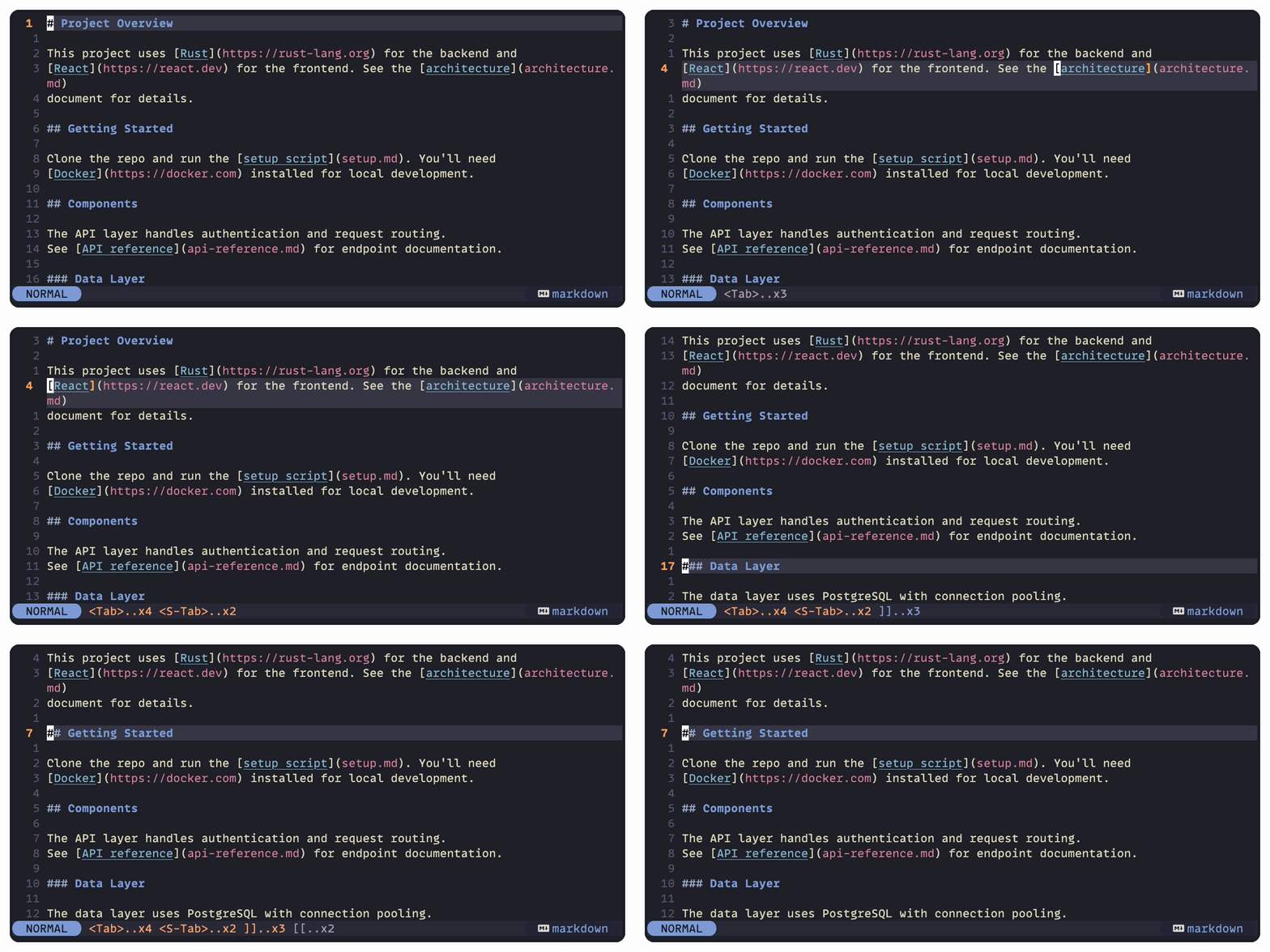
Within-buffer navigation
- Jump to links
- Jump to section headings
Within-notebook navigation
- Link following
- Open markdown and other text filetypes in the current window
- Open other filetypes and URLs with your system's default application
- Browser-like 'Back' and 'Forward' functionality
- Table of contents window
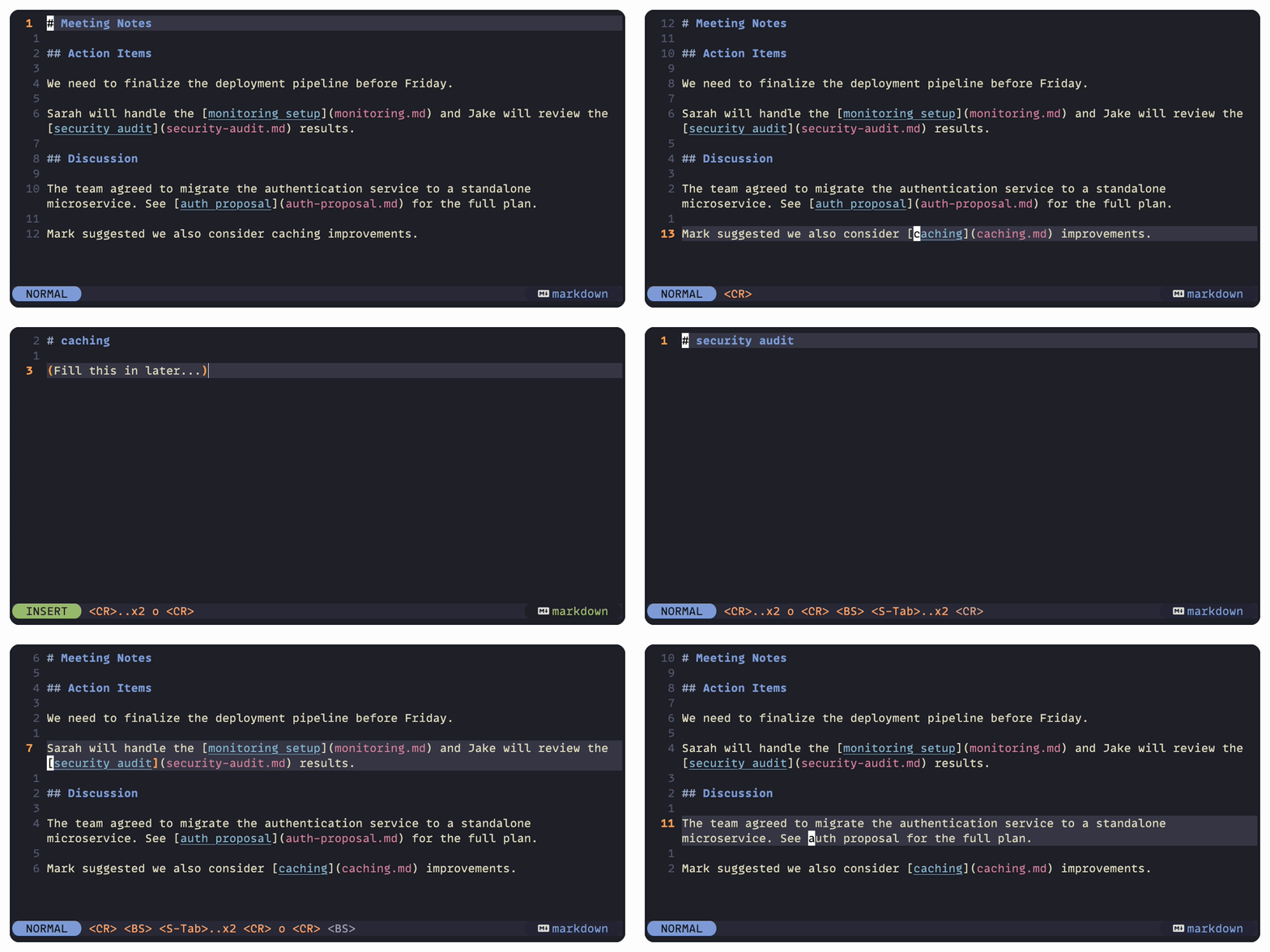
🔗 Link and reference handling
- Link creation from a visual selection or the text under the cursor
- Link destruction
- Follow links to local paths and other Markdown files
- Follow external links (open using default application)
- Follow
.bib-based references- Open
urlordoifield in the default browser - Open documents specified in
filefield
- Open
- Implicit filetype extensions
- Support for various link types
- Standard Markdown links (
[my page](my_page.md)) - Wiki links (direct
[[my page]]or piped[[my_page.md|my page]]) - Automatic links (
<https://my.page>) - Reference-style links (
[my page][1]with[1]: my_page.md) - Image links (
) — opened in system viewer - Citations (
@citekeyor Pandoc-style[@citekey]) - Footnotes (
[^1]with[^1]: Footnote text)
- Standard Markdown links (
📊 Table support
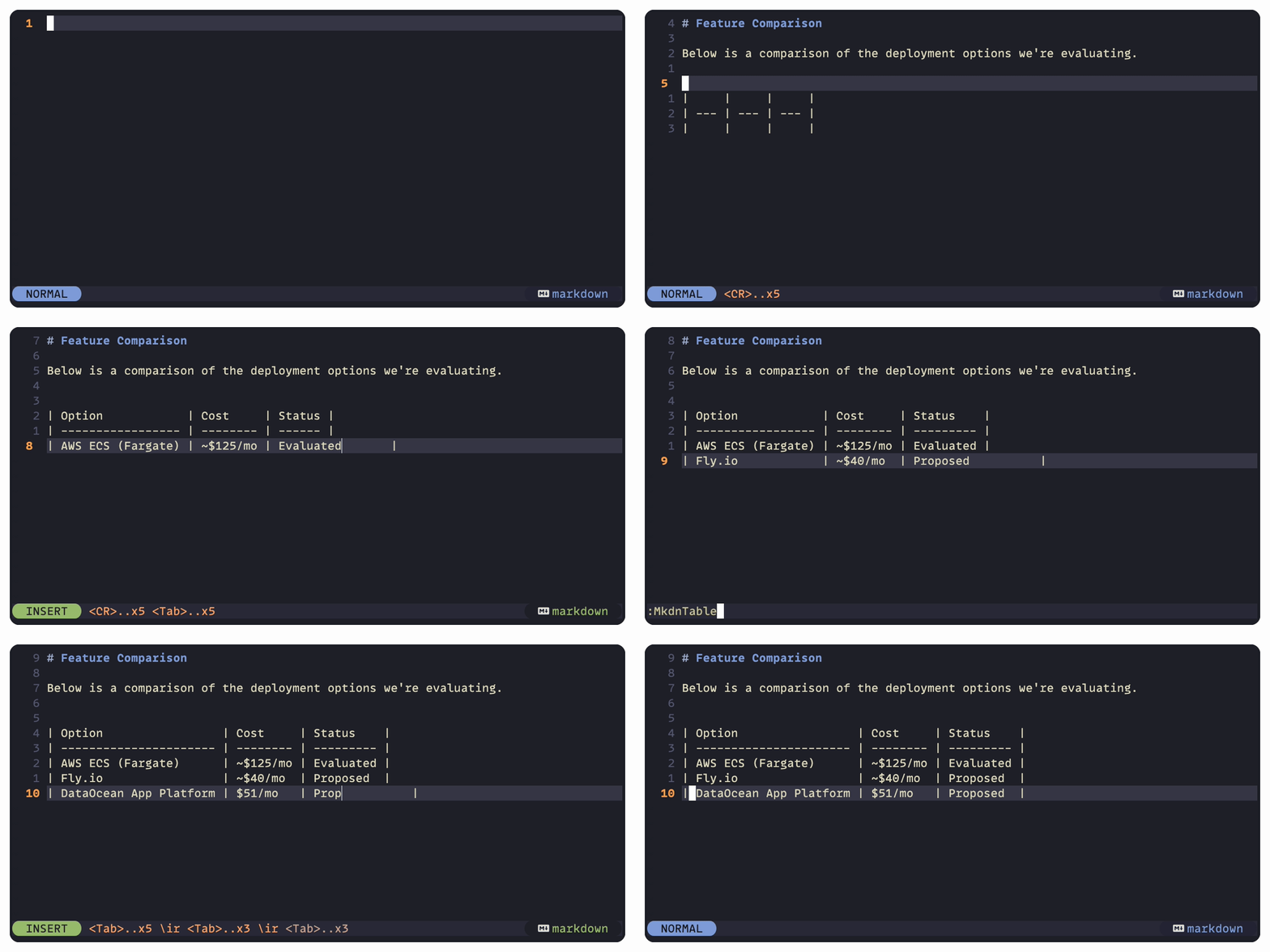
- Table creation
- Table extension (add rows and columns)
- Table formatting
- Pandoc grid table support
- Column alignment (left, right, center)
- Paste delimited data as a table
- Import delimited file into a new table
📝 List support
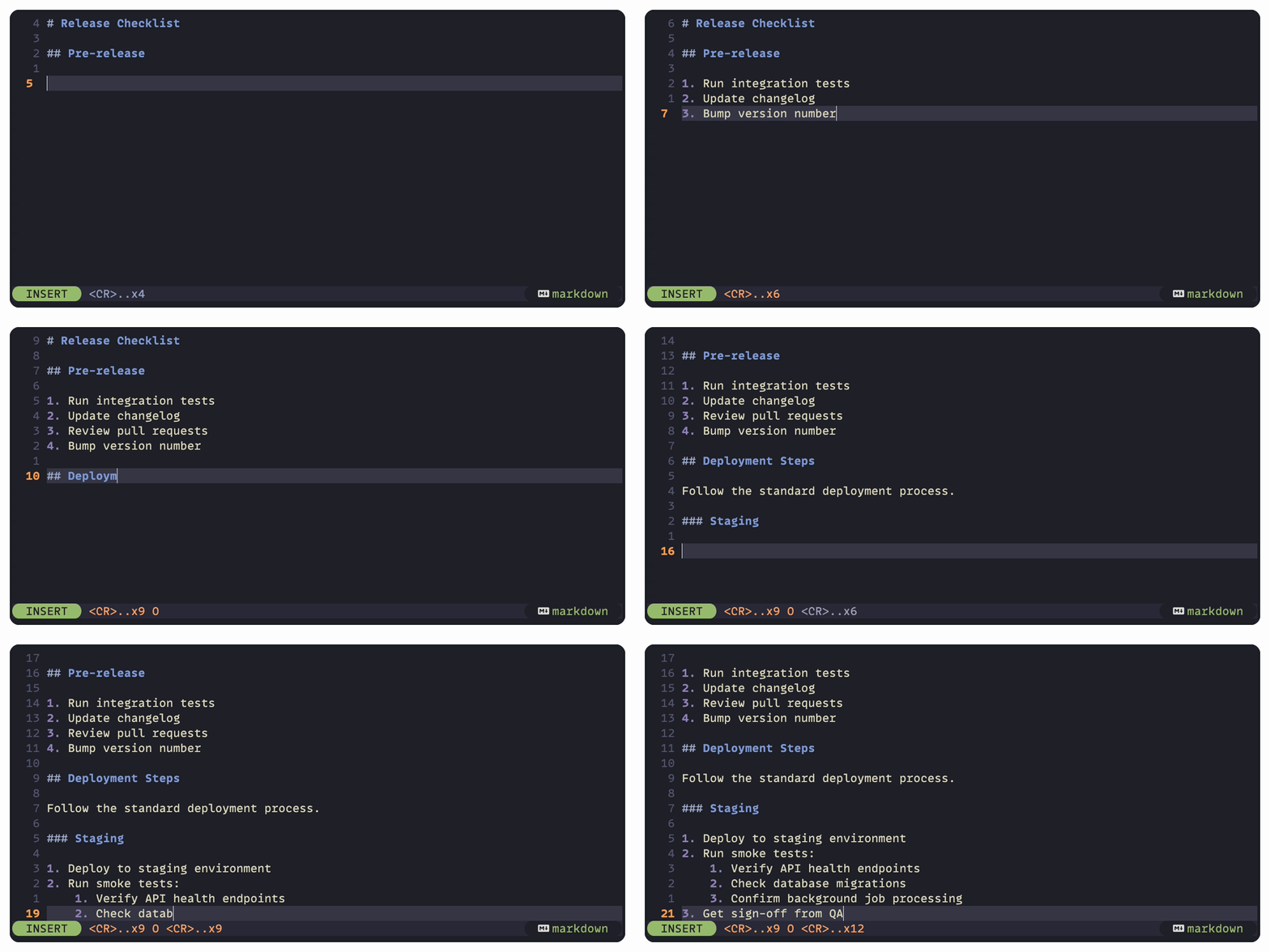
- Automatic list extension
- Sensible auto-indentation and auto-dedentation
- Ordered list number updating
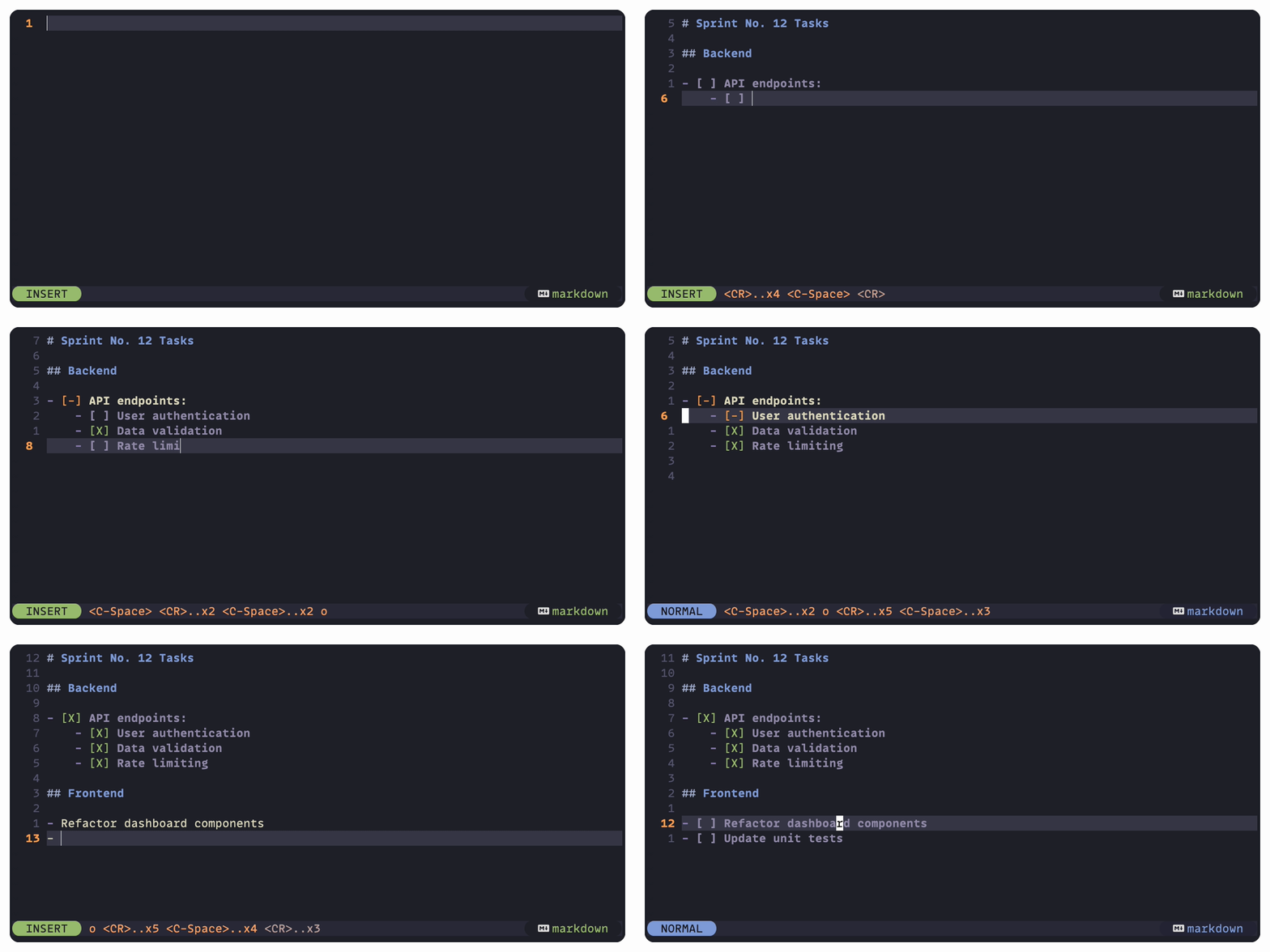
✅ To-do list support
- Toggle to-do item status
- Status propagation
- To-do list sorting
- Create to-do items from plain ordered or unordered list items
- Customizable highlighting for to-do status markers and content
📁 File management
- Simultaneous link and file renaming
- As-needed directory creation
🪗 Folding
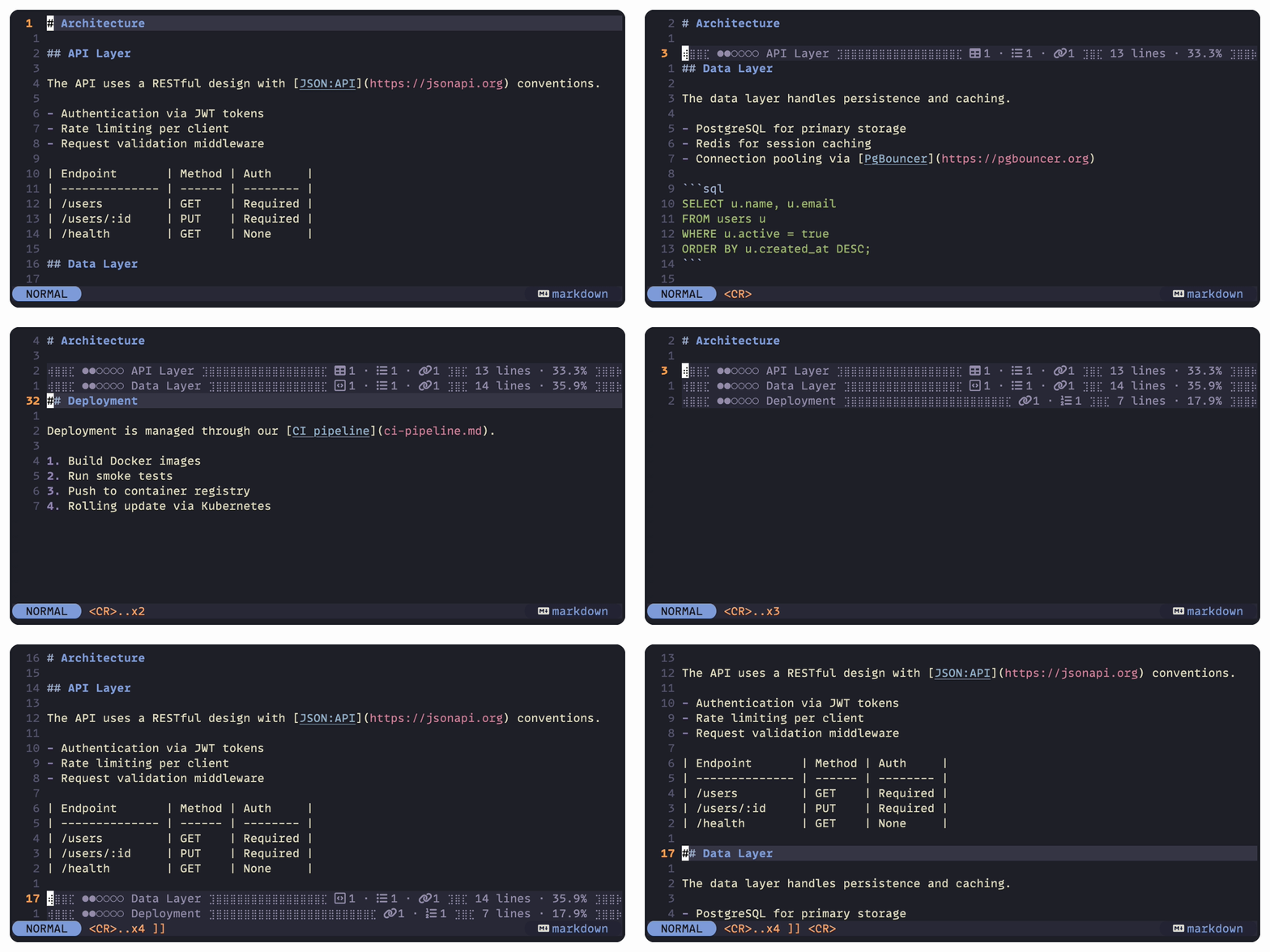
- Section folding and fold toggling
- Helpful indicators for folded section contents
- Section heading level
- Counts of Markdown objects (tables, lists, code blocks, etc.)
- Line and word counts
- YAML block folding
🔮 Completion
- Path completion
- Completion of bibliography items
🧩 YAML block parsing
- Specify a bibliography file in YAML front matter
🖌️ Visual enhancements
- Conceal markdown and wiki link syntax
- Extended link highlighting
- Automatic links
- Wiki links
💾 Installation
Requirements:
- Linux, macOS, or Windows
- Neovim >= 0.9.5 (tested on 0.9.5, 0.10.x, and stable)
Install Mkdnflow using your preferred package manager for Neovim. Once installed, Mkdnflow is configured and initialized using a setup function.
Install with Lazy
require('lazy').setup({
    -- Your other plugins
    {
        'jakewvincent/mkdnflow.nvim',
        ft = { 'markdown', 'rmd' },  -- Add custom filetypes here if configured
        config = function()
            require('mkdnflow').setup({
                -- Your config
            })
        end
    }
    -- Your other plugins
})
Install with Vim-Plug
" Vim-Plug
Plug 'jakewvincent/mkdnflow.nvim'

" Include the setup function somewhere else in your init.vim file, or the
" plugin won't activate itself:
lua << EOF
require('mkdnflow').setup({
    -- Config goes here; leave blank for defaults
})
EOF
⚙️ Configuration
⚡ Quick start
Mkdnflow is configured and initialized using a setup function. To use the default settings, pass no arguments or an empty table to the setup function:
{
    'jakewvincent/mkdnflow.nvim',
    config = function()
        require('mkdnflow').setup({})
    end
}
🔧 Advanced configuration and sample recipes
Most features are highly configurable. Study the default config first and read the documentation for the configuration options below or in the help files.
🔧 Complete default config
{
    modules = {
        bib = true,
        buffers = true,
        conceal = true,
        cursor = true,
        folds = true,
        foldtext = true,
        links = true,
        lists = true,
        maps = true,
        paths = true,
        tables = true,
        templates = true,
        to_do = true,
        yaml = false,
        completion = false,
    },
    create_dirs = true,
    silent = false,
    wrap = false,
    on_attach = false,
    path_resolution = {
        primary = 'first',
        fallback = 'current',
        root_marker = false,
        sync_cwd = false,
        update_on_navigate = true,
    },
    filetypes = {
        markdown = true,
        rmd = true,
    },
    foldtext = {
        object_count = true,
        object_count_icon_set = 'emoji',
        object_count_opts = function()
            return require('mkdnflow').foldtext.default_count_opts()
        end,
        line_count = true,
        line_percentage = true,
        word_count = false,
        title_transformer = function()
            return require('mkdnflow').foldtext.default_title_transformer
        end,
        fill_chars = {
            left_edge = '⢾⣿⣿',
            right_edge = '⣿⣿⡷',
            item_separator = ' · ',
            section_separator = ' ⣹⣿⣏ ',
            left_inside = ' ⣹',
            right_inside = '⣏ ',
            middle = '⣿',
        },
    },
    bib = {
        default_path = nil,
        find_in_root = true,
    },
    cursor = {
        jump_patterns = nil,
    },
    links = {
        style = 'markdown',
        compact = false,
        conceal = false,
        search_range = 0,
        implicit_extension = nil,
        transform_on_follow = false,
        transform_on_create = function(text)
            text = text:gsub('[ /]', '-')
            text = text:lower()
            text = os.date('%Y-%m-%d_') .. text
            return text
        end,
        transform_scope = 'path',
        auto_create = true,
        on_create_new = false,
    },
    new_file_template = {
        enabled = false,
        placeholders = {
            before = {
                title = 'link_title',
                date = 'os_date',
            },
            after = {},
        },
        template = '# {{ title }}',
    },
    to_do = {
        highlight = false,
        statuses = {
            not_started = {
                marker = ' ',
                highlight = {
                    marker = { link = 'Conceal' },
                    content = { link = 'Conceal' },
                },
                sort = { section = 2, position = 'top' },
                propagate = {
                    up = function(host_list)
                        local no_items_started = true
                        for _, item in ipairs(host_list.items) do
                            if item.status.name ~= 'not_started' then
                                no_items_started = false
                            end
                        end
                        if no_items_started then
                            return 'not_started'
                        else
                            return 'in_progress'
                        end
                    end,
                    down = function(child_list)
                        local target_statuses = {}
                        for _ = 1, #child_list.items, 1 do
                            table.insert(target_statuses, 'not_started')
                        end
                        return target_statuses
                    end,
                },
            },
            in_progress = {
                marker = '-',
                highlight = {
                    marker = { link = 'WarningMsg' },
                    content = { bold = true },
                },
                sort = { section = 1, position = 'bottom' },
                propagate = {
                    up = function(host_list)
                        return 'in_progress'
                    end,
                    down = function(child_list) end,
                },
            },
            complete = {
                marker = { 'X', 'x' },
                highlight = {
                    marker = { link = 'String' },
                    content = { link = 'Conceal' },
                },
                sort = { section = 3, position = 'top' },
                propagate = {
                    up = function(host_list)
                        local all_items_complete = true
                        for _, item in ipairs(host_list.items) do
                            if item.status.name ~= 'complete' then
                                all_items_complete = false
                            end
                        end
                        if all_items_complete then
                            return 'complete'
                        else
                            return 'in_progress'
                        end
                    end,
                    down = function(child_list)
                        local target_statuses = {}
                        for _ = 1, #child_list.items, 1 do
                            table.insert(target_statuses, 'complete')
                        end
                        return target_statuses
                    end,
                },
            },
        },
        status_order = { 'not_started', 'in_progress', 'complete' },
        status_propagation = {
            up = true,
            down = true,
        },
        sort = {
            on_status_change = false,
            recursive = false,
            cursor_behavior = {
                track = true,
            },
        },
    },
    tables = {
        type = 'pipe',
        trim_whitespace = true,
        format_on_move = true,
        auto_extend_rows = false,
        auto_extend_cols = false,
        style = {
            cell_padding = 1,
            separator_padding = 1,
            outer_pipes = true,
            apply_alignment = true,
        },
    },
    yaml = {
        bib = { override = false },
    },
    mappings = {
        MkdnEnter = { { 'n', 'v' }, '<CR>' },
        MkdnGoBack = { 'n', '<BS>' },
        MkdnGoForward = { 'n', '<Del>' },
        MkdnMoveSource = { 'n', '<F2>' },
        MkdnNextLink = { 'n', '<Tab>' },
        MkdnPrevLink = { 'n', '<S-Tab>' },
        MkdnFollowLink = false,
        MkdnDestroyLink = { 'n', '<M-CR>' },
        MkdnTagSpan = { 'v', '<M-CR>' },
        MkdnYankAnchorLink = { 'n', 'yaa' },
        MkdnYankFileAnchorLink = { 'n', 'yfa' },
        MkdnNextHeading = { 'n', ']]' },
        MkdnPrevHeading = { 'n', '[[' },
        MkdnNextHeadingSame = { 'n', '][' },
        MkdnPrevHeadingSame = { 'n', '[]' },
        MkdnIncreaseHeading = { { 'n', 'v' }, '+' },
        MkdnDecreaseHeading = { { 'n', 'v' }, '-' },
        MkdnIncreaseHeadingOp = { { 'n', 'v' }, 'g+' },
        MkdnDecreaseHeadingOp = { { 'n', 'v' }, 'g-' },
        MkdnToggleToDo = { { 'n', 'v' }, '<C-Space>' },
        MkdnNewListItem = false,
        MkdnNewListItemBelowInsert = { 'n', 'o' },
        MkdnNewListItemAboveInsert = { 'n', 'O' },
        MkdnExtendList = false,
        MkdnUpdateNumbering = { 'n', '<leader>nn' },
        MkdnTableNextCell = { 'i', '<Tab>' },
        MkdnTablePrevCell = { 'i', '<S-Tab>' },
        MkdnTableNextRow = false,
        MkdnTablePrevRow = { 'i', '<M-CR>' },
        MkdnTableNewRowBelow = { 'n', '<leader>ir' },
        MkdnTableNewRowAbove = { 'n', '<leader>iR' },
        MkdnTableNewColAfter = { 'n', '<leader>ic' },
        MkdnTableNewColBefore = { 'n', '<leader>iC' },
        MkdnTableDeleteRow = { 'n', '<leader>dr' },
        MkdnTableDeleteCol = { 'n', '<leader>dc' },
        MkdnFoldSection = { 'n', '<leader>f' },
        MkdnUnfoldSection = { 'n', '<leader>F' },
        MkdnTab = false,
        MkdnSTab = false,
        MkdnIndentListItem = { 'i', '<C-t>' },
        MkdnDedentListItem = { 'i', '<C-d>' },
        MkdnCreateLink = false,
        MkdnCreateLinkFromClipboard = { { 'n', 'v' }, '<leader>p' },
    },
}
🎨 Configuration options
modules
require('mkdnflow').setup({
    modules = {
        bib = true,
        buffers = true,
        conceal = true,
        cursor = true,
        folds = true,
        foldtext = true,
        links = true,
        lists = true,
        maps = true,
        paths = true,
        tables = true,
        to_do = true,
        yaml = false,
        cmp = false,
    notebook = true,
    }
})
| Option | Type | Description |
|---|---|---|
modules.bib |
boolean |
true (default): bib module is enabled (required for parsing .bib files and following citations).false: Disable bib module functionality. |
modules.buffers |
boolean |
true (default): buffers module is enabled (required for backward and forward navigation through buffers).false: Suppress buffers keybindings. Note: This is a core module and is always loaded internally because other modules depend on it. Setting this to false only disables its keybindings. |
modules.conceal |
boolean |
true (default): conceal module is enabled (required if you wish to enable link concealing. This does not automatically enable conceal behavior; see links.conceal.)false: Disable conceal module functionality. |
modules.cursor |
boolean |
true (default): cursor module is enabled (required for cursor movements: jumping to links, headings, etc.).false: Suppress cursor keybindings. Note: This is a core module and is always loaded internally because other modules depend on it. Setting this to false only disables its keybindings. |
modules.folds |
boolean |
true (default): folds module is enabled (required for section folding).false: Disable folds module functionality. |
modules.foldtext |
boolean |
true (default): foldtext module is enabled (required for prettified foldtext).false: Disable foldtext module functionality. |
modules.links |
boolean |
true (default): links module is enabled (required for creating, destroying, and following links).false: Suppress links keybindings. Note: This is a core module and is always loaded internally because other modules depend on it. Setting this to false only disables its keybindings. |
modules.lists |
boolean |
true (default): lists module is enabled (required for working in and manipulating lists, etc.).false: Disable lists module functionality. |
modules.to_do |
boolean |
true (default): to_do module is enabled (required for manipulating to-do statuses/lists, toggling to-do items, to-do list sorting, etc.)false: Disable to_do module functionality. |
modules.paths |
boolean |
true (default): paths module is enabled (required for link interpretation, link following, etc.).false: Suppress paths keybindings. Note: This is a core module and is always loaded internally because other modules depend on it. Setting this to false only disables its keybindings. |
modules.tables |
boolean |
true (default): tables module is enabled (required for table management, navigation, formatting, etc.).false: Disable tables module functionality. |
modules.templates |
boolean |
true (default): templates module is enabled (required for new-file template formatting and injection when following links to non-existent files).false: Disable templates module functionality. Template injection will be skipped even if new_file_template.enabled is true. |
modules.yaml |
boolean |
true: yaml module is enabled (required for parsing yaml headers).false (default): Disable yaml module functionality. |
modules.completion |
boolean |
true: Completion module is enabled. Automatically registers with nvim-cmp if installed; blink.cmp users should also set this to true (see completion setup below).false (default): Disable completion module functionality. |
modules.notebook |
boolean |
true (default): notebook module is enabled. Provides shared cross-file primitives for scanning notebook files, headings, and links. This module has zero cost at load time (no autocommands, keymaps, or side effects) and serves as infrastructure for other features.false: Disable notebook module functionality. |
modules.backlinks |
boolean |
true (default): backlinks module is enabled. Provides a side panel showing all files in the notebook that link to the current file. Requires the notebook module.false: Disable backlinks module functionality. |
create_dirs
require('mkdnflow').setup({
    create_dirs = true,
})
| Option | Type | Description |
|---|---|---|
create_dirs |
boolean |
true (default): Directories referenced in a link will be (recursively) created if they do not exist.false: No action will be taken when directories referenced in a link do not exist. Neovim will open a new file, but you will get an error when you attempt to write the file. |
path_resolution
require('mkdnflow').setup({
    path_resolution = {
        primary = 'first',
        fallback = 'current',
        root_marker = false,
        sync_cwd = false,
        update_on_navigate = false,
    },
})
| Option | Type | Description |
|---|---|---|
path_resolution.primary |
string |
'first' (default): Links will be interpreted relative to the first-opened file (when the current instance of Neovim was started).'current': Links will always be interpreted relative to the current file.'root': Links will be always interpreted relative to the root directory of the current notebook (requires path_resolution.root_marker to be specified).Previously named perspective.priority. |
path_resolution.fallback |
string |
'first': Links will be resolved relative to the first-opened file.'current' (default): Links will be resolved relative to the current file.The fallback strategy is used when the primary strategy cannot resolve a path (e.g. when primary is 'root' but no root marker is found). Since 'root' cannot fall back to itself, only 'first' and 'current' are valid here. |
path_resolution.root_marker |
string | boolean |
false (default): The plugin does not look for the notebook root.string: The name of a file (not a full path) by which a notebook's root directory can be identified. For instance, '.root' or 'index.md'.Previously named perspective.root_tell. |
path_resolution.sync_cwd |
boolean |
true: Changes in path resolution will be reflected in the nvim working directory. (In other words, the working directory will sync with the plugin's path resolution.) This helps ensure (at least) that path completions (if using a completion plugin with support for paths) will be accurate and usable.false (default): Neovim's working directory will not be affected by Mkdnflow.Previously named perspective.nvim_wd_heel. |
path_resolution.update_on_navigate |
boolean |
true: Path resolution will be updated when following a link to a file in a separate notebook/wiki (or navigating backwards to a file in another notebook/wiki).false (default): Path resolution will be not updated when following a link to a file in a separate notebook/wiki. (Links in the file in the separate notebook/wiki will be interpreted relative to the original notebook/wiki.)Previously named perspective.update. |
filetypes
require('mkdnflow').setup({
    filetypes = {
        markdown = true,
        rmd = true,
    },
})
| Option | Type | Description |
|---|---|---|
filetypes.markdown |
boolean |
true (default): The plugin activates for files with the markdown filetype (includes .md, .markdown, .mkd, .mkdn, .mdwn, .mdown extensions).false: The plugin does not activate for markdown files. |
filetypes.rmd |
boolean |
true (default): The plugin activates for files with the rmd filetype (.rmd extension).false: The plugin does not activate for R Markdown files. |
filetypes.<name> |
boolean | string |
Custom filetype/extension configuration: - true: If Neovim recognizes this as an extension (e.g., md), the detected filetype is used. Otherwise, the extension is auto-registered as its own filetype (e.g., wiki = true registers .wiki files as filetype wiki).- 'filetype' (string): Register this extension as the specified filetype. Example: txt = 'markdown' makes .txt files activate mkdnflow and be treated as markdown.- false: Disable for this filetype/extension.Note: Old extension-based configs (e.g., md = true) are automatically migrated to filetype-based configs (e.g., markdown = true).Examples: lua<br>filetypes = {<br> markdown = true, -- Standard (default)<br> rmd = true, -- Standard (default)<br> wiki = true, -- Auto-register .wiki as 'wiki' filetype<br> txt = 'markdown', -- Treat .txt files as markdown<br>}<br> |
Note
Mkdnflow activates based on Neovim's filetype detection, not file extensions.
This means files with modelines like vim: ft=markdown will activate the plugin
regardless of their extension.
Lazy loading note: If you use a plugin manager with lazy loading (e.g., ft = { 'markdown' })
and configure custom extensions like wiki = true, you must add those filetypes
to your lazy loading configuration (e.g., ft = { 'markdown', 'wiki' }), since the
plugin won't load until it sees a matching filetype.
wrap
require('mkdnflow').setup({
    wrap = false,
})
| Option | Type | Description |
|---|---|---|
wrap |
boolean |
true: When jumping to next/previous links or headings, the cursor will continue searching at the beginning/end of the file.false (default): When jumping to next/previous links or headings, the cursor will stop searching at the end/beginning of the file. |
bib
require('mkdnflow').setup({
    bib = {
        default_path = nil,
        find_in_root = true,
    },
})
| Option | Type | Description |
|---|---|---|
bib.default_path |
string | nil |
nil (default): No default/fallback bib file will be used to search for citation keys.string: A path to a default .bib file to look for citation keys in when attempting to follow a reference. The path need not be in the root directory of the notebook. |
bib.find_in_root |
boolean |
true (default): When path_resolution.primary is also set to root (and a root directory was found), the plugin will search for bib files to reference in the notebook's top-level directory. If bib.default_path is also specified, the default path will be added to the list of bib files found in the top-level directory so that it will also be searched.false: The notebook's root directory will not be searched for bib files. |
silent
require('mkdnflow').setup({
    silent = false,
})
| Option | Type | Description |
|---|---|---|
silent |
boolean |
true: The plugin will not display any messages in the console except compatibility warnings related to your config.false (default): The plugin will display messages to the console. |
cursor
require('mkdnflow').setup({
    cursor = {
        jump_patterns = nil,
    },
})
| Option | Type | Description |
|---|---|---|
cursor.jump_patterns |
table | nil |
nil (default): Cursor jumping (MkdnNextLink/MkdnPrevLink) uses detection-based link finding, which reuses the same link detection system as followLink(). All recognized link types (markdown links, wiki links, auto links, reference links, citations, footnote refs with definitions) are automatically jumped to based on the configured links.style. Links inside fenced code blocks and inline code spans are skipped.table: A table of additional Lua regex patterns to jump to alongside detected links. Useful for non-link targets like TODO markers (e.g. { 'TODO', 'FIXME' }).{} (empty table): No extra patterns; only detected links are jumped to (same as nil). |
cursor.yank_register |
string |
'"' (default): Anchor links are yanked to the unnamed register.'+': Yank to the system clipboard.'<any register>': Yank to any valid Vim register (e.g. 'a', '*', '0'). |
links
require('mkdnflow').setup({
    links = {
        style = 'markdown',
        compact = false,
        conceal = false,
        search_range = 0,
        implicit_extension = nil,
        transform_on_follow = false,
        transform_on_create = function(text)
            text = text:gsub(" ", "-")
            text = text:lower()
            text = os.date('%Y-%m-%d_') .. text
            return(text)
        end,
        auto_create = true,
        on_create_new = false,
    },
})
| Option | Type | Description |
|---|---|---|
links.style |
string |
'markdown' (default): Links will be expected in the standard markdown format: [<title>](<source>)'wiki': Links will be expected in the unofficial wiki-link style, specifically the title-after-pipe format: [[<source>|<title>]].This sets the default style for link creation. To create links in both styles, you can override the style per-call via :MkdnCreateLink wiki (or markdown), or via the Lua API: createLink({ style = 'wiki' }). See 'custom-mappings-on-attach' for an example. |
links.compact |
boolean |
true: Wiki-style links will be created with the source and name being the same (e.g. [[Link]] will display as "Link" and go to a file named "Link.md").false (default): Wiki-style links will be created with separate name and source (e.g. [[link-to-source|Link]] will display as "Link" and go to a file named "link-to-source.md").Previously named links.name_is_source. |
links.conceal |
boolean |
true: Link sources and delimiters will be concealed (depending on which link style is selected).false (default): Link sources and delimiters will not be concealed by mkdnflow. |
links.ref_hint |
boolean |
true: When the cursor is on a reference-style link ([text][ref] or [label]), the resolved URL is shown as virtual text at the end of the line. When the cursor is on a reference definition line ([ref]: url), a usage count is shown instead. The virtual text uses the MkdnflowRefHint highlight group, which is linked to Comment by default. To customize its appearance, override the highlight group, e.g. vim.api.nvim_set_hl(0, 'MkdnflowRefHint', { fg = '#88aaff', italic = true }).false (default): No virtual text hints for reference links. |
links.search_range |
integer |
When following or jumping to links, consider n lines before and after a given line (useful if you ever permit links to be interrupted by a hard line break). Default: 0.Previously named links.context. |
links.implicit_extension |
string |
A string that instructs the plugin (a) how to interpret links to files that do not have an extension, and (b) how to create new links from the text under the cursor or text selection.nil (default): Extensions will be explicit when a link is created and must be explicit in any notebook link.'<any extension>' (e.g. 'md'): Links without an extension (e.g. [Homepage](index)) will be interpreted with the implicit extension (e.g. index.md), and new links will be created without an extension. |
links.transform_on_create |
fun(string): string | boolean |
false: No transformations are applied to the text to be turned into the name of the link source/path.fun(string): string (default): A function that transforms the text to be inserted as the source/path of a link when a link is created. Anchor links are not currently customizable. For an example, see the sample recipes beneath this table.Previously named links.transform_explicit. |
links.transform_scope |
string |
Controls which part of the link text is passed to transform_on_create when the text contains /.'path' (default): The entire text (including directory components) is passed to transform_on_create. For example, work/with/dirs is transformed as a single string, and the default transform produces 2026-02-15_work-with-dirs.md.'filename': Only the filename portion (after the last /) is passed to transform_on_create; the directory prefix is preserved. For example, work/with/dirs becomes work/with/2026-02-15_dirs.md.If the text contains no /, both modes behave identically.Can be overridden per-call via the Lua API: createLink({ transform_scope = 'filename' }), or via command argument: :MkdnCreateLink filename. |
links.transform_on_follow |
fun(string): string | boolean |
false (default): Do not perform any transformations on the link's source when following.fun(string): string: A function that transforms the path of a link immediately before interpretation. It does not transform the actual text in the buffer but can be used to modify link interpretation. For an example, see the sample recipe below.Previously named links.transform_implicit. |
links.auto_create |
boolean |
true (default): Try to create a link from the text under the cursor if there is no link under the cursor to follow.false: Do nothing if trying to follow a link and a link can't be found under the cursor.Previously named links.create_on_follow_failure. |
links.on_create_new |
false | fun(string, string|nil): string|nil |
A callback invoked when following a link to a file that does not yet exist, allowing file creation to be delegated to an external tool (e.g. zk,Obsidian CLI, a custom script). This callback is only invoked when the target file does not yet exist. Following a link to an existing file bypasses this callback entirely. The function receives two arguments: the full resolved path (with extension) that mkdnflow would create, and the link's display text (which may be nil).It should return a string (file path for mkdnflow to open) or nil (if thecallback handled everything). If a path is returned and the file exists there, mkdnflow opens it directly (skipping template injection). If the file does not exist at the returned path, mkdnflow runs its normal creation flow. false (default): Use mkdnflow's built-in file creation. |
links.edit_dirs |
boolean | fun(path: string) |
Controls what happens when you follow a link that points to a directory rather than a file. This is useful when your notebook has subdirectories that you link to (e.g. [recipes](recipes/)) and you want your preferredfile browser plugin to handle them instead of the default filename prompt. false (default): Prompt the user to type a filename within the directory.true: Run :edit on the directory, which triggers whateverdirectory-browsing plugin you have installed (netrw, oil.nvim, etc.). fun(path: string): Call the supplied function with the absolutedirectory path. The return value is ignored. This is useful for file browsers that don't hook into :edit and need their own API call.In all non-default modes, the buffer stack is updated before the directory is opened, so MkdnGoBack will return you to the previousfile. Example: lua<br>-- Open directories with mini.files<br>links = {<br> edit_dirs = require('mini.files').open,<br>}<br> |
links.uri_handlers |
table<string, fun(uri: string, scheme: string, path: string, anchor: string|nil)|'system'> |
A table of custom URI scheme handlers, keyed by scheme name (without ://).When following a link whose path starts with <scheme>://, the registeredhandler is called instead of the normal path classification. This is useful for custom protocols like phd://, zotero://, obsidian://, etc.Each value can be: - A function fun(uri, scheme, path, anchor) receiving the full URI(with anchor reattached), the scheme name, the path (without anchor), and the anchor (e.g. '#section') or nil. The function has full controlover what happens when the link is followed. - The string 'system' to open the URI with the OS default handler(same as how http:// URLs are opened).Standard schemes like http and https can also be overridden byregistering a handler for them. {} (default): No custom URI scheme handlers are registered.Example: lua<br>links = {<br> uri_handlers = {<br> phd = function(uri, scheme, path, anchor)<br> vim.fn.jobstart({ 'xdg-open', uri }, { detach = true })<br> end,<br> zotero = 'system',<br> },<br>}<br> |
Sample links recipes
require('mkdnflow').setup({
    links = {
        -- If you want all link paths to be explicitly prefixed with the year
        -- and for the path to be converted to uppercase:
        transform_on_create = function(input)
            return(string.upper(os.date('%Y-')..input))
        end,
        -- Link paths that match a date pattern can be opened in a `journals`
        -- subdirectory of your notebook, and all others can be opened in a
        -- `pages` subdirectory:
        transform_on_follow = function(input)
            if input:match('%d%d%d%d%-%d%d%-%d%d') then
                return('journals/'..input)
            else
                return('pages/'..input)
            end
        end
    }
})
Delegate new-file creation to zk:
require('mkdnflow').setup({
    links = {
        on_create_new = function(path, title)
            -- Let zk create the note with its own templates and ID scheme.
            -- `zk new` prints the created path to stdout.
            local dir = vim.fn.fnamemodify(path, ':h')
            local cmd = { 'zk', 'new', '--no-input', '--print-path', dir }
            if title then
                table.insert(cmd, '--title')
                table.insert(cmd, title)
            end
            local result = vim.fn.system(cmd)
            local new_path = vim.trim(result)
            if vim.v.shell_error ~= 0 then
                vim.notify('zk new failed: ' .. result, vim.log.levels.ERROR)
                return nil
            end
            return new_path  -- mkdnflow opens the zk-created file
        end,
    },
})
new_file_template
require('mkdnflow').setup({
    new_file_template = {
        enabled = false,
        placeholders = {
            before = { title = 'link_title', date = 'os_date' },
            after = {},
        },
        template = '# {{ title }}',
    },
})
| Option | Type | Description |
|---|---|---|
new_file_template.enabled |
boolean |
true: Use the new-file template when opening a new file by following a link.false (default): Don't use the new-file template when opening a new file by following a link.Previously named new_file_template.use_template. |
new_file_template.placeholders |
table<string, string|fun(ctx: table): string> |
A flat table whose keys are placeholder names mapped to one of: - A function fun(ctx): string — called with a context table containing all resolved built-in values. Available fields in ctx:- link_title — the display text of the link under the cursor, or ''- os_date — today's date as YYYY-MM-DD- source_file — basename of the source file (e.g. 'index.md')- filename — stem of the new file being created, without extension (e.g. 'my-page')- heading_context — text of the nearest heading above the cursor (without # prefix), or ''- A magic string shorthand — one of 'link_title' or 'os_date', which resolves to the corresponding ctx value.- A plain string literal — used as-is (e.g., author = 'Jake').All placeholders are resolved in a single pass before the new buffer is opened. Default: { title = 'link_title', date = 'os_date' }Deprecated: The old nested format { before = {...}, after = {} } is auto-migrated to this flat format. placeholders.after entries are merged in but all placeholders now resolve before the buffer switch. |
new_file_template.template |
string |
A string, optionally containing placeholder names, that will be inserted into a new file. Default: '# {{ title }}' |
to_do
require('mkdnflow').setup({
    to_do = {
        highlight = false,
        statuses = {
            not_started = { marker = ' ', ... },
            in_progress = { marker = '-', ... },
            complete = { marker = { 'X', 'x' }, ... },
        },
        status_order = { 'not_started', 'in_progress', 'complete' },
        status_propagation = { up = true, down = true },
        sort = {
            on_status_change = false,
            recursive = false,
            cursor_behavior = { track = true },
        },
    },
})
| Option | Type | Description |
|---|---|---|
to_do.create_on_toggle |
boolean |
true (default): When toggling a line that is not already a to-do item, convert it into one (adding a checkbox to plain list items or wrapping plain text in - [ ] ).false: Only rotate the status of existing to-do items. Lines without a checkbox are left unchanged. This is useful when mapping MkdnToggleToDo to a key like <CR> alongside other context-sensitive actions — the command becomes a no-op on non-to-do lines, allowing subsequent actions to fire instead. |
to_do.highlight |
boolean |
true: Apply highlighting to to-do status markers and/or content (as defined in to_do.statuses[*].highlight).false (default): Do not apply any highlighting. |
to_do.status_propagation.up |
boolean |
true (default): Update ancestor statuses (recursively) when a descendant status is changed or when a new to-do item is added to a list (e.g. a completed parent reverts to in-progress when a new uncompleted child is added). Updated according to logic provided in to_do.statuses[*].propagate.up.false: Ancestor statuses are not affected by descendant status changes or new item creation. |
to_do.status_propagation.down |
boolean |
true (default): Update descendant statuses (recursively) when an ancestor's status is changed. Updated according to logic provided in to_do.statuses[*].propagate.down.false: Descendant statuses are not affected by ancestor status changes. |
to_do.sort_on_status_change |
boolean |
true: Sort a to-do list when an item's status is changed.false (default): Leave all to-do items in their current position when an item's status is changed.Note: This will not apply if the to-do item's status is changed manually (i.e. by typing or pasting in the status marker). |
to_do.sort.recursive |
boolean |
true: sort_on_status_change applies recursively, sorting the host list of each successive parent until the root of the list is reached.false (default): sort_on_status_change only applies at the current to-do list level (not to the host list of the parent to-do item). |
to_do.sort.cursor_behavior.track |
boolean |
true (default): Move the cursor so that it remains on the same to-do item, even after a to-do list sort relocates the item.false: The cursor remains on its current line number, even if the to-do item is relocated by sorting. |
to_do.statuses |
table (dict-like) |
A dictionary of to-do statuses, keyed by status name (e.g. 'not_started', 'in_progress', 'complete'). Each value is a table with the options described in the following rows. An arbitrary number of statuses can be defined. Users can partially override individual statuses — for example, overriding just the highlight of not_started while keeping all other defaults. See default statuses in the settings table. |
to_do.statuses.<name>.marker |
string | table |
The marker symbol to use for the status. The marker's string width must be 1. When provided as a string (e.g. ' '), the string is used as both the recognized and written marker.When provided as a table (e.g. { 'X', 'x' }), the first element is the primary marker — the one written to the buffer when the status is set. Any additional elements are legacy markers that will be recognized as belonging to this status when read from a file, but will be replaced with the primary marker on the next toggle. This is useful for accepting alternate symbols from other tools or conventions without losing compatibility. |
to_do.statuses.<name>.highlight.marker |
table (highlight definition) |
A table of highlight definitions to apply to a status marker, including brackets. See the {val} parameter of :h nvim_set_hl for possible options. |
to_do.statuses.<name>.highlight.content |
table (highlight definition) |
A table of highlight definitions to apply to the to-do item content (everything following the status marker). See the {val} parameter of :h nvim_set_hl for possible options. |
to_do.statuses.<name>.sort.section |
integer |
The integer should represent the linear section of the list in which items of this status should be placed when sorted. A section refers to a segment of a to-do list. If you want items with the 'in_progress' status to be first in the list, you would set this option to 1 for the status.Note: Sections are not visually delineated in any way other than items with the same section number occurring on adjacent lines in the list. |
to_do.statuses.<name>.sort.position |
string |
Where in its assigned section a to-do item should be placed:'top': Place a sorted item at the top of its corresponding section.'bottom': Place a sorted item at the bottom of its corresponding section.'relative': Maintain the current relative order of the sorted item whose status was just changed (vs. other list items). |
to_do.statuses.<name>.propagate.up |
fun(to_do_list): string | nil |
A function that accepts a to-do list instance and returns a valid to-do status name. The list passed in is the list that hosts the to-do item whose status was just changed. The return value should be the desired value of the parent. Return nil to leave the parent's status as is. |
to_do.statuses.<name>.propagate.down |
fun(to_do_list): string[] |
A function that accepts a to-do list instance and returns a list of valid to-do status names. The list passed in will be the child list of the to-do item whose status was just changed. Return nil or an empty table to leave the children's status as is. |
to_do.status_order |
table (array-like) |
An ordered list of status names that controls the toggle rotation order. When a to-do item is toggled, it cycles through the statuses in this order. A status defined in to_do.statuses but absent from status_order is still recognized when reading files, but excluded from toggle rotation (useful for statuses that should only be set via propagation).Replaces the deprecated to_do.statuses[*].skip_on_toggle option. |
Warning
The following to-do configuration options are deprecated. Please use the
to_do.statuses dict and to_do.status_order instead. Continued support
for these options is temporarily provided by a compatibility layer that will
be removed in the near future.
to_do.symbols- A list of markers representing to-do completion statusesto_do.not_started- Which marker represents a not-yet-started to-doto_do.in_progress- Which marker represents an in-progress to-doto_do.complete- Which marker represents a complete to-doto_do.update_parents- Whether parent to-dos' statuses should be updatedto_do.statuses(array form) - The old array-of-tables format for statusesto_do.statuses[*].skip_on_toggle- Usestatus_ordermembership insteadto_do.statuses[*].exclude_from_rotation- Usestatus_ordermembership instead
foldtext
require('mkdnflow').setup({
    foldtext = {
        object_count = true,
        object_count_icon_set = 'emoji',
        object_count_opts = function()
            return require('mkdnflow').foldtext.default_count_opts()
        end,
        line_count = true,
        line_percentage = true,
        word_count = false,
        title_transformer = function()
            return require('mkdnflow').foldtext.default_title_transformer
        end,
        fill_chars = {
            left_edge = '⢾⣿⣿',
            right_edge = '⣿⣿⡷',
            item_separator = ' · ',
            section_separator = ' ⣹⣿⣏ ',
            left_inside = ' ⣹',
            right_inside = '⣏ ',
            middle = '⣿',
        },
    },
})
| Option | Type | Description |
|---|---|---|
foldtext.object_count |
boolean |
true (default): Show a count of all objects inside of a folded section.false: Do not show a count of any objects inside of a folded section. |
foldtext.object_count_icon_set |
string | table |
'emoji' (default): Use pre-defined emojis as icons for counted objects.'plain': Use pre-defined plaintext UTF-8 characters as icons for counted objects.'nerdfont': Use pre-defined nerdfont characters as icons for counted objects. Requires a nerdfont.table<string, string>: Use custom mapping of object names to icons. |
foldtext.object_count_opts |
fun(): table<string, table> |
A function that returns the options table defining the final attributes of the objects to be counted, including icons and counting methods. The pre-defined object types are tbl, ul, ol, todo, img, fncblk, sec, par, and link. |
foldtext.line_count |
boolean |
true (default): Show a count of the lines contained in the folded section.false: Don't show a line count. |
foldtext.line_percentage |
boolean |
true (default): Show the percentage of document (buffer) lines contained in the folded section.false: Don't show the percentage. |
foldtext.word_count |
boolean |
true: Show a count of the paragraph words in the folded section, ignoring words inside of other objects.false (default): Don't show a word count. |
foldtext.title_transformer |
fun(): fun(string): string |
A function that returns another function. The inner function accepts a string (the section heading text) and returns a potentially modified string. |
foldtext.fill_chars.left_edge |
string |
The character(s) to use at the very left edge of the foldtext. Default: '⢾⣿⣿'. |
foldtext.fill_chars.right_edge |
string |
The character(s) to use at the very right edge of the foldtext. Default: '⣿⣿⡷' |
foldtext.fill_chars.item_separator |
string |
The character(s) used to separate the items within a section. Default: ' · ' |
foldtext.fill_chars.section_separator |
string |
The character(s) used to separate adjacent sections. Default: ' ⣹⣿⣏ ' |
foldtext.fill_chars.left_inside |
string |
The character(s) used at the internal left edge of fill characters. Default: ' ⣹' |
foldtext.fill_chars.right_inside |
string |
The character(s) used at the internal right edge of fill characters. Default: '⣏ ' |
foldtext.fill_chars.middle |
string |
The character used to fill empty space in the foldtext line. Default: '⣿' |
Sample foldtext recipes
-- SAMPLE FOLDTEXT CONFIGURATION RECIPE WITH COMMENTS
require('mkdnflow').setup({
    foldtext = {
        title_transformer = function()
            local function my_title_transformer(text)
                local updated_title = text:gsub('%b{}', '')
                updated_title = updated_title:gsub('^%s*', '')
                updated_title = updated_title:gsub('%s*$', '')
                updated_title = updated_title:gsub('^######', '░░░░░▓')
                updated_title = updated_title:gsub('^#####', '░░░░▓▓')
                updated_title = updated_title:gsub('^####', '░░░▓▓▓')
                updated_title = updated_title:gsub('^###', '░░▓▓▓▓')
                updated_title = updated_title:gsub('^##', '░▓▓▓▓▓')
                updated_title = updated_title:gsub('^#', '▓▓▓▓▓▓')
                return updated_title
            end
            return my_title_transformer
        end,
        object_count_icon_set = 'nerdfont',
        object_count_opts = function()
            local opts = {
                link = false,
                blockquote = {
                    icon = ' ',
                    count_method = {
                        pattern = { '^>.+$' },
                        tally = 'blocks',
                    }
                },
                fncblk = { icon = ' ' }
            }
            return opts
        end,
        line_count = false,
        word_count = true,
        fill_chars = {
            left_edge = '╾─🖿 ─',
            right_edge = '──╼',
            item_separator = ' · ',
            section_separator = ' // ',
            left_inside = ' ┝',
            right_inside = '┥ ',
            middle = '─',
        },
    },
})
The above recipe will produce foldtext like the following
(for an h3-level section heading called My section):

tables
require('mkdnflow').setup({
    tables = {
        type = 'pipe',
        trim_whitespace = true,
        format_on_move = true,
        auto_extend_rows = false,
        auto_extend_cols = false,
        style = {
            cell_padding = 1,
            separator_padding = 1,
            outer_pipes = true,
            apply_alignment = true,
        },
    },
})
| Option | Type | Description |
|---|---|---|
tables.type |
string |
'pipe' (default): New tables are created in pipe format (| cell | cell | with | --- | --- | separator).'grid': New tables are created in pandoc grid format with +---+ border lines between rows and +===+ header separators. Grid tables support native multiline cells.Regardless of this setting, existing tables are auto-detected and handled in their native format when formatting, navigating, or editing. |
tables.trim_whitespace |
boolean |
true (default): Trim extra whitespace from the end of a table cell when a table is formatted.false: Leave whitespace at the end of a table cell when formatting. |
tables.format_on_move |
boolean |
true (default): Format the table each time the cursor is moved to the next/previous cell/row using the plugin's API.false: Don't format the table when the cursor is moved. |
tables.auto_extend_rows |
boolean |
true: Add another row when attempting to jump to the next row and the row doesn't exist.false (default): Leave the table when attempting to jump to the next row and the row doesn't exist. |
tables.auto_extend_cols |
boolean |
true: Add another column when attempting to jump to the next column and the column doesn't exist.false (default): Go to the first cell of the next row when attempting to jump to the next column and the column doesn't exist. |
tables.style.cell_padding |
integer |
1 (default): Use one space as padding at the beginning and end of each cell.<n>: Use <n> spaces as cell padding. |
tables.style.separator_padding |
integer |
1 (default): Use one space as padding in the separator row.<n>: Use <n> spaces as padding in the separator row. |
tables.style.outer_pipes |
boolean |
true (default): Include outer pipes when formatting a table.false: Do not use outer pipes when formatting a table. |
tables.style.apply_alignment |
boolean |
true (default): Apply the cell alignment indicated in the separator row when formatting the table.false: Always visually left-align cell contents when formatting a table.Previously named tables.style.mimic_alignment. |
yaml
require('mkdnflow').setup({
    yaml = {
        bib = { override = false },
    },
})
| Option | Type | Description |
|---|---|---|
yaml.bib.override |
boolean |
true: A bib path specified in a markdown file's yaml header should be the only source considered for bib references in that file.false (default): All known bib paths will be considered, whether specified in the yaml header or in your configuration settings. |
mappings
require('mkdnflow').setup({
    mappings = {
        MkdnEnter = { { 'n', 'v' }, '<CR>' },
        MkdnGoBack = { 'n', '<BS>' },
        MkdnGoForward = { 'n', '<Del>' },
        MkdnMoveSource = { 'n', '<F2>' },
        MkdnNextLink = { 'n', '<Tab>' },
        MkdnPrevLink = { 'n', '<S-Tab>' },
        MkdnFollowLink = false,
        MkdnDestroyLink = { 'n', '<M-CR>' },
        MkdnTagSpan = { 'v', '<M-CR>' },
        MkdnYankAnchorLink = { 'n', 'yaa' },
        MkdnYankFileAnchorLink = { 'n', 'yfa' },
        MkdnNextHeading = { 'n', ']]' },
        MkdnPrevHeading = { 'n', '[[' },
        MkdnNextHeadingSame = { 'n', '][' },
        MkdnPrevHeadingSame = { 'n', '[]' },
        MkdnIncreaseHeading = { { 'n', 'v' }, '+' },
        MkdnDecreaseHeading = { { 'n', 'v' }, '-' },
        MkdnIncreaseHeadingOp = { { 'n', 'v' }, 'g+' },
        MkdnDecreaseHeadingOp = { { 'n', 'v' }, 'g-' },
        MkdnToggleToDo = { { 'n', 'v' }, '<C-Space>' },
        MkdnNewListItem = false,
        MkdnNewListItemBelowInsert = { 'n', 'o' },
        MkdnNewListItemAboveInsert = { 'n', 'O' },
        MkdnExtendList = false,
        MkdnUpdateNumbering = { 'n', '<leader>nn' },
        MkdnTableNextCell = { 'i', '<Tab>' },
        MkdnTablePrevCell = { 'i', '<S-Tab>' },
        MkdnTableNextRow = false,
        MkdnTablePrevRow = { 'i', '<M-CR>' },
        MkdnTableNewRowBelow = { 'n', '<leader>ir' },
        MkdnTableNewRowAbove = { 'n', '<leader>iR' },
        MkdnTableNewColAfter = { 'n', '<leader>ic' },
        MkdnTableNewColBefore = { 'n', '<leader>iC' },
        MkdnTableDeleteRow = { 'n', '<leader>dr' },
        MkdnTableDeleteCol = { 'n', '<leader>dc' },
        MkdnTableAlignLeft = { 'n', '<leader>al' },
        MkdnTableAlignRight = { 'n', '<leader>ar' },
        MkdnTableAlignCenter = { 'n', '<leader>ac' },
        MkdnTableAlignDefault = { 'n', '<leader>ax' },
        MkdnFoldSection = { 'n', '<leader>f' },
        MkdnUnfoldSection = { 'n', '<leader>F' },
        MkdnTab = false,
        MkdnSTab = false,
        MkdnIndentListItem = { 'i', '<C-t>' },
        MkdnDedentListItem = { 'i', '<C-d>' },
        MkdnCreateLink = false,
        MkdnCreateLinkFromClipboard = { { 'n', 'v' }, '<leader>p' },
    },
})
See descriptions of commands and mappings below.
Note: <command> should be the name of a command defined in
mkdnflow.nvim/plugin/mkdnflow.lua (see :h Mkdnflow-commands for a list).
| Option | Type | Description |
|---|---|---|
mappings.<command> |
[string|string[], string] |
The first item is a string or an array of strings representing the mode(s) that the mapping should apply in ('n', 'v', etc.). The second item is a string representing the mapping (in the expected format for vim). |
🔮 Completion setup
Mkdnflow provides completion for file links, bib citations (@), footnotes
([^), and heading anchors (](# / [[#). Both nvim-cmp and blink.cmp
are supported.
nvim-cmp
Set modules.completion = true in your mkdnflow config, then add mkdnflow
as a source in your cmp setup:
-- mkdnflow setup
require('mkdnflow').setup({
    modules = { completion = true },
})

-- nvim-cmp setup
cmp.setup({
    sources = cmp.config.sources({
        { name = 'mkdnflow' },
    }),
more like this