perplexity-cli
🧠 A simple command-line client for the Perplexity API. Ask questions and receive answers directly from the terminal! 🚀🚀🚀
Python★ 176
Reminds you to drink water - on your terminal.
 kalbhor
git clone https://github.com/kalbhor/thirsty.gitkalbhor/thirsty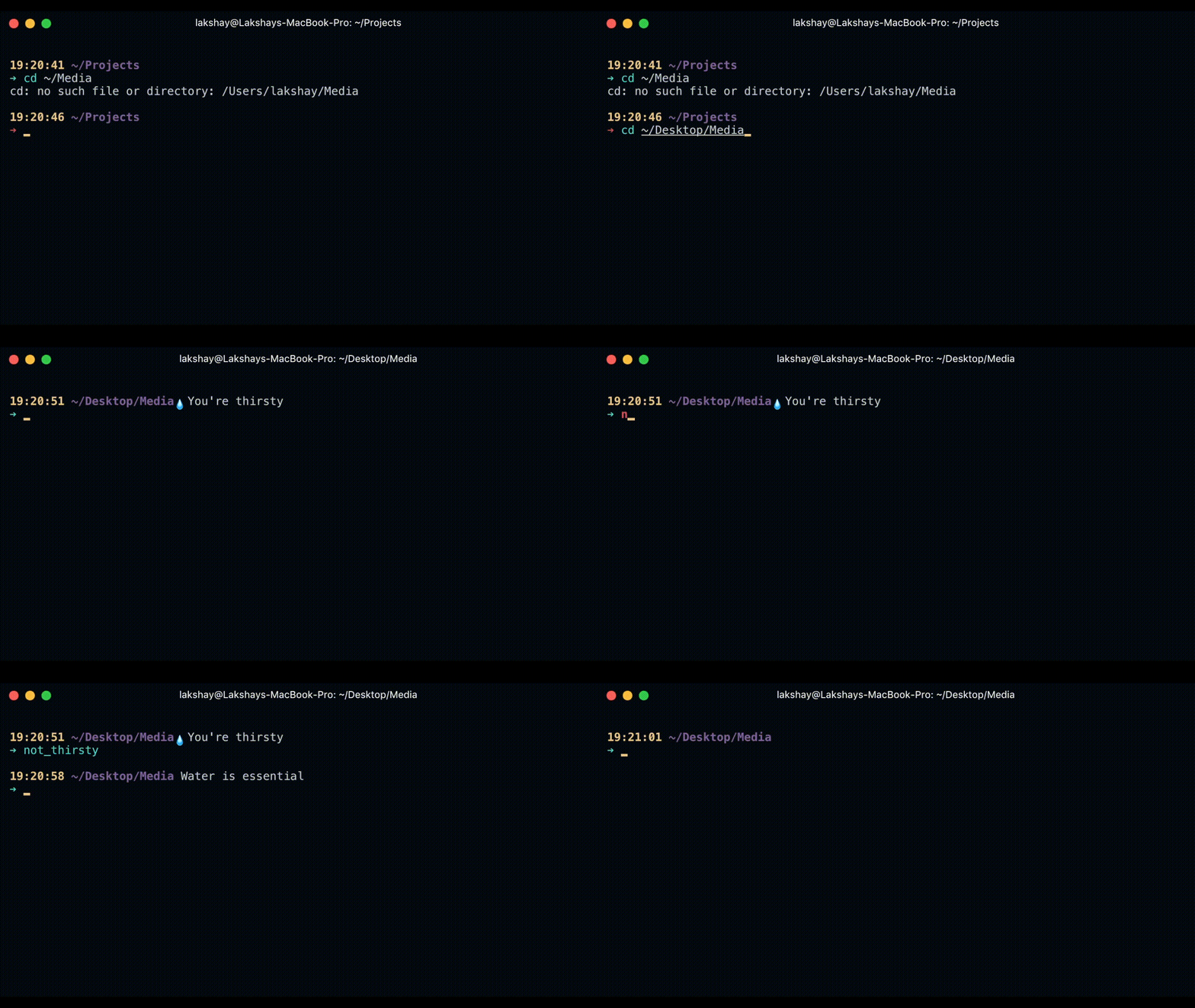
zsh/bash script to remind you to drink water.
If you're like me and you spend a lot of time programming with the command line open, chances are that you forget about everything for hours, which includes drinking water. At the end of the day I used to realise that I had not consumed enough water. Hence I created a bash/zsh script to remind me to drink water right on my command line.
PROMPT='$(some_function)' or PROMPT_COMMAND='$(some_function)' for bash and add drink_water inside that function. (This will be the case if you're using a theme)PROMPT, then just add PROMPT='$(drink_water)' or PROMPT_COMMAND='$(drink_water)' for bash in the file.WATER_TIME in seconds, eg : WATER_TIME=1200 sets it to 20 mins.not_thirsty in your command line.more like this
🧠 A simple command-line client for the Perplexity API. Ask questions and receive answers directly from the terminal! 🚀🚀🚀
Open the next door in your Vim journey — personalized command discovery based on your actual usage
search projects, people, and tags