blogtato
A CLI RSS/Atom feed reader inspired by Taskwarrior
 kantord
git clone https://github.com/kantord/blogtato.gitkantord/blogtatoblogtato
A CLI RSS/Atom feed reader inspired by Taskwarrior.
Features
- Subscribe to RSS and Atom feeds
- Simple query language for filtering by feed, read status, and date, with grouping and export
- Git-based sync across machines with conflict-free merge (why git?)
- No accounts, no servers, no continuous network dependency
- Mark content as read
- Designed to be distraction free, minimalistic and work out of the box
Install
cargo install blogtato
Git sync
git based synchronization is entire optional. blogtato can work entirely
offline on a single device.
To set up git synchronization, create a private repo on your git host, then:
# On your first machine
blog clone user/repo

# From now on, sync fetches feeds and pushes/pulls from the remote
# with no remote repository, `blog sync` just pulls the latest posts from
# all feeds
blog sync
On your device(s), run the same blog clone to pull down your feeds and posts.
Don't worry about setting git sync up if you are just trying blogtato out:
you can run blog clone user/repo later and your existing feeds will be merged
with the remote automatically.
Quick start
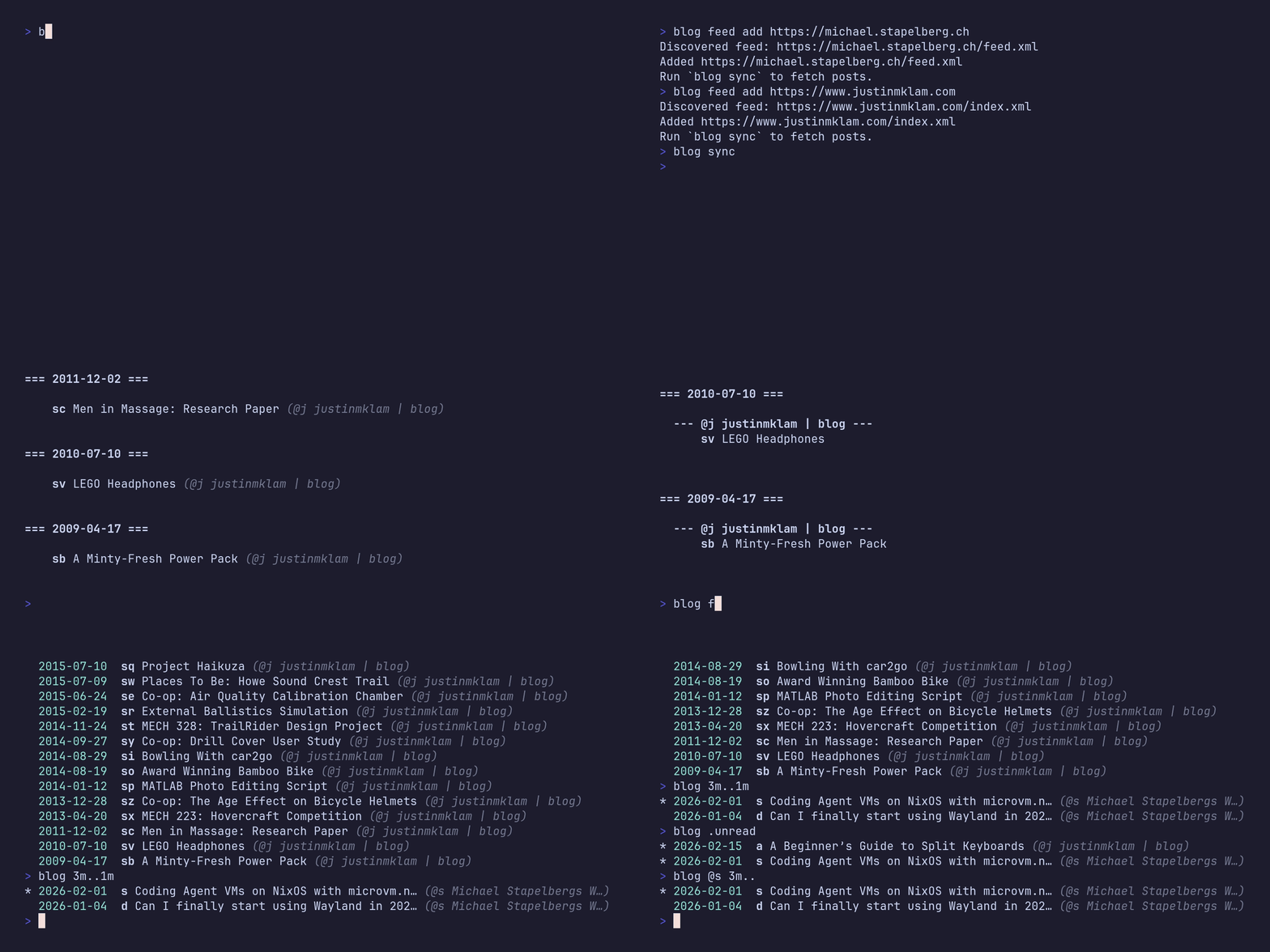
Once you set up your git-based sync, or if you decided to skip it, subscribe
to your favorite feeds using blog feed add:
blog feed add https://michael.stapelberg.ch
blog feed add https://www.justinmklam.com
You can import your subscriptions from other RSS readers (Feedly, Inoreader, NetNewsWire, FreshRSS, Feeder, Tiny Tiny RSS, Outlook, and others) using an OPML file:
blog feed import feeds.opml
Fetch and list latest posts:
blog sync
blog
Read whatever you found interesting by referring to its shorthand
blog df read
You can subscribe to blogtato releases to know when new features or fixes are
available:
blog feed add https://github.com/kantord/blogtato/releases.atom
Usage examples
# Subscribe to a feed
blog feed add https://news.ycombinator.com/rss

# Fetch new posts and sync with git remote
blog sync

# Sync only selected feeds by @shorthand from `blog feed ls`
blog sync --feed @df --feed @dg

# Show posts (defaults to unread posts from the last 3 months, grouped by week)
blog

# Group by date, week, or feed
blog /d
blog /w
blog /f

# Combine groupings
blog /d /f

# Filter by feed shorthand
blog @hn

# Filter by read status
blog .unread
blog .read
blog .all

# Filter by date
blog 1w..
blog 3m..1m
blog /d 2w..1w

# Combine filters - list unread posts form HackerNews grouped by date
blog @hn .unread /d

# Open a post in the default browser
blog abc open

# Print a post URL (useful with CLI browsers)
blog abc read
w3m $(blog abc read)

# Mark a post as unread
blog abc unread

# Export matching posts as JSONL
blog .all export
blog @myblog export
blog 1w.. export

# List subscriptions
blog feed ls

# Remove a feed
blog feed rm https://news.ycombinator.com/rss
blog feed rm @hn
Design philosophy
I built blogtato around the idea of subscription detox and simplicity. I just
wanted to use a simple and RSS reader that is not distracting, but can be
synced between different devices seamlessly without having to set up another
user account and paying another monthly subscription fee.
blogtato uses a simple database that stores data in JSONL files and syncs
them using git. From a performance standpoint, this is admittedly
sub-optimal, and an quite esoteric design. At the same time, if you are
comfortable with CLI tools you likely have access to a remote git host such
as GitHub, GitLab or a Forgejo instance: and that's all blogtato needs to be
able to keep data up to date on all of your devices. From a user perspective,
this just works with effectively zero configuration.
blogtato's database uses a conflict-free design: even if you have diverging
changes between different devices, you will never have to manually resolve
conflicts. You can forget about git being there.
Network operations are always initiated by the user. There is no need for a continuously running server. And all operations that don't strictly need network access work offline.
It is my goal to keep the feature-set and the complexity of this project down, so that it can be maintained with minimal effort and can be considered to be "done".
Optional configuration
blogtato is designed to work out of the box without any configuration.
Most users should never need to change any settings. Nevertheless, a few things
can be configured, when the nature of the synchronized database calls for
measures to protect data consistency, or in other cases where taking advantage
of the synced database for storing the configuration would be convenient.
Configuration is stored in the same git-based database as your feeds and posts, so settings automatically sync across all your devices.
Custom store location
By default, blogtato stores data in the platform-specific data directory:
- macOS:
~/Library/Application Support/blogtato/stores/default - Linux:
$XDG_DATA_HOME/blogtato/stores/default(typically~/.local/share/blogtato/stores/default)
You can override this location by setting RSS_STORE env:
export RSS_STORE=/path/to/another/store
Custom default query
By default, blog with no arguments shows unread posts from the last 3 months
grouped by week. You can change this:
# Show posts from the past 3 months grouped by date instead
blog config set default_query '.all /d 3m..'

# Show unread posts from the last week
blog config set default_query '.unread 1w..'

# Reset to built-in default
blog config unset default_query
Ingest filter
You can configure a jq expression that
transforms posts during blog sync, before they are stored. This lets you
filter out unwanted content or rewrite fields. The expression receives an array
of post objects and must return an array.
blogtato calls jq as an external process. It
is not bundled with blogtato
- it is an optional runtime dependency, only needed if you configure an
ingest_filter. When no filter is set, all posts are stored as-is.
jq was chosen over arbitrary shell scripting because feed data is structured
JSON, which is difficult to manipulate correctly with most other shell tools,
so users would otherwise just create shell script files that are a boilerplate
wrapper over jq. jq is the standard tool for this purpose that most CLI
users already have installed and are familiar with.
Also, calling an arbitrary binary/script file would be a runtime dependency
that does not automatically sync to other machines, so one could easily create
runtime errors or load inconsistent data in the database. Storing a jq
expression in the synced database means it automatically carries over to all
your devices.
# Filter out sponsored posts
blog config set ingest_filter '[.[] | select(.title | startswith("[Sponsored]") or contains("Partner Content") | not)]'

# Strip tracking parameters from links
blog config set ingest_filter '[.[] | .link |= sub("\\?utm.*"; "")]'

# Combine both: filter sponsored posts and strip tracking parameters
blog config set ingest_filter '[.[] | select(.title | startswith("[Sponsored]") or contains("Partner Content") | not) | .link |= sub("\\?utm.*"; "")]'

# Remove the filter
blog config unset ingest_filter
Each post object has these fields: title, date, link, raw_id, feed.
Naming
The naming is meant to symbolize simplicity and pragmatic silliness: I just mashed the word "blog" together with the first word I could think of: potato.
Comparison with alternatives
blogtato is relatively new and there are several good, and more mature
alternatives. This section attempts to summarize how they differ from
blogtato and why some users might still prefer to use blogtato instead.
Newsboat
Newsboat is a very mature TUI RSS client with a wide range of features that
blogtato does not have. Just like blogtato, it supports local-only
workflows.
It can also act as a client to remote servers, so if you are ok with having to
self-host a server or signing up to a hosted server, then blogtato's git
sync feature is not a relevant differentiator for you.
Another reason why blogtato might be relevant to you is that it has a
Taskwarrior-like interface that is even more minimalistic than Newsboat.
Newsraft
Newsraft is a more minimalistic alternative to Newsboat. The Newsboat breakdown mostly applies.
FreshRSS, Miniflux & Tiny Tiny RSS
These are mature, self-hostable web-based RSS readers/aggregators. What
blogtato offers in comparison is a minimalistic CLI interface and effectively
zero-setup sync between different machines using git, without the need for an
additional, continuously running server.
Feedly, Inoreader
These are full-featured web-based services. If you are a heavy RSS-user and like the user interfaces and features they offer (such as GUI apps for iOS and Android, content recommendations) you will likely prefer one of these options.
You could find blogtato interesting if you'd prefer a more minimalistic,
distraction-free CLI interface and do not need their advanced features.
more like this
TachiSnap
TachiSnap — Pixel Snapper for animation pixel artists. Rust + WebAssembly client-side tool for cleaning up AI-generated…
meine
meine 🌒 - A CLI file manager and system utility built with Textual. It combines intuitive command parsing with rich t…
bit_gossip
Pathfinding library for calculating all node pairs' shortest paths in an unweighted undirected graph.