WSL-config
CS 4400 - Step by step guide for using WSL and Vim as a development environment
Vim script★ 167
Terminal emulator for Windows Subsystem for Linux (WSL)
 mskyaxl
git clone https://github.com/mskyaxl/wsl-terminal.gitmskyaxl/wsl-terminalA terminal emulator for Windows Subsystem for Linux (WSL), based on mintty, fatty and wslbridge2.
All emojis designed by OpenMoji – the open-source emoji and icon project. License: CC BY-SA 4.0
中文页面(The Chinese README is no longer maintained)
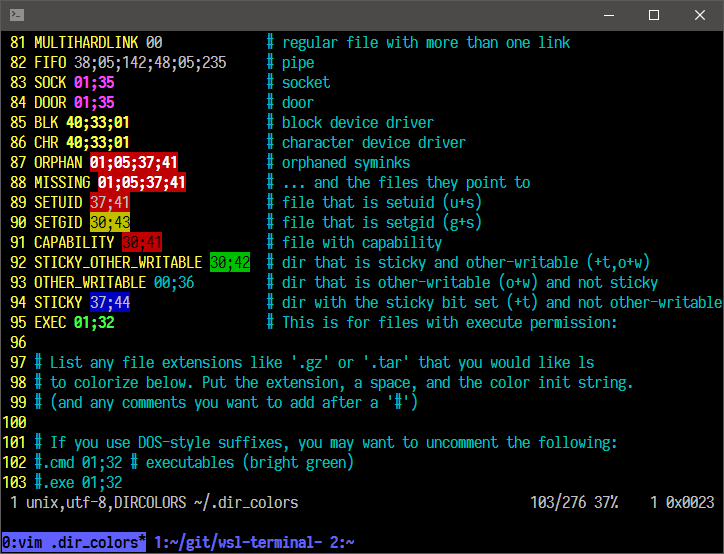
More screenshots here.
Make sure you have 7z installed. On Ubuntu run: sudo apt install p7zip-full, on Archlinux: run pacman -S p7zip
Change the directory to the folder where you want to install wsl-terminal to.
Make sure to install wsl-terminal in a the windows filesystem and not in the wsl filesistem. The installation folder needs to be on a local NTFS volume.
wsl bash -c "$(wget https://raw.githubusercontent.com/mskyaxl/wsl-terminal/master/scripts/install.sh -qO -)"
bash -c "$(wget https://raw.githubusercontent.com/mskyaxl/wsl-terminal/master/scripts/install.sh -qO -)"
If you want to install the tabbed version you have to add a -t as parameter as shown bellow
bash -c "$(wget https://raw.githubusercontent.com/mskyaxl/wsl-terminal/master/scripts/install.sh -qO -)" '' -t
Run open-wsl.exe to open a WSL terminal in current directory.
Run tools/1-add-open-wsl-terminal-here-menu.js (help) to add a Open wsl-terminal Here context menu to explorer.exe (Run tools/1-remove-open-wsl-terminal-here-menu.js to remove it). If you are using Total Commander, Use wsl-terminal with Total Commander may help you.
run-wsl-file.exe can run any .sh (or any others like .py .pl) script files in wsl-terminal, support Open With context menu in explorer.exe.
vim.exe can open any files with vim (in wsl-terminal), support Open With context menu in explorer.exe. vim.exe can be renamed to emacs.exe nvim.exe nano.exe ... to open files in emacs nvim nano ....
| key | function |
|---|---|
Alt + Enter |
Fullscreen |
Alt + F2 |
New window |
Alt + F3 |
Search text |
Ctrl + [Shift] + Tab |
Switch window |
Ctrl + = + - 0 |
Zoom |
Ctrl + Click |
Open URL or dir/file under the cursor |
Ctrl + Right Click |
Open context menu |
Bind wsl-terminal to a hotkey.
Usage: open-wsl [OPTION]...
  -a: activate an existing wsl-terminal window.
      if use_tmux=1, attach the running tmux session.
  -l: start a login shell and cd to $HOME (doesn't work with use_tmux=1).
  -c command: run command (e.g. -c "echo a b; echo c; cat").
  -e commands: run commands (e.g. -e echo a b; echo c; cat).
  -C dir: change directory to a WSL dir (e.g. /home/username).
  -W dir: change directory to a Windows dir (e.g. c:\Users\username).
  -d distro: switch distros.
  -b "options": pass additional options to wslbridge.
  -B "options": pass additional options to mintty.
  -h: show help.
For -B and -b, see also mintty params and wslbridge2 params.
Usage: cmdtool [OPTION]...
  wcmd: run Windows programs with cmd.exe /c.
  wstart: run Windows programs with cmd.exe /c start.
  wstartex file|url: like wstart, but use WSL file path.
  update: check the latest wsl-terminal version, and upgrade it.
  killall: kill all WSL processes.
  install dash: install Cygwin dash (for debugging).
  install busybox: install Cygwin busybox (for debugging).
Files in tools directory:
| filename | function |
|---|---|
| 1-add-open-wsl-terminal-here-menu.js | Add Open wsl-terminal Here context menu to explorer.exe. |
| 1-remove-open-wsl-terminal-here-menu.js | Remove Open wsl-terminal Here context menu. |
| 2-add-wsl-terminal-dir-to-path.js | Add wsl-terminal directory to Path environment variable. |
| 2-remove-wsl-terminal-dir-from-path.js | Remove wsl-terminal directory from Path environment variable. |
| 3-write-distro-to-config-file.js | Write distro guids to etc/wsl-terminal.conf. |
| 4-create-start-menu-shortcut.js | Create a start menu shortcut to open-wsl -C ~. |
| 4-create-start-menu-shortcut-login-shell.js | Create a start menu shortcut to open-wsl -l. |
| 4-remove-all-start-menu-shortcuts.js | Remove all wsl-terminal start menu shortcuts. |
| 5-add-open-with-vim-menu.js | Add Open with vim in wsl-terminal context menu. |
| 5-remove-open-with-vim-menu.js | Remove Open with vim in wsl-terminal context menu. |
| 6-set-default-shell.bat | Set shell in etc/wsl-terminal.conf to the default shell in WSL. |
Double click any .js file to run it. If it was open by any editor, open it with Microsoft (R) Windows Based Script Host, or open a cmd.exe in tools directory and run wscript xxx.js.
etc/wsl-terminal.conf is wsl-terminal config file.
[config]
title="my title"
shell=/bin/bash
use_tmux=0
;icon=
;distro=
etc/themes/* are theme files, use themes.
etc/minttyrc is mintty config file, mintty tips.
Open open-wsl.exe in wsl-terminal directory, run ./cmdtool update to check the latest wsl-terminal version and upgrade it. If the download speed is too slow, you can download wsl-terminal-v{version}.7z from releases with other tools, and put it into wsl-terminal directory, then run ./cmdtool update.
wget and 7z commands are needed (Ubuntu: apt install wget p7zip-full, Archlinux: pacman -S wget p7zip) .
Config files won't be overridden, etc/wsl-terminal.conf and etc/minttyrc will be placed to etc/wsl-terminal.conf.pacnew and etc/minttyrc.pacnew. Some .bak files will be left in bin, because they are running, those files will be removed after the next upgrading.
use_tmux=1 in etc/wsl-terminal.conf. And set attach_tmux_locally=1 if the version number is less than 0.8.1.~/.bashrc (shell=/bin/bash in config) or ~/.zshrc (shell=/bin/zsh in config):[[ -z "$TMUX" && -n "$USE_TMUX" ]] && {
[[ -n "$ATTACH_ONLY" ]] && {
tmux a 2>/dev/null || {
cd && exec tmux
}
exit
}
tmux new-window -c "$PWD" 2>/dev/null && exec tmux a
exec tmux
}
If you're using fish then update your '~/.config/fish/config.fish' (shell=/bin/fish in config) with
if [ -z "$TMUX" ]; and [ -n "$USE_TMUX" ]
    if [ -n "$ATTACH_ONLY" ]
        if not tmux a 2>/dev/null
            cd; and exec tmux
        end
        exit
    end

    tmux new-window -c "$PWD" 2>/dev/null; and exec tmux a
    exec tmux
end
Then open-wsl will use tmux.
Use open-wsl -d distro to switch distros:
# list all distros
> wslconfig /l
Legacy (Default)
Ubuntu

# use Ubuntu (will run wslconfig /s Ubuntu before mintty)
> open-wsl -d Ubuntu

# Ubuntu is the default distro now
> wslconfig /l
Ubuntu (Default)
kali-linux
Or set distro in wsl-terminal.conf (Won't change the default distro).
Run tools/3-write-distro-to-config-file.js (help), then a msgbox will show the result:
result has been written to ..\etc\wsl-terminal.conf:

;distro=kali-linux

;distro=Ubuntu

remove the ; before distro to use the distro.
If you want to pass the distro_guid to open-wsl in cmdline:
# pass the distro guid to wslbridge
> open-wsl -b "-d Ubuntu"
wget tar xz gzip p7zip are available (Ubuntu: run apt install wget tar xz-utils gzip p7zip-full, Archlinux: run pacman -S wget tar xz gzip p7zip) are installed in WSL.gcc-g++, make, w32api-headers (for compiling fatty)clone the repo in WSL(to maintain the linux EOL characters) but on windows drive eg (/mnt/c/Users/<userName>/work/wsl-terminal)
use build.sh to build with the appropiate parameters.
➜  wsl-terminal git:(master) scripts/build.sh -h
Usage:
    build.sh -h                 Display this help message.
    build.sh -a                 Builds wsl-terminal and wsl-terminal-tabbed.
    build.sh -t                 Builds only wsl-terminal-tabbed(cygwin is required).
    build.sh                    Builds only wsl-terminal.
MIT
more like this
CS 4400 - Step by step guide for using WSL and Vim as a development environment
Windows + WSL 2 Ubuntu + Windows Terminal + zsh + systemd + p10k + Docker + IntelliJ IDEA + GitBash with zsh
search projects, people, and tags