Godot-Voxel-Destruction
Allows dynamic voxel destruction with debris along with other voxel features. Allows importing .vox files and damaging…
GDScript★ 52
[NeurIPS 2024] SCube: Instant Large-Scale Scene Reconstruction using VoxSplats
 nv-tlabs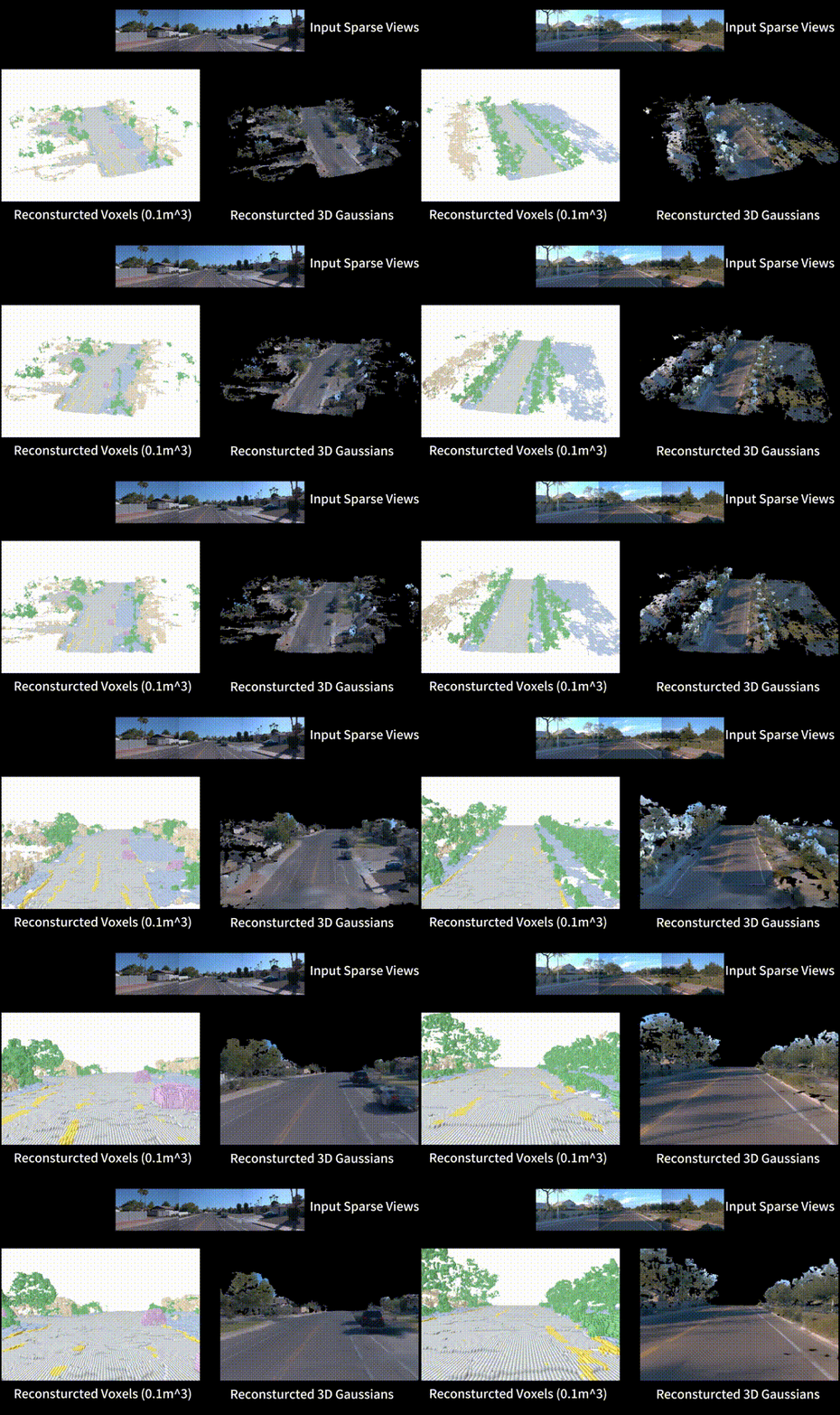
SCube: Instant Large-Scale Scene Reconstruction using VoxSplats
Xuanchi Ren$^* $, Yifan Lu$^* $, Hanxue Liang, Zhangjie Wu, Huan Ling, Mike Chen, Sanja Fidler, Francis Williams, Jiahui Huang
* indicates equal contribution
[Project Page]
mkdir SCube-release # wrap it in a folder
cd SCube-release
git clone https://github.com/nv-tlabs/SCube.git
mkdir wandb
mkdir waymo_tfrecords
cd SCube
(Optional) Install libMamba for a huge quality of life improvement when using Conda
conda update -n base conda
conda install -n base conda-libmamba-solver
conda config --set solver libmamba
Install the conda environment
conda env create -f environment.yml
conda activate scube
mim install "mmcv>=2.0.0"
pip install "mmsegmentation>=1.0.0"
Our training script highly relies on WandB. Please register an account for WandB first and get your API_key. Then you can setup for your machine by running this command in the terminal:
wandb login # requires your API key
First download our splits of waymo dataset.
gdown https://drive.google.com/drive/folders/1d8V4aoHsDf5U0-SH_VY2MOZJdYvOG8TM -O ../waymo_split --folder
Download the all the training & validation clips from waymo perception dataset v1.4.2 to the SCube-release/waymo_tfrecords.
If you have sudo, you can use gcloud to download them from terminal.
sudo apt-get update
sudo apt-get install apt-transport-https ca-certificates gnupg curl
curl https://packages.cloud.google.com/apt/doc/apt-key.gpg | sudo gpg --dearmor -o /usr/share/keyrings/cloud.google.gpg
echo "deb [signed-by=/usr/share/keyrings/cloud.google.gpg] https://packages.cloud.google.com/apt cloud-sdk main" | sudo tee -a /etc/apt/sources.list.d/google-cloud-sdk.list
sudo apt-get update && sudo apt-get install google-cloud-cli
Then you can login your google account and download the above tfrecords via
# or use `gcloud init --no-launch-browser` if you are in a remote terminal session
gcloud init
bash datagen/download_waymo.sh datagen/waymo_all.json ../waymo_tfrecords
After downloading tfrecord files, we expect a folder structure as follows:
SCube-release
|-- SCube
|   `-- ...
|-- waymo_split
|   `-- ...
`-- waymo_tfrecords
    |-- segment-10247954040621004675_2180_000_2200_000_with_camera_labels.tfrecord
    |-- segment-11379226583756500423_6230_810_6250_810_with_camera_labels.tfrecord
    |-- ...
    `-- segment-1172406780360799916_1660_000_1680_000_with_camera_labels.tfrecord
Note
If you download the tfrecord files from the console, you will have prefixes like individual_files_training_ or individual_files_validation_. Make sure these prefixes are removed before further processing.
We first extract the image, LiDAR, pose, intrinsic, annotation files out of tfrecords, which will be saved in ../waymo_ns. If you have multiple CPU cores, you can set --num_workers to your core number for parallelization.
python datagen/waymo2nerfstudio.py -i ../waymo_tfrecords -o ../waymo_ns [--num_workers YOUR_CPU_CORE]
We then process the raw data into webdataset format required by SCube training while infering SegFormer for sky mask and Metric3Dv2 for GT depth. The results will be saved in ../waymo_webdataset. Note that this step is very time-comsuming for 1000 clips x 198 frames x 5 cameras, which can take over 1 day on 8x A100 GPUs.
Note
You might encounter AssertionError: MMCV==2.2.0 is used but incompatible. Please install mmcv>=2.0.0rc4. when using mmcv. Solution here.
Note
You might encounter RuntimeError: Failed to find function: mono.model.backbones.vit_large_reg when using Metric3D v2. Solution here
# single GPU
python datagen/nerfstudio2webdataset.py -i ../waymo_ns -o ../waymo_webdataset

# multiple GPU
torchrun --nnodes=1 --nproc-per-node=8 'datagen/nerfstudio2webdataset.py' -i ../waymo_ns -o ../waymo_webdataset
Now the ../waymo_ns and ../waymo_tfrecords will not be used anymore. We expect the folder structure like:
SCube-release
|-- SCube
|   `-- ...
|-- waymo_split
|   `-- ...
`-- waymo_webdataset
    `-- ...
We provide the webdataset-format files of ground-truth voxels on Hugging Face. Download and uncompress it in SCube-release/waymo_webdataset along with other attributes.
To visualize the ground-truth voxel data, which is stored in point cloud format, you can run the following command:
python inference/visualize_gt_pc.py -p <GT_VOXEL_TAR_FILE>
# Coarse stage VAE
python train.py configs/waymo_scube/train_vae_64x64x64_dense_height_down2_residual.yaml --wname train_vae_64x64x64_dense_height_down2_residual --max_epochs 10 --gpus 8 --eval_interval 1

# Fine stage VAE
python train.py configs/waymo_scube/train_vae_256x256x128_sparse.yaml --wname train_vae_256x256x128_sparse --max_epochs 10 --gpus 8 --eval_interval 1
Important
You need to modify the vae_checkpoint in configs/waymo_scube/train_diffusion_64x64x64_image_cond.yaml and configs/waymo_scube/train_diffusion_256x256x128_sparse.yaml to your own experiments. In you wandb webpage, you can find a unique "run id" for your experiment and replace the [YOUR_RUN_ID] in the yaml file.
# Image conditioned voxel diffusion
python train.py configs/waymo_scube/train_diffusion_64x64x64_image_cond.yaml --wname train_diffusion_64x64x64_image_cond --max_epochs 40 --gpus 8 --eval_interval 1

# Semantic conditioned upsampling voxel diffusion
python train.py configs/waymo_scube/train_diffusion_256x256x128_sparse.yaml --wname train_diffusion_256x256x128_sparse --max_epochs 20 --gpus 8 --eval_interval 1
python train.py configs/waymo_scube/train_gsm_unet3d_view3.yaml --wname train_gsm_unet3d_view3 --max_epochs 30 --gpus 8 --eval_interval 1
Inference VAE
# replace nvidia-toronto to your own wandb account!
python inference/vae.py none --ckpt_vae wdb:nvidia-toronto/scube-scene-recon/waymo_wds/train_vae_64x64x64_dense_height_down2_residual
python inference/vae.py none --ckpt_vae wdb:nvidia-toronto/scube-scene-recon/waymo_wds/train_vae_256x256x128_sparse
This will generate a folder ../vae_output_waymo_wds/, storing predicted & GT grid + semantics. Specify --ckpt_vae to the experiment name.
Inference Diffusion
# replace nvidia-toronto to your own wandb account!
python inference/diffusion.py none --use_ema --use_ddim --ddim_step 100 --ckpt_dm wdb:nvidia-toronto/scube-scene-recon/waymo_wds/train_diffusion_64x64x64_image_cond
python inference/diffusion.py none --use_ema --use_ddim --ddim_step 100 --ckpt_dm wdb:nvidia-toronto/scube-scene-recon/waymo_wds/train_diffusion_256x256x128_sparse
This will generate a folder ../diffusion_output_waymo_wds/, storing predicted & GT voxel grid with semantics.
Specify --ckpt_dm to the experiment name.
Inference GSM
# replace nvidia-toronto to your own wandb account!
python inference/gaussian_feedforward.py none --ckpt_gsm wdb:nvidia-toronto/scube-scene-recon/waymo_wds/train_gsm_unet3d_view3 [--save_gs]
This will generate a folder ../diffusion_output_waymo_wds/, storing predicted & GT grid + semantics.
Specify --ckpt_gsm to the experiment name. Add [--save_gs] to save the 3D Gaussians.
Inference Full Pipeline
# replace nvidia-toronto to your own wandb account!
python inference/diffusion_cascading_gsm.py none \
    --use_ema --use_ddim --ddim_step 100 \
    --ckpt_dm_c wdb:nvidia-toronto/scube-scene-recon/waymo_wds/train_diffusion_64x64x64_image_cond \
    --ckpt_dm_f wdb:nvidia-toronto/scube-scene-recon/waymo_wds/train_diffusion_256x256x128_sparse \
    --ckpt_gsm wdb:nvidia-toronto/scube-scene-recon/waymo_wds/train_gsm_unet3d_view3 \
    --input_frame_offsets [0] \
    --sup_frame_offsets [0,5,10] \
    --split val \
    --val_starting_frame 0
Visualize Grids
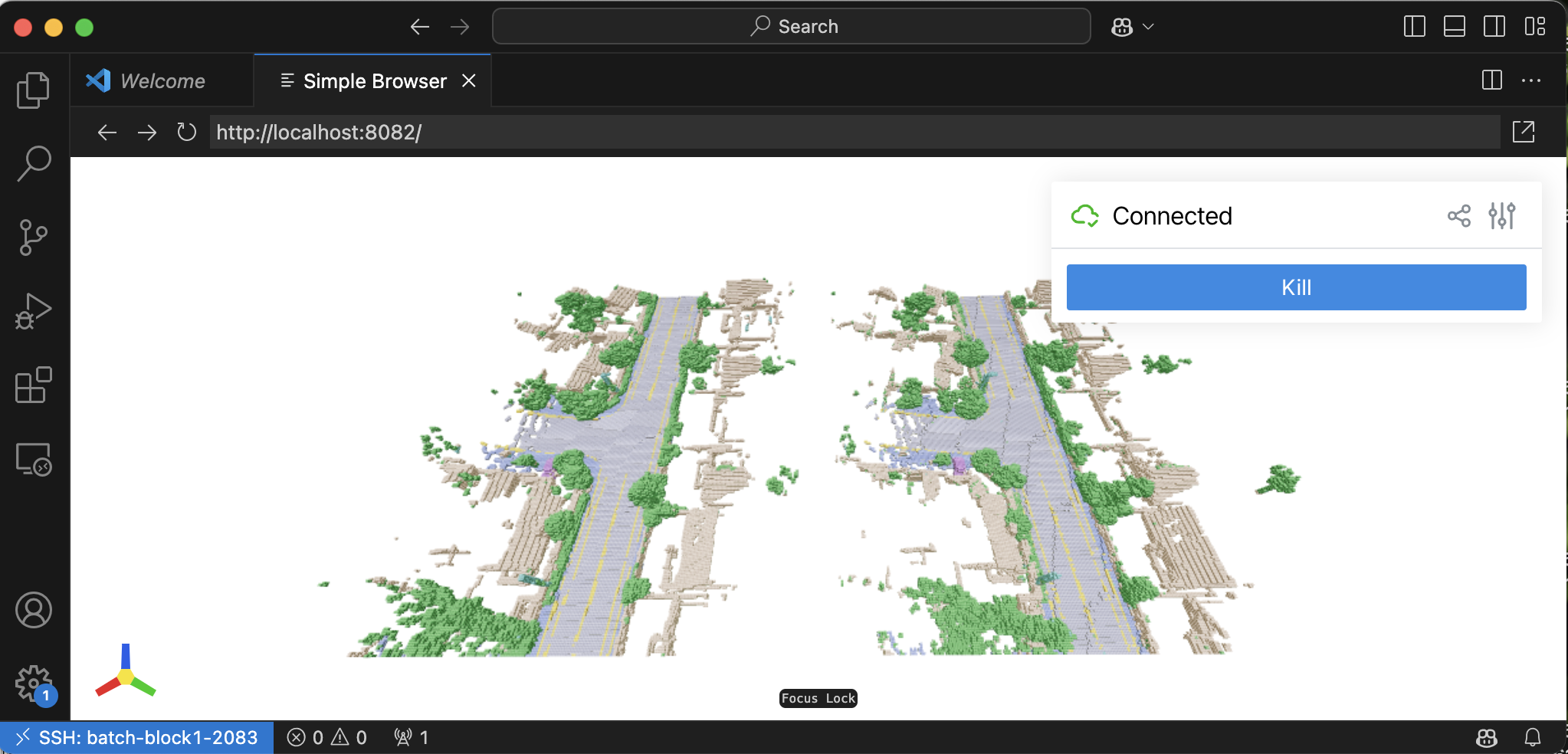
In ../vae_output_waymo_wds/ and ../diffusion_output_waymo_wds/ and ../cascading_diffusion_output_waymo_wds, you can find some folders containing x.pt and x_gt.pt, where x is the sample index for your inference. Run the following command to launch a interactive visualizer (even on a remote-ssh machine) in a web browser.
python inference/visualize_grid_compare.py -p <PT_FILES_FOLDER> [-t voxel]
where -t is available for voxel or pc. Do not use voxel for the fine stage, which is very heavy for rendering. It would be easy to use it on a remote machine with VSCode; VSCode will forward the port automatically for you.
Visualize 3DGS
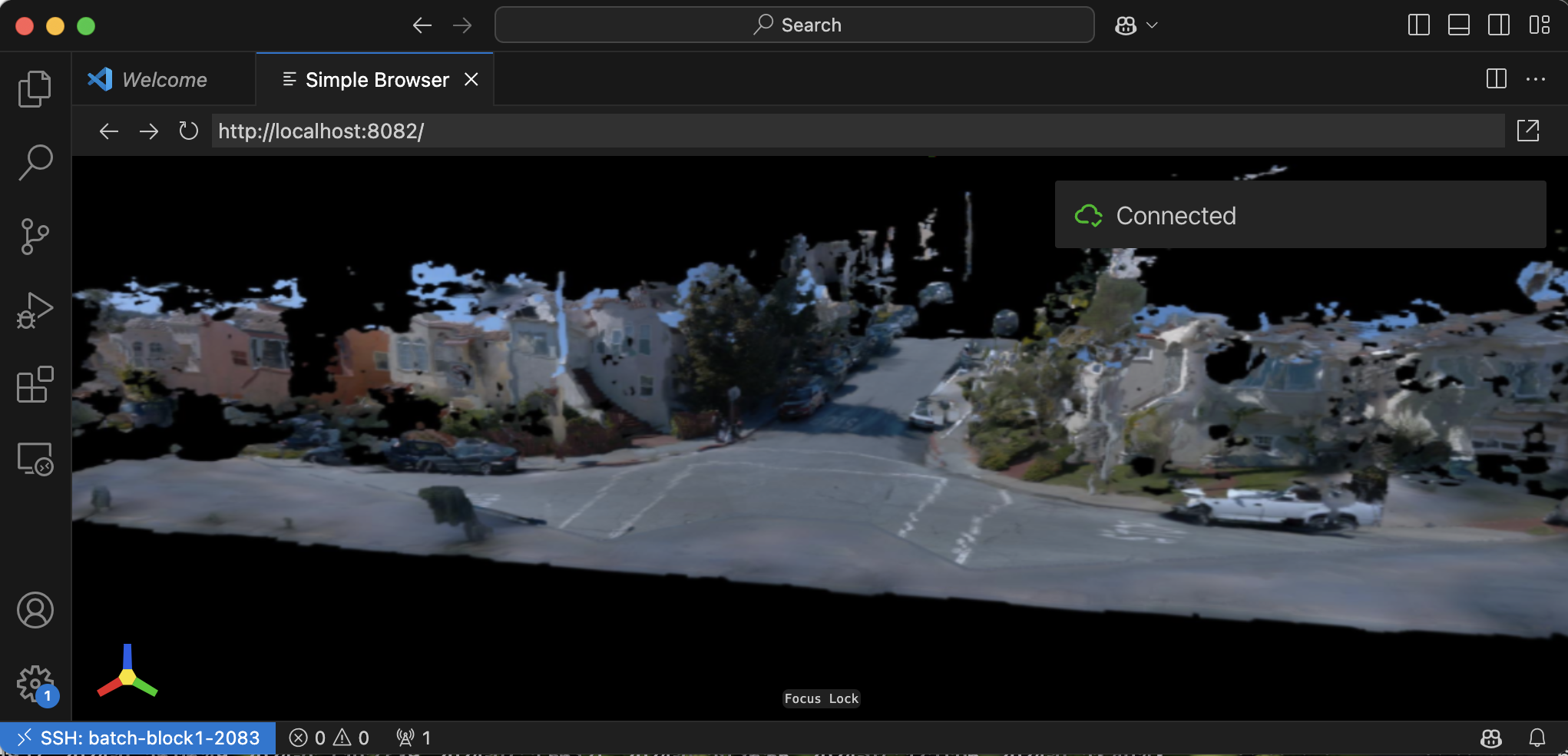
In ../splat_output_waymo_wds and cascading_diffusion_output_waymo_wds, you can find some folder containing x_splat.pkl, where x is the sample index for your inferenece. You can visualize the 3DGS with
python inference/visualize_3dgs_pkl.py -p <3DGS_PKL_FILE>
Shortcut
You could install this project to create short cut for visualization.
poetry install
Then you will have command vis-pair equivalent to python inference/visualize_grid_compare.py, vis-gs equivalent to python inference/visualize_3dgs_pkl.py and vis-gt-pc equivalent to inference/visualize_gt_pc.py. You can run visualization as
vis-pair -p <PT_FILES_FOLDER>
vis-gs -p <3DGS_PKL_FILE>
vis-gt-pc -p <GT_VOXEL_TAR_FILE>
Copyright © 2024, NVIDIA Corporation & affiliates. All rights reserved. This work is made available under the Nvidia Source Code License.
This repo is based on https://github.com/nv-tlabs/XCube.
@inproceedings{
    ren2024scube,
    title={SCube: Instant Large-Scale Scene Reconstruction using VoxSplats},
    author={Ren, Xuanchi and Lu, Yifan and Liang, Hanxue and Wu, Jay Zhangjie and Ling, Huan and Chen, Mike and Fidler, Sanja annd Williams, Francis and Huang, Jiahui},
    booktitle={The Thirty-eighth Annual Conference on Neural Information Processing Systems},
    year={2024},
}
more like this
Allows dynamic voxel destruction with debris along with other voxel features. Allows importing .vox files and damaging…
Voxel.Wiki is a website that is all about voxels: Values on regular grids in three-dimensional space!
search projects, people, and tags