lottery
🎉🌟✨🎈年会抽奖程序,基于 Express + Three.js的 3D 球体抽奖程序,奖品🧧🎁,文字,图片,抽奖规则均可配置,😜抽奖人员信息Excel一键导入😍,抽奖结果Excel导出😎,给你的抽奖活动带来全新酷炫体验🚀🚀🚀
JavaScript★ 4.6k
Open-source BullMQ dashboard — modern alternative to bull-board. 13 framework adapters, FlowProducer DAGs, schedulers,…
 pontusab
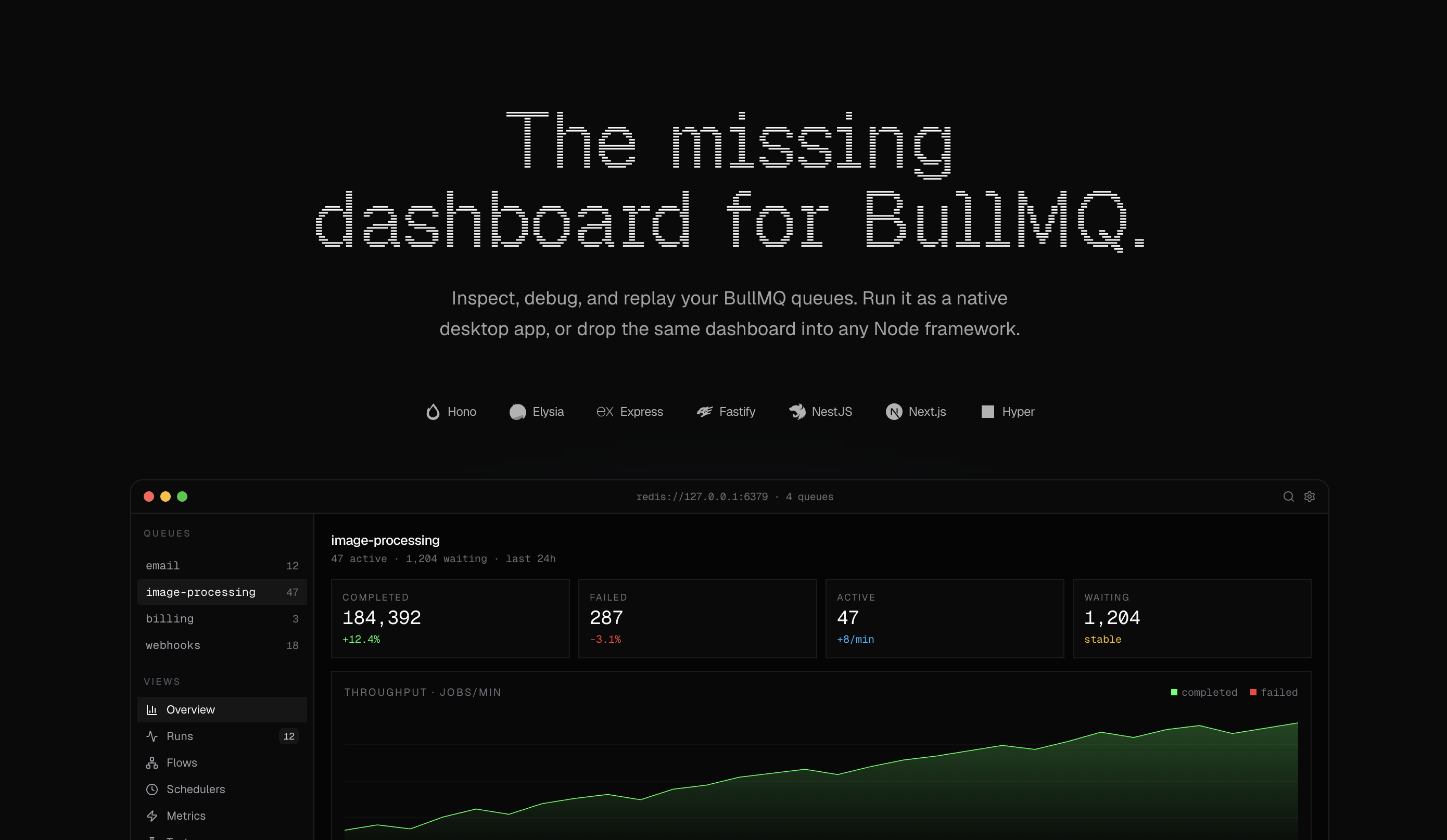
Open-source BullMQ dashboard. Drop-in for any Node or Bun backend.
Workbench is a modern dashboard for BullMQ. Runs jobs, flows, schedulers and metrics, all served from your own backend behind your own auth.
ghcr.io/<owner>/workbench-standalone) for Docker / Kubernetes deploymentsWebsite: getworkbench.dev · Documentation
Workbench is a drop-in alternative with thirteen first-party framework adapters, FlowProducer DAGs, error triage, and a keyboard-driven UI.
| bull-board | Workbench |
|---|---|
@bull-board/express |
@getworkbench/express |
@bull-board/fastify |
@getworkbench/fastify |
@bull-board/koa |
@getworkbench/koa |
@bull-board/nestjs |
@getworkbench/nestjs |
@bull-board/hono |
@getworkbench/hono |
@bull-board/h3 |
@getworkbench/h3 |
@bull-board/elysia |
@getworkbench/elysia |
Run npx @getworkbench/cli init to swap the mount in one command. Full comparison: getworkbench.dev/blog/workbench-vs-bull-board
npx @getworkbench/cli init
The CLI detects your framework, installs the matching @getworkbench/<fw> package, injects the mount (or scaffolds a route file for Next.js), writes .env.example entries, and optionally drops a docker-compose.yml for Redis.
Pick the adapter that matches your stack:
npm i @getworkbench/hono bullmq hono
import { Hono } from "hono";
import { Queue } from "bullmq";
import { workbench } from "@getworkbench/hono";

const app = new Hono();
const emailQueue = new Queue("email", { connection: { url: process.env.REDIS_URL! } });

app.route("/jobs", workbench({ queues: [emailQueue] }));

export default app;
bun add @getworkbench/elysia bullmq elysia
import { Elysia } from "elysia";
import { Queue } from "bullmq";
import { workbench } from "@getworkbench/elysia";

const emailQueue = new Queue("email", { connection: { url: process.env.REDIS_URL! } });

new Elysia()
  .mount("/jobs", workbench({ queues: [emailQueue], basePath: "/jobs" }))
  .listen(3000);
npm i @getworkbench/express bullmq express
import express from "express";
import { Queue } from "bullmq";
import { workbench } from "@getworkbench/express";

const app = express();
const emailQueue = new Queue("email", { connection: { url: process.env.REDIS_URL! } });

app.use("/jobs", workbench({ queues: [emailQueue] }));
app.listen(3000);
npm i @getworkbench/fastify bullmq fastify
import Fastify from "fastify";
import { Queue } from "bullmq";
import { workbench } from "@getworkbench/fastify";

const app = Fastify();
const emailQueue = new Queue("email", { connection: { url: process.env.REDIS_URL! } });

await app.register(workbench({ queues: [emailQueue] }), { prefix: "/jobs" });
await app.listen({ port: 3000 });
npm i @getworkbench/nestjs bullmq
import { NestFactory } from "@nestjs/core";
import { Queue } from "bullmq";
import { workbench } from "@getworkbench/nestjs";
import { AppModule } from "./app.module";

async function bootstrap() {
  const app = await NestFactory.create(AppModule);

  const emailQueue = new Queue("email", { connection: { url: process.env.REDIS_URL! } });

  await workbench(app, "/jobs", { queues: [emailQueue] });

  await app.listen(3000);
}
bootstrap();
Works on both the Express (default) and Fastify NestJS platforms.
npm i @getworkbench/adonis bullmq @adonisjs/core
// start/routes.ts
import router from "@adonisjs/core/services/router";
import { Queue } from "bullmq";
import { mountWorkbench } from "@getworkbench/adonis";

const emailQueue = new Queue("email", { connection: { url: process.env.REDIS_URL! } });

mountWorkbench(router, "/jobs", { queues: [emailQueue] });
Works with AdonisJS 6 and 7. See examples/with-adonis.
npm i @getworkbench/next bullmq
// app/jobs/[[...workbench]]/route.ts
import { Queue } from "bullmq";
import { workbench } from "@getworkbench/next";

const emailQueue = new Queue("email", { connection: { url: process.env.REDIS_URL! } });

export const { GET, POST, PUT, PATCH, DELETE } = workbench({
  queues: [emailQueue],
  basePath: "/jobs",
});
Next doesn't host BullMQ workers itself — run them in a sibling process. See examples/with-next.
npm i @getworkbench/tanstack-start bullmq @tanstack/react-start
// src/lib/workbench-handlers.ts
import { Queue } from "bullmq";
import { workbench } from "@getworkbench/tanstack-start";

const emailQueue = new Queue("email", { connection: { url: process.env.REDIS_URL! } });

export const workbenchHandlers = workbench({
  queues: [emailQueue],
  basePath: "/jobs",
});
// src/routes/jobs.ts
import { createFileRoute } from "@tanstack/react-router";
import { workbenchHandlers } from "../lib/workbench-handlers";

export const Route = createFileRoute("/jobs")({
  server: { handlers: workbenchHandlers },
});
// src/routes/jobs/$.ts
import { createFileRoute } from "@tanstack/react-router";
import { workbenchHandlers } from "../../lib/workbench-handlers";

export const Route = createFileRoute("/jobs/$")({
  server: { handlers: workbenchHandlers },
});
Register handlers on both
/jobsand/jobs/$so the bare mount and nested paths work. TanStack Start doesn't host BullMQ workers itself — run them in a sibling process. See examples/with-tanstack-start.
npm i @getworkbench/koa bullmq koa
import Koa from "koa";
import { Queue } from "bullmq";
import { workbench } from "@getworkbench/koa";

const app = new Koa();
const emailQueue = new Queue("email", { connection: { url: process.env.REDIS_URL! } });

app.use(workbench({ queues: [emailQueue], basePath: "/jobs" }));
app.listen(3000);
Koa has no built-in mount helper — pass
basePathso the middleware can match its own prefix and forward everything else to the next middleware.
npm i @getworkbench/astro bullmq
// src/pages/jobs/[...workbench].ts
import { Queue } from "bullmq";
import { workbench } from "@getworkbench/astro";

const emailQueue = new Queue("email", { connection: { url: process.env.REDIS_URL! } });

export const { GET, POST, PUT, PATCH, DELETE, prerender } = workbench({
  queues: [emailQueue],
  basePath: "/jobs",
});
Astro must be in server output mode (
output: "server"or"hybrid"). Astro doesn't host BullMQ workers itself — run them in a sibling process. See examples/with-astro.
npm i @getworkbench/nuxt bullmq
// server/routes/jobs/[...].ts
import { Queue } from "bullmq";
import { workbench } from "@getworkbench/nuxt";

const emailQueue = new Queue("email", { connection: { url: process.env.REDIS_URL! } });

export default workbench({
  queues: [emailQueue],
  basePath: "/jobs",
});
Nuxt's server runtime (Nitro / h3) doesn't host BullMQ workers itself — run them in a sibling process. See examples/with-nuxt.
bun add @getworkbench/bun bullmq
import { Queue } from "bullmq";
import { workbench } from "@getworkbench/bun";

const emailQueue = new Queue("email", { connection: { url: process.env.REDIS_URL! } });

const handler = workbench({ queues: [emailQueue], basePath: "/jobs" });

Bun.serve({
  port: 3000,
  fetch(req) {
    return handler(req, () => new Response("home"));
  },
});
npm i @getworkbench/h3 bullmq h3
import { createServer } from "node:http";
import { createApp, createRouter, toNodeListener } from "h3";
import { Queue } from "bullmq";
import { workbench } from "@getworkbench/h3";

const emailQueue = new Queue("email", { connection: { url: process.env.REDIS_URL! } });

const handler = workbench({ queues: [emailQueue], basePath: "/jobs" });

const router = createRouter().use("/jobs", handler).use("/jobs/**", handler);
const app = createApp().use(router);

createServer(toNodeListener(app)).listen(3000);
h3's
**only matches one-or-more sub-segments, so register the handler at both/jobsand/jobs/**.
Visit http://localhost:PORT/jobs.
| Option | Type | Description |
|---|---|---|
queues |
Queue[] |
BullMQ Queue instances to display. Required. |
auth |
{ username, password } |
Basic auth credentials. Strongly recommended in prod. |
title |
string |
Dashboard title. Default: "Workbench". |
logo |
string |
Logo URL to display in the nav. |
basePath |
string |
Override base path detection. Required for @getworkbench/elysia, @getworkbench/koa, @getworkbench/next, @getworkbench/tanstack-start, @getworkbench/astro, @getworkbench/nuxt, and @getworkbench/h3. |
readonly |
boolean |
Disable actions (retry, remove, promote). |
tags |
string[] |
Fields from job.data to extract as filterable tags. |
alerts |
AlertsOptions |
Self-hosted Slack/Discord/webhook alerting via BullMQ QueueEvents. |
Alerts are on by default. Configure Slack, Discord, or webhook contact points and rules in the dashboard Alerts page — notifications are only sent after you set that up. The model follows Grafana-style contact points + rules (unlike Bull Board, which has no built-in alerting). See @getworkbench/core README for setup steps.
| Package | Description |
|---|---|
@getworkbench/core |
Core + API router + UI |
@getworkbench/hono |
Hono adapter |
@getworkbench/elysia |
Elysia adapter |
@getworkbench/express |
Express adapter |
@getworkbench/fastify |
Fastify adapter |
@getworkbench/koa |
Koa adapter |
@getworkbench/nestjs |
NestJS adapter |
@getworkbench/adonis |
AdonisJS adapter |
@getworkbench/next |
Next.js App Router adapter |
@getworkbench/tanstack-start |
TanStack Start adapter |
@getworkbench/astro |
Astro adapter |
@getworkbench/nuxt |
Nuxt (Nitro/h3) adapter |
@getworkbench/h3 |
h3 adapter (Nitro/SolidStart/Analog) |
@getworkbench/bun |
Bun.serve adapter |
@getworkbench/cli |
npx @getworkbench/cli init |
@getworkbench/mcp |
Model Context Protocol server — Cursor/Claude/Zed/Continue |
apps/standalone |
Standalone Bun server + Docker image (ghcr.io/pontusab/workbench-standalone) |
Hyper is distributed via a source-component registry, so its Workbench integration ships separately as a hyper add @getworkbench component in the pontusab/hyper repo.
Run Workbench as its own container when you don't want to embed it in an app server. See apps/standalone for env vars and local dev.
docker run --rm -p 3000:3000 \
  -e REDIS_URL=redis://host.docker.internal:6379 \
  -e QUEUE_NAMES=email,image \
  ghcr.io/pontusab/workbench-standalone:latest
Tagged releases publish ghcr.io/pontusab/workbench-standalone:<version> automatically.
Is it BullMQ-only? Yes. Bull (legacy) is not supported.
What Node version? 18+ (or Bun 1.1+ for the Elysia and Bun.serve adapters).
What TypeScript version? Any TypeScript 4.x or 5.x for the non-Hono adapters (Express, Fastify, NestJS, Next.js, Elysia) and @getworkbench/core. @getworkbench/hono requires TypeScript 5.0+ because Hono 4's own bundled .d.ts uses const type parameters introduced in TS 5.0.
Can I run it without auth? Yes, omit the auth option. Don't do that in production.
Does it require a separate service? No for the embed path — it mounts as a route in your existing backend. Use the standalone Docker image when you want a separate container instead.
bun i
bun run build
bun run typecheck

# end-to-end smoke test against every example
docker compose up -d redis
bun run smoke
See CONTRIBUTING.md.
MIT © Pontus Abrahamsson
more like this
🎉🌟✨🎈年会抽奖程序,基于 Express + Three.js的 3D 球体抽奖程序,奖品🧧🎁,文字,图片,抽奖规则均可配置,😜抽奖人员信息Excel一键导入😍,抽奖结果Excel导出😎,给你的抽奖活动带来全新酷炫体验🚀🚀🚀
Comprehensive analytics dashboard for AI coding agents — Cursor, Windsurf, Claude Code, VS Code Copilot, Zed, Antigravi…
an efficient and user friendly OTA server equipped with a powerful WEB UI, designed to effortlessly manage both your ES…
search projects, people, and tags