psnet
A beautiful real-time TUI network monitor for Windows PowerShell — built in Rust
 psmux
psmuxgit clone https://github.com/psmux/psnet.gitpsmux/psnet
◈ PSNET
A beautiful real-time network monitor for your terminal.
9 tabs. GeoIP maps. Device discovery. Firewall. Topology. All in one 12 MB binary.
Features • Install • Tabs • Keys • Screenshots • Architecture • Contributing
What is PSNET?
PSNET is a zero-dependency (no Npcap/WinPcap needed) TUI network monitor built in Rust for Windows. A single psnet.exe binary gives you 9 interactive tabs covering everything from live speed graphs and active connections to a world map, LAN device discovery, firewall management, topology visualization, and security alerts — all in a beautiful dark terminal UI.
Think GlassWire + Wireshark + htop, but for your terminal.
Screenshots
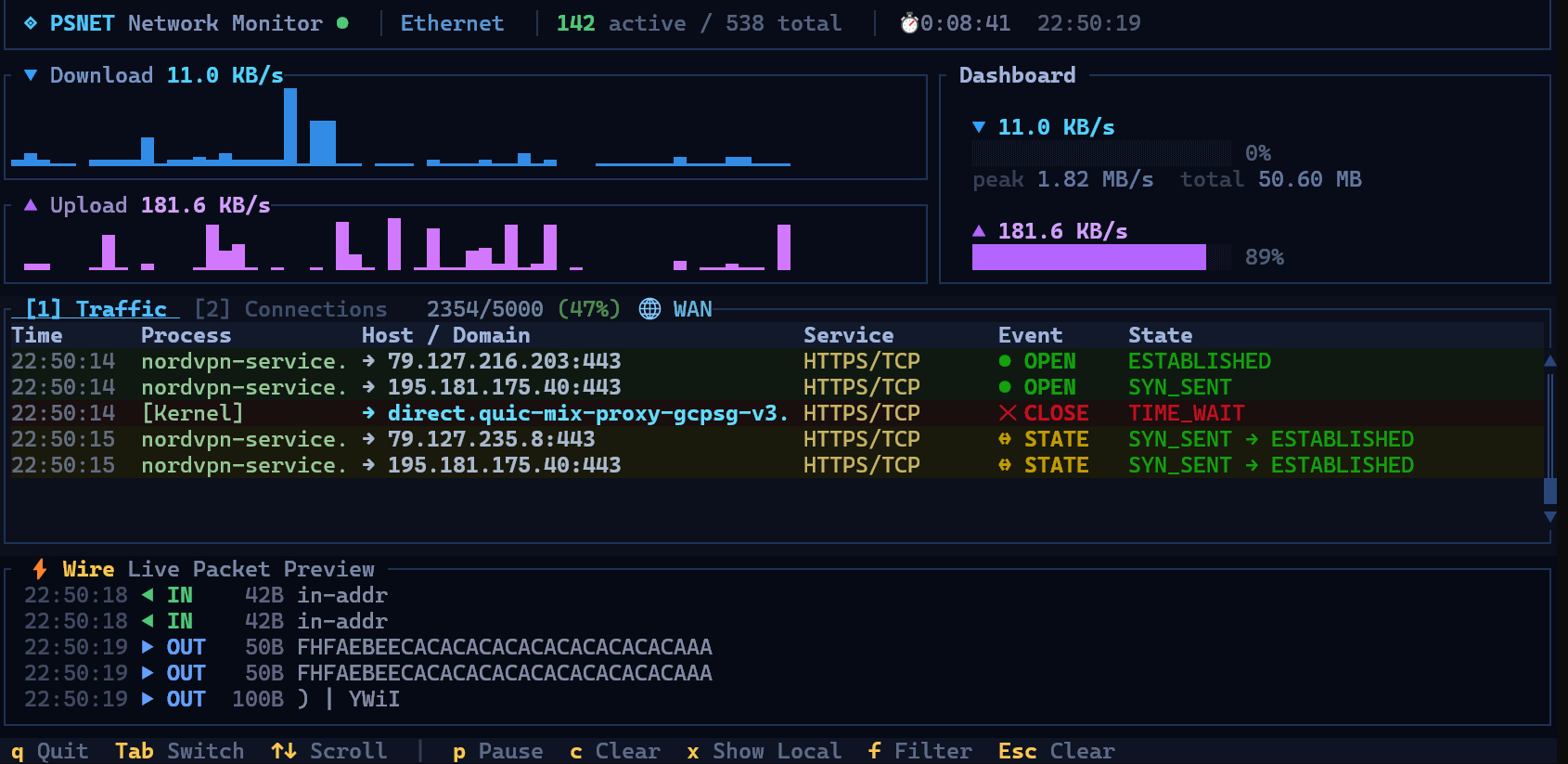
Features
📊 Dashboard (GlassWire-style)
- Traffic graph with selectable time ranges (5m / 15m / 1h / 24h)
- World map showing live connection dots colored by TCP state
- Top countries by connection count with proportional bars
- Network health gauge (score based on active connections, threats, alerts, firewall status)
- Top apps by bandwidth bar chart
🔗 Connections
- DNS-resolved hostnames — see
github.cominstead of140.82.121.4 - Service labels —
HTTPS/TCP,DNS/UDP,SSH/TCPinstead of raw port numbers - Color-coded by state — ESTABLISHED green, SYN_SENT cyan, TIME_WAIT purple, CLOSE_WAIT orange
- Sortable columns — Process, Remote Host, Service, State, Local Port
- Localhost filter — hide
127.0.0.1noise (toggle withx) - Live filtering — type to search by process, hostname, port, or service
- Detail popup — press Enter for full connection details with GeoIP, bandwidth, and timing
🖥️ Servers (Listening Ports)
- Service fingerprinting — identifies 200+ server types (nginx, PostgreSQL, Redis, Docker, VS Code, etc.)
- Wappalyzer technology detection — HTTP banner analysis with 6,500+ technology signatures
- TCP exposure panel — at-a-glance view of how many ports are network-facing (
*) vs localhost-only - Bind address badges — each server card shows a colored badge: red
*for all-interfaces, blue127.0.0.1for localhost, gold for specific IPs - Responsive status — UP/silent indicators, TLS detection, active connection counts
- Version detection — extracted from banners and HTTP headers
📦 Packets (Wireshark-style)
- Expert-level packet inspector with severity indicators (Chat / Note / Warn / Error)
- Protocol layer dissection — Ethernet → IP → TCP/UDP → Application
- DNS enrichment — resolved hostnames shown alongside IPs
- GeoIP enrichment — country flags and codes on remote IPs
- Hex + ASCII payload view in detail popup
- Filterable by protocol, IP, port, or process
🗺️ Topology
- Hub-and-spoke network diagram — your machine at center, connected to gateway, DNS, LAN devices, and remote hosts
- Live connection lines colored by state
- Scrollable with device details
🚨 Alerts
- Categorized security alerts — suspicious hosts, unusual ports, threat intelligence matches
- Split-pane layout with independent scrolling per category
- Detail popup with full alert context and recommended actions
🛡️ Firewall
- App-centric firewall management — see which apps are making connections
- Block/Allow per app — toggle firewall rules directly from the TUI
- Bandwidth columns — download/upload per app
- Rule status indicators — blocked (red), allowed (green), no rule (dim)
📡 Devices (LAN Scanner)
- ARP-based device discovery on your local network
- OUI vendor lookup — 35,000+ MAC prefix database identifies device manufacturers (Apple, Dell, Intel, etc.)
- Sortable table — IP, hostname, MAC, vendor, open ports, online status
- Sent/received byte counters per device
🌐 Networks
- Multi-adapter view — VPNs, Docker bridges, WSL, Hyper-V virtual switches, secondary adapters
- Bluetooth section (collapsible)
- Tunnel detection — identifies VPN tunnels, mesh networks, and container overlays
- Adapter status — IP addresses, gateway, DNS, link speed
⚡ Always Visible
- Speed section (top) — download/upload sparkline waveforms, gauge bars, peak/total counters
- Wire preview (bottom) — live packet payload snippets with direction indicators (requires Administrator)
- Title bar — interface name, active/total connections, session timer, activity indicator
🌍 Embedded Databases
All data files compile into the binary — nothing to download or configure:
- GeoIP — DB-IP country-level database (~7 MB) for world map and country enrichment
- Fingerprints — 200+ server identification signatures
- Wappalyzer — 6,500+ web technology detection rules
- OUI — 35,000+ MAC vendor prefix database
Installation
Via Cargo (crates.io)
cargo install psnet
psnet
Via Chocolatey
choco install psnet
psnet
Via WinGet
winget install marlocarlo.psnet
psnet
Download Binary
Grab the latest psnet.exe from GitHub Releases — no installation needed. Place it in your PATH and run.
From Source
git clone https://github.com/marlocarlo/psnet.git
cd psnet
cargo build --release
.\target\release\psnet.exe
Requirements
- Windows 10/11 (uses Win32 APIs —
iphlpapi.dll,dnsapi.dll,ws2_32.dll,kernel32.dll) - Rust 1.70+ for building from source
- Administrator privileges — optional, enables Wire packet preview and raw socket capture
Tabs
| # | Tab | Description |
|---|---|---|
| 1 | Dashboard | GlassWire-style overview — traffic graph, world map, health gauge, top apps/countries |
| 2 | Connections | Live connection table with DNS hostnames, service labels, process names, state |
| 3 | Servers | Listening ports with fingerprinted service names, bind address badges, exposure panel |
| 4 | Packets | Wireshark-style packet inspector with protocol dissection and hex view |
| 5 | Topology | Hub-and-spoke network diagram of your machine's connections |
| 6 | Alerts | Categorized security alerts with severity and recommendations |
| 7 | Firewall | Per-app firewall management — block/allow apps, see bandwidth per app |
| 8 | Devices | LAN device scanner with MAC vendor lookup, hostname resolution |
| 9 | Networks | Multi-adapter view — VPNs, Docker, WSL, Hyper-V, Bluetooth |
Press Tab / Shift+Tab to cycle through them.
Keybindings
Global
| Key | Action |
|---|---|
q / Ctrl+C |
Quit |
Tab / Shift+Tab |
Next / Previous tab |
↑ ↓ |
Scroll |
PgUp PgDn |
Scroll fast |
Home End |
Jump to top / bottom |
Enter |
Open detail popup for selected item |
Esc |
Close popup / Clear filter |
Dashboard
| Key | Action |
|---|---|
1-4 |
Select time range (5m / 15m / 1h / 24h) |
m |
Toggle full-screen world map |
Connections
| Key | Action |
|---|---|
1-5 |
Sort by column |
l |
Toggle LISTEN connections |
x |
Toggle localhost filter |
f + typing |
Live filter (any key works while typing; Enter done, Esc clear) |
Servers
| Key | Action |
|---|---|
s |
Trigger full scan (enumerate + probe + classify) |
o |
Open server's folder in Explorer |
y |
Copy exe path to clipboard |
f + typing |
Live filter (any key works while typing; Enter done, Esc clear) |
Firewall
| Key | Action |
|---|---|
b |
Block selected app |
a |
Allow selected app |
d |
Delete firewall rule |
How It Works
Connection Tracking
GetExtendedTcpTable and GetExtendedUdpTable from iphlpapi.dll enumerate all TCP/UDP connections with owning process IDs.
DNS Resolution
Dual-source: DnsGetCacheDataTable API (every tick) + ipconfig /displaydns parsing (periodic) for full coverage without generating network traffic.
GeoIP
The DB-IP country-level MaxMind-format database is embedded in the binary. Lookups are instantaneous — no network calls.
Service Fingerprinting
A custom fingerprint database matches process names, ports, and banner patterns to identify 200+ server types. Additionally, HTTP responses are analyzed against the Wappalyzer technology database (6,500+ signatures).
Device Discovery
ARP table enumeration plus active probing discovers devices on the local network. MAC addresses are matched against a 35,000-entry OUI database to identify manufacturers.
Packet Capture
Raw sockets with SIO_RCVALL (promiscuous mode) capture IP packets. Headers are parsed for protocol/port information; payloads are extracted for the Wire preview. Requires Administrator.
Architecture
psnet/
├── Cargo.toml
├── data/
│   ├── dbip-country-lite.mmdb    # GeoIP country database (7 MB, embedded)
│   ├── fingerprints.json         # Server fingerprint signatures (embedded)
│   ├── oui.txt                   # MAC vendor prefixes (embedded)
│   └── wappalyzer.json           # Web technology signatures (embedded)
└── src/
    ├── main.rs                   # Entry point, event loop, terminal setup
    ├── app.rs                    # Application state, input handling, tick logic
    ├── types.rs                  # Shared types (Connection, TcpState, BottomTab, etc.)
    ├── utils.rs                  # Formatting helpers (speed, bytes, etc.)
    ├── network/
    │   ├── alerts.rs             # Alert engine — threat detection
    │   ├── bandwidth.rs          # Per-app bandwidth tracking
    │   ├── capture.rs            # Traffic event tracker (diff-based)
    │   ├── connections.rs        # Win32 FFI for TCP/UDP table enumeration
    │   ├── dns.rs                # Windows DNS cache reader + service port map
    │   ├── firewall.rs           # Windows Firewall rule management
    │   ├── geoip.rs              # MaxMind GeoIP lookups
    │   ├── hostnames.rs          # Hostname resolution
    │   ├── oui.rs                # MAC vendor OUI database
    │   ├── protocols.rs          # Protocol identification
    │   ├── scanner.rs            # LAN device scanner (ARP)
    │   ├── sniffer.rs            # Raw socket packet sniffer
    │   ├── speed.rs              # Network speed via sysinfo
    │   ├── system_monitor.rs     # System resource monitoring
    │   ├── threats.rs            # Threat intelligence
    │   ├── usage.rs              # Network usage accounting
    │   ├── networks/             # Multi-adapter discovery (VPN, Docker, WSL, etc.)
    │   └── servers/              # Listening port scanner + fingerprinting
    │       ├── classify.rs       # Server classification logic
    │       ├── fingerprint.rs    # Banner fingerprinting
    │       ├── fingerprints.rs   # Fingerprint database loader
    │       ├── listeners.rs      # Port enumeration
    │       ├── types.rs          # Server types + 200 known server definitions
    │       └── wappalyzer_db.rs  # Wappalyzer technology database
    └── ui/
        ├── mod.rs                # Master layout (title + speed + tabs + wire + status)
        ├── dashboard.rs          # Dashboard tab (traffic graph, world map, health)
        ├── connections.rs        # Connections tab (sortable table)
        ├── servers.rs            # Servers tab (card list + exposure panel)
        ├── packets_tab.rs        # Packets tab (Wireshark-style inspector)
        ├── topology.rs           # Topology tab (network diagram)
        ├── alerts.rs             # Alerts tab (categorized alerts)
        ├── firewall.rs           # Firewall tab (app block/allow)
        ├── devices.rs            # Devices tab (LAN scanner results)
        ├── networks.rs           # Networks tab (adapters, VPN, Docker, etc.)
        ├── detail_popup.rs       # Modal detail overlay
        ├── title.rs              # Title bar
        ├── speed.rs              # Speed sparklines + gauges
        ├── packets.rs            # Wire preview (always visible)
        ├── status.rs             # Tab menu + key hints
        └── widgets/              # Reusable chart widgets
            ├── bar_chart.rs
            ├── traffic_chart.rs
            ├── world_map.rs
            ├── health_gauge.rs
            └── ...
Dependencies
| Crate | Purpose |
|---|---|
| ratatui | Terminal UI framework |
| crossterm | Cross-platform terminal I/O |
| sysinfo | Network interface byte counters |
| chrono | Timestamp formatting |
| serde + serde_json | Fingerprint/Wappalyzer JSON parsing |
| maxminddb | GeoIP database reader |
| dns-lookup | Hostname resolution |
| dirs | Platform directory paths |
No Npcap. No WinPcap. Zero external runtime dependencies.
FAQ
Q: Why Windows only?
A: PSNET uses Windows-specific APIs (iphlpapi.dll, dnsapi.dll, ws2_32.dll, kernel32.dll, Windows Firewall COM) for deep system integration that cross-platform abstractions can't match.
Q: Do I need Npcap/WinPcap? A: No. All features use built-in Windows APIs and raw sockets.
Q: Why do some connections show IPs instead of hostnames? A: PSNET reads the Windows DNS cache. Connections established before PSNET launched may not have cached DNS entries yet. Over time, more hostnames will resolve.
Q: Why is the Wire preview empty?
A: It requires Administrator privileges. Right-click your terminal → "Run as Administrator" → run psnet. Encrypted (TLS) traffic won't produce readable ASCII.
Q: How big is the binary? A: ~12 MB. This includes 4 embedded databases (GeoIP 7 MB, OUI 1 MB, fingerprints, Wappalyzer). No additional files to download.
Contributing
Contributions are welcome! Areas where help would be great:
- 🐧 Linux/macOS support — replacing Win32 FFI with platform-specific equivalents
- 💾 Export — save connection logs / packet captures to CSV/JSON/PCAP
- 🎨 Themes — configurable color schemes
- 🧪 Testing — unit and integration tests
License
MIT License — see LICENSE for details.
◈ PSNET — See your network. Understand your network.
Built with Rust 🦀 and love for the terminal.
more like this
thorn
a pure lazy functional programming language to make ASCII art animations (and other things too)
bit_gossip
Pathfinding library for calculating all node pairs' shortest paths in an unweighted undirected graph.