dont-track-me-google
Firefox and Chrome extensions to prevent Google from making links ugly.
JavaScript★ 587
An open-source userscript manager for Safari
 quoid
quoidAn open-source userscript editor for Safari
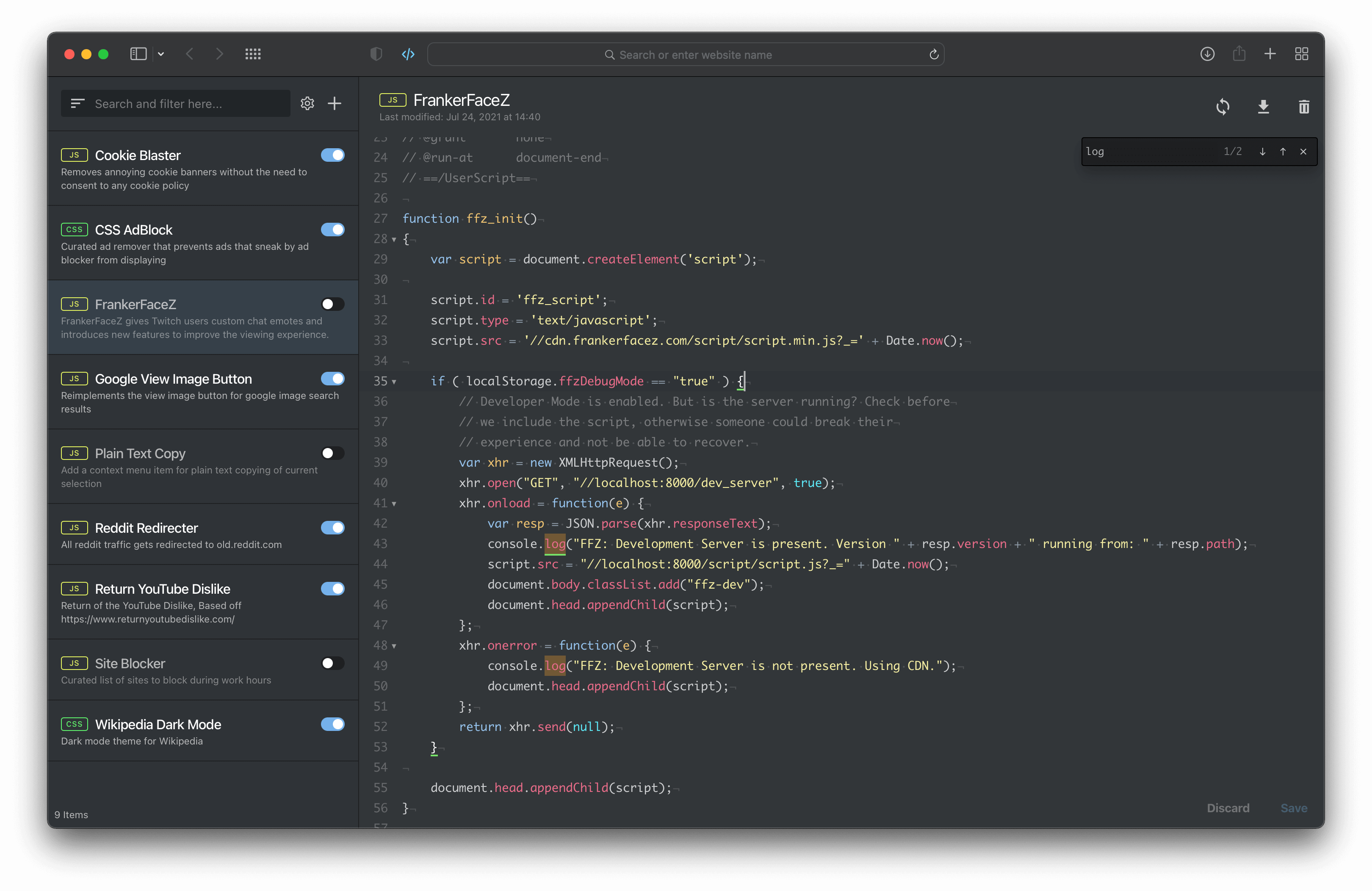
Userscripts is available for iOS (iPadOS) and macOS. For all versions, installation is done through Apple's App Store. On macOS, versions prior to 4.x were made available to download and install directly from the repository, but due to changes in the way Apple allows developers to distribute apps built with the WebExtension API, that is no longer an option.
To run Userscripts on iOS you should be on iOS 15.1 or higher.
To run Userscripts on macOS you should running macOS 12 or higher, along with Safari 14.1 or higher.
It's recommend to read this documentation and, if you have time, watch the following video overviews to familiarize yourself with the app and extension.
Once the app is downloaded and installed the following steps should be taken:
After installing the iOS App, you need two main steps to make the extension work:
Open the App and set a directory (For saving and loading userscripts)
Set Userscripts Directory button and select the directoryEnable the extension in Safari (And grant permissions)
AA button on iPhone, extension-icon on iPad, also where you open the extension's popup interface)Always Allow Userscripts for All WebsitesNote
The iOS App cannot detect whether you have enabled the extension in Safari, therefore, the App prompt will not change after you enable the extension. Currently the App interface is only used to set or change the userscripts directory.
You could select an iCloud folder for syncing scripts between macOS and iOS, but please note that there may be delays in synchronization, and you may encounter files be evictioned due to iCloud optimization, please refer to #424. (Since macOS 15 / iOS 18, please set "keep downloaded" for the folder to avoid eviction)
There are two main ways to install a user script from the iOS version:
.user.js URL in Safari, then open the extension popup and you will see an installation prompt
.user.js in /PATH part, not the ?QUERY or #HASH parts.user.js directly to the Userscripts directory you set aboveTip
Both of the above work equally well in the macOS version.
The iOS version does not include the script editor provided in the macOS version, but you can always edit script files in the directory you set directly on iOS. (use any third-party code editor apps, support in-place opening and editing)
After installing Userscripts on macOS, you do not need to select a userscripts directory if you do not plan on syncing your userscripts between multiple devices. Instead you can choose to use the default directory, which is located at ~/User/Library/Containers/Userscripts/Data/Documents/scripts - again, this is default (and automatic) behavior. You only need to select a new location if you want to store your userscripts elsewhere, which is especially useful if you are using an external code editor such as Sublime Text or VSCode.
Refer to Apple's official guide page: Use Safari extensions on your Mac
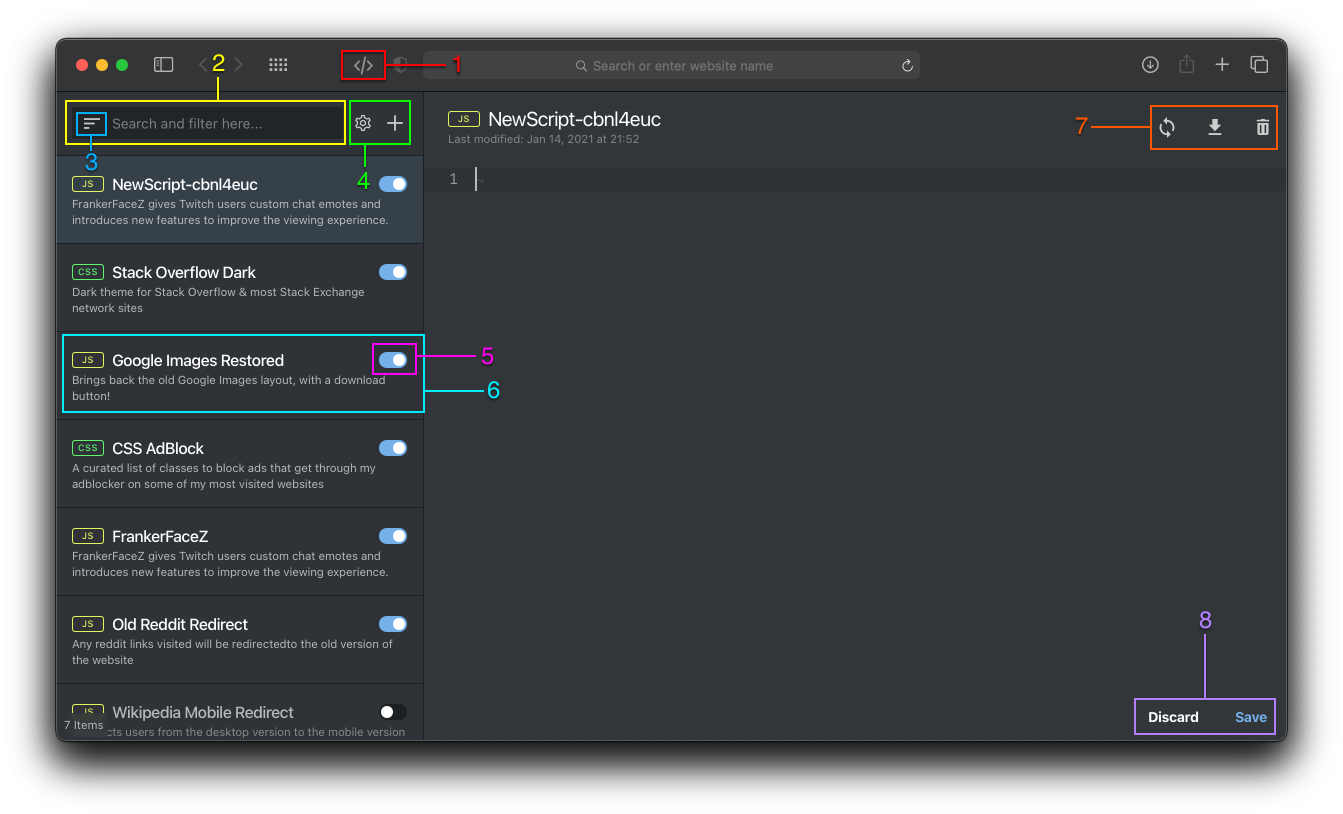
settings button (represented by a cog) displays the settings modal (discussed below)plus button allows users to add new items
New CSS is a "userscript" that expects CSS codeNew Javascript is a prototypical userscript that expects Javascript codeNew Remote allows the user to add a remote hosted userscript (or style) by inputting the web address (ex: https://www.k21p.com/example.user.js)@version tag@updateURL tagDiscard - while editing, reverts any unsaved changes you've made to a userscriptSave - while editing, saves all changes you've made to a userscript
Command + S is the keyboard shortcut for the action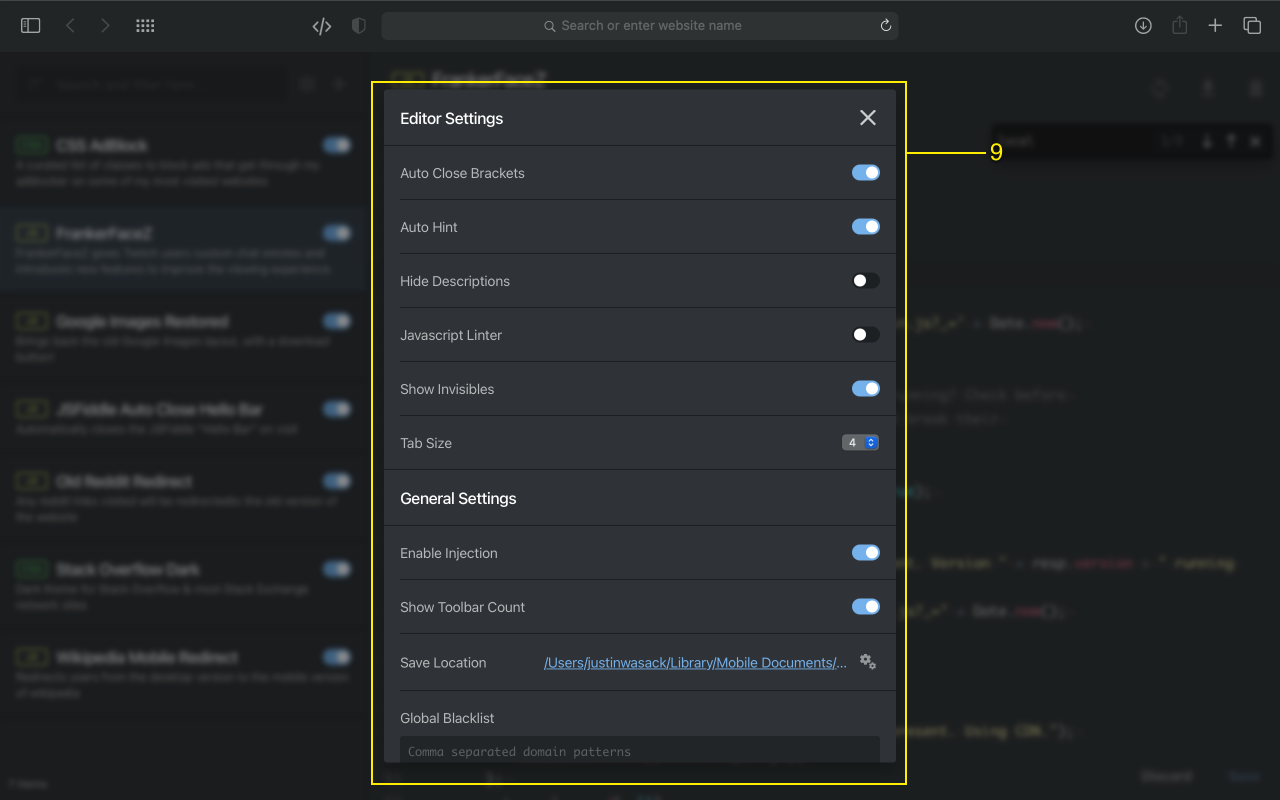
() [] {} "" ''4 because using 2 spaces is absolute insanity@match patterns (Match pattern structure), a page url that matches against a pattern in this list will be ignored for script injection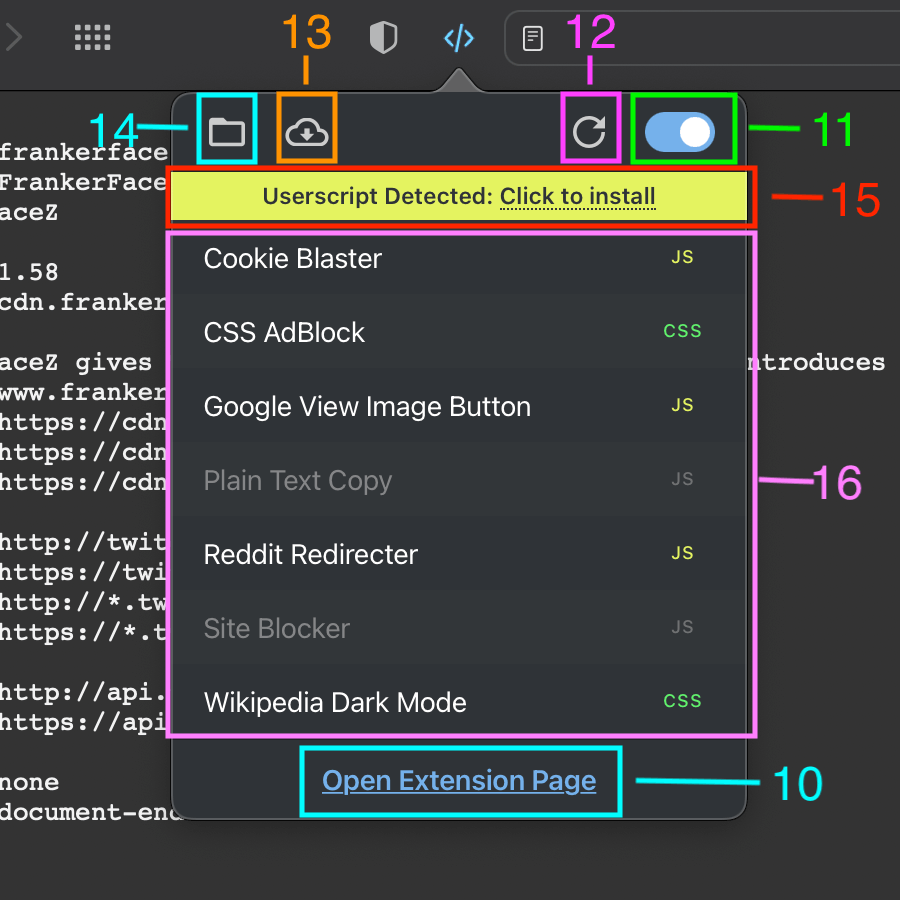
Userscripts Safari currently supports the following userscript metadata:
@name - This will be the name that displays in the sidebar and be used as the filename - you can not use the same name for multiple files of the same type@description- Use this to describe what your userscript does - this will be displayed in the sidebar - there is a setting to hide descriptions@icon - This doesn't have a function with this userscript manager, but the first value provided in the metadata will be accessible in the GM_/GM.info object@match - Domain match patterns - you can use several instances of this field if you'd like multiple domain matches - please refer to: Match pattern structure
http/s@exclude-match - Domain patterns where you do not want the script to run@include - Used to match against urls for injection, globs and regular expressions are allowed, read more here@exclude - Functions in a similar way as @include but rather than injecting, a match against this key's value will prevent injection@inject-into - allows the user to choose which context to inject the script into
auto (default), content, page
GM apis are only available when using content@run-at
@weight
@require
@version
@updateURL, this will allow the user to update a userscript from a remote source, if the version on their machine is < version at the update URL@version does nothing by itself, it needs to be paired with @updateURL for remote updating to function properly@updateURL
/PATH should end with .meta.js and contains the Metadata block> the version on the local machine, the file will be updated@updateURL does nothing by itself, it needs to be paired with @version for remote updating to function properly@downloadURL
/PATH should end with .user.js, that is, it cannot be in ?QUERY or #HASH parts@version and @updateURL)@version and @updateURL, if the local version is < the version of the file that @updateURL points to, the extension will attempt to update the file's code with the contents of the file located at the @downloadURL@downloadURL does nothing by itself, it needs @version and @updateURL to present in order to function properly@noframes
@grant
APIs (if any) your script uses, one on each @grant line, only those API methods will be provided.@grant values are provided, none will be assumed.none and something else, none takes precedence.All userscripts need at least 1 @match or @include to run!
Userscripts currently supports the following api methods. All methods are asynchronous unless otherwise noted. Users must @grant these methods in order to use them in a userscript. When using API methods, it's only possible to inject into the content script scope due to security concerns.
Note
The following API description applies to the latest development branch, you may need to check the documentation for the corresponding version. Please switch to the version you want to check via Branches or Tags at the top. For example:
For the current version of the App Store: https://github.com/quoid/userscripts/tree/release/4.x.x#api
For the v4.5.x and earlier versions: https://github.com/quoid/userscripts/tree/v4.5.4#api
For API type definitions, please refer to: types.d.ts
GM.addStyle(css)
css: StringPromise, resolved if succeeds, rejected with error message if failsGM.setValue(key, value)
key: Stringvalue: Any - any can be JSON-serializedPromise, resolved if succeeds, rejected with error message if failsGM.getValue(key, defaultValue)
key: StringdefaultValue: Any - optionalPromise, resolved with the value that was set or defaultValue provided or undefined if succeeds, rejected with error message if failsGM.deleteValue(key)
key: StringPromise, resolved if succeeds, rejected with error message if failsGM.listValues()
Promise, resolved with an array of the key names of presently set values if succeeds, rejected with error message if failsGM.getTab()
Promise, resolved with Any data that is persistent as long as this tab is open if succeeds, rejected with error message if failsGM.saveTab(tabObj)
tabObj: Any - any can be JSON-serializedPromise, resolved if succeeds, rejected with error message if failsGM.openInTab(url, openInBackground)
GM.closeTab(tabId)
tabId: Int - optional, the caller tab by defaultPromise, resolved if succeeds, rejected with error message if failsGM.setClipboard(data, type)
data: Stringtype: String - optional, text/plain by defaultPromise, resolved with a Bool value indicating succeeds or fails, rejected with error message if failsGM.info && GM_info
@grantscriptHandler: String - returns Userscriptsversion: String - the version of Userscripts appscriptMetaStr: String - the metablock for the currently running scriptscript: Object - contains data about the currently running script
description: Stringexclude-match: [String]excludes: [String]grant: [String]includes: [String]inject-into: Stringmatches: [String]name: Stringnamespace: Stringnoframes: Boolrequire: [String]resources: [String] - currently not implementedrun-at: Stringversion: String - the userscript version valueGM.xmlHttpRequest(details)
details: Objectdetails object accepts the following properties
url: String - requiredmethod: String - optional, GET by defaultuser: String - optionalpassword: String - optionalheaders: Object - optionaloverrideMimeType: String - optionaltimeout: Int - optionalbinary: Bool - optional (Deprecated, use binary data objects such as Blob, ArrayBuffer, TypedArray, etc. instead.)data: String | Blob | ArrayBuffer | TypedArray | DataView | FormData | URLSearchParams - optionalresponseType: String - optionalXMLHttpRequestsupload: Object - optional
onabort: Function - optionalonerror: Function - optionalonload: Function - optionalonloadend: Function - optionalonloadstart: Function - optionalonprogress: Function - optionalontimeout: Function - optionallengthComputableloadedtotalonabort: Function - optionalonerror: Function - optionalonload: Function - optionalonloadend: Function - optionalonloadstart: Function - optionalonprogress: Function - optionalonreadystatechange: Function - optionalontimeout: Function - optionalreadyStateresponseresponseHeadersresponseTyperesponseURLstatusstatusTexttimeoutresponseText (when responseType is text)Promise contains an additional property abort, resolved with the response object.
const xhr = GM.xmlHttpRequest({...});xhr.abort(); to abort the requestconst response = await xhr;const response = await GM.xmlHttpRequest({...});GM_xmlhttpRequest(details)
GM.xmlHttpRequest(details), except:abort, which is a Function
const foo = GM.xmlHttpRequest({...}); ... foo.abort(); to abort the requestThis is the directory where the app/extension will read from and write to. This directory is changed by opening the containing app and clicking the respective "change location" button.
Script Directory Notes
If you encounter a problem while using this app/extension or are in need of some assistance, please open an issue here in the repository. When doing so, please provide as much detail as possible. This includes listing system specs and what website and script you are trying to execute. Please follow the issue template!
"Refused to execute a script" error(s), what should I do!?
You are seeing this error because of the website's Content Security Policy. Currently there is no way to allow extension content scripts to bypass CSPs in Safari.
Automatically, the extension will attempt to circumvent strict CSPs, but if you are still experiencing issues, trying setting the userscript metadata key/val
// @inject-into autoor// @inject-into content.You can read more about this in this issue.
Do I need to use the extension's editor to create new userscripts or to edit existing?
You can use your own editor to update and manage your files. As long as you are saving the files to the save location, and they are properly formatted, they should be injected. However, you must open the extension popup beforehand. That means, if you create a new or edit an existing userscript with an external editor and save it to the save location, before injection will occur properly, the extension popup must be opened and the popup must load completely.
What are the keyboard shortcuts?
Whilst using the included editor, clicking
⌘ + swill save the file. While working the editor, clicking⌘ + fwill bring up the search bar andescwill hide it.
When I use @require, where are the required files stored?
All required files are saved as Javascript files in the extension container folder in macOS 11.x. That folder is located in the default save location, at:
~/Library/Containers/Userscripts/Data/Documents/require/.If you move files from the require folder or manually edit the
manifest.jsonfile, you will likely break app/extension functionality.
Code level contributions please refer to contributing.md
Further, any issue marked "help wanted" is actively seeking assistance. Please respond to those issues with feedback, guidance or offers of coding assistance.
Participating and interacting with any existing Issues or Discussions would be a great help to the project and open source communities. Thank you for your contributions.
The quickest and easiest way to support the project is by leaving a positive review on the App Store if you enjoy the extension and want to see future improvements. Seeing these reviews let me know I am doing something right, or wrong, and motivates me to continue working on the project.
The second best way to help out is to sign up to beta test new versions of the app. Since this extension values your privacy, and does not collect any data from users, it is difficult to gauge how the extension is being used. By signing up to be a beta tester it not only allows you to test upcoming features, but also gives me the opportunity to elicit direct feedback from real users.
Please join and test the corresponding beta version in releases via the TestFlight public link.
Userscripts does not collect any data from its users nor monitor activities or actions you perform within the application and extension. This means everything that you do with the application and extension is private to you and is never shared with the developers or third parties. Since there is no data collection, there is no data retention of any kind.
Copyright © 2018-2025 Justin Wasack
Licensed under the GNU General Public License v3.0 license for all open source applications. A commercial license is required for all other applications.
more like this
Firefox and Chrome extensions to prevent Google from making links ugly.
A window-oriented bottom taskbar for macOS — a Dock replacement that organizes by window, not app. 以「窗口」为单位的 macOS 任务条
search projects, people, and tags