red
rust based console code editor
 red-rs
git clone https://github.com/red-rs/red.gitred-rs/redRED
Introduction
red is a console-based text editor designed to be simple and efficient. It provides a straightforward interface for users who prefer command-line editing.
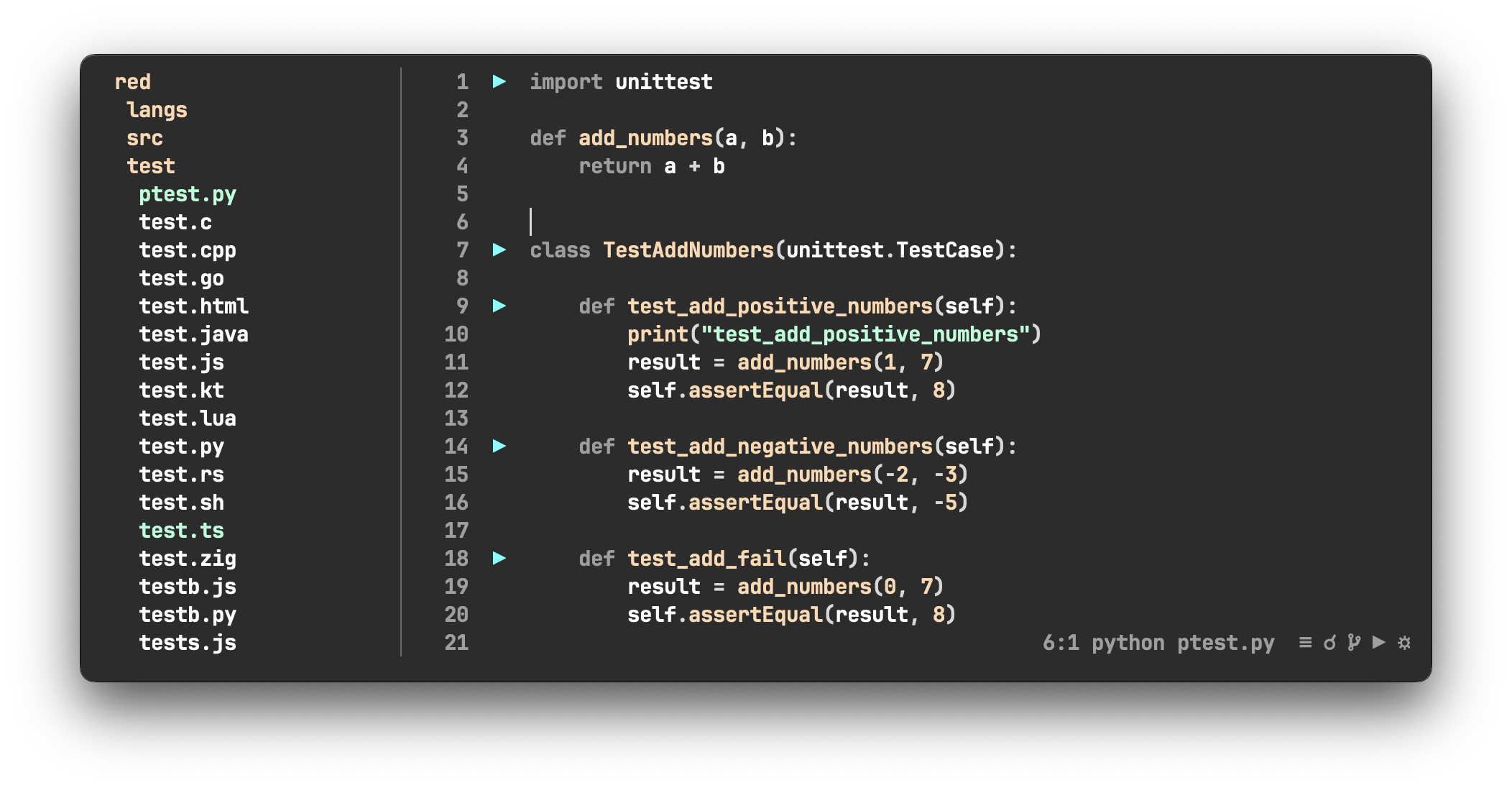
Features
Intuitive
red provides a clean and straightforward interface, making it easy to navigate and edit text efficiently. red also features intuitive key bindings, allowing users to perform common tasks quickly and effortlessly.
Performance
red leverages Rust's efficiency for blazing-fast text editing, ensuring that it consumes fewer resources as possble. With optimized cursor movement, content redraw, and Tree Sitter integration for highlighting, it ensures a responsive and efficient editing experience.
Mouse Support
red provides robust mouse and touchpad support, enabling smooth navigation, scrolling, selection. Furthermore, red is designed with keyboard-only users in mind, ensuring a seamless experience for all input preferences.
Code execution
With red, executing code to a Tmux session is as simple as a button click. Enjoy the convenience of seamlessly integrating code execution with your Tmux sessions, streamlining your workflow with ease.
Lsp
red supports the Language Server Protocol (LSP), enhancing your coding experience with intelligent code completion, real-time diagnostics, go to definition, references and more.
Search
red offers both local and global search capabilities, allowing users to effortlessly find text within their documents. With simple match movement, navigating through search results is intuitive and efficient, ensuring a seamless editing experience.
Themes
red comes with a variety of themes to personalize your editing experience. Choose from a selection of carefully crafted themes or create your own to suit your preferences. Compare to others terminal editors, red distinguishes itself by prioritizing background color customization, allowing the window to be fully transparent in accordance with glassmorphism design trends.
Discussion
Prerequisites
- Rust: Ensure you have Rust installed on your system.
- Cargo:
redis built using Cargo, Rust's package manager.
Installation
From releases
Linux:
curl -L https://github.com/red-rs/red/releases/latest/download/red-linux.tar.gz | tar -xz --overwrite
sudo mv red /usr/local/bin/
sudo chmod +x /usr/local/bin/red
red --help
Macos:
curl -L https://github.com/red-rs/red/releases/latest/download/red-universal-apple-darwin.tar.gz | tar -xz --overwrite
sudo mv red /usr/local/bin/
sudo chmod +x /usr/local/bin/red
red --version
From sources
-
Clone the repository:
git clone https://github.com/red-rs/red.git
-
Navigate to the project directory:
cd red
-
Install Rust:
curl --proto '=https' --tlsv1.2 -sSf https://sh.rustup.rs | sh
source $HOME/.cargo/env
-
Build the project:
cargo build --release
-
Set the RED_HOME env, add it to the PATH and apply (~/.bashrc or ~/.zshrc):
# bash
echo "export RED_HOME=$(pwd)" >> ~/.bashrc
echo 'export PATH="$RED_HOME/target/release:$PATH"' >> ~/.bashrc
source ~/.bashrc

# zsh
echo "export RED_HOME=$(pwd)" >> ~/.zshrc
echo 'export PATH="$RED_HOME/target/release:$PATH"' >> ~/.zshrc
source ~/.zshrc
-
Run red:
red file.txt
Key bindings and features:
-
Control + q- quit -
Control + s- save -
Control + c- copy -
Control + v- paste -
Control + x- cut -
Control + d- duplicate -
Control + z- undo -
Control + y- redo -
Control + f- find -
Control + f, type prefix, Control + g- global find -
Control + o- cursor back -
Control + p- cursor forward -
Shift + arrow- select text -
Option + right/left- smart horizontal movement -
Option + down/up- smart selection -
Option + delete- delete line -
Option + /- comment line -
Control + Shift + down/up- lines swap -
mouse selection- select text -
mouse double click- select word -
mouse triple click- select line -
Control + space- lsp completion -
Control + h- lsp hover -
Control + g / Control + mouse click- lsp definition -
Control + r / Option + mouse click- lsp references -
Control + e- lsp diagnostic (errors)
LSP
red assumes that you will install the LSP server by yourself and lsp is available from the terminal.
# rust
# curl --proto '=https' --tlsv1.2 -sSf https://sh.rustup.rs | sh
rustup component add rust-analyzer

# python
pip install -U 'python-lsp-server[all]'

# js/ts
npm i -g typescript typescript-language-server

# html
npm i -g vscode-langservers-extracted

# c/c++
# go to https://clangd.llvm.org/installation.html
clangd

# go
go install golang.org/x/tools/gopls@latest

# java
# jdtls

# kotlin
# https://github.com/fwcd/kotlin-language-server
# mac
brew install kotlin-language-server

# swift
# https://github.com/apple/sourcekit-lsp
xcrun

# bash
npm i -g bash-language-server


# zig
# mac
brew install zls
You can change the LSP settings in the config.toml file.
Performance Comparison
In the following test cases, the performance of red is compared to other popular editors, including Neovim (nvim), Helix, IntelliJ IDEA (idea), and different terminal emulators.
| Test Case | red |
nvim |
nvim (astro) |
helix |
red+alacritty |
red+alacritty +rust-analyzer |
idea |
red+mac terminal |
red+iterm |
|---|---|---|---|---|---|---|---|---|---|
| Cursor movement, cpu % | 0.5 | 5 | 6 | 4 | 0.4 + 12 | 60 | 25 | 30 | |
| Arrow scrolling, cpu % | 3 | 7 | 20 | 6 | 3+20 | 65 | 40 | 50 | |
| Mouse scrolling, cpu % | 10 | 30 | 45 | 30 | 20+30 | 55 | 60 | 130 | |
| Text editing, cpu % | 1.5 | 10 | 30 | 8 | 4+20 | 4+20+70 | 600 | 40 | 45 |
more like this
TachiSnap
TachiSnap — Pixel Snapper for animation pixel artists. Rust + WebAssembly client-side tool for cleaning up AI-generated…
bit_gossip
Pathfinding library for calculating all node pairs' shortest paths in an unweighted undirected graph.