moxon-frame-generator
simple generator for 3D-printed frames for a moxon rectangle antenna
OpenSCAD★ 50
Convert vector graphics to g-code for pen plotters, laser engravers, and other CNC machines
 sameer



Convert vector graphics to g-code for pen plotters, laser engravers, and other CNC machines
Check it out at https://sameer.github.io/svg2gcode. Just select an SVG and click generate!

cargo install svg2gcode-cli
Arguments:
  [FILE]
          A file path to an SVG, else reads from stdin

Options:
      --tolerance <TOLERANCE>
          Curve interpolation tolerance (mm)

      --feedrate <FEEDRATE>
          Machine feed rate (mm/min)

      --dpi <DPI>
          Dots per Inch (DPI) Used for scaling visual units (pixels, points, picas, etc.)

      --on <TOOL_ON_SEQUENCE>
          G-Code for turning on the tool

      --off <TOOL_OFF_SEQUENCE>
          G-Code for turning off the tool

      --begin <BEGIN_SEQUENCE>
          G-Code for initializing the machine at the beginning of the program

      --end <END_SEQUENCE>
          G-Code for stopping/idling the machine at the end of the program

  -o, --out <OUT>
          Output file path (overwrites old files), else writes to stdout

      --settings <SETTINGS>
          Provide settings from a JSON file. Overrides command-line arguments

      --export <EXPORT>
          Export current settings to a JSON file instead of converting.

          Use `-` to export to standard out.

      --origin <ORIGIN>
          Coordinates for the bottom left corner of the machine

      --dimensions <DIMENSIONS>
          Override the width and height of the SVG (i.e. 210mm,297mm)

          Useful when the SVG does not specify these (see https://github.com/sameer/svg2gcode/pull/16)

          Passing "210mm," or ",297mm" calculates the missing dimension to conform to the viewBox aspect ratio.

      --circular-interpolation <CIRCULAR_INTERPOLATION>
          Whether to use circular arcs when generating g-code

          Please check if your machine supports G2/G3 commands before enabling this.

          [possible values: true, false]

      --line-numbers <LINE_NUMBERS>
          Include line numbers at the beginning of each line

          Useful for debugging/streaming g-code

          [possible values: true, false]

      --checksums <CHECKSUMS>
          Include checksums at the end of each line

          Useful for streaming g-code

          [possible values: true, false]

      --newline-before-comment <NEWLINE_BEFORE_COMMENT>
          Add a newline character before each comment

          Workaround for parsers that don't accept comments on the same line

          [possible values: true, false]

  -h, --help
          Print help (see a summary with '-h')

  -V, --version
          Print version
svg2gcode-cli examples/Vanderbilt_Commodores_logo.svg --off 'M4' --on 'M5' -o out.gcode
To convert curves to G02/G03 Gcode commands, use flag --circular-interpolation true.

cat out.gcode
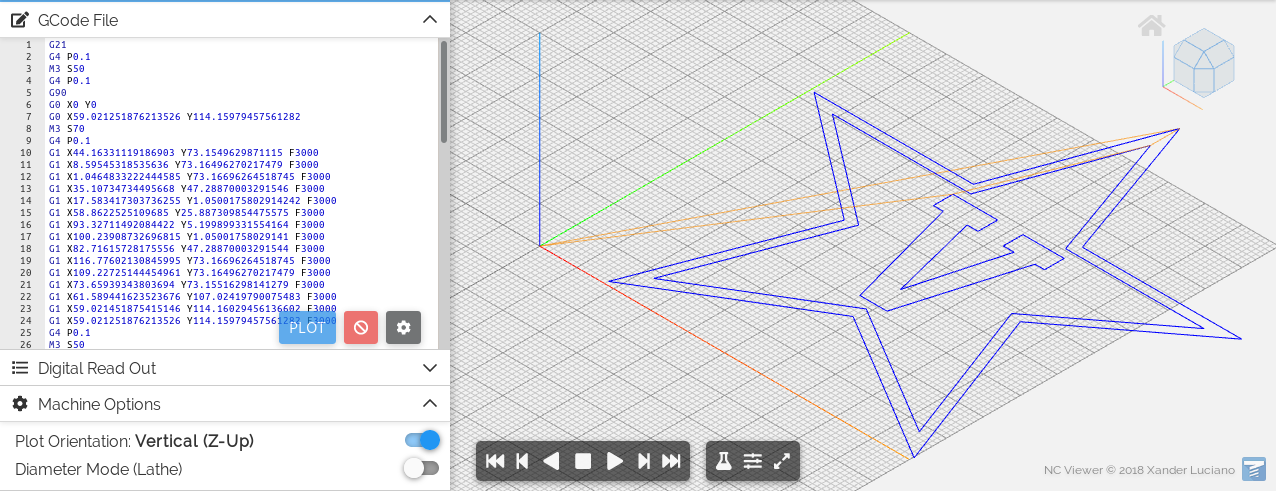
The core functionality of this tool is available as the svg2gcode crate.
These go into greater detail on the tool's origins, implementation details, and planned features.
Use a 3D printer for plotting: (thanks @jeevank for sharing this) https://medium.com/@urish/how-to-turn-your-3d-printer-into-a-plotter-in-one-hour-d6fe14559f1a
Convert a PDF to GCode: follow this guide using Inkscape to convert a PDF to an SVG, then use it with svg2gcode
Are shapes, fill patterns supported? No, but you can convert them to paths in Inkscape with Object to Path. See #15 for more discussion.
Are stroke patterns supported? No, but you can convert them into paths in Inkscape with Stroke to Path.
more like this
simple generator for 3D-printed frames for a moxon rectangle antenna
GPX 轨迹转 3D 可打印地形模型 | Hiking trail to 3D printable terrain | Electron + Vue。 一款面向户外爱好者与 3D 打印玩家的 Web 工具。将 GPX 徒步/骑行轨迹一键转…
Install and monitor KlipperScreen on Android via DroidKlipp APK, USB ADB forwarding, and WiFi fallback
search projects, people, and tags