moxon-frame-generator
simple generator for 3D-printed frames for a moxon rectangle antenna
OpenSCAD★ 50
MSLA/DLP, file analysis, calibration, repair, conversion and manipulation
 sn4k3
sn4k3git clone https://github.com/sn4k3/UVtools.gitsn4k3/UVtools
winget install -e --id PTRTECH.UVtoolschoco install -y uvtoolsNote: Winget is included on Windows 10 with recent updates and Windows 11 by default.
[ "$(command -v apt)" -a -z "$(command -v curl)" ] && sudo apt-get install -y curl
[ "$(command -v dnf)" -a -z "$(command -v curl)" ] && sudo dnf install -y curl
[ "$(command -v pacman)" -a -z "$(command -v curl)" ] && sudo pacman -S curl
[ "$(command -v zypper)" -a -z "$(command -v curl)" ] && sudo zypper install -y curl
bash -c "$(curl -fsSL https://raw.githubusercontent.com/sn4k3/UVtools/master/Scripts/install-uvtools.sh)"
bash -c "$(curl -fsSL https://raw.githubusercontent.com/sn4k3/UVtools/master/Scripts/install-uvtools.sh)"
# Replace x.x.x by the version you want to install
bash -c "$(curl -fsSL https://raw.githubusercontent.com/sn4k3/UVtools/master/Scripts/install-uvtools.sh)" -- x.x.x
This simple tool can give you insight of supports and find key failures.
Did you forget what resin or other settings you used on a project?
This can also save you, check every setting that was used with or change them!
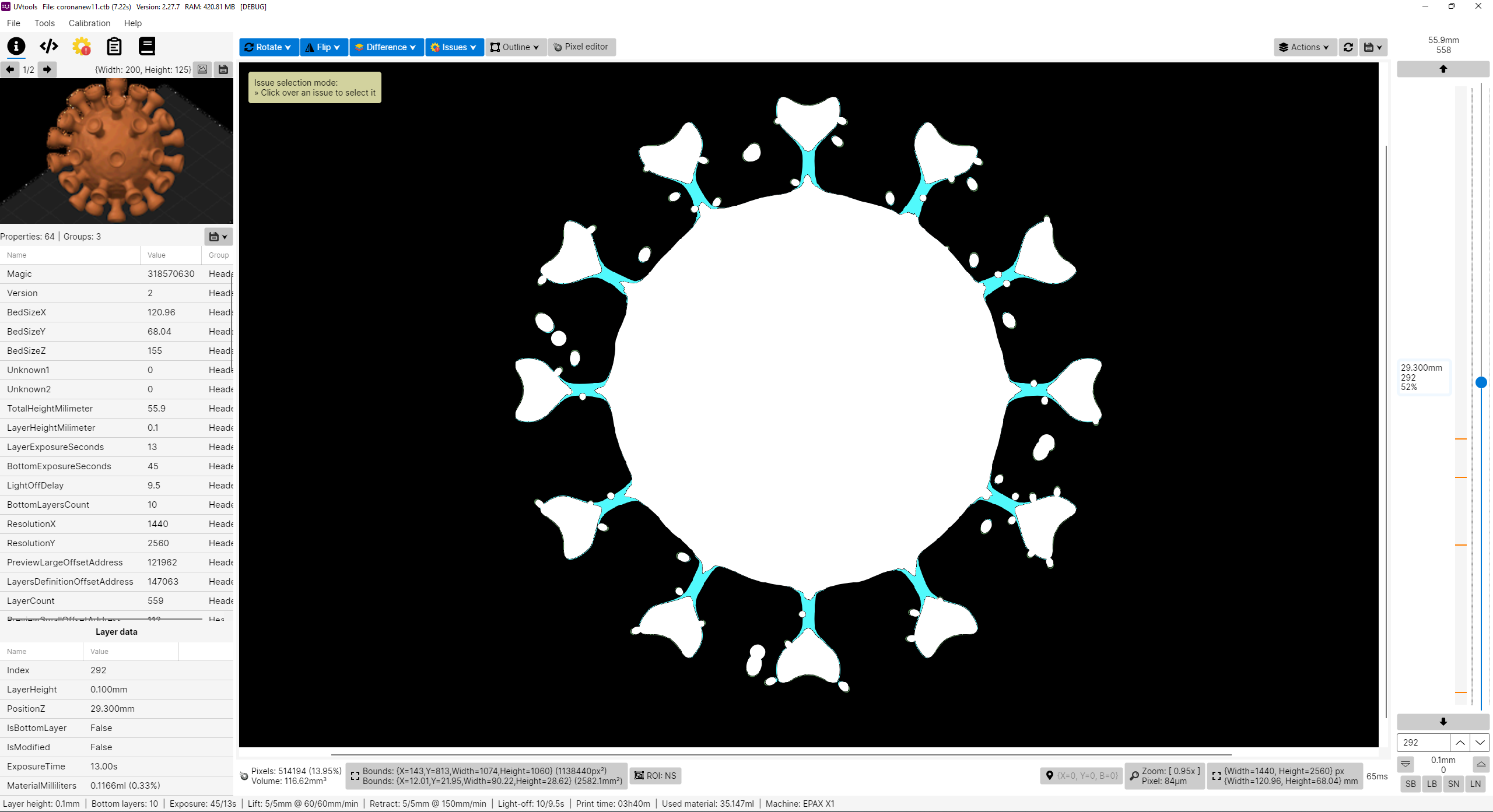
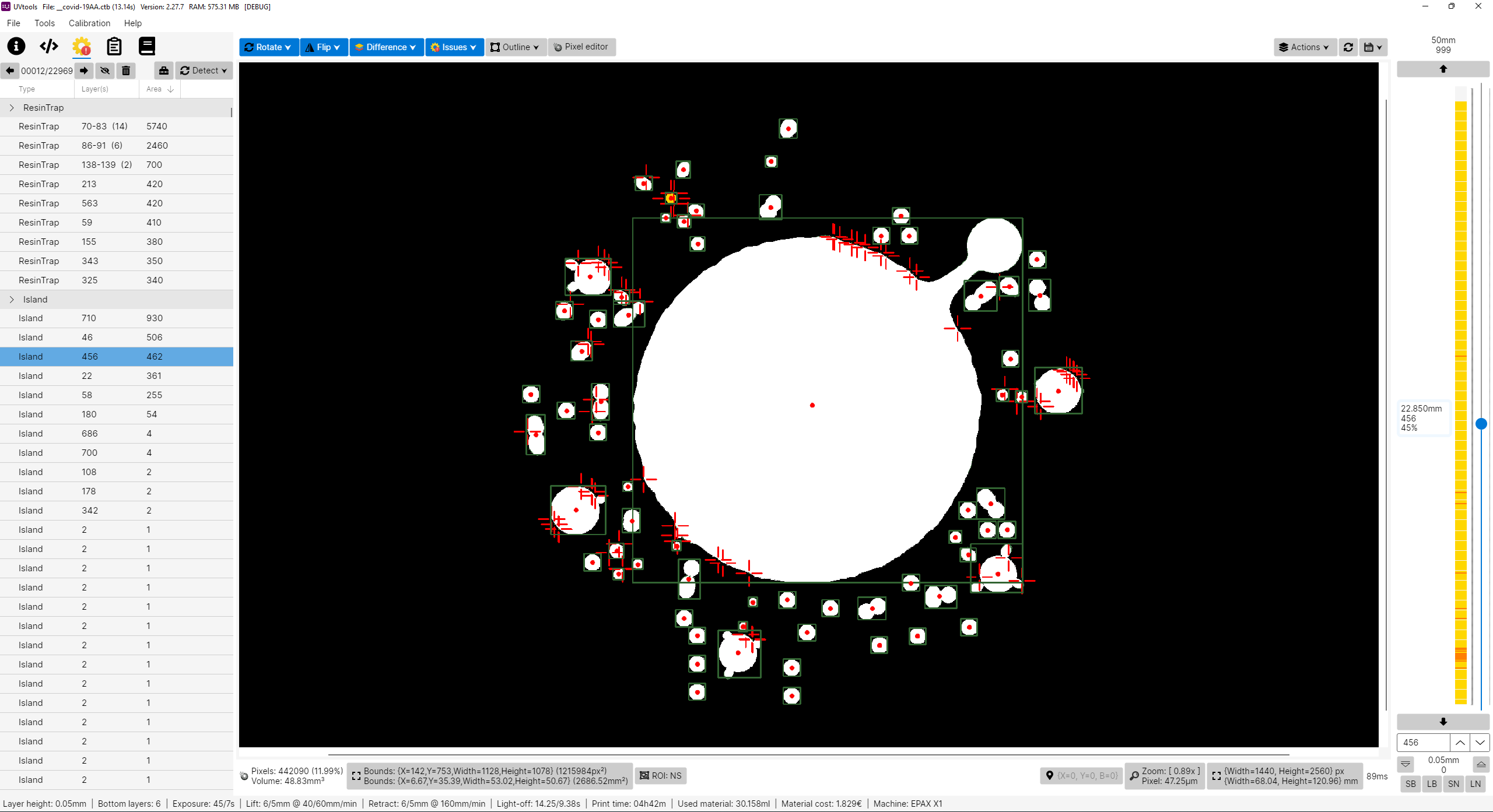
I don't own a Prusa SL1 or any other resin printer, for now I’m only an FDM user with Prusa MK3 and an Ender3. PrusaSlicer is my only choice, why? Because I think it's the best and features more, at least for me, simple but powerful.
So why this project? Well, in fact, I’m looking for a resin printer. I like to study and learn first before buying and get good and don't regret. While inspecting, I found that resin printers firmwares are not as universal as FDM, too many file formats and there before each printer can use their own property file, this of course limit the software selection. For example, only PrusaSlicer can slice SL1 files. So with that in mind, I'm preparing when I get a resin printer in the future, I can use PrusaSlicer instead of others. I've explored the other slicers and again, no one gives me joy, and I feel them unstable, many users slice model on PrusaSlicer just to get those supports and export STL to load in another, that means again PrusaSlicer is on the win side, the problem is they can't slice directly on PrusaSlicer, so, in the end, my project aims to do almost that, configure a printer on PrusaSlicer, e.g.: EPAX X1, slice, export a file, convert SL1 to native printer file and print.
Please note I don't own any resin printer! All my work is virtual and calculated, so, use experimental functions with care! Once things got confirmed, a list will show. But also, I need victims for a test subject. Proceed at your own risk!
Note that some variables will only work if the target format supports them, otherwise they will be ignored.
Replace the "xxx" by your desired value in the correct units
Usage:
  UVtoolsCmd [command] [options]

Options:
  -q, --quiet     Make output silent but exceptions error will still show
  --no-progress   Show no progress
  --dummy         Do not save alterations to file
  --core-version  Show core version information
  --version       Show version information
  -?, -h, --help  Show help and usage information

Commands:
  set-properties <input-file> <property=value>                                            Set properties in a file or to it layers with new values
  run <input-file> <classes/files>                                                        Run operations, suggestions and/or scripts
  convert <input-file> <target-type/ext> <output-file>                                    Convert input file into a output file format by a known type or extension []
  extract <input-file> <output-folder>                                                    Extract file contents to a folder []
  copy-parameters <input-file> <target-files>                                             Copy print parameters from one file to another
  set-preview, set-thumbnail <input-file> <file path|layer index|:random-layer|:heatmap>  Sets and replace thumbnail(s) in the file [default: :heatmap]
  compare <input-file-a> <input-file-b>                                                   Compare two files and output the differences
  print-issues <input-file>                                                               Detect and print issues
  print-properties <input-file>                                                           Prints available properties
  print-gcode <input-file>                                                                Prints the gcode of the file if available
  print-machines                                                                          Prints machine settings
  print-formats                                                                           Prints the available formats
Note: On each command you can use -? to see specific command help and extra options
UVtoolsCmd and the UI will not run. It still shows the terminal window.The following commands are the old way and commands under the UI executable, they will be removed soon, try to not use them, please prefer UVtoolsCmd.
Copy the following script, paste and run on a terminal:
(Required if you didn't use the auto installer or if it
failed to detect and install dependencies)
[ "$(command -v apt-get)" -a -z "$(command -v curl)" ] && sudo apt-get install -y curl
[ "$(command -v pacman)" -a -z "$(command -v curl)" ] && sudo pacman -S curl
[ "$(command -v dnf)" -a -z "$(command -v curl)" ] && sudo dnf install -y curl
[ "$(command -v zypper)" -a -z "$(command -v curl)" ] && sudo zypper install -y curl
sudo bash -c "$(curl -fsSL https://raw.githubusercontent.com/sn4k3/UVtools/master/Scripts/install-dependencies.sh)"
To run UVtools, open it folder on a terminal and call one of:
UVtools file./UVtoolsbash UVtools.shdotnet UVtools.dll [For universal package only, requires dotnet-runtime]If you download the .AppImage package variant, you must set run permissions to it before attempting to run it:

To run UVtools, open its folder on a terminal and call one of:
UVtools file./UVtools.app/Contents/MacOS/UVtoolsbash UVtools.app/Contents/MacOS/UVtools.shThere are multiple ways to open your file in UVtools:
Are you a developer? This project includes a .NET library (UVtools.Core) that can be referenced in your application to make use of my work. Easy-to-use calls that allow you to work with the formats. For more information, navigate the main code to see some calls.
Nuget package: https://www.nuget.org/packages/UVtools.Core
dotnet add package UVtools.Core
Build directions
The fastest way to compile the project is by run the build/compile.bat, however, if you wish to develop with Visual
Studio follow the following steps:
dotnet tool install --global wixAll my work here is given for free (OpenSource), it took some hours to build, test and polish the program.
If you're happy to contribute to a better program and for my work, I will appreciate the tip.
Use one of the following methods:
If you use UVtools in academic or scientific work, Please cite the specific UVtools version used in your research. The citation year should correspond to that version's release year.
Conceição, T. M. F. (2026). UVtools: MSLA/DLP file analysis, calibration, repair, conversion and manipulation (Version 6.0.3) [Computer software]. GitHub. https://github.com/sn4k3/UVtools/releases/tag/v6.0.3
In-text citation: (Conceição, 2026)
Conceição, Tiago M. F. (2026) UVtools: MSLA/DLP file analysis, calibration, repair, conversion and manipulation, version 6.0.3 [computer software]. Available at: https://github.com/sn4k3/UVtools/releases/tag/v6.0.3 (Accessed: 23 June 2026).
In-text citation: (Conceição, 2026)
T. M. F. Conceição, “UVtools: MSLA/DLP file analysis, calibration, repair, conversion and manipulation,” version 6.0.3, 2026. [Computer software]. Available: https://github.com/sn4k3/UVtools/releases/tag/v6.0.3
In-text citation: [1]
Conceição, Tiago M. F. UVtools: MSLA/DLP File Analysis, Calibration, Repair, Conversion and Manipulation. Version 6.0.3. Computer software. 2026. https://github.com/sn4k3/UVtools/releases/tag/v6.0.3
Conceição TMF. UVtools: MSLA/DLP file analysis, calibration, repair, conversion and manipulation [computer software]. Version 6.0.3. 2026. Available from: https://github.com/sn4k3/UVtools/releases/tag/v6.0.3
Conceição, Tiago M. F. UVtools: MSLA/DLP File Analysis, Calibration, Repair, Conversion and Manipulation. Version 6.0.3, GitHub, 2026, https://github.com/sn4k3/UVtools/releases/tag/v6.0.3
File processing was performed using UVtools, an open-source application for MSLA/DLP file analysis, calibration, repair, conversion and manipulation (Conceição, 2026).
@software{conceicao_uvtools,
author  = {Conceição, Tiago M. F.},
title   = {{UVtools}: MSLA/DLP File Analysis, Calibration, Repair,
Conversion and Manipulation},
version = {VERSION_USED},
year    = {VERSION_RELEASE_YEAR},
url     = {https://github.com/sn4k3/UVtools/releases/tag/VERSION_TAG},
note    = {Open-source computer software}
}
more like this
simple generator for 3D-printed frames for a moxon rectangle antenna
GPX 轨迹转 3D 可打印地形模型 | Hiking trail to 3D printable terrain | Electron + Vue。 一款面向户外爱好者与 3D 打印玩家的 Web 工具。将 GPX 徒步/骑行轨迹一键转…
Install and monitor KlipperScreen on Android via DroidKlipp APK, USB ADB forwarding, and WiFi fallback
search projects, people, and tags