mcec
The Model Context Environment Controller is eyes, hands, and a safe front door for agents on Windows; and the same batt…
 tig
tigBy Tig Kindel - Copyright © Kindel, LLC.
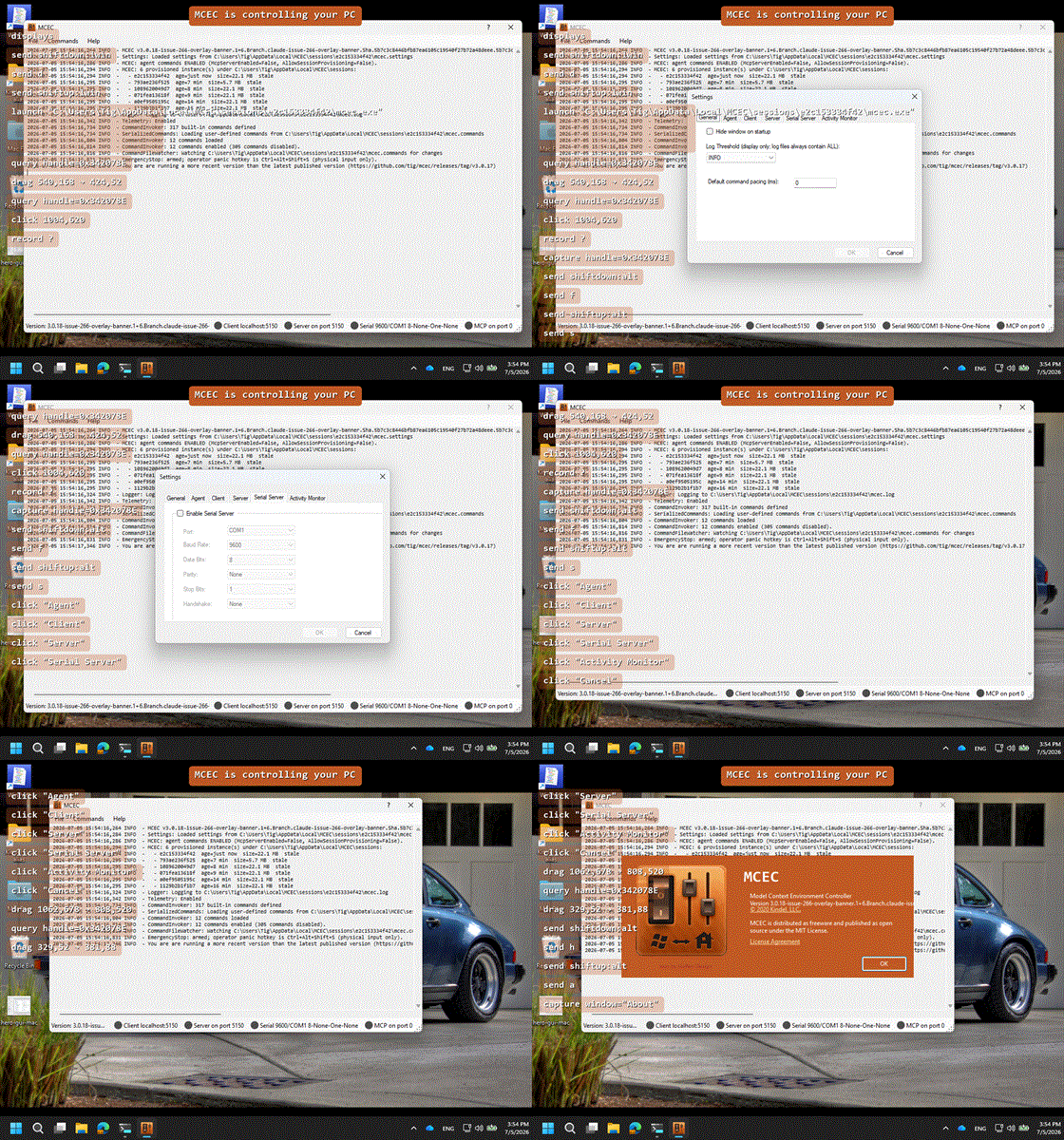
MCEC — the Model Context Environment Controller — is eyes, hands, and a safe front door for AI agents on Windows, and the same battle-tested TCP/serial remote control for integration systems it has always been.
For agents, it is a small native Windows daemon that gives a computer use model (the same capability Claude, Codex, and similar agents use to see a screen and drive a keyboard and mouse) something to mount, see through, and drive over the Model Context Protocol (MCP): capture windows, read UI Automation trees, find controls, launch apps, and actuate keyboard/mouse input. For control systems, it listens on TCP/IP or a serial port and translates remote commands into keystrokes, text, mouse moves, window messages, and app launches (Control4, Crestron, iRule, and others). The 3.0 agent surface is purely additive; classic remote control is unchanged.
Caution
The agent surface is powerful and off by default. Once enabled, an agent acts with your rights on whatever it targets. Read Agent Safety before you opt in.
Getting started
Install with winget (recommended):
winget install Kindel.mcec
Or download the signed installer. Launch MCEC from the Start menu when setup finishes.
To let a desktop agent app drive Windows through MCEC, use Provision new… on File ▸ Settings ▸ Agent (do not enable agent gates on the Program Files install). The full walkthrough — opt-in, handoff dialog, MCP client setup, and teardown — is in Agent Control → Quick start.
Documentation
Full guides live on the docs site:
- Install: winget, what gets installed where, side-by-side copies
- Configuration: Settings,
mcec.settings, commands, logging - Agent Control - the computer use surface: observation, targeting, actuation, MCP/HTTP
- Agent Safety: consent, provisioning, emergency stop, overlay
- Remote Control: TCP/serial commands and User Activity Monitor
- Examples: worked agent-driving recipes
Developers and agents: AGENTS.md (connect-time guidance and the MCEC-drives-MCEC dogfood test).
Contributor docs (CI, signing, architecture, image regeneration) live in dev/.
Frequently Asked Questions (FAQ)
Q: Claude, Copilot, and other agent platforms already support computer use. Why would I use MCEC?
Those platforms aim for cross-platform reach, so their computer use is built primarily on computer
vision: a screenshot, interpreted by a vision model, on every step. That is slow (a network round trip per
observation) and token-expensive (a full-window PNG on every turn). MCEC is Windows-only by design, so it
can go deeper than pixels: query reads the real Windows UI Automation tree (control type, name,
automation ID, bounds, enabled state, value), letting an agent target and verify a specific control instead
of re-parsing an image every step. capture (a real screenshot) is still there for when vision is the
right tool. And because MCEC speaks the Model Context Protocol (MCP), it works with any MCP-capable
agent, Claude, Codex, or a custom client, so a workflow or automated system built on it isn't locked to one
AI provider.
Q: Is it safe?
It depends on how you use it, but the defaults are safe. The agent surface is off until you opt in; every command ships individually disabled; every agent action is audit-logged on screen (the overlay) and in the log; and a global emergency-stop hotkey lets the operator halt a session instantly. See Agent Safety for the full model.
Q: What's the history of this thing?
- 3.0 (2026): Rebranded to the Model Context Environment Controller. Agent automation over MCP:
observation (
capture/query/record), targeting (find/wait-for), actuation (invoke/launch/drag/click), emergency stop, and isolated session provisioning; all opt-in and off by default. - 2.x (2019): Major rework: robust client/server, User Activity Monitor (occupancy sensing), Commands
Window with built-in test mode, per-monitor DPI support, config in
%APPDATA%. - 1.x (2004–2017): Born as Media Center Edition Controller (MS later dropped the "Edition" from
"Windows Media Center") for Windows Media Center HTPCs. Grew keyboard/mouse/window-message
simulation,
chars:with Unicode escapes, serial support, multi-client TCP, and the.commandsextension file. Moved from SourceForge to CodePlex to GitHub.
Integrations
more like this
todo-swipe-card
A specialized swipe card for todo lists in Home Assistant with custom styling
esphome_modbus_bridge
ESPHome Modbus TCP↔RTU Bridge – Transparent bridge for ESP8266/ESP32 that lets multiple Modbus TCP clients communicate…
ESPGeiger
☢️ ESP8266 / ESP32 Firmware for collecting and reporting statistics from Geiger counters