tunein-cli
Browse and listen to thousands of radio stations across the globe right from your terminal 🌎 📻 🎵✨
 tsirysndr
git clone https://github.com/tsirysndr/tunein-cli.gittsirysndr/tunein-cli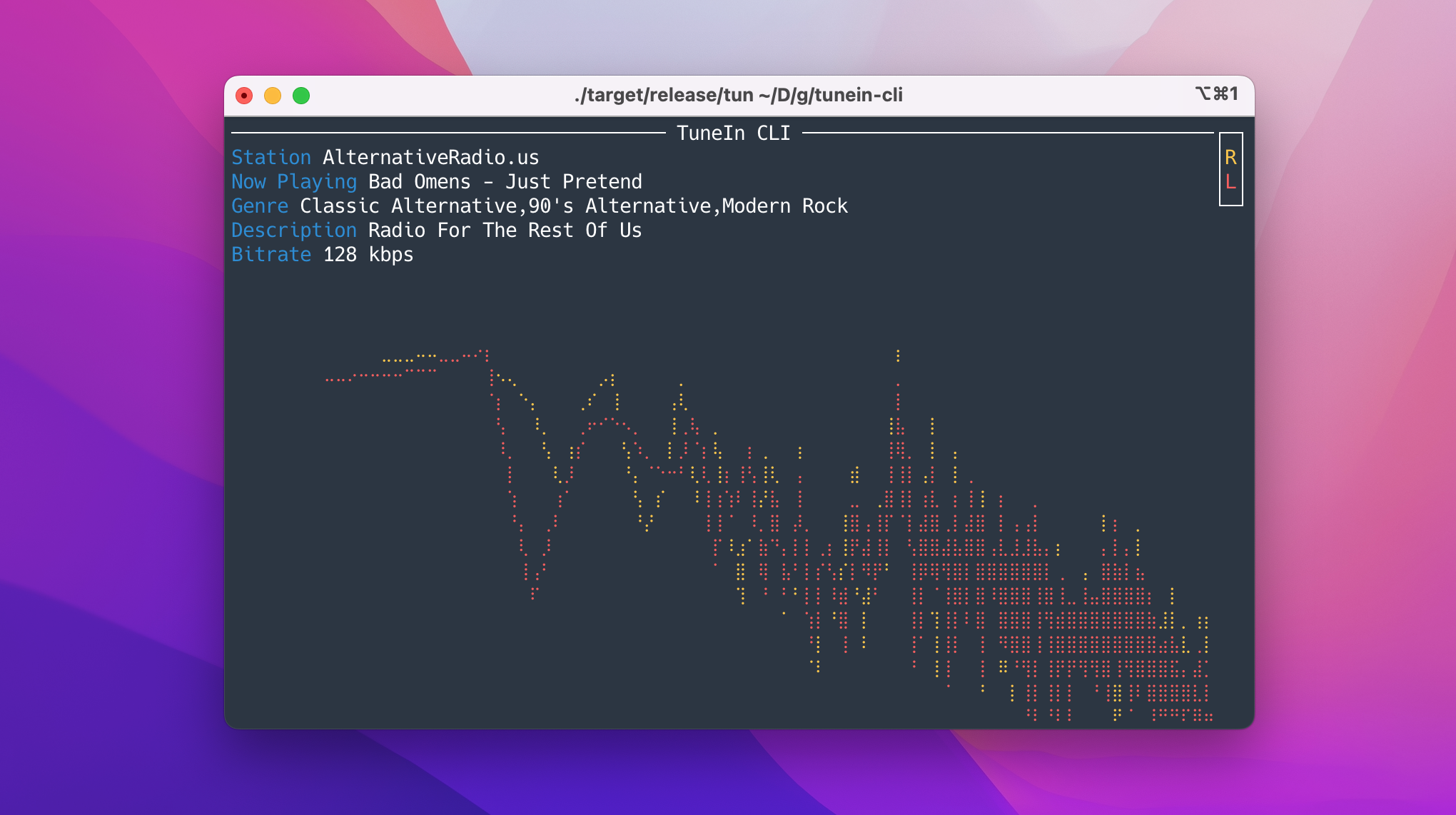
TuneIn CLI 📻 🎵 ✨

A command line interface for TuneIn Radio / Radio Browser.
You can search for stations, play them, and see what's currently playing.
📖 Table of Contents
- Features
- Installation
- Downloads
- Usage
- Equalizer
- Keyboard Shortcuts
- Web UI & GraphQL API
- Systemd Service
- API Documentation
- License
✨ Features
- 🔍 Search and play thousands of radio stations from TuneIn or Radio Browser
- 🎵 Plays all the common Icecast stream formats: MP3, AAC/AAC+, Ogg Vorbis, FLAC and WAV (decoded with Symphonia)
- 🎧 Powerful DSP (Equalizer, Bass, Treble) based on the Rockbox DSP engine
- 📻 Interactive TUI: browse categories, favourites, resume last station
- 🌈 Real-time audio visualizations: oscilloscope, vectorscope and spectroscope
- 🖥️ OS media controls integration (play/pause/volume from your keyboard's media keys)
- 🛰️ Built-in gRPC server, installable as a systemd service
- 🌐 Embedded web UI with a GraphQL API (
tunein web) — search, browse and listen from your browser
🚚 Installation
Compile from source, without Nix:
# Install dependencies
brew install protobuf # macOS
sudo apt-get install -y libasound2-dev protobuf-compiler libdbus-1-dev # Ubuntu/Debian
# Compile and install
git clone https://github.com/tsirysndr/tunein-cli
cd tunein-cli
cargo install --path .
With Nix:
git clone https://github.com/tsirysndr/tunein-cli
cd tunein-cli
nix develop --experimental-features "nix-command flakes"
cargo install --path .
macOS/Linux
Using Bash:
curl -fsSL https://cdn.jsdelivr.net/gh/tsirysndr/tunein-cli@ab6a1ab/install.sh | bash
Using Homebrew:
brew install tsirysndr/tap/tunein
Using Nix:
cachix use tsirysndr
nix profile install --experimental-features "nix-command flakes" github:tsirysndr/tunein-cli
Ubuntu/Debian
echo "deb [trusted=yes] https://apt.fury.io/tsiry/ /" | sudo tee /etc/apt/sources.list.d/fury.list
sudo apt-get update
sudo apt-get install tunein-cli
Fedora
Add the following to /etc/yum.repos.d/fury.repo:
[fury]
name=Gemfury Private Repo
baseurl=https://yum.fury.io/tsiry/
enabled=1
gpgcheck=0
Then run:
dnf install tunein-cli
Arch Linux
Using paru:
paru -S tunein-cli-bin
Or download the latest release for your platform here.
📦 Downloads
Mac: arm64: tunein_v0.7.1_aarch64-apple-darwin.tar.gz intel: tunein_v0.7.1_x86_64-apple-darwin.tar.gzLinux: tunein_v0.7.1_x86_64-unknown-linux-gnu.tar.gz
🚀 Usage
USAGE:
    tunein <SUBCOMMAND>

OPTIONS:
    -h, --help                   Print help information
    -p, --provider <provider>    The radio provider to use, can be 'tunein' or 'radiobrowser'.
                                 Default is 'tunein' [default: tunein]
    -V, --version                Print version information

SUBCOMMANDS:
    browse    Browse radio stations
    help      Print this message or the help of the given subcommand(s)
    play      Play a radio station
    search    Search for a radio station
    server    Start the server
    service   Manage systemd service for tunein-cli server
    web       Start the web UI & GraphQL API server
Search for a radio station:
tunein search "BBC Radio 1"
Result:
BBC Radio 1 | The best new music | id: s24939
BBC Radio 1Xtra | Remi Burgz | id: s20277
Play a radio station:
tunein play "alternativeradio.us"
# Or by station ID
tunein play s221580
🎧 Equalizer
TuneIn CLI ships a powerful DSP (Equalizer, Bass, Treble) based on the Rockbox DSP engine. Press e while playing (or anywhere in interactive mode) to open the equalizer popup: a 10-band graphic equalizer plus Bass and Treble shelf controls.
| Key | Action |
|---|---|
e |
Open / close the equalizer |
← / → |
Select a band (or Bass / Treble) |
↑ / ↓ |
Adjust the selected gain (Shift for coarse steps) |
Space |
Toggle the equalizer on / off |
0 |
Reset all gains to 0 dB |
Esc |
Close the popup |
Bass & Treble
The Bass and Treble columns control Rockbox-style shelf filters (±24 dB, in whole-dB steps). Following Rockbox semantics they are independent of the equalizer on/off switch: any non-zero value is applied even when the band EQ is off. The shelf cutoffs default to 200 Hz (bass) and 3.5 kHz (treble) and can be changed in the settings file.
Settings
Every change is saved immediately to settings.toml in the config directory (~/Library/Application Support/io.tunein-cli.tunein-cli/ on macOS, ~/.config/tunein-cli/ on Linux). The schema matches Rockbox's settings.toml, so EQ presets round-trip between the two:
eq_enabled = true
bass = 4        # dB, shelf filter, independent of eq_enabled
treble = -2     # dB
bass_cutoff = 0   # Hz, 0 = default (200)
treble_cutoff = 0 # Hz, 0 = default (3500)

[[eq_band_settings]]
cutoff = 32 # Hz
q = 7       # Q × 10 (0.7)
gain = 30   # dB × 10 (+3.0 dB)

# … 9 more [[eq_band_settings]] entries (63, 125, 250, 500, 1k, 2k, 4k, 8k, 16k)
🎹 Keyboard Shortcuts
Press ? in either UI to see every available shortcut with a description. Highlights:
| Key | Player | Interactive mode |
|---|---|---|
Space |
Play / pause | Toggle EQ (in popup) |
Tab |
Cycle visualization | — |
↑ / ↓ |
Volume | Navigate lists |
e |
Equalizer | Equalizer |
f |
— | Add / remove favourite |
x |
— | Stop playback |
+ / - |
— | Volume |
? |
Help | Help |
q / Ctrl+C |
Quit | Quit (Ctrl+C) |
🌐 Web UI & GraphQL API
TuneIn CLI ships a modern dark-themed web interface — an internet radio player and browser — served together with a GraphQL API from a single embedded Actix server:
tunein web          # listens on http://localhost:8881
tunein web 3000     # custom port
- Web UI: http://localhost:8881 — instant search, category browsing, provider switching (TuneIn / Radio Browser) and a persistent player with live "now playing" metadata.
- GraphQL playground: http://localhost:8881/graphql (GraphiQL); POST your queries to the same endpoint.
The frontend lives in web/ and is embedded into the binary at compile time — see web/README.md for the stack, development workflow and GraphQL API reference.
🧙 Systemd Service
Tunein daemon can be started as a systemd service. To enable and start the service, run the following command:
tunein service install
To disable and stop the service, run the following command:
tunein service uninstall
To check the status of the service, run the following command:
tunein service status
API Documentation
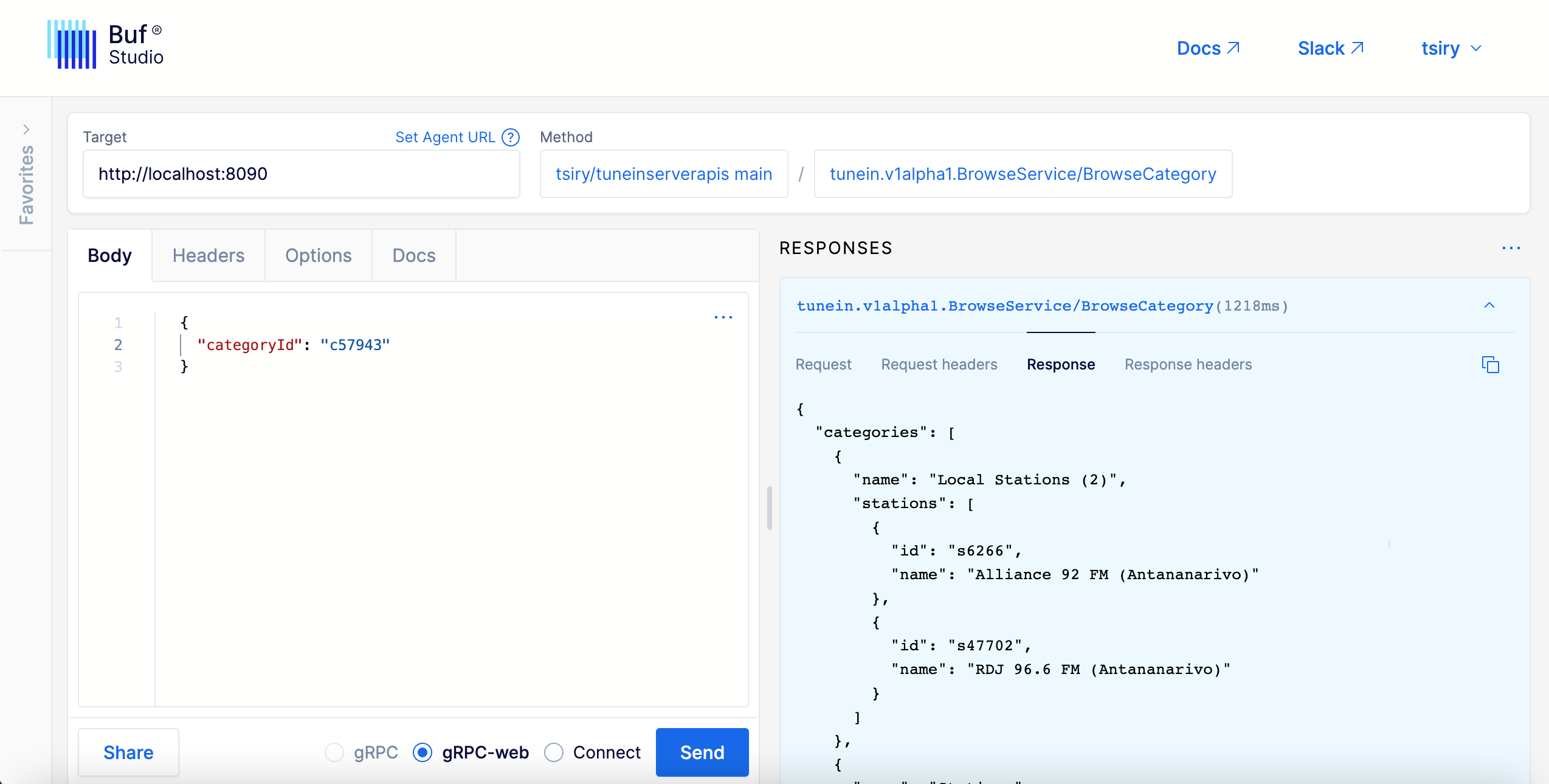
https://buf.build/tsiry/tuneinserverapis/docs/main:tunein.v1alpha1
You can start the server locally by running:
tunein server
and then use Buf Studio to make requests to the server
📝 License
more like this