moxon-frame-generator
simple generator for 3D-printed frames for a moxon rectangle antenna
OpenSCAD★ 50
Thumbnail generator for STL files
 unlimitedbacon
git clone https://github.com/unlimitedbacon/stl-thumb.gitunlimitedbacon/stl-thumb
Stl-thumb is a fast lightweight thumbnail generator for 3D model(STL, OBJ, 3MF) files. It can show previews for model files in your file manager on Linux and Windows. It is written in Rust and uses OpenGL.
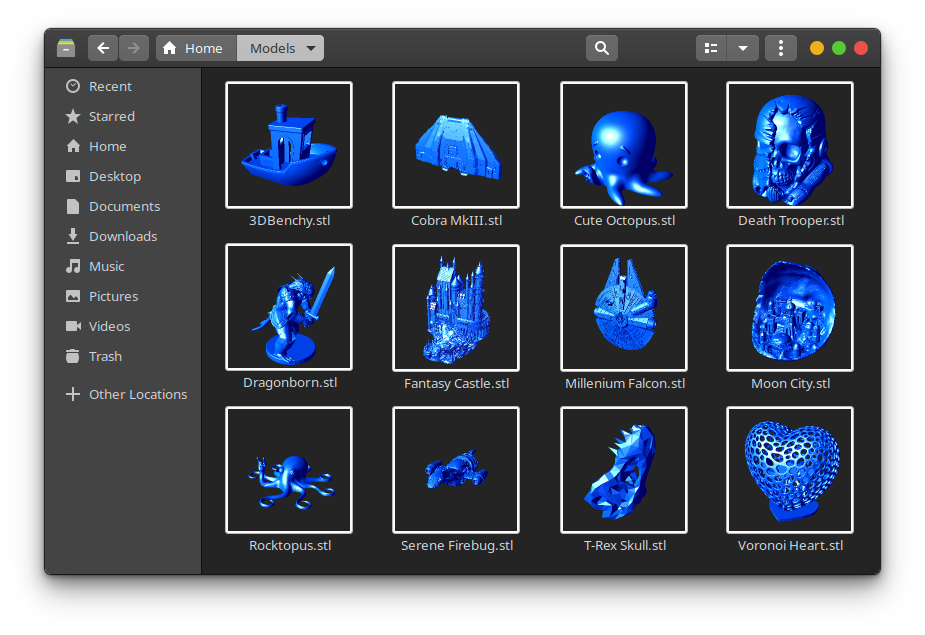
Stl-thumb requires 64 bit Windows 7 or later. Download the installer .exe for the latest release and run it.
The installer will tell the Windows shell to refresh the thumbnail cache, however this does not always seem to work. If your icons do not change then try using the Disk Cleanup utility to clear the thumbnail cache.
Stl-thumb works with Gnome and most other similar desktop environements. If you are using the KDE desktop environment then you will also need to install the seperate stl-thumb-kde package.
Make sure that your file manager is set to generate previews for files larger than 1 MB. Most file managers have this setting under the Preview tab in their Preferences.
A package is available in the AUR. Install it manually or using your favorite AUR helper.
$ yay -S stl-thumb
Download the .deb package for your platform (usually amd64) and install it. Packages are also available for armhf (Raspberry Pi) and arm64 (Pine64 and other SBCs).
$ sudo apt install ./stl-thumb_0.4.0_amd64.deb
For openSUSE Tumblweed there is a user repo available:
$ sudo zypper ar -f obs://home:jubalh:stl stl
$ sudo zypper ref
$ sudo zypper install stl-thumb
If you get errors about fontconfig being missing, install the development package
You can build the debug version with:
$ cargo build
When your done, build the realease version with:
$ cargo build --release
$ cargo install cargo-deb #this is an additional dependency
$ cargo deb
$ cargo install generate-rpm #this is an additional dependency
$ cargo generate-rpm
$ stl-thumb <MODEL_FILE> [IMG_FILE]
| Option | Description |
|---|---|
| <MODEL_FILE> | The model file you want a picture of. Use - to read from stdin instead of a file. |
| <IMG_FILE> | The thumbnail image file that will be created. Use - to write to stdout instead of a file. |
| -s, --size <size> | Specify width of the image. It will always be a square. |
| -f, --format <format> | The format of the image file. If not specified it will be determined from the file extension, or default to PNG if there is no extension. Supported formats: PNG, JPEG, GIF, ICO, BMP |
| -m, --material <ambient> <diffuse> <specular> | Colors for rendering the mesh using the Phong reflection model. Requires 3 colors as rgb hex values: ambient, diffuse, and specular. Defaults to blue. |
| -b, --backround <color> | The background color with transparency (rgba). Default is ffffff00. |
| -a, --antialiasing [none, fxaa] | Anti-aliasing method. Default is FXAA, which is fast but may introduce artifacts. |
| --recalc-normals | Force recalculation of face normals. Use when dealing with malformed STL files. |
| -x | Display the image in a window instead of saving a file. |
| -h, --help | Prints help information. |
| -V, --version | Prints version information. |
| -v[v][v] | Increase message verbosity. Levels: Errors, Warnings, Info, Debugging |
more like this
simple generator for 3D-printed frames for a moxon rectangle antenna
GPX 轨迹转 3D 可打印地形模型 | Hiking trail to 3D printable terrain | Electron + Vue。 一款面向户外爱好者与 3D 打印玩家的 Web 工具。将 GPX 徒步/骑行轨迹一键转…
Install and monitor KlipperScreen on Android via DroidKlipp APK, USB ADB forwarding, and WiFi fallback
search projects, people, and tags