Godot-Voxel-Destruction
Allows dynamic voxel destruction with debris along with other voxel features. Allows importing .vox files and damaging…
GDScript★ 52
Point cloud processing tool library.
 zxy-bjtu
git clone https://github.com/zxy-bjtu/PointCloudToolBox.gitzxy-bjtu/PointCloudToolBoxThis point cloud processing tool library can be used to process point clouds, 3d meshes, and voxels. Our toolbox not only supports single file processing, but also batch processing.
All operations have been encapsulated and can be run directly on the command line. The basic operations of the current toolbox support running on windows and linux systems, but some operations, such as point cloud upsampling, require a gpu operating environment, so currently it can only be run on linux systems. Please refer to the usage to learn how to use our point cloud toolbox.
Our code has passed the test on windows10 and ubuntu18.04. The python version we use is 3.7.5 and the cuda version is 10.0. Before running our code, you need to install some dependent libraries as followed. In order to facilitate the installation environment, you can use the command:
pip install -r requirements.txt
Dependent packages:
- scipy==1.6.2
- torch==1.4.0+cu100
- openmesh==1.1.6
- open3d==0.13.0
- plyfile==0.7.4
- numpy==1.21.2
- vtk==8.2.0
- python-pcl==0.3.0rc1
- pyntcloud==0.1.5
- mayavi==4.7.1+vtk82
- pyvista==0.31.3
It is noticed that package python-pcl is not easy to install. You can refer to here for more details.
Nearly all commands can be found in run.sh. More details will be introduced in this section.
This module can batch convert one point cloud format into another point cloud format.
python pc_factory.py --mode 0 --input_dir ../data/test --output_dir ../result/pcd_2_xyz/ --input_format pcd --output_format xyz
This module can batch convert one point cloud format into another 3d mesh format. The technology used here is 3D reconstruction. Refer to open3d, Poisson surface reconstruction and ball pivoting reconstruction are implemented in this toolbox.
# poisson surface reconstruction
python pc_factory.py --mode 11 --input_dir ../data/test --output_dir ../result/3d_poisson/ --input_format pcd --output_format off --constructor poisson --depth 9
# ball pivoting
python pc_factory.py --mode 11 --input_dir ../data/test --output_dir ../result/ball_pivoting/ --input_format pcd --output_format off --constructor ball_pivoting
For more details about parameters, you can find in here.
This module can convert point cloud into binvox voxel grid. This is implemented by using pyntcloud and script binvox_rw.py.
# batch processing
python pc_factory.py --mode 10 --input_dir ../data/test --output_dir ../result/pc_voxel_grid/ --input_format pcd --output_format binvox --voxel 64
# single processing
python PointCloud2Voxel.py --mode 10 --input_file ../data/test/plant_0312.xyz --output_dir ../result/pc_voxel_grid/ --output_format binvox --voxel 64
Our toolbox uses Mayavi to visualize the point cloud. The script can be found in here. Some parameters (fgcolor, colormap, scale_factor, sphere) can be modified according to your own situation.
python pointcloud_vis.py --mode 12 --input_file ../data/test/000001.pcd --scale_factor 0.1
The result is shown:
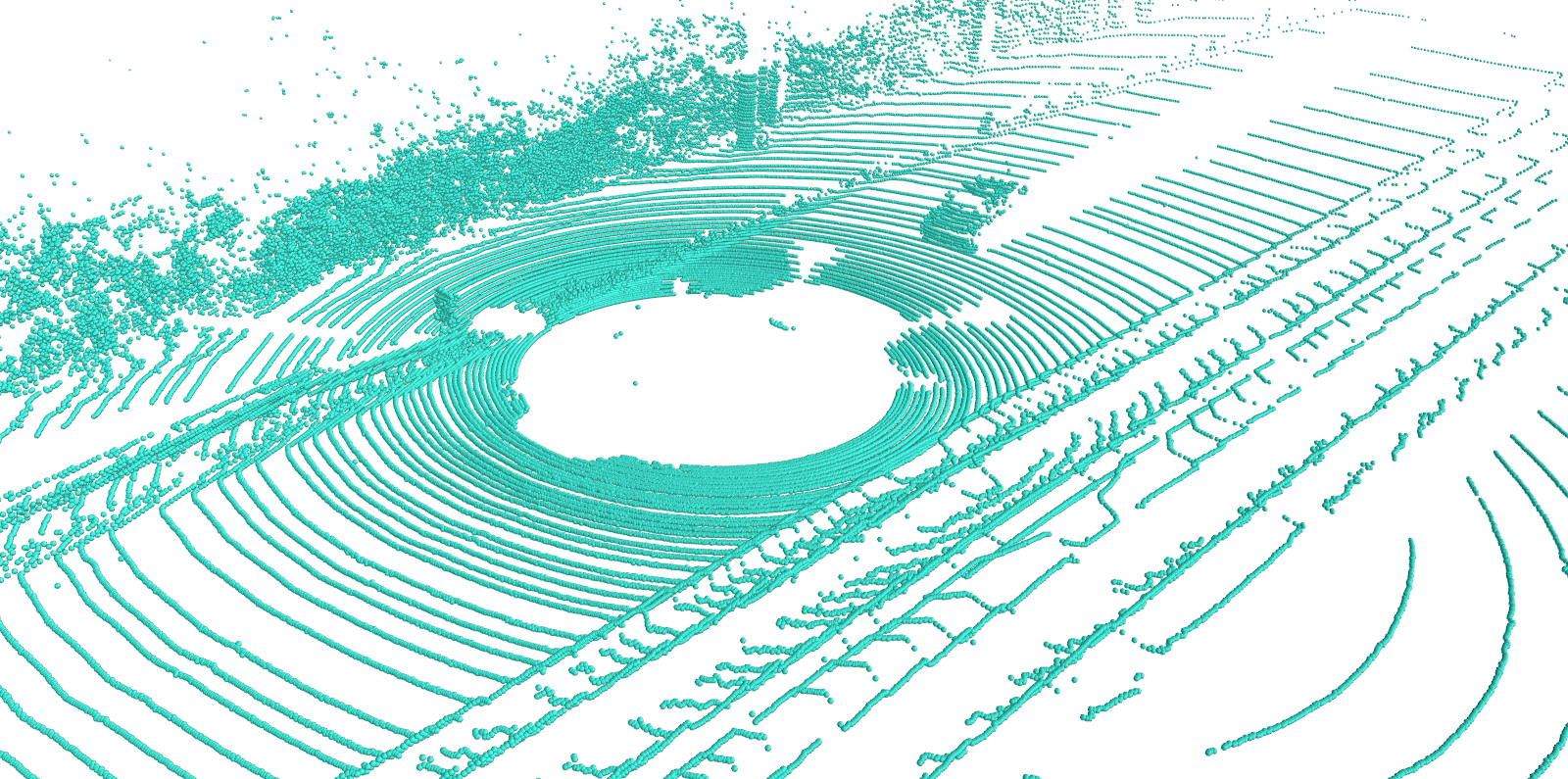
Besides, you can export eps, pdf, png, jpg and other binary format using Mayavi.
This module can convert dense point cloud into sparse one. The input is dense point cloud, whereas the output is sparse point cloud with same extension. Here we implemented 4 point cloud downsampling algorithms: fps, random downsampling, uniform downsampling and voxel downsampling. The fps is also called farthest point sampling, which needs to use pytorch to speed up.
# FPS(recommended)
python pc_factory.py --mode 5 --down_sampler fps --point_num 2048 --input_dir ../data/test --output_dir ../result/downsample/fps/ --input_format ply
# random downsampling
python pc_factory.py --mode 5 --down_sampler random --point_num 2048 --input_dir ../data/test --output_dir ../result/downsample/random/ --input_format ply
# uniform downsampling
python pc_factory.py --mode 5 --down_sampler uniform --k 4 --input_dir ../data/test --output_dir ../result/downsample/uniform/ --input_format ply
# voxel downsampling
python pc_factory.py --mode 5 --down_sampler voxel --voxel_size 0.5 --input_dir ../data/test --output_dir ../result/downsample/voxel/ --input_format ply
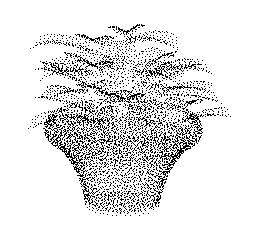
The result of fps is shown. The input point has 8192 points, whereas output points has 2048 points.
The input:
The fps output:
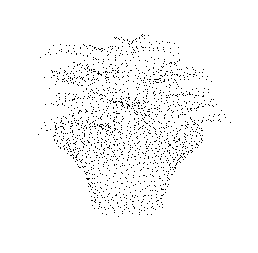
Since uniform sampling and voxel sampling cannot get the result of the specified number of points, and random sampling may lose semantic information of the original point cloud . So it is recommended to use fps.
This module can convert sparse point cloud into dense one. Here we use Meta-PU to sample point cloud with arbitrary upsampling rate. Pretrained models were provided in our toolbox, you can find them in here. This application requires CUDA environment. You can't run this application on Windows10 unless you have CUDA environment. It is recommended to run it on Unix platform. More details can be found in ./PU/Meta-PU/README.md.
python pc_factory.py --mode 9 --input_dir ../PU/Meta-PU/model/data/all_testset/4/input --input_format xyz --pu_model Meta-PU --scale 5.5
In the script pc_factory.py, we have encapsulated the Meta-PU model. You can directly use the above command to complete upsampling, or refer to ./PU/Meta-PU/README.md to run.
This module achieves point cloud filtering by python-pcl. Five filtering algorithms can be used here: PassThroughFilter, VoxelGrid, project_inliers, remove_outlier, statistical_removal. The script of point cloud filtering is here.
# PassThroughFilter
python pc_factory.py --mode 3 --filter PassThroughFilter --upper_limit 5 --input_dir ../data/test --output_dir ../result/filter/PassThroughFilter/ --input_format pcd
# VoxelGrid(recommended)
python pc_factory.py --mode 3 --filter VoxelGridFilter --voxel_size 0.1 --input_dir ../data/test --output_dir ../result/filter/VoxelGridFilter/ --input_format pcd
# project_inliers
python pc_factory.py --mode 3 --filter project_inliers --input_dir ../data/test --output_dir ../result/filter/project_inliers/ --input_format pcd
# remove_outlier
python pc_factory.py --mode 3 --filter remove_outliers --removal radius --radius 5.0 --min_neighbor 3 --input_dir ../data/test --output_dir ../result/filter/remove_outlier/ --input_format pcd
python pc_factory.py --mode 3 --filter remove_outliers --removal condition --radius 5.0 --min_neighbor 3 --input_dir ../data/test --output_dir ../result/filter/remove_outlier/ --input_format pcd
# statistical_removal
python pc_factory.py --mode 3 --filter statistical_removal --std_dev 1.0 --input_dir ../data/test --output_dir ../result/filter/statistical_removal/ --input_format pcd
Since the parameter upper_limit, radius, min_neighbor, std_dev are not easy to adjust. So it is recommended to use VoxelGrid Filter.
This module can register the original point cloud and target point cloud, and return the transformation matrix. The traditional ICP and RANSAC registration algorithms are achieved here.
cd ./common
# ICP
python iterative_closest_point.py --s_file ../data/registration/bun000.ply --t_file ../data/registration/bun045.ply
# RANSAC
python RANSAC.py --s_file ../data/registration/bun000.ply --t_file ../data/registration/bun045.ply
This module can batch convert one mesh format into another mesh format.
python mesh_factory.py --mode 1 --input_dir ../data/test --output_dir ../result/ply_2_obj/ --input_format ply --output_format obj
This module can convert 3d mesh into point cloud by poisson disk sampling or uniformly sampling.
# poisson disk sampling
# off->xyz
python mesh_factory.py --mode 2 --input_dir ../data/test --output_dir ../result/possion/  --input_format off --output_format xyz --sampler poisson_disk_sampling --point_num 1024 --factor 5

# uniform sampling
# off->xyz
python mesh_factory.py --mode 2 --input_dir ../data/test --output_dir ../result/uniform/  --input_format off --output_format xyz --sampler uniform_sampling --point_num 1024
This module can convert mesh into voxel grid. This is implemented by using binvox.
python voxel_factory.py --mode 7 --input_dir ../data/test --output_dir ../result/mesh_2_voxel/ply2binvox/ --input_format ply --output_format binvox --d 256
It is noticed that the upper value of parameter d is 1024. The binvox file can be previewed by viewvox. The linux version and Windows version are provided in ./vox. You can open vtk file using software paraview, open msh file using software gmsh.
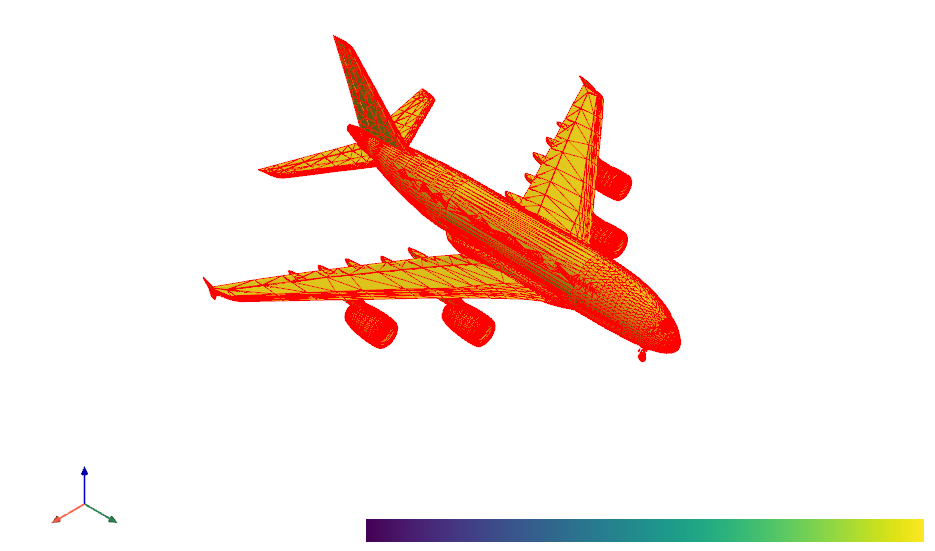
Here we use pyvista to visualize 3d mesh. The script can be found in here.
python mesh_vis.py --mode 13 --input_file ../data/test/A380.obj --screenshot ../result/snapshot/
The result is shown:
This module achieves mesh filtering by open3d. Three filtering algorithms can be used here: taubin filter, Laplacian smooth filter, simple neighbour average.
# taubin filter
python mesh_factory.py --mode 4 --mesh_filter taubin --input_dir ../data/test --output_dir ../result/filter/taubin/ --input_format ply
# Laplacian smooth filter
python mesh_factory.py --mode 4 --mesh_filter laplacian --input_dir ../data/test --output_dir ../result/filter/laplacian/ --input_format ply
# simple neighbour average
python mesh_factory.py --mode 4 --mesh_filter neighbour --input_dir ../data/test --output_dir ../result/filter/simple/ --input_format ply
In mesh subdivision we divide each triangle into a number of smaller triangles. More details can refer to here.
# loop
python mesh_factory.py --mode 6 --subdivision_type loop --iteration 1 --input_dir ../data/test --output_dir ../result/subdivision/loop/ --input_format ply
# midpoint
python mesh_factory.py --mode 6 --subdivision_type midpoint --iteration 1 --input_dir ../data/test --output_dir ../result/subdivision/midpoint/ --input_format ply
This module can calculate the approximate value of surface area and volume of 3d mesh. Here vtk and open3d are used. The script can be found in SurfaceAreaVolume.py.
python SurfaceAreaVolume.py --input_dir ../data/test --input_format ply
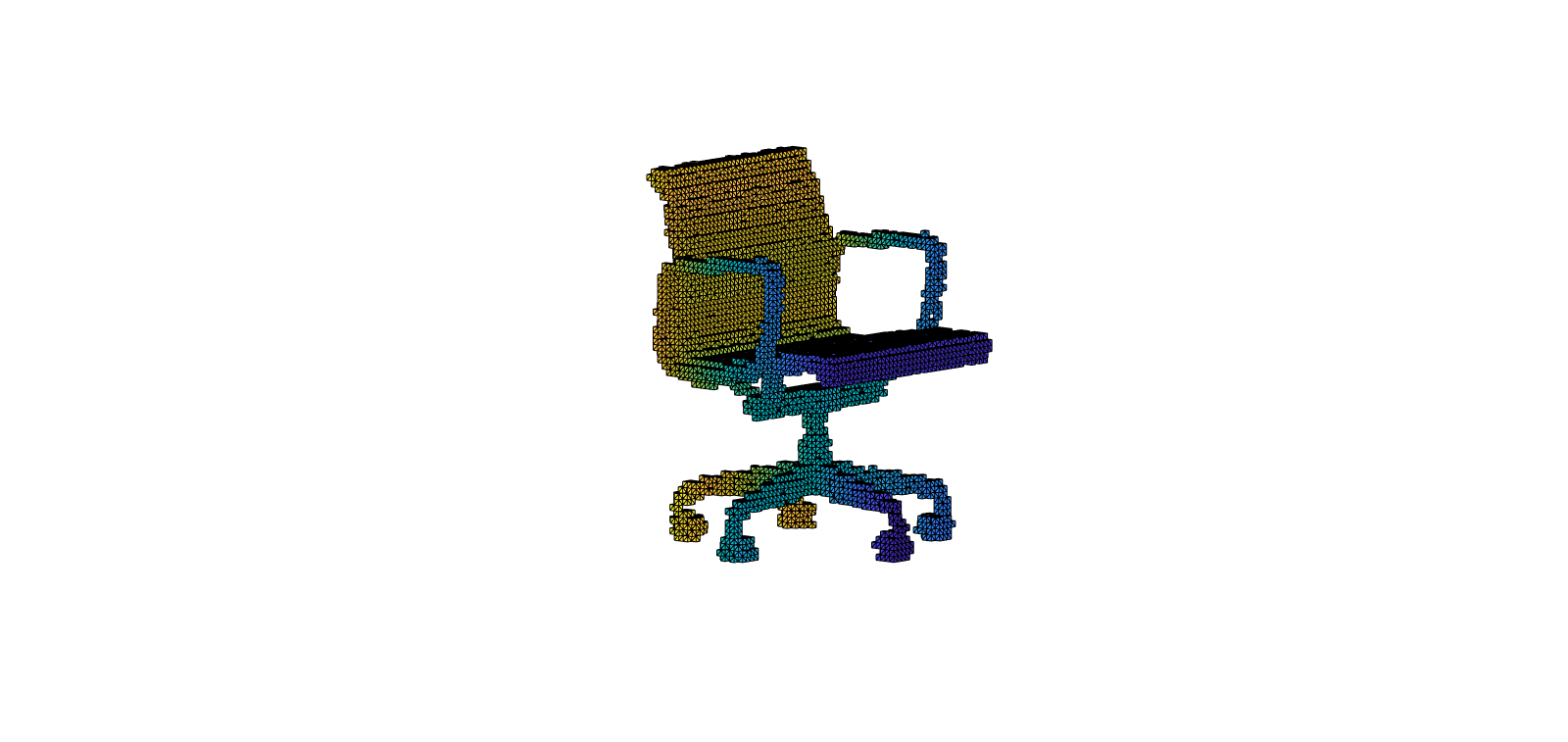
Here we use viewvox to visualize the voxel grid.
python voxel_vis.py --mode 8 --input_file ../result/mesh_2_voxel/ply2binvox/14.binvox
python voxel_vis.py --mode 8 --input_file ../result/mesh_2_voxel/ply2mira/14.mira
Regrettably, viewvox does not support exporting images. Therefore, you can try to read the binvox file using the script binvox_rw.py to get the data and then use matlab or matplotlib to show binvox. The matlab scripts are provided here. By using this script, I get the image:
@article{Ye2021MetaPUAA,
  title={Meta-PU: An Arbitrary-Scale Upsampling Network for Point Cloud},
  author={S. Ye and Dongdong Chen and Songfang Han and Ziyu Wan and Jing Liao},
  journal={IEEE transactions on visualization and computer graphics},
  year={2021},
  volume={PP}
}

@article{nooruddin03,
  author = {Fakir S. Nooruddin and Greg Turk},
  title = {Simplification and Repair of Polygonal Models Using Volumetric Techniques},
  journal = {IEEE Transactions on Visualization and Computer Graphics},
  volume = {9},
  number = {2},
  pages = {191--205},
  year = {2003}
}

@Misc{binvox,
  author = {Patrick Min},
  title =  {binvox},
  howpublished = {{\tt http://www.patrickmin.com/binvox} or {\tt https://www.google.com/search?q=binvox}},
  year =  {2004 - 2019},
  note = {Accessed: yyyy-mm-dd}
}

@Misc{meshconv,
  author = {Patrick Min},
  title =  {meshconv},
  howpublished = {{\tt http://www.patrickmin.com/meshconv} or {\tt https://www.google.com/search?q=meshconv}},
  year =  {1997 - 2019},
  note = {Accessed: yyyy-mm-dd}
}
To be continued...
more like this
Allows dynamic voxel destruction with debris along with other voxel features. Allows importing .vox files and damaging…
Voxel.Wiki is a website that is all about voxels: Values on regular grids in three-dimensional space!
search projects, people, and tags