xmb-bigscreen
XMB for Plasma BigScreen, console-like fullscreen launcher for living room gamepad users
QML★ 50
Dynamic wallpaper plugin for KDE Plasma
 zzag
zzaggit clone https://github.com/zzag/plasma5-wallpapers-dynamic.gitzzag/plasma5-wallpapers-dynamicA wallpaper plugin for KDE Plasma that continuously updates the desktop background based on the current time in your location.
More dynamic wallpapers can be found at https://github.com/karmanyaahm/awesome-plasma5-dynamic-wallpapers.
yay -S plasma5-wallpapers-dynamic
sudo dnf install plasma-wallpapers-dynamic
In order to use the dynamic wallpaper builder tool, install plasma-wallpapers-dynamic-builder package.
sudo apt install plasma-wallpaper-dynamic
Note: master branch targets Plasma 6. If you use Plasma 5, check the latest release.
In order to build this wallpaper plugin from source code, you need to install a couple of prerequisites
Arch Linux:
sudo pacman -S cmake extra-cmake-modules git plasma-framework qt5-base qt5-declarative \
    qt5-location libexif libavif
Fedora:
sudo dnf install cmake extra-cmake-modules git kf5-kpackage-devel kf5-plasma-devel \
    kf5-ki18n-devel qt5-qtbase-devel qt5-qtdeclarative-devel qt5-qtlocation-devel \
    libexif-devel libavif-devel qt5-qtbase-private-devel
Ubuntu:
sudo apt install cmake extra-cmake-modules git libkf5package-dev libkf5plasma-dev \
    libkf5i18n-dev qtbase5-dev qtdeclarative5-dev qtpositioning5-dev gettext \
    qml-module-qtpositioning libexif-dev libavif-dev build-essential qtdeclarative5-private-dev \
    qtbase5-private-dev
Once all prerequisites are installed, you need to grab the source code
git clone https://github.com/zzag/plasma5-wallpapers-dynamic.git
cd plasma5-wallpapers-dynamic
Configure the build
mkdir build && cd build
cmake .. -DCMAKE_BUILD_TYPE=Release \
    -DCMAKE_INSTALL_PREFIX=/usr \
    -DCMAKE_INSTALL_LIBDIR=lib \
    -DBUILD_TESTING=OFF
Now trigger the build by running the following command
make
To install run
sudo make install
Right-click a blank area of the desktop and choose "Configure Desktop...", select "Dynamic" wallpaper type and click the Apply button.
The kdynamicwallpaperbuilder command line tool is used to create dynamic wallpapers. As input,
it takes a manifest json file describing the wallpaper and produces the wallpaper
kdynamicwallpaperbuilder path/to/manifest.json --output wallpaper.avif
This engine supports several types of dynamic wallpapers - solar and day-night.
With a solar dynamic wallpaper, the engine will try to keep the images in sync with the Sun position at your location.
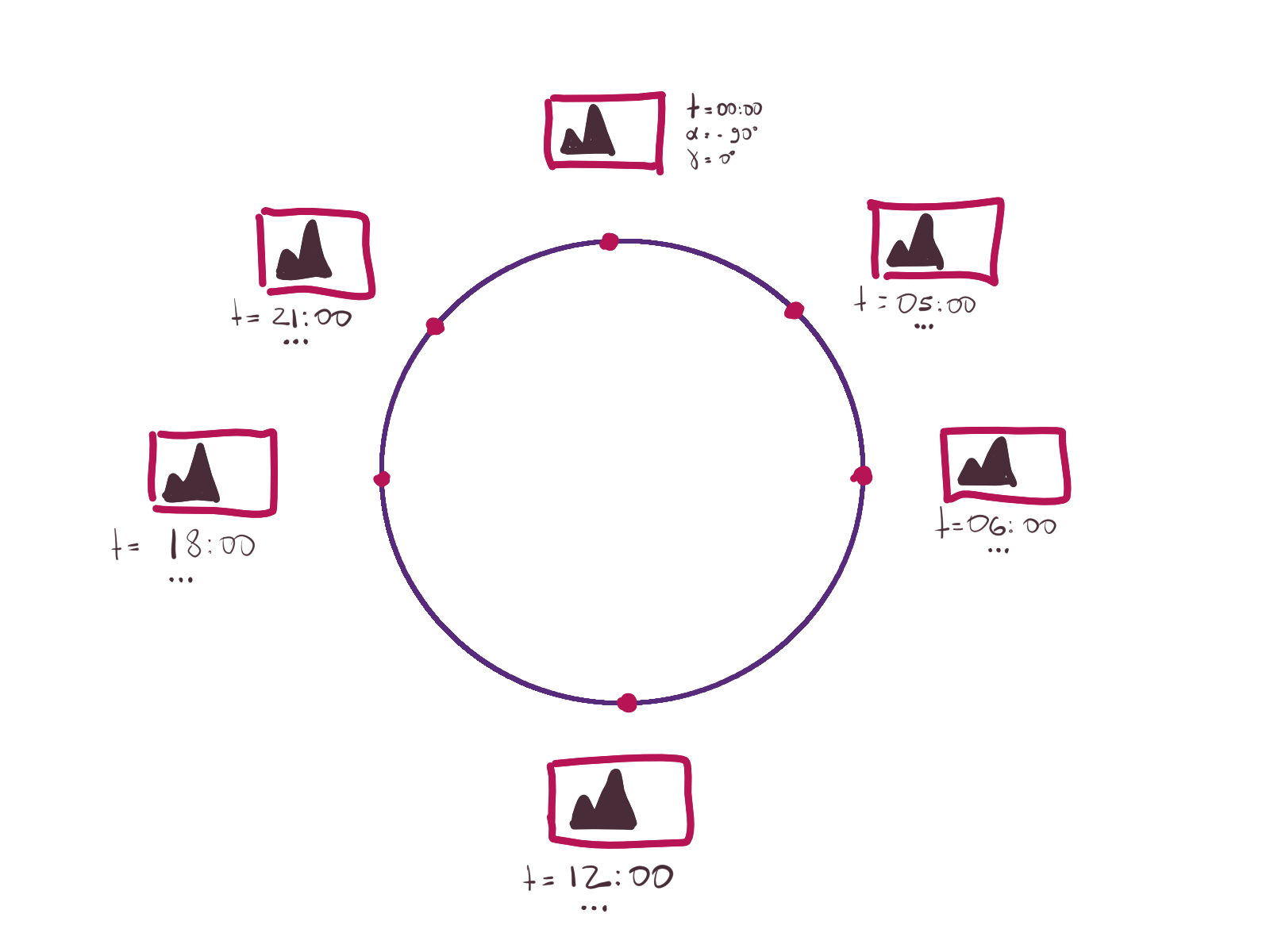
The manifest file looks as follows
{
    "Type": "solar",
    "Meta": [
        {
            "SolarAzimuth": "*",
            "SolarElevation": "*",
            "CrossFade": true,
            "Time": "*",
            "FileName": "0.png"
        }, {
            "SolarAzimuth": 0,
            "SolarElevation": -90,
            "CrossFade": true,
            "Time": "00:00",
            "FileName": "1.png"
        }, {
            "SolarAzimuth": 90,
            "SolarElevation": 0,
            "CrossFade": true,
            "Time": "06:00",
            "FileName": "2.png"
        }, {
            "SolarAzimuth": 180,
            "SolarElevation": 90,
            "CrossFade": true,
            "Time": "12:00",
            "FileName": "3.png"
        }
    ]
}
The SolarAzimuth field and the SolarElevation field specify the position of the Sun when the
associated picture was taken. The Time field specifies the time, which is in 24-hour format, when
the picture was taken. If the user is not located near the North or the South Pole, the dynamic
wallpaper engine will try to show images based on the current position of the Sun; otherwise it will
fallback to using time metadata.
Only the Time field is required, the position of the Sun is optional.
The CrossFade field indicates whether the current image can be blended with the next one. The
cross-fading is used to make transitions between images smooth. By default, the CrossFade field is
set to true. Last, but not least, the FileName field specifies the file path of the image
relative to the manifest json file.
Now that you have prepared all images and a manifest file, it's time pull out big guns. Run the following command
kdynamicwallpaperbuilder path/to/manifest.json
If the command succeeds, you will see a new file in the current working directory wallpaper.avif,
which can be used as a dynamic wallpaper.
Note that encoding the dynamic wallpaper may take a lot of memory (AVIF encoders are very memory hungry) and time!
SolarAzimuth, SolarElevation, and Time fields can have a special value of *. In which case,
kdynamicwallpaperbuilder will use the Exif metadata in the image to fill them. An image must
contain the following GPS EXIF tags to compute the position
of the Sun:
GPSLatitude and GPSLatitudeRefGPSLongitude and GPSLongitudeRefGPSTimeStamp and GPSDateStampThe calculated position of the Sun can be viewed by passing --verbose to the kdynamicwallpaperbuilder command.
A day/night dynamic wallpaper consists of only two images - one for the day, and one for the night. The engine will automagically figure out which one to use based on the current time or the Sun position at your location.
The manifest file for a day/night wallpaper looks as follows
{
    "Type": "day-night",
    "Meta": [
        {
            "TimeOfDay": "day",
            "FileName": "day.png"
        }, {
            "TimeOfDay": "night",
            "FileName": "night.png"
        }
    ]
}
Since dynamic wallpapers for macOS and this plugin are incompatible, you need to use a script to convert dynamic wallpapers.
curl -sLO https://raw.githubusercontent.com/zzag/plasma5-wallpapers-dynamic-extras/master/dynamicwallpaperconverter
chmod +x dynamicwallpaperconverter
Once you've downloaded the dynamicwallpaperconverter script, you can start converting wallpapers
./dynamicwallpaperconverter --crossfade file.heic
After the command above has finished its execution, you should see a file in the current working
directory named wallpaper.avif, which can be fed into this plugin.
If it takes too long to encode the wallpaper as an avif file, you can change the encoding speed. Note that the encoding speed affects the final file size!
./dynamicwallpaperconverter --speed 5 --crossfade file.heic
For more details, check the output of ./dynamicwallpaperconverter --help.
more like this
XMB for Plasma BigScreen, console-like fullscreen launcher for living room gamepad users
多源壁纸聚合平台 · 自动归档 Bing + Unsplash 精选壁纸 · AI 视觉故事生成 · 企业微信推送 · GitHub Pages 在线画廊
search projects, people, and tags