DailyWallpaperHub
多源壁纸聚合平台 · 自动归档 Bing + Unsplash 精选壁纸 · AI 视觉故事生成 · 企业微信推送 · GitHub Pages 在线画廊
Python★ 50
Display near-real-time satellite imagery on your desktop.
 Colonial-Dev
git clone https://github.com/Colonial-Dev/satpaper.gitColonial-Dev/satpaper
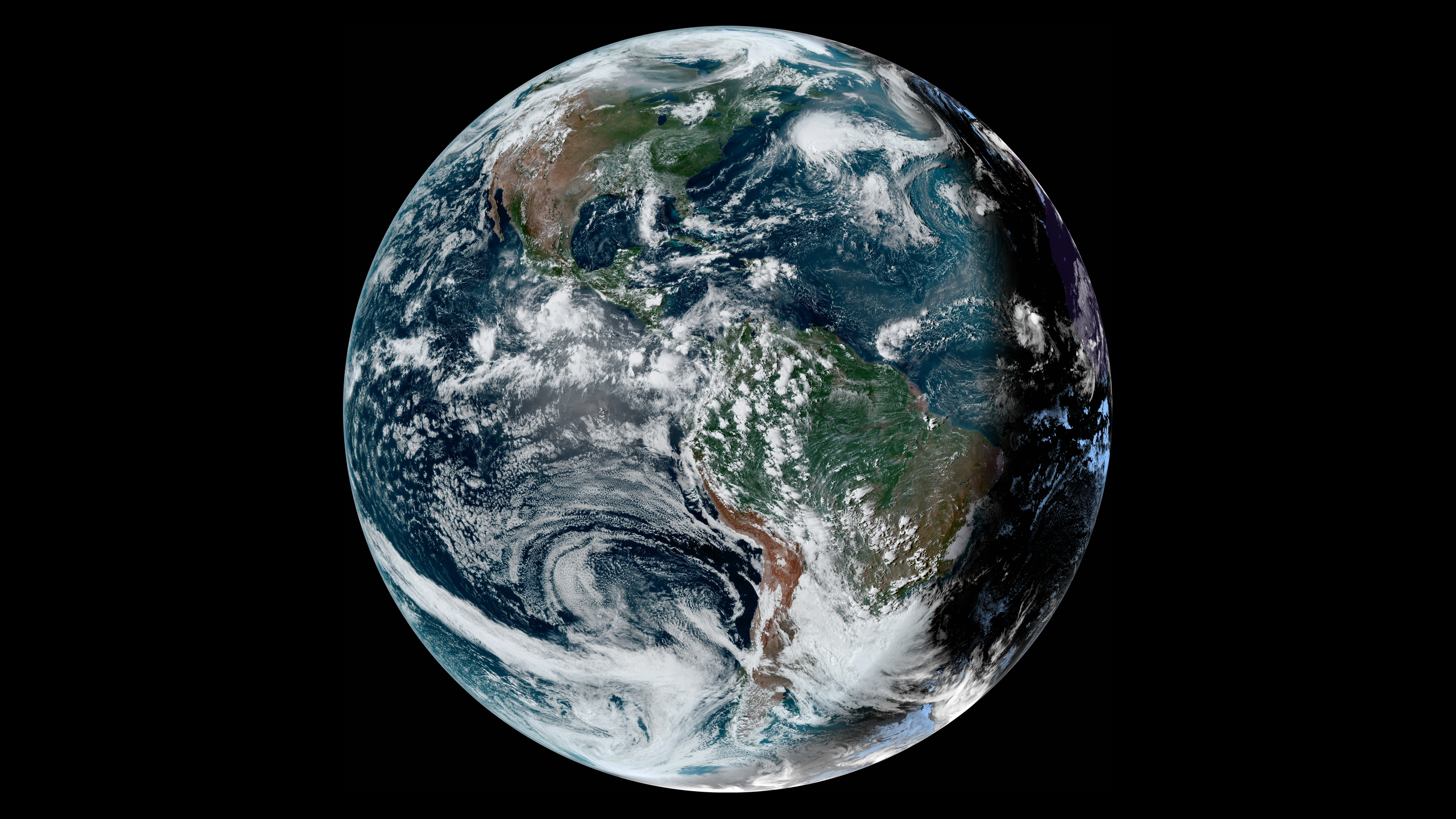
(Click to see full-size version)
Satpaper generates live wallpapers for your desktop, using near-real-time imagery from RAMMB SLIDER.
There are several satellites to choose from, each covering a different region of the world.
It's also possible to specify a custom background image, if desired.
Satpaper downloads satellite imagery at the highest available resolution and downscales it to fit your specifications. The exact download size varies depending on which satellite you are using and the image contents, but it's typically in the ballpark of twenty megabytes.
If you're on a metered and/or severely bandwidth-limited connection, twenty megabytes every ten to fifteen minutes can really add up. You have been warned!
If your environment is not supported, you have a few options:
--wallpaper-command/SATPAPER_WALLPAPER_COMMAND argument to specify a command to run whenever a new wallpaper is generated.--once flag to turn Satpaper into a one-off wallpaper generator, allowing it to be integrated into a larger script or program.PRs to add automatic support are also welcome!
Precompiled versions of Satpaper are available for:
x86_64-unknown-linux-musl, which should Just Work™ on most distributions)windows-latest)macos-latest)All binaries can be found in the releases section. Additionally, please note that I'm only able to test the Linux binary - please open an issue if there's something wrong with the binary for your platform (doesn't work at all, only works on the newest version, whatever.)
Dependencies:
gcc.)Just use cargo install, and Satpaper will be compiled and added to your PATH.
cargo install --locked --git https://github.com/Colonial-Dev/satpaper --branch master
systemd serviceTo automatically start Satpaper when you log in, you can use a systemd unit.
[Unit]
Description=Run Satpaper on login.

# You should adjust these values as needed/preferred.
[Service]
Environment=SATPAPER_SATELLITE=goes-east
Environment=SATPAPER_RESOLUTION_X=2560
Environment=SATPAPER_RESOLUTION_Y=1440
Environment=SATPAPER_DISK_SIZE=94
Environment=SATPAPER_TARGET_PATH=/var/home/colonial/.local/share/backgrounds/

ExecStart=/var/home/colonial/.cargo/bin/satpaper
Restart=on-failure
RestartSec=5

[Install]
WantedBy=default.target
# (Write out or paste in your unit file)
nano $HOME/.config/systemd/user/satpaper.service
systemctl --user enable satpaper
systemctl --user start satpaper
launchd service (Mac)# (Ensure background folder location exists) touch $HOME/.local/share/backgrounds # Copy the plist below and place it at $HOME/Library/LaunchAgents/com.satpaper.plist # Ensure you change your username (placeholder is $YOUR_USERNAME) nano $HOME/Library/LaunchAgents/com.satpaper.plist # Launch the launchd service launchctl load $HOME/Library/LaunchAgents/com.satpaper.plist launchctl start $HOME/Library/LaunchAgents/com.satpaper.plist
<?xml version="1.0" encoding="UTF-8"?>
<!DOCTYPE plist PUBLIC "-//Apple//DTD PLIST 1.0//EN" "http://www.apple.com/DTDs/PropertyList-1.0.dtd">
<plist version="1.0">
<dict>
    <key>Label</key>
    <string>com.satpaper.rs</string>
    <key>EnvironmentVariables</key>
    <dict>
        <key>SATPAPER_SATELLITE</key>
        <string>goes-east</string>
        <key>SATPAPER_RESOLUTION_X</key>
        <string>2560</string>
        <key>SATPAPER_RESOLUTION_Y</key>
        <string>1440</string>
        <key>SATPAPER_DISK_SIZE</key>
        <string>94</string>
        <key>SATPAPER_TARGET_PATH</key>
        <string>/Users/${YOUR_USERNAME}/.local/share/backgrounds/</string>
    </dict>
    <key>ProgramArguments</key>
    <array>
      <string>/Users/${YOUR_USERNAME}/.cargo/bin/satpaper</string>
    </array>
    <key>KeepAlive</key>
    <true/>
    <key>StartInterval</key>
    <integer>10</integer>
    <key>RestartService</key>
    <dict>
        <key>FailureAction</key>
        <string>restart</string>
        <key>SuccessAction</key>
        <string>restart</string>
    </dict>
    <key>StandardErrorPath</key>
    <string>/Users/${YOUR_USERNAME}/satpaper.log</string>
    <key>StandardOutPath</key>
    <string>/Users/${YOUR_USERNAME}/satpaper.log</string>
    <key>UserName</key>
    <string>${YOUR_USERNAME}</string>
    <key>WorkingDirectory</key>
    <string>/Users/${YOUR_USERNAME}</string>
</dict>
</plist>
Thanks to cyberbit, everything you need to build and run a Satpaper Docker image can be found in the docker/ directory.
-s/--satellite/SATPAPER_SATELLITE - the satellite to source imagery from.
goes-east, goes-west, himawari, meteosat9, and meteosat10.-x/--resolution-x/SATPAPER_RESOLUTION_X (and equivalents for the y dimension) - the width/height of the generated wallpaper.
-d/--disk-size/SATPAPER_DISK_SIZE - the size of the "disk" (Earth) relative to the generated wallpaper's smaller dimension.
[1, 100] inclusive, mapping to a percentage value.-t/--target-path/SATPAPER_TARGET_PATH - where the generated wallpaper should be saved.
/home/user/Pictures, the output will be at /home/user/Pictures/satpaper_latest.png.-b/--background-image/SATPAPER_BACKGROUND_IMAGE - the path to an image to use as the background.
-w/--wallpaper-command/SATPAPER_WALLPAPER_COMMAND - custom command to run when a wallpaper is generated.
sh -c "{command} file://{image_path}".-o/--once/SATPAPER_ONCE - whether or not to only run once.
--once set, Satpaper will generate one wallpaper and terminate, without altering your existing wallpaper.There are two possible causes:
libmimalloc_sys::mi_collect is called to ensure as much memory as possible is returned to the OS.libc's free deciding it was fine to just... not return multi-hundred-megabyte allocations to the OS, as well as the tokio runtime being fairly memory heavy. I resolved these issues by switching to mimalloc and transitioning away from async, so behavior should improve if you update.This is a byproduct of the CIRA GeoColor processing algorithm used to generate full-color images from the raw satellite data. GeoColor uses infrared for night-time imaging, which is then overlaid with false city lights and whitened clouds. The resulting image usually looks pretty good at a glance, but might begin to seem unnatural upon closer inspection.
Unfortunately, this is a necessary evil, as geostationary weather satellites don't capture enough visible spectrum light to generate a true-color night-time image.
$EXTREME_LATITUDE - is there a way to get better imagery of my location?Not really. Geostationary orbits (required for the type of imaging we want) can only be achieved at a very specific altitude directly above the equator.
You're most likely seeing something like this:
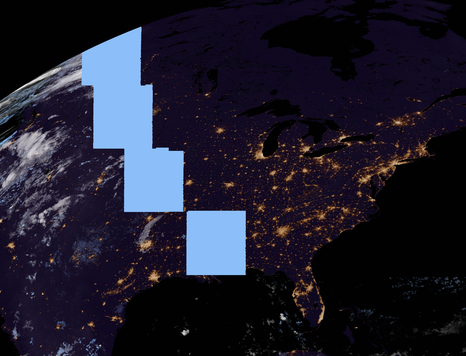
This is not a software error, but is instead lens flare from the Sun peeking over from the other side of the Earth. This is caused by the Earth's tilt, and is most visible in late February and August.
You can find a more detailed explanation here.
more like this
多源壁纸聚合平台 · 自动归档 Bing + Unsplash 精选壁纸 · AI 视觉故事生成 · 企业微信推送 · GitHub Pages 在线画廊
search projects, people, and tags