cava-bg
A high-performance audio visualizer for Wayland compositors
 leriart
git clone https://github.com/leriart/cava-bg.gitleriart/cava-bgcava-bg - Native CAVA Visualizer for Wayland
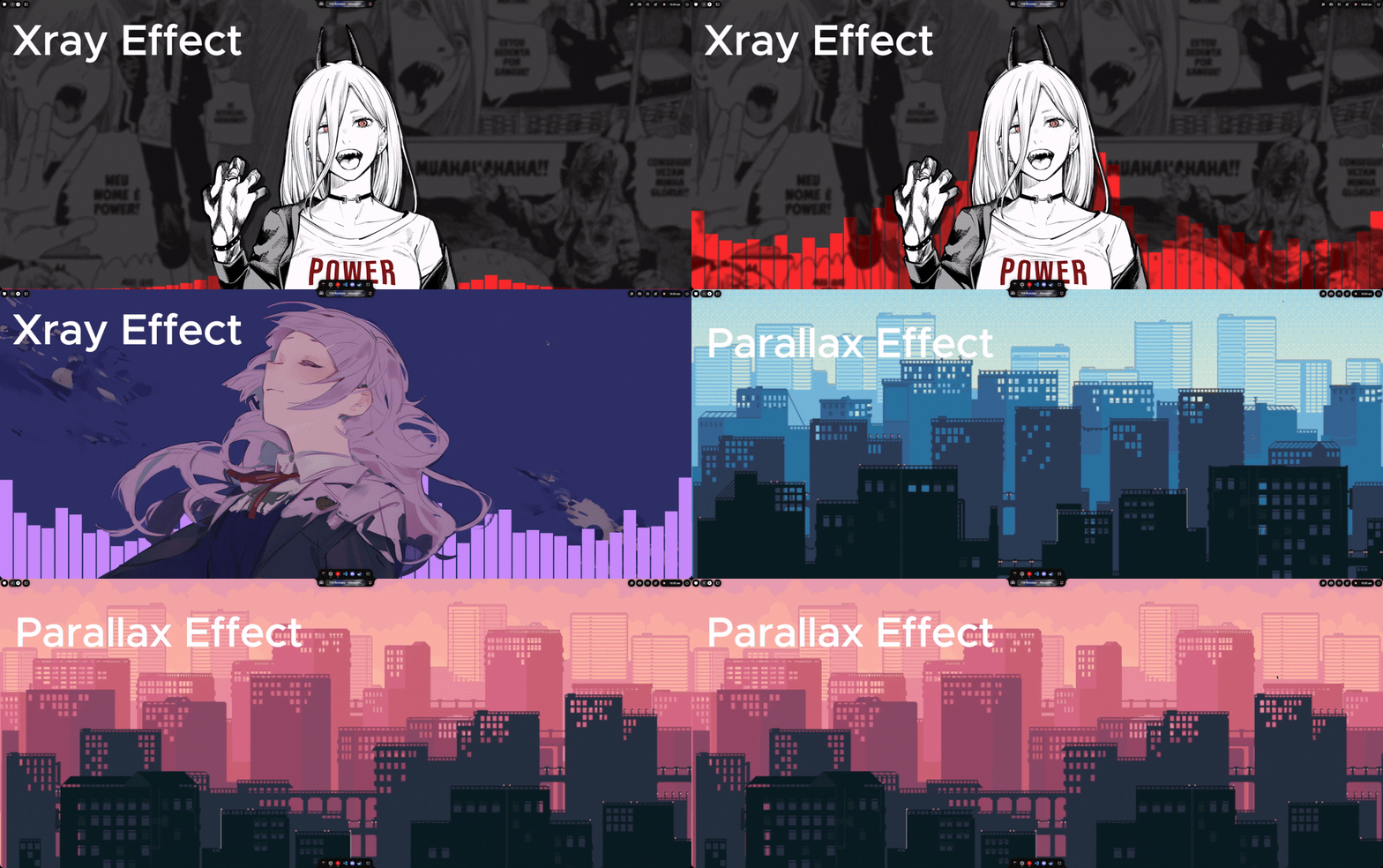
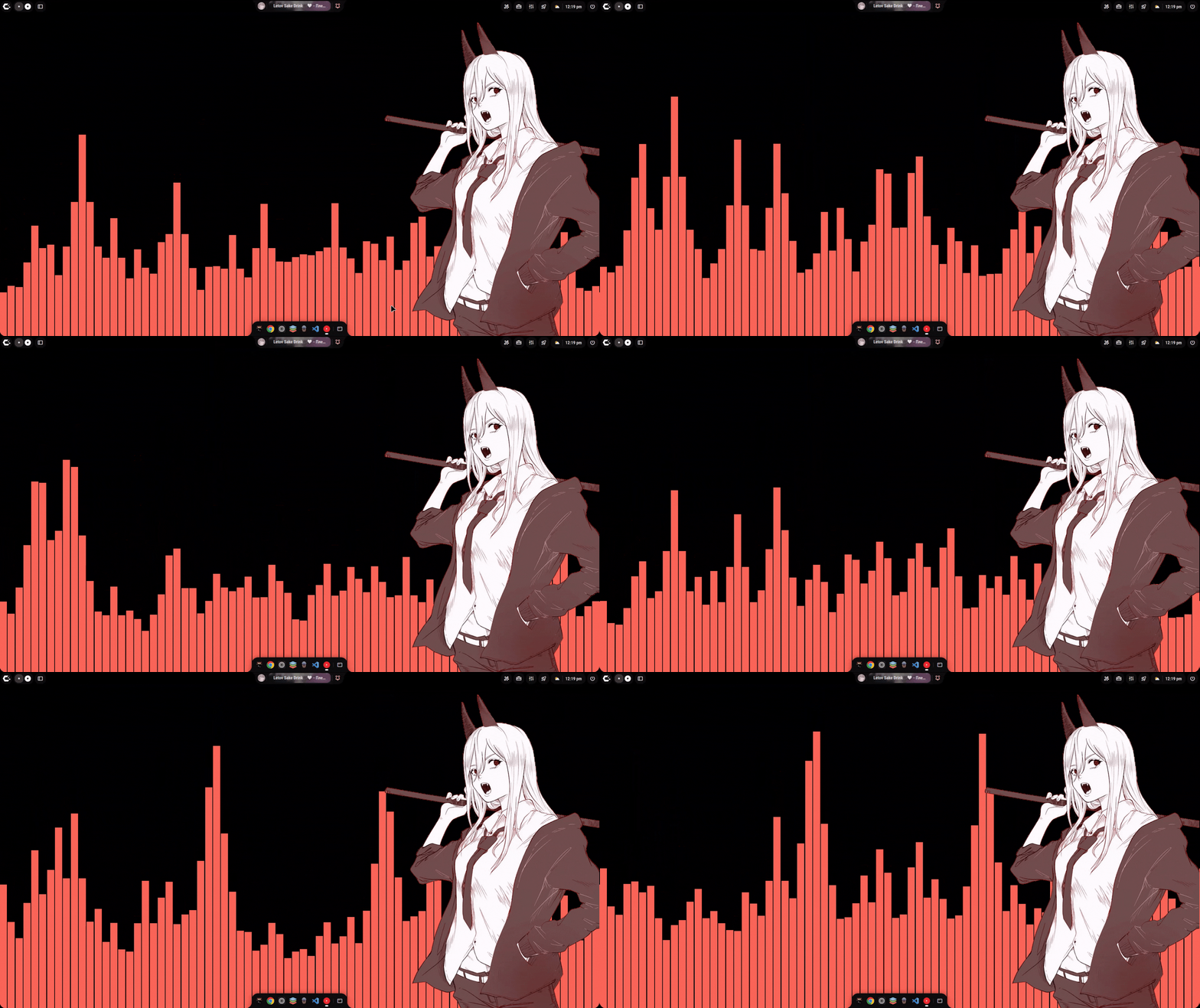
cava-bg is a modern, lightweight, and highly customizable visualizer that turns any Wayland desktop into a dynamic audio experience. Designed for users who want seamless wallpaper integration without sacrificing performance, it features real-time color adaptation to your wallpaper and a unique multi-layer parallax and "hidden image" reveal mode, making it the perfect choice for stylized desktop setups.
Features
- Native Wayland + wgpu rendering – GPU‑accelerated visuals with low latency
- Adaptive colors – Extracts a gradient palette from your current wallpaper
- Real‑time wallpaper monitoring – Automatically updates colors when you change your wallpaper (supports awww, mpvpaper, waypaper, swaybg, swww, hyprpaper, wpaperd, etc.)
- Full configuration – TOML config file with options for bar count, gap, smoothing, framerate, and more
- Static color fallback – Use manually defined colors if dynamic extraction is disabled
- Lightweight – Spawns a single
cavaprocess and renders at your specified framerate - Multi‑output support – Works on multiple monitors; can target a specific output
- Kill command –
cava-bg killstops any running instance - Animated Hidden Images & Video Wallpapers - Support for video files (mp4, webm, etc.) for hidden layer reveals via ffmpeg-next.
- Parallax System - Add depth to your desktop environment with mouse-reactive and audio-reactive layers.
- Advanced X-Ray system - Seamlessly animate image masks reacting to audio.
- Daemon Mode - Easy background running via
cava-bg onandcava-bg off. - Systemd Integration - Native sd-notify, watchdog, and
cava-bg on --systemdfor journald logging. - GUI Configuration - Full visual editor with color previews and tabbed organization (
cava-bg gui). - Hot Reloading - Configuration changes are applied without restarting the daemon.
- Performance Optimization - Idle mode, lazy video decoding, and FPS limiting.
Static Color Mode (Fallback or Manual)
If dynamic_colors = false, the visualizer uses user-defined colors from the [colors] section of the configuration file. Each color can be defined as a simple hex string ("#rrggbb") or as an object containing both hex and alpha values.
Flexible TOML Configuration
- Default file path:
~/.config/cava-bg/config.toml - Key options include:
framerate: Frames per second.bar_count: Total number of vertical bars.gap: Spacing between bars (as a fraction of bar width).bar_alpha: Transparency level for the bars.corner_radius: Corner rounding for the window (useful if the background isn't fully transparent).height_scale: Allows bars to stay within a fraction of screen height.autosens/sensitivity: CAVA sensitivity controls.preferred_outputs: List of target monitor names (e.g.["DP-1", "HDMI-A-1"]).background_color: Background color for the overlay layer (fully transparent by default).
Example.Simple.webm
Advanced Hidden Image / X-Ray System
Displays a fixed or animated layer that is "revealed" by the bars as they move up and down.
- Image/Video Effects: Apply transformations or react to the audio directly. Video support allows animated reveals over static wallpapers.
- Advanced Features: You can use your current wallpaper as the hidden image or enable an automatic "x-ray" search in a specific directory to find stylized versions of your wallpaper (
basename.*andbasename_reveal.*) for special visual effects, for both x-rays and parallax layers.
Multi-layer Parallax System
Create a 3D depth effect by moving independent layers at different speeds.
- Modes:
AudioReactive,MouseReactive,Animated(independent), andHybrid. - Profiles: Save and load complete sets of layers as profiles (toml). Automatic selection based on wallpaper name.
- Per-layer Configuration: Z-depth, opacity, blend mode, parallax speed, offset, mouse reaction (sensitivity, max offset), audio reaction (frequency zone, response curve, transforms: shift, scale, rotate), standalone animation (
Float,Rotate,Scale,Pulse,Wiggle), and drop shadow. - Performance: Lazy loading of assets, pausing on idle mode, disabling under high load.

GUI Configuration Interface
Launch the visual editor with cava-bg gui. The GUI organizes all options into tabs:
- Audio: Audio source, sensitivity, complete audio disabling.
- Visualizer: Display mode (Bars, Mirrored Bars, Inverted Bars, Blocks, Waveform, Spectrum, Ring), bar shape (Rectangle, Circle, Triangle, Line), dimensions, spacing, height, and mode-specific options.
- Effects: Bar smoothing, advanced CAVA filters (Monstercat, waves).
- Colors: Palette editor (multiple colors with picker), gradient direction, automatic extraction from wallpaper, bar opacity.
- X-Ray: Activation, image source (specific file or name-matched directory), color effects (grayscale, invert, sepia), blend mode.
- Parallax: Global settings (mode, 3D depth, mouse tracking), profile management (create, load, save, delete), layer order, individual layer properties.
- Performance: VSync, multi-threaded decoding, idle mode (audio threshold, timeout, idle FPS, exit transition), video decoder settings (lazy init, auto shutdown, pause on idle), X-Ray texture optimization (prescale, mipmaps, mask compute mode), telemetry.
- Advanced: Verbose logging, target output (runtime detected list, output overrides), preset management (save, load, import/export).
The GUI also includes daemon control (start, stop, restart) and auto-saving with hot-reloading when changes are made.
Performance Optimization (Idle Mode)
The visualizer can save resources when no audio is playing:
- Detection: Lowers the FPS and pauses video decoding processes if audio levels drop below a threshold for a set amount of time.
- Transitions: Smoothly restores performance when audio is detected again (configurable exit/enter duration).
Installation
One-line Install (curl)
The fastest way to install cava-bg on any Linux distribution. The script auto-detects your package manager, installs cava, builds the release binary, and installs completions.
curl -fsSL https://raw.githubusercontent.com/leriart/cava-bg/main/install.sh | bash
By default the binary is installed to ~/.local/bin/cava-bg. To install system-wide to /usr/local/bin/cava-bg instead, use --system:
curl -fsSL https://raw.githubusercontent.com/leriart/cava-bg/main/install.sh | bash -s -- --system
Additional flags:
--user(default) – install to~/.local/bin--system– install to/usr/local/bin(requiressudo)--no-cava– skipcavainstallation--no-config– skip creating~/.config/cava-bg/config.toml--no-completions– skip installing shell completions--branch <name>– install from a specific branch or tag--help– show all options
Requirements:
git,curl,sudo, and a C toolchain (for Rust dependencies). Rust is installed automatically viarustupif missing.
Arch Linux (AUR)
Using yay
yay -S cava-bg
Using paru
paru -S cava-bg
NixOS (Flakes)
Add cava-bg to your system configuration using the flake:
# In your flake.nix inputs:
inputs.cava-bg.url = "github:leriart/cava-bg";

# In your system configuration:
environment.systemPackages = [ inputs.cava-bg.packages.${system}.default ];
Or run it directly without installing:
nix run github:leriart/cava-bg
Home Manager Integration
- Add the input to your flake:
inputs = {
  # ... other inputs
  cava-bg.url = "github:leriart/cava-bg";
};
- Import the module and configure:
{
  homeConfigurations."user@host" = home-manager.lib.homeManagerConfiguration {
    pkgs = nixpkgs.legacyPackages.x86_64-linux;
    modules = [
      cava-bg.homeManagerModules.cava-bg # Import the module

      {
        programs.cava-bg = {
          enable = true;

          # Declarative configuration (mirrors config.toml)
          settings = {
            general.framerate = 60;
            audio.bar_count = 76;
            colors.use_gradient = true;
            xray.enabled = false;
          };

          # Systemd user service management
          systemd = {
            enable = true;
            # supervisor = true;    # Enable per-output child processes
            memoryMax = "500M";
            # watchdogSec = 30;     # Hardware watchdog (restart on freeze)
          };
        };
      }
    ];
  };
}
Dependencies
Before installing from source or pre-built packages, ensure you have the following dependencies:
- cava
- wayland
- ffmpeg (for video background support)
- Rust toolchain (if building from source)
Debian/Ubuntu (DEB packages)
Download the .deb package from the releases section and install it with:
sudo dpkg -i cava-bg_<version>_amd64.deb
sudo apt-get install -f  # To fix dependencies if needed
Fedora (RPM packages)
Download the .rpm package from the releases section and install it with:
sudo rpm -i cava-bg-<version>.rpm
or using dnf
sudo dnf install cava-bg-<version>.rpm
From Source
- Install Dependencies:
# Arch Linux
sudo pacman -S cava rustup wayland wayland-protocols libxkbcommon mesa libglvnd ffmpeg
# Debian/Ubuntu
sudo apt install cava rustc cargo libwayland-dev wayland-protocols libxkbcommon-dev libgl1-mesa-dev libglvnd-dev libavformat-dev libavcodec-dev libavutil-dev libavfilter-dev libswscale-dev libswresample-dev
# Fedora
sudo dnf install cava rust cargo wayland-devel wayland-protocols-devel libxkbcommon-devel mesa-libGL-devel libglvnd-devel ffmpeg-devel
- Build and Install:
git clone https://github.com/leriart/cava-bg.git
cd cava-bg
cargo build --release
sudo cp target/release/cava-bg /usr/local/bin/
- Test Installation:
# Run cava-bg
cava-bg on
Usage
# Start in the background as a daemon
cava-bg on

# Run with per-output child process isolation
cava-bg on --supervisor

# Run as a systemd service (logs to journald, sd_notify)
cava-bg on --systemd

# Run in the foreground with a custom config
cava-bg --config /path/to/config.toml

# Run in foreground with debugging logs
cava-bg on --debug

# Stop the background daemon
cava-bg off # or cava-bg kill

# List output monitors
cava-bg outputs

# Turn visualizer on a specific output monitor
cava-bg output-on --output DP-1
Configuration
cava-bg uses a flexible TOML configuration file. The default configuration is created at ~/.config/cava-bg/config.toml. See CONFIG.md for the complete configuration reference.
- Key options include:
framerate: Render frames per second (general.framerate).bar_count: Total number of vertical bars (audio.bar_count).gap: Spacing between bars as a fraction (audio.gap).bar_alpha: Transparency level for the bars (audio.bar_alpha).corner_radius: Corner rounding for the wayland window (general.corner_radius).height_scale: Allows bars to stay within a fraction of screen height (audio.height_scale).autosens/sensitivity: CAVA sensitivity controls (general.autosens).dynamic_colors: Extract colors from wallpaper automatically (general.dynamic_colors).vsync: VSync configuration (performance.vsync).
For custom and fallback color palettes, see the [colors] block.
How It Works
- Wallpaper detection – Automatically monitors tools like awww, mpvpaper, hyprpaper, swaybg, swww, waypaper, and more.
- Color extraction – Using color_thief, it extracts a palette of dominant colors from your background, smoothly transitioning when the background changes.
- Parallax System - Reacts to global mouse movements across output monitors or audio frequencies to shift layered images independently.
- CAVA integration – Spawns an internal cava process reading raw 16-bit output.
- Wayland layer shell – Uses the wlr_layer_shell protocol via smithay-client-toolkit to draw a transparent background window seamlessly.
- wgpu rendering – High-performance shader rendering.
- Video Decoding - Built-in fast software video decoding via
ffmpeg-nextallows multi-threaded playback of mp4 and other animated sources.
Supported Wallpaper Tools & Managers
- awww
- mpvpaper
- hyprpaper
- swaybg
- wpaperd
- waypaper
- waytrogen
- hpaper
- walt
- wlsbg
- wallrizz
- Any Qt Multimedia based wallpaper engine
Hyprland Shells/Dotfiles
- ambxst
- quickshell
- qmlscene
Desktop Environments
- GNOME (Wayland)
- KDE Plasma (Wayland)
- Cinnamon (Wayland)
- Budgie (Wayland)
- XFCE (Wayland)
- MATE (Wayland)
- LXQt (Wayland)
- Deepin (Wayland)
- Enlightenment (Wayland)
Acknowledgments
Projects & Libraries
- wallpaper-cava - Inspiration and audio processing approach
- CAVA - Audio visualization engine
- Smithay Client Toolkit - Wayland client library
- wgpu - Modern graphics API for Rust
more like this
TachiSnap
TachiSnap — Pixel Snapper for animation pixel artists. Rust + WebAssembly client-side tool for cleaning up AI-generated…
DailyWallpaperHub
多源壁纸聚合平台 · 自动归档 Bing + Unsplash 精选壁纸 · AI 视觉故事生成 · 企业微信推送 · GitHub Pages 在线画廊
bit_gossip
Pathfinding library for calculating all node pairs' shortest paths in an unweighted undirected graph.