agentlytics
Comprehensive analytics dashboard for AI coding agents — Cursor, Windsurf, Claude Code, VS Code Copilot, Zed, Antigravi…
JavaScript★ 555
TreeMap is a fully downloadable app that can run on mac, windows, and linux. That visualizeses all of your disk-space i…
 Prithvi-Web
git clone https://github.com/Prithvi-Web/TreeMap-Disk-Visualizer.gitPrithvi-Web/TreeMap-Disk-Visualizer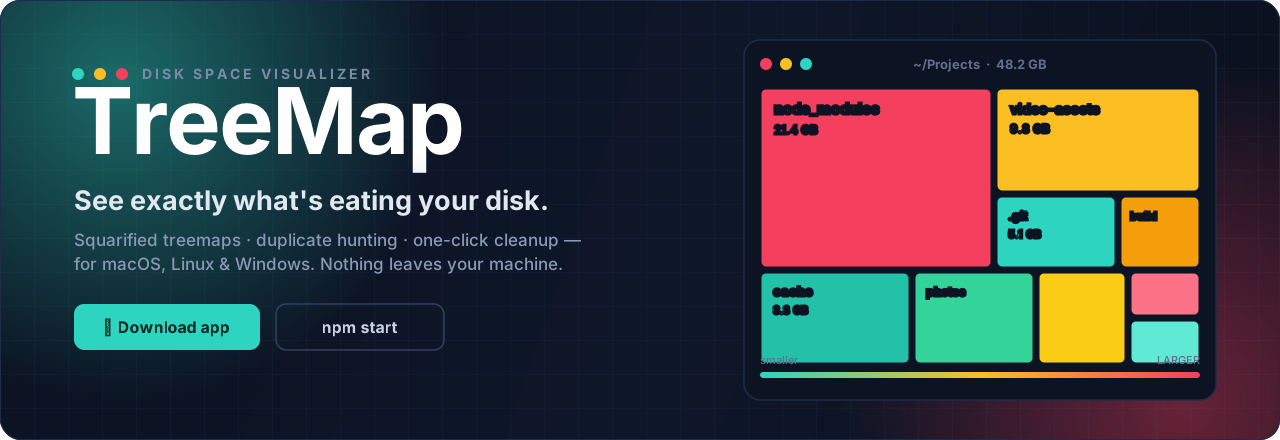
⬇ Download ✨ Features 🚀 Run it 🤖 AI / MCP 🔌 API 🛡️ Safety

| 🟩 Find it Squarified treemap of every byte |
🟨 Understand it Trends, diffs & duplicate hunting |
🟥 Reclaim it One-click cleanup → system Trash |
Tip
No Node. No setup. No telemetry. The desktop app is fully self-contained and scans the disk of the machine it runs on. Deletes always go to your system Trash — nothing is ever hard-deleted, so every action is recoverable.
TreeMap isn't just a treemap — it's a full disk-hygiene workbench. Fifteen views, one zero-dependency frontend.

📊 DashboardDisk-usage ring, live scan progress, file-type donut chart, and the top-10 largest files and folders. Click a folder to leap straight into the treemap. A disk-full forecast projects from your scan history — "At current growth (+5.4 GB/day), this disk is full in ~58 days — top culprits: …" — and is honest when it can't know: too little history, erratic growth, or shrinking usage all say so instead of inventing a number. An All Storage strip unifies your local disk with any connected Google Drive / Dropbox / OneDrive — scan a cloud account into the very same treemap (metadata only, no file contents are ever downloaded; deletes go to the provider's own trash; duplicates/live/offload are disabled with clear notices). Opt-in and local-first: with no account connected, zero cloud code runs and nothing touches the network. Two more cards sit here. Cost to Keep prices the scanned data against Google Drive, Dropbox, OneDrive and iCloud+ — in your choice of six currencies — from a table that ships inside the app: TreeMap never looks prices up online, so the Held-Up Space catches the disk's most confusing lie: a file you deleted whose space never came back, because a still-running program is holding the handle open. TreeMap groups those by the process holding them, biggest holder first, and offers to ask that process to quit — gracefully only. It refuses system PIDs, TreeMap itself and TreeMap's parent, refuses a PID whose process isn't what the caller named, and a program that declines to quit is reported as still running rather than force-killed. Processes it cannot see are counted, not guessed at. |
🗺️ TreemapA squarified treemap of every file, sized by bytes and colored teal → amber → red. Drill in, climb back with breadcrumbs + zoom-out, search with highlights ( |
🔲 GridA size-proportional icon grid with multi-select, sorting, and virtual scrolling — buttery even on huge folders. |
📦 AppsHow much disk does each application own? Every app's total, split into app / caches / data / logs, with a "Clear caches safely" button (Trash-only, never touches your data) and click-through into the treemap. Files no app owns land in an honest "Everything else" bucket, so the totals always match the scan. |
🎮 GamesSteam, Epic, GOG and itch.io libraries, read from each launcher's own manifests (including a hand-written parser for Valve's KeyValues format), with Steam's own reported size shown next to TreeMap's so you can see they agree. Every title is split into base install / shader cache / workshop content / Proton prefix / DLC — and only the shader cache is ever offered for removal, because it regenerates at the cost of one stutter on next launch. The rest costs a redownload, a mod re-subscribe, or a destroyed compatibility prefix, so TreeMap won't put a checkbox next to it. |
🛡️ SecurityFinds keys, credentials and wallets sitting outside the folder they belong in — a private key in |
🌐 Fleet — other machines on your networkSee how full your other computers are without walking over to them. Off by default, and it announces nothing until you turn it on. Machines exchange a summary only — the name you gave the machine and its OS, the volume's total/used/free, and the folder you last scanned with its time and size. That list is not a promise in a README, it's an eleven-field allow-list in the code ( File trees, Security findings and download origins never cross the network, and there is no remote-delete route in the server at all — not a disabled one, not a permission-gated one; it does not exist. Asking a peer to run a scan is a separate opt-in that peer must grant. Pairing is a six-digit code, compared in constant time, good for three minutes and one machine; a wrong guess doesn't cancel the window, so nobody on the network can interrupt a pairing by guessing. The LAN listener is a separate server with three routes — the main API is never mounted on it and stays bound to |
|
🧬 DuplicatesFinds true duplicates (size + streamed SHA-256), grouped with reclaimable space per group. Auto-select keeps the newest copy of each. A Near-Duplicate Images tab catches resized, re-encoded and screenshot copies with a perceptual dHash. |
📈 TrendsEvery scan saves a lightweight snapshot, charted over time per folder — with a clear "what grew / what shrank since last scan" breakdown. |
🔀 ComparePick any two scans of the same folder for a file-level diff: added, removed, grew, shrank. Subtrees collapse to one row instead of thousands. Every removed row also offers "Check snapshots" — your OS has probably been keeping filesystem snapshots (APFS local snapshots, Btrfs subvolumes, Volume Shadow Copies) the whole time, so a file deleted weeks ago and long gone from the Trash is often still recoverable. Looking costs nothing and asks for nothing; recovering asks for your administrator password once, at that moment, on macOS and Windows (Linux needs none). The recovered copy is written beside the original, never over whatever is there now — it came from an older snapshot, so overwriting by default would replace newer work with older. |
🧹 Clean UpCustom rules (old / huge / by extension / duplicated), Smart Suggestions — sorted into regenerable ( Smart Suggestions come from versioned rule packs ( Shrink Video re-encodes large videos to HEVC using your machine's hardware encoder (VideoToolbox / NVENC / QSV / AMF — never a software encode that would run for hours). This is the one lossy thing TreeMap does, so the order is the guarantee: encode beside the original → probe the result → verify it → only then trash the original → rename → restore timestamps. If any step fails the original is still sitting there untouched. Where Package orphans sorts package-manager artifacts into orphaned (the project that owned them is gone, so nothing will ever rebuild them), active (context only) and shared cache (always reclaimable), each with the command that restores or clears it. It refuses to guess: with the owning manifest missing, a directory is only claimed when one of the rule's |
📤 OffloadedThe third option next to keep and trash: Offload… copies files to another drive, verifies every byte (SHA-256, read back from the destination), and only then moves the originals to the Trash — never a bare move; any failure rolls back cleanly. This tab is the searchable index of everything offloaded, with per-destination totals, reveal-on-destination, and verified Restore. Unplugged drives show grayed out with a last-seen date. |
🕰️ Time CapsuleThe safety net for deletions you didn't watch happen. Before TreeMap ever deletes something automatically, it copies it here, verifies every byte (SHA-256), and only then moves the original to the Trash — so emptying the Trash doesn't lose it. Searchable and grouped by run, with one-click verified Restore back to the exact original path (never overwriting anything that's there now). It can't fill your disk: a size cap (default 10%) evicts the oldest copies first, and anything too big to protect is left undeleted rather than deleted unprotected — with the reason shown, never hidden in a log. Copies are kept 30 days by default; both numbers are in Settings. Files you delete go to the Trash as usual and aren't copied here. |
✨ AutopilotClean Up, but it keeps happening. Write a policy once — "clear old build folders in ~/Projects" — and TreeMap carries it out on its own. Every rail §B1 asks for is here and visible in the editor: the first run of any new policy is always a preview, showing exactly what it matched, and it deletes nothing until you approve it; byte caps per run and per rolling week; a cooldown that doubles as the schedule; and "ask me first above N GB" so a policy that suddenly matches far more than expected stops instead of executing. Everything it removes goes through the Time Capsule first, so any run can be undone in one click, and the run history shows what each run deleted and why — or the reason it decided not to. Clean Up stays exactly as it was: manual, for deleting something right now. |
⏰ Scheduled scans + 🚫 Ignore listRe-scan folders on a schedule with growth-threshold alerts and disk-full forecast warnings (native desktop notifications; the forecast horizon is configurable in Settings, default 30 days). Tell it what to skip with paths, names, or globs like |
How it's built — Node.js + Express 5 + TypeScript on the backend. A single, zero-dependency
index.htmlon the frontend: hand-coded Canvas 2D, no React, no D3, no Chart.js. Navigation is a liquid-glass sidebar that collapses to a 64-px icon rail with ⌘B (and floats over the content, with a scrim, on narrow windows). Ships as a web app and a downloadable Electron desktop app for macOS and Windows.
Grab the latest installer from the Releases page:
| Platform | File | How |
|---|---|---|
| 🍎 macOS | TreeMap-x.y.z-arm64.dmg |
Open it, drag TreeMap to Applications, launch. |
| 🪟 Windows | TreeMap Setup x.y.z.exe |
Run it and follow the installer. |
Important
First-launch security prompt. Because the app isn't signed with a paid Apple/Microsoft developer certificate, your OS shows a one-time warning.
After the first launch it opens normally.
That happens when the download's quarantine flag is still set. Clear it once, then launch normally — open Terminal and paste:
xattr -dr com.apple.quarantine /Applications/TreeMap.app
No Node.js or setup required — the desktop app is self-contained and scans the disk of the computer it runs on.
npm run dist:portable-mac / -win / -linux.
npm install
npm run build
npm start
Then open http://127.0.0.1:4280 in your browser.
💡 For development with auto-reload:
npm run dev
Requires Node.js 20+. Trash support uses gio on Linux (preinstalled on GNOME/KDE), Finder via osascript on macOS, and the Recycle Bin via PowerShell on Windows.
npm install
npm run app          # build + launch the desktop app locally
npm run dist:mac     # produce a macOS .dmg in release/
npm run dist:win     # produce a Windows installer in release/
⚠️ You can only build the macOS app on a Mac and the Windows app on Windows. To get both without owning both machines, use the automated release below — GitHub builds them for you.
A workflow (.github/workflows/release.yml) builds the macOS and Windows installers on GitHub's servers and attaches them to a Release — including the latest*.yml metadata the in-app auto-updater checks.
To cut a release:
version in package.json (e.g. 1.2.1).v (e.g. v1.2.1) and push it.
In GitHub Desktop: Repository → Push, then on github.com: Releases → Draft a new release → Choose a tag → type v1.2.1 → Publish.You can also trigger a test build anytime from Actions → Build & Release → Run workflow (installers are saved as downloadable artifacts instead of a Release).
| Endpoint | Description |
|---|---|
POST /api/scan |
Start scanning a folder → { scanId } |
GET /api/scan/:id/progress |
Live scan progress (Server-Sent Events) |
GET /api/scan/:id/result |
Full file tree (202 while running) |
GET /api/scan/:id/treemap |
Pre-computed squarified treemap layout |
GET /api/scan/:id/stats |
Scan counters incl. engine, duration & fast-rescan cache usage |
GET /api/scan/:id/budgets |
Saved folder budgets cross-referenced against this scan |
GET /api/scan/:id/export?format=csv|pdf |
Download the scan as CSV (files / folders) or a PDF report |
GET /api/scans |
Completed scans currently in memory |
GET /api/large-files?scanId= |
Top N largest files |
GET /api/large-folders?scanId= |
Top N largest folders (recursive sizes) |
GET /api/file-types?scanId= |
Size breakdown by extension |
GET /api/apps?scanId= |
Per-app storage attribution: totals, app / cache / data / logs breakdown, safe-to-clear bytes |
GET /api/duplicates?scanId= |
Duplicate groups (starts hashing; poll until complete) |
GET /api/near-duplicates?scanId=&threshold= |
Perceptual (dHash) near-duplicate image clusters |
GET /api/empty-folders?scanId= |
Recursively empty folders (ignoreJunk configurable) |
GET /api/compare?scanIdA=&scanIdB= |
File-level diff of two scans of the same root |
GET /api/snapshots |
Scan history: roots, per-root snapshots (?path=), or all (?all=true) |
GET /api/snapshots/compare?a=&b= |
Top-level deltas between two snapshots |
GET /api/snapshots/tree?path=&at= |
Historical treemap closest to a timestamp (time slider), with grew/shrank data |
GET /api/forecast?path= |
Disk-full projection: days until full, confidence, top growers — honest when history is thin |
GET /api/watch/:scanId |
Live disk activity (Server-Sent Events): per-second batches of { path, delta, kind } |
POST /api/container/expand |
List a container's contents (zip/jar/tar/tgz/iso/docker) as virtual treemap children — never extracts |
POST /api/offload · GET /api/offload/:id/progress |
Copy → SHA-256 verify → trash originals, to another drive (SSE progress, cancellable with rollback) |
GET /api/offload/index · POST /api/offload/restore |
Searchable offload catalog (mount-aware) and verified restore |
GET /api/cloud/status · POST /api/cloud/connect · …/disconnect |
Cloud accounts: local-only status, PKCE OAuth (loopback + paste fallback), token wipe |
POST /api/cloud/scan · POST /api/cloud/trash |
Metadata-only cloud scan (registers like a disk scan) and provider-trash deletes — the documented pathGuard exemption |
GET /api/cleanup/suggestions?scanId= |
Smart cleanup suggestions (regenerable / cache / junk) |
GET /api/packages/orphans?scanId= |
Package-manager leftovers: orphaned / active / shared cache |
GET /api/games?scanId= |
Game libraries per title: base, shader cache, workshop, Proton prefix, DLC |
GET /api/security/findings?scanId= |
Keys and credentials sitting outside their expected folders |
GET /api/provenance?path= |
Where a file came from, and when it was last opened |
GET /api/health/smart?device= |
Drive SMART attributes next to the growth forecast |
GET /api/cost/estimate?scanId= |
What the data would cost to keep on each cloud provider |
GET /api/compression/candidates?scanId= |
Video worth re-encoding to HEVC, with estimated savings |
GET /api/platform/shell-integration |
The "Scan with TreeMap" right-click entry (add / remove) |
GET /api/platform/portable |
Whether this is a no-trace portable session |
GET /api/fleet |
Other TreeMaps on your network — off by default, summaries only |
GET /api/cleanup/browser-profiles?scanId= |
Per-browser-profile cache breakdown |
GET /api/git/repos?scanId= · POST /api/git/gc |
Git pack/loose/LFS breakdown, and git gc a scanned repo |
GET /api/system/snapshots · POST …/purge |
OS snapshot accounting (APFS / Btrfs / VSS) |
GET /api/system/snapshots/find-deleted?path= |
Which filesystem snapshots could still hold a lost path — needs no privileges |
POST /api/system/snapshots/restore |
Recover it, written beside the original (asks for admin on macOS/Windows) |
GET /api/autopilot/policies · PUT … |
Standing cleanup policies (re-validated on save; editing a policy's scope revokes its approval) |
POST /api/autopilot/simulate |
Exactly what a policy would delete — writes nothing, touches no schedule |
POST /api/autopilot/policies/:id/approve |
Let a policy start deleting, after its mandatory first preview |
GET /api/autopilot/runs · POST …/runs/:id/undo |
Run history, and a verified one-click undo from the Time Capsule |
GET /api/timecapsule |
Items copied aside before an automated delete, with capacity + history |
POST /api/timecapsule/:id/restore · DELETE /api/timecapsule/:id |
Verified restore to the original path (202 + SSE job), or forget one copy |
GET /api/timecapsule/jobs/:jobId/progress |
Restore progress (Server-Sent Events), cancellable |
GET /api/settings · PUT /api/settings |
Ignore list, scheduled scans + folder budgets |
GET /api/notifications |
Growth alerts from scheduled scans |
GET /api/system · GET /api/trash/size |
Disk totals & platform; system Trash size |
GET /api/fs/list?path= |
Folder browser (powers the path picker) |
GET /api/files/preview?path= |
Quick-look preview (image / text / thumbnail) |
DELETE /api/files |
Move files to the system trash |
POST /api/files/open |
Open / reveal a path in Finder & co. |
TreeMap speaks the Model Context Protocol (MCP) — the open standard that lets AI assistants like Claude use apps as tools. Connect it once and you can simply talk to your disk:
"What's eating my disk?" · "Find duplicates in my Downloads and clean them up" · "How long until this disk is full?" · "Move my old videos to the external drive"
The AI does the scanning and number-crunching with TreeMap's real engine, and every safety rule still applies: deletes only ever go to the system Trash, destructive actions can be previewed with a dry run first, and everything is written to an audit log.
You need Node.js 20+ installed. Then copy-paste this into a terminal:
git clone https://github.com/Prithvi-Web/TreeMap-Disk-Visualizer.git
cd TreeMap-Disk-Visualizer
npm install
npm run build
Done. Now print the folder's full location — you'll paste it in step 2 wherever you see /PATH/TO/TreeMap-Disk-Visualizer:
pwd
claude_desktop_config.json
(macOS: ~/Library/Application Support/Claude/, Windows: %APPDATA%\Claude\).mcpServers block, just add the "treemap" entry inside it):{
"mcpServers": {
"treemap": {
"command": "node",
"args": ["/PATH/TO/TreeMap-Disk-Visualizer/dist/mcp/index.js"]
}
}
}
treemap.🪟 Windows: write the path with double backslashes, e.g.
"C:\\Users\\you\\TreeMap-Disk-Visualizer\\dist\\mcp\\index.js".
One command (swap in your real path):
claude mcp add treemap -- node /PATH/TO/TreeMap-Disk-Visualizer/dist/mcp/index.js
That's it — next session, ask Claude Code to scan a folder and it will pick up the TreeMap tools automatically. (claude mcp list shows it; claude mcp remove treemap undoes it.)
Create (or edit) .cursor/mcp.json in your home folder for all projects — or in a project's root for just that project — with:
{
  "mcpServers": {
    "treemap": {
      "command": "node",
      "args": ["/PATH/TO/TreeMap-Disk-Visualizer/dist/mcp/index.js"]
    }
  }
}
Then enable it under Settings → MCP.
TreeMap is a standard stdio MCP server. Point your client at:
node/PATH/TO/TreeMap-Disk-Visualizer/dist/mcp/index.jsNo environment variables, ports, or API keys needed — it runs locally and talks over stdin/stdout. (Quick smoke test from the repo folder: npm run mcp should print server ready on stdio.)
Eight tools, all calling the exact same internals as the app — same validation, same safety rails:
| Tool | What it does |
|---|---|
scan_path |
Scan a folder → returns a scanId the other tools use |
get_largest |
The biggest files or folders in a scan |
find_duplicates |
True duplicates (size + SHA-256 content hashing) |
cleanup_suggestions |
Known-reclaimable space: caches, regenerable build folders, junk |
forecast |
Disk-full projection — "full in ~58 days at current growth" |
compare_scans |
What grew and what shrank between two scans |
offload |
Move files to another drive the safe way: copy → verify → then trash originals |
trash_paths |
Move files to the system Trash — never a hard delete |
trash_paths and offload accept dryRun: true, returning the exact list of affected files and bytes while doing nothing — so the AI can show you the plan before acting.agent-policy.json (allowed roots, protected paths, a per-operation byte cap) — see AGENTS.md.audit.jsonl you can review any time.🤓 Prefer plain HTTP? The same power is available as a REST API with a machine-readable spec — start the server and fetch
/api/openapi.jsonor/api/capabilities, or read AGENTS.md, the full guide for automated agents.
Disk tools should never lose your data. TreeMap is built defensively:
/proc, /sys, /dev, /run, C:\Windows\System32, …) are blocked outright.~/Library/Application Support/TreeMap, %APPDATA%\TreeMap, or ~/.config/treemap).
src/
  api/          Express routes (scan, files, system, insights, settings)
  services/     ScanStore (packed Structure-of-Arrays scan memory),
                DiskScanner (adaptive concurrent walker), Cleaner (trash/open),
                DuplicateFinder (staged hashing), Snapshots (Trends history),
                CleanupRules (smart suggestions), AppAttribution (per-app storage),
                Forecast (disk-full projection), Watcher (live activity),
                ContainerScanner (archive drill-down), Offload (copy-verify-trash),
                cloud/ (Google Drive, Dropbox, OneDrive — OAuth + metadata scans),
                Scheduler (recurring scans), Settings, Storage (app-data JSON), DiskUsage
  models/       Shared TypeScript interfaces
  utils/        formatBytes, squarified treemap, path sanitizer, glob matcher
  middleware/   errorHandler, rateLimiter, pathGuard
  index.ts      App entrypoint + graceful shutdown
electron/
  main.js       Desktop shell: window, tray, drag-drop, notifications, auto-update
  preload.js    Context-isolated bridge for drag-drop paths & scan pushes
public/
  index.html    The entire frontend (inline CSS + JS, zero dependencies)
scripts/
  gen-tray-icon.js  One-time generator for the tray template icons
src/services/scanStore.ts): names in one UTF-8 pool, children as contiguous id ranges laid out breadth-first, paths reconstructed on demand instead of stored. Measured cost: ~52 bytes per file at 1M, 5M, 20M and 40M synthetic nodes — a 40M-item scan is ~2 GB of arrays, and a 100M-item scan projects to ~5 GB, on hardware where the object tree could not have held 20M. Summing every directory size is one reverse linear pass (28 ms for 5M nodes vs 2.2 s recursive), nothing recurses on pathological depth, and the browser notices nothing: the pruned JSON the API emits is byte-identical to the old tree — a golden test replays a fixture scan against responses recorded from the pre-rewrite server and compares the raw bytes. The store is pure JS + TypedArrays — no native modules, nothing new to package. (An on-disk SQLite tier behind the same interface remains a possible future for scans that must survive restarts; the packed store is the shipping default.) The one deliberate trade: handing 250k pruned nodes to the UI rebuilds path strings the old tree kept around, ~150 ms per handover on an operation that already spends ~170 ms serializing.lstat/readdir runs on libuv's threadpool, which defaults to 4 threads — that, not the walker's concurrency, was the bottleneck. TreeMap sizes the pool to 2× cores (≤ 16) before it spins up; measured on APFS this scans ~1.6× faster, while 32 threads is slower than 4 (kernel metadata-lock contention). The dashboard shows which engine ran and how long the scan took.load average 3.1–4.6, i.e. not a quiet benchmark box): a whole-disk scan of / covered 1,411,715 items in 16.4 s (~86,000 items/s), and a home folder of 458,661 items took 9.1 s. The persistent index stores a node in 183 bytes on disk (164 after compaction), and readTree hands the UI its 250,000-node cap in ~790 ms. Expect better on an idle machine and worse under load; the relationships between these numbers are the stable part, not the absolute values.snapshots.json (a few KB each, capped at 200 per folder); the time slider's shallow trees (≤ 3 levels, ~100 KB budget each) sit in separate per-root files so the main history file stays tiny.setInterval, not node-cron — hour-level granularity doesn't justify a dependency. Schedules fire while the app runs (the desktop app keeps running in the tray).
TreeMap · built with 🟩🟨🟥 by Prithvi-Web
If TreeMap freed up a few gigs for you, a ⭐ goes a long way.
more like this
Comprehensive analytics dashboard for AI coding agents — Cursor, Windsurf, Claude Code, VS Code Copilot, Zed, Antigravi…
Jasspa's MicroEmacs is a powerful and efficient terminal and window based text editor. Designed to be lightweight yet f…
an efficient and user friendly OTA server equipped with a powerful WEB UI, designed to effortlessly manage both your ES…
search projects, people, and tags