Rinkhals
Rinkhals custom firmware for Anycubic Kobra 3D printers
 rinkhals-community
git clone https://github.com/rinkhals-community/Rinkhals.gitrinkhals-community/Rinkhals
Rinkhals
Rinkhals is a custom firmware for some Anycubic Kobra 3D printers (specifically the ones running Kobra OS, see below for the details).
The goal of this project is to expand existing Anycubic features with better compatibility, apps and more. This project will likely not support every use case, such as running vanilla Klipper or a specific feature / plugin.
By using Rinkhals, you will keep all stock Anycubic features (print screen, Anycubic tools, calibration, ...) and get even more, like:
- Mainsail, Fluidd (with Moonraker)
- USB camera support in Mainsail, Fluidd
- Prints from Orca will show the print screen
- SSH access for customization (user: root, password: rockchip)
- OTA Rinkhals updates
- Apps system (OctoEverywhere, Cloudflare, Tailscale, ...)
Latest version will likely support the two latest firmwares from Anycubic, unless specified. For older firmware please check older releases or our firmware archive. Here are the supported GoKlipper / K3-family printers and firmwares with the latest Rinkhals release:
| Model | Tested firmwares | Notes |
|---|---|---|
| Kobra 3 (+ combo) | 2.4.5 2.4.6.7 |
|
| Kobra 2 Pro | 3.1.2.3 3.1.4 |
Only with mainboard Trigorilla Spe B v1.0.x. 3.1.4 seems to be buggy for some people |
| Kobra S1 (+ combo) | 2.7.0.9 2.7.2.7 |
|
| Kobra 3 Max (+ combo) | 2.5.1.7 2.5.2.8 |
|
| Kobra 3 V2 (+ combo) | 1.1.0.4 1.1.2.8 |
|
| Kobra S1 Max (+ combo) | 2.6.9.6 2.7.1.4 |
The K4-family currently has a separate status:
| Model | Status | Notes |
|---|---|---|
| Kobra X | Not supported | Uses the KlipperC++ / K4 software base and is currently blocked by SWU RSA signature verification. See the Kobra X documentation for details. |
Kobra X status
Some Kobra X firmware packages are publicly available and the SWU password has also been recovered.
However, Anycubic moved from the K3 software base (GoKlipper) to a K4 software base using a C++ Klipper port. Because of this, Kobra X support is not expected to be a simple port of the current Rinkhals stack.
In addition, the SWU update flow requires a trusted certificate for package acceptance. Until a reliable bypass is discovered, SWU-based firmware injection similar to Rinkhals is not currently feasible on Kobra X.
General Information
In case you're wondering this project is named after rinkhals, a sub-species of Cobras ... Kobra ... Rinkhals 👏
You can join the Rinkhals community on Discord: https://discord.gg/bQcrsteFGU
Since people have been asking, donations are accepted, but please remember this project is built for fun and not for the money. Donations will not be accepted to work on specific bugs or features. The donation link is the Sponsor button at the top of the page.

Rinkhals installation
Warning
Make sure you're confident tweaking your printer and you understand what you're doing. We're not responsible if you brick your printer (even if there's some documentation) about that)
Caution
Many users want to change their Klipper printer configuration (the printer.cfg file). We strongly advise against modifying the stock printer configuration. Rinkhals offers additional protection you don't have while modifying directly your printer configuration. We won't offer any support and your printer might not work properly or not boot anymore. Check the documentation for more information: Printer configuration
A quick start guide is available to get Rinkhals up and running on your printer.
There are two options to install Rinkhals:
- Use the provided Rinkhals installer (named install-*.swu)
- Install the raw swu directly (named update-*.swu)
Either way, you'll need to:
- Download the release / file you want from the Releases page
- Rename the downloaded SWU file as update.swu
- Copy it in a directory named aGVscF9zb3Nf (or update for the Kobra 2 Pro in certain conditions) on a FAT32 USB drive (MBR, GPT is not supported)
- Plug the USB drive in your printer
More detailed information about the Rinkhals installer are available in the documentation
For more information about installation, firmware updates and details about specific situations, go to https://rinkhals-community.github.io/Rinkhals/about/installation-and-firmware-updates/
Touch UI
After installation, Rinkhals provides a touch UI accessible from the printer screen when you tap the Settings icon, then tap Rinkhals.
The main menu gives you quick access to four areas arranged in a 2×2 grid:
- Manage apps — enable, disable, start and stop individual apps
- App Store — browse and install community apps directly from the printer screen (see below)
- Updates — check for and apply OTA Rinkhals updates
- Settings — advanced options, reboot controls and system information

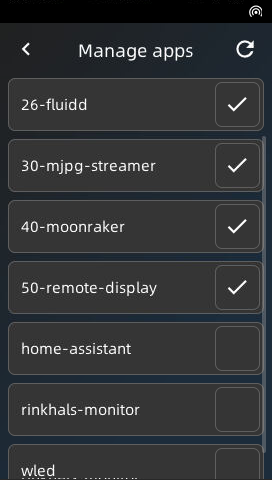

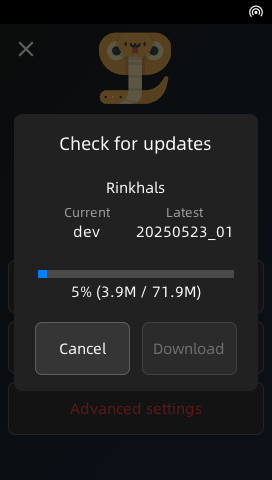
Rinkhals Installer
From the release pages, you'll find the installer-*.swu files for your printer model. This is an interactive touch tool to install and update Rinkhals and system firmware updates.
You can find more information in the documentation
Apps system
Warning
Those printers are quite weak in terms of CPU and Memory. Every additional app / feature and client you connect to the web interface will make the experience slower and might end up in crashes.
Having said that, running your printer with Moonraker, 1~2 apps and 1~2 connected clients should work fine.
An apps system is provided in Rinkhals. It allows for the users to easily add some features to their printer. Some default ones ship with every release (Moonraker, Mainsail, Fluidd, mjpg-streamer, Remote display via VNC, Hostname/mDNS, the opt-in Firmware Collector, and the Rinkhals monitor for MQTT) and additional community apps are available on separate repos like:
- https://github.com/rinkhals-community/Rinkhals.Apps (Tailscale, Cloudflare Tunnel, OctoApp, OctoEverywhere, NFS mount, stunnel, vanilla Klipper, and more)
- https://github.com/basvd/Rinkhals.WebUI (a web interface for Rinkhals)
The default apps are listed in detail under Features and built-in apps in the documentation. Instructions on how to install or develop apps live in the Rinkhals.Apps repository.
App Store
The Rinkhals Touch UI includes a built-in App Store that lets you browse, install and remove community apps without leaving the printer screen. Apps are sourced directly from rinkhals-community/Rinkhals.Apps on GitHub.
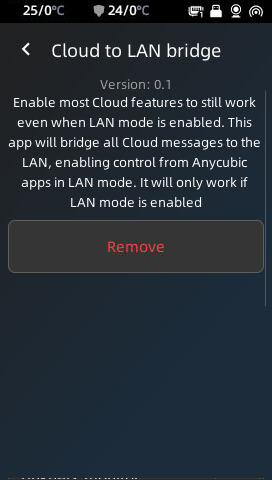
To use it, open the Rinkhals Touch UI and tap App Store. The store will fetch the latest app list, show version info and flag already-installed apps. Tap any app to see its description, then tap Install or Remove as needed.
Contributing
Note
If you develop on Windows, don't forget to disable Git's autocrlf function, as this repo contains Linux scripts running on Linux machines.
Run git config core.autocrlf false BEFORE cloning the repo
More and more contributors help this project move faster. Thank you everyone! If you want to help Rinkhals and contribute, whether it's code, documentation or sharing good ideas, come join us on Discord!
Current maintainers:
- jbatonnet
- martinbogo
- antirad
- basvd
Special thanks to those people for providing the base research and helping support for more printers:
- utkabobr (https://github.com/utkabobr/DuckPro-Kobra3)
- systemik (https://github.com/systemik/Kobra3-Firmware)
- moosbewohner for Kobra 2 Pro support. (https://github.com/moosbewohner/Rinkhals)
- Kalenell and woswai1337 for Kobra S1 support.
- evil_santa, CalmFrog, basvd, _René, RadioRadio and more for Kobra 3 Max support.
- AndrewS for ethernet adapters USB testing and Kobra X firmware dump.
- Ac_K for passwords and technical discovery of Kobra X.
- clutchthrower for the built-in App Store in the Touch UI.
- Anycubic for the cool printer and the few OSS items. (https://github.com/ANYCUBIC-3D/Kobra)
more like this
moxon-frame-generator
simple generator for 3D-printed frames for a moxon rectangle antenna
TrailPrint-3D
GPX 轨迹转 3D 可打印地形模型 | Hiking trail to 3D printable terrain | Electron + Vue。 一款面向户外爱好者与 3D 打印玩家的 Web 工具。将 GPX 徒步/骑行轨迹一键转…