SimGAN
Pytorch Implementation of SimGAN: Hybrid Simulator Identification for Domain Adaptation via Adversarial Reinforcement L…
Python★ 50
Real-Time 3D Semantic Reconstruction from 2D data
 MIT-SPARK
git clone https://github.com/MIT-SPARK/Kimera-Semantics.gitMIT-SPARK/Kimera-Semantics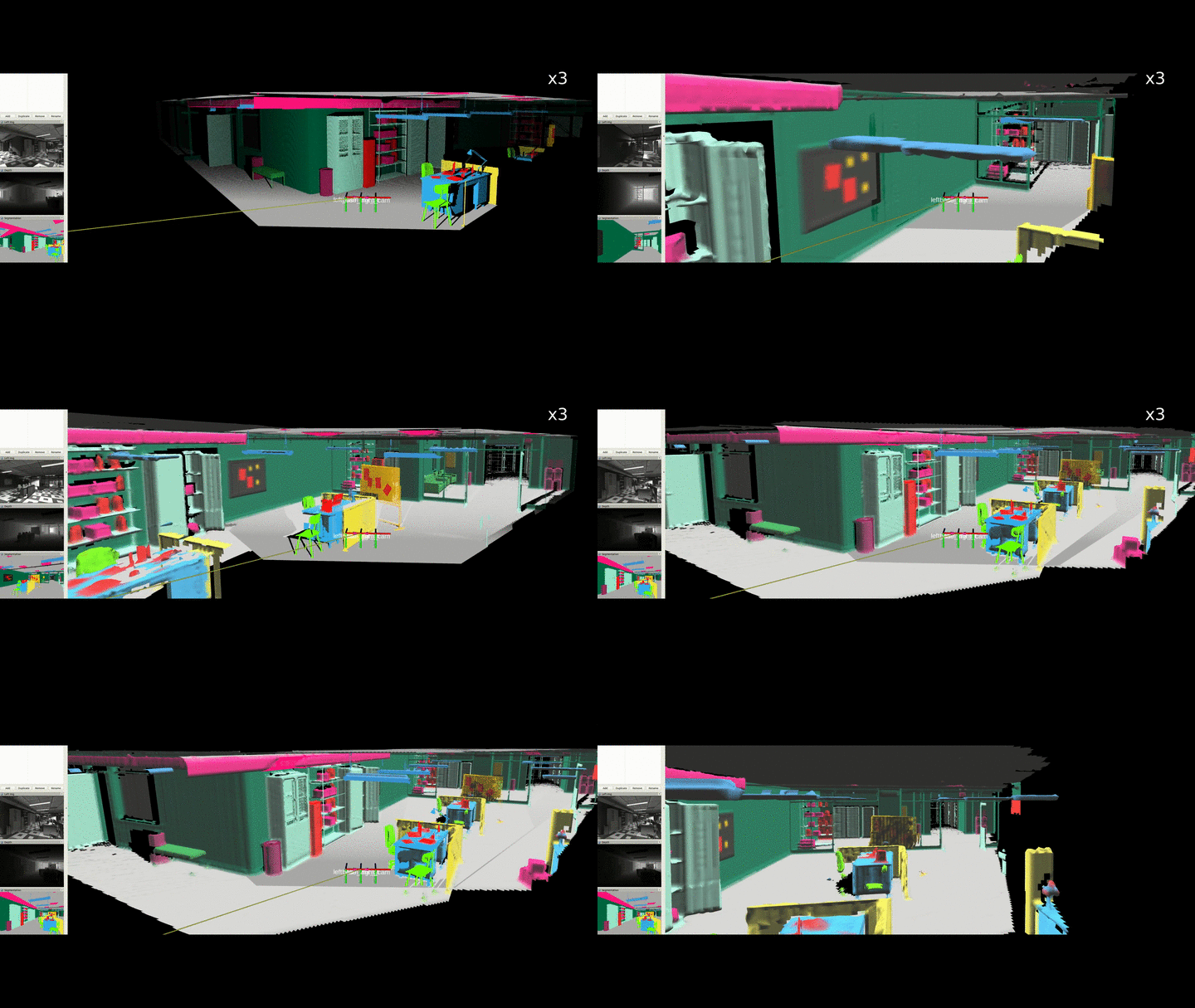
fast method: an order of magnitude faster (took approx 1s before, 0.1s now) than using merged, with minimal accuracy loss for small voxels (it leverages Voxblox' fast approach):
you can play with both methods by changing the parameter semantic_tsdf_integrator_type in the launch file.
High-res video here.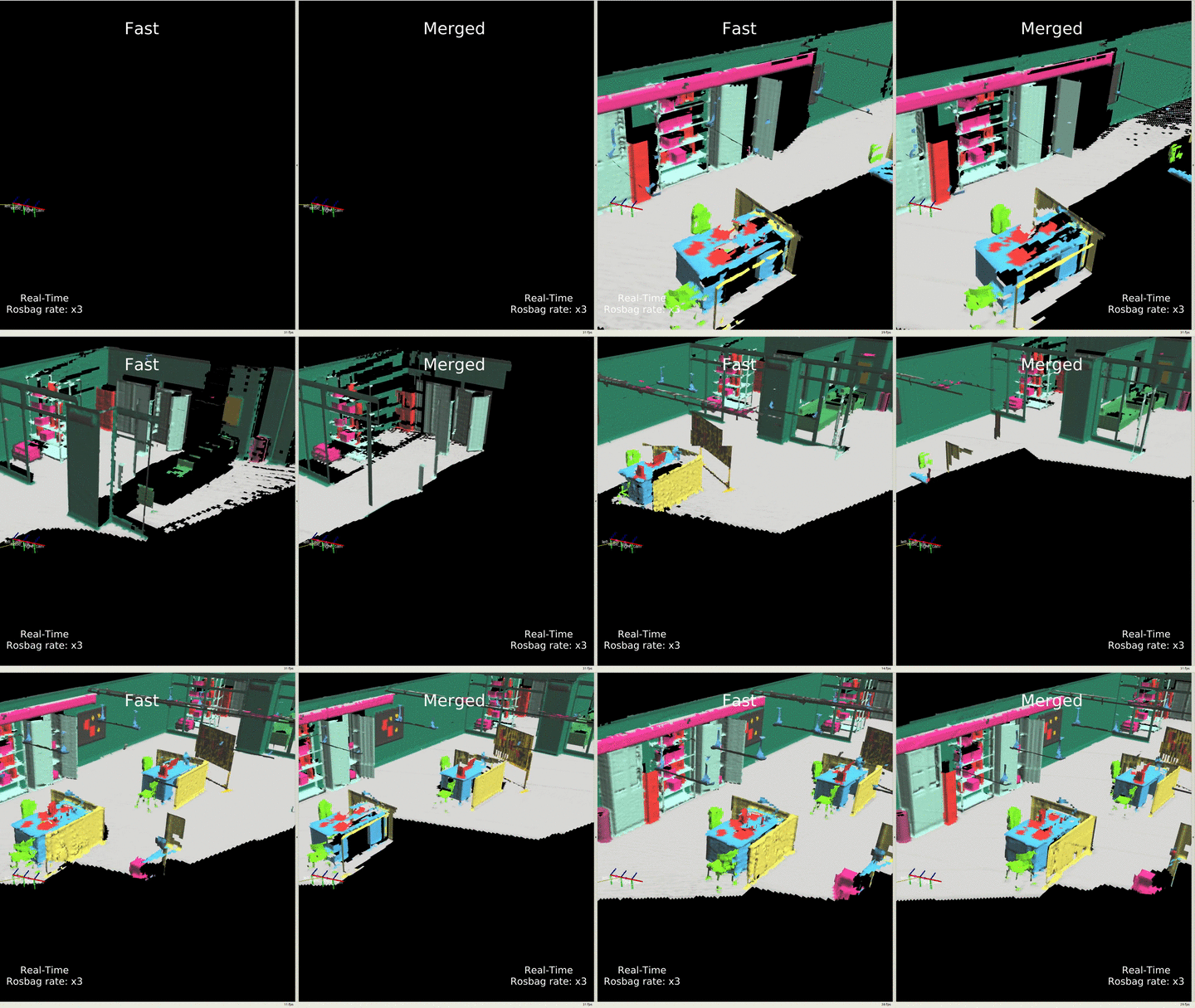
We kindly ask to cite our paper if you find this library useful:
@InProceedings{Rosinol20icra-Kimera,
  title = {Kimera: an Open-Source Library for Real-Time Metric-Semantic Localization and Mapping},
  author = {Rosinol, Antoni and Abate, Marcus and Chang, Yun and Carlone, Luca},
  year = {2020},
  booktitle = {IEEE Intl. Conf. on Robotics and Automation (ICRA)},
  url = {https://github.com/MIT-SPARK/Kimera},
  pdf = {https://arxiv.org/pdf/1910.02490.pdf}
}
Our work is built using Voxblox, an amazing framework to build your own 3D voxelized world:
Which was originally inspired by OpenChisel:
A related work to ours is Voxblox++ which also uses Voxblox for geometric and instance-aware segmentation, differently from our dense scene segmentation, check it out as well!:
Install ROS by following our reference, or the official ROS website.
Install system dependencies:
sudo apt-get install python-wstool python-catkin-tools  protobuf-compiler autoconf
# Change `melodic` below for your own ROS distro
sudo apt-get install ros-melodic-cmake-modules
Using catkin:
# Setup catkin workspace
mkdir -p ~/catkin_ws/src
cd ~/catkin_ws/
catkin init
catkin config --extend /opt/ros/melodic # Change `melodic` to your ROS distro
catkin config --cmake-args -DCMAKE_BUILD_TYPE=Release
catkin config --merge-devel

# Add workspace to bashrc.
echo 'source ~/catkin_ws/devel/setup.bash' >> ~/.bashrc

# Clone repo
cd ~/catkin_ws/src
git clone git@github.com:MIT-SPARK/Kimera-Semantics.git

# Install dependencies from rosinstall file using wstool
wstool init # Use unless wstool is already initialized

# Optionally add Kimera-Semantics to the rosinstall file
# wstool scrape

# For ssh:
wstool merge Kimera-Semantics/install/kimera_semantics_ssh.rosinstall
# For https:
#wstool merge Kimera-Semantics/install/kimera_semantics_https.rosinstall

# Download and update all dependencies
wstool update
Finally, compile:
# Compile code
catkin build kimera_semantics_ros

# Refresh workspace
source ~/catkin_ws/devel/setup.bash
First, install Kimera-Semantics, see instructions above.
Download the demo rosbag (click here to download) and save it in: ./kimera_semantics_ros/rosbag/kimera_semantics_demo.bag.
As a general good practice, open a new terminal and run: roscore
In another terminal, launch Kimera-Semantics:
roslaunch kimera_semantics_ros kimera_semantics.launch play_bag:=true
This will launch the rosbag that was downloaded in step 0 and will launch Kimera-Semantics.
rviz -d $(rospack find kimera_semantics_ros)/rviz/kimera_semantics_gt.rviz
Note: you will need to source your
catkin_wsfor each new terminal unless you added the following line to your~/.bashrcfile:source ~/catkin_ws/devel/setup.bash # Changebashto the shell you use.
Note 2: you might need to check/uncheck once the
Kimera Semantic 3D Meshleft pane topic in rviz to visualize the mesh.
roscoreroslaunch kimera_vio_ros kimera_vio_ros_euroc.launch run_stereo_dense:=true
The flag
run_stereo_dense:=truewill do stereo dense reconstruction (using OpenCV's StereoBM algorithm).
roslaunch kimera_semantics_ros kimera_semantics_euroc.launch
rosbag play V1_01_easy.bag --clock
Note 1: Don't forget the
--clockflag!Note 2: Kimera is so fast that you could also increase the rosbag rate by 3
--rate 3and still see a good performance (results depend on available compute power).
rviz -d $(rospack find kimera_semantics_ros)/rviz/kimera_semantics_euroc.rviz
Minkindr doesn't compile:
Catkin ignore the minkindr_python catkin package:
touch ~/catkin_ws/src/minkindr/minkindr_python/CATKIN_IGNORE
How to run Kimera-Semantics without Semantics?
We are using Voxblox as our 3D reconstruction library, therefore, to run without semantics, simply do:
roslaunch kimera_semantics_ros kimera_semantics.launch play_bag:=true metric_semantic_reconstruction:=false
How to enable Dense Depth Stereo estimation
This will run OpenCV's StereoBM algorithm, more info can be found here (also checkout this to choose good parameters):
roslaunch kimera_semantics_ros kimera_semantics.launch run_stereo_dense:=1
This will publish a /points2 topic, which you can visualize in Rviz as a 3D pointcloud.
Alternatively, if you want to visualize the depth image, since Rviz does not provide a plugin to
visualize a disparity image, we also run a disparity_image_proc nodelet that will publish the depth image to /depth_image.
more like this
Pytorch Implementation of SimGAN: Hybrid Simulator Identification for Domain Adaptation via Adversarial Reinforcement L…
A barebones 64-bit RISC-V micro-controller class CPU, implementing the I(nteger), M(ul/div), C(ompressed) and K(ryptogr…
search projects, people, and tags